- Top Pick: 8BitDo M30 Bluetooth Controller
- Runner-up: LG GP65NB60 Portable DVD Writer
- Also consider: Samsung T7 Portable SSD 1TB
Sega CD emulation on PC is a solved problem at the level of raw performance: any modern machine runs the add-on’s games without effort. The friction is in the files. Every serious emulator needs a BIOS dumped from your own hardware, and every game needs a disc image in a format your chosen emulator actually reads, so the right program is the one that matches your library.
As an Amazon Associate, we earn from qualifying purchases.
This roundup compares the four routes that matter: Genesis Plus GX, the accuracy reference inside RetroArch and BizHawk; Kega Fusion, the finished all-in-one from 2010; PicoDrive, the speed-first core built for weak hardware; and BlastEm, whose 1.0 release added Sega CD support in September 2026.
This article contains affiliate links, and we may earn a commission on qualifying purchases at no extra cost to you.
Quick Answer
Start with Genesis Plus GX inside RetroArch or BizHawk: it is the accuracy reference for Sega CD, reads CHD images, and handles the full library well. Choose Kega Fusion if you want one program that also covers 32X and CD 32X games, or PicoDrive on low-powered hardware. Whichever you pick, you need a region-matched BIOS dumped from your own Sega CD.
What the Sega CD Added
The Sega CD launched in Japan in December 1991 as the Mega-CD and reached North America the following year. It is not just a disc drive bolted onto a Genesis: it carries a second Motorola 68000 running faster than the base console’s, extra memory, a graphics chip adding scaling and rotation effects the Genesis lacked, and a dedicated PCM sound chip alongside Red Book CD audio, all fed by a single-speed drive.
That hardware shaped a distinctive library: full-motion video titles such as Night Trap, enhanced cartridge ports with CD soundtracks, and games such as Sonic CD and the Lunar pair. For emulation it means two processors and a CD subsystem to model, which is why the projects below differ mainly in how carefully they time the CD hardware.
The BIOS Question
No emulator in this roundup ships with the Sega CD firmware, because the BIOS is Sega’s copyrighted code. Genesis Plus GX, PicoDrive and Kega Fusion all expect you to supply it, and the legal source is a dump from a Sega CD unit you own. The file must match the game’s region: a US disc wants the US BIOS, a Japanese Mega-CD disc wants the Japanese one. In RetroArch the three files sit in the system folder as bios_CD_U.bin, bios_CD_E.bin and bios_CD_J.bin, and core documentation publishes checksums to confirm your dump is clean.
Which revision you dump matters less than the region. Model 1 and Model 2 units shipped different BIOS versions, with different boot animations and music: the Model 1’s starfield sequence is not the Model 2’s bouncing logo screen. US dumps include Model 1 version 1.10 and Model 2 versions such as 2.00 and 2.11, and Genesis Plus GX is not locked to specific revisions, so any correct-region dump works.
The Emulators, Compared Honestly
Genesis Plus GX
Genesis Plus GX, developed by Eke-Eke, is the core most players should install first. It runs as a libretro core in RetroArch and also powers Genesis and Sega CD emulation inside BizHawk. The maker describes its compatibility with the released Sega CD library as complete, a claim we repeat as the project’s own rather than as our measurement, and its CD drive behaviour is modelled in unusual detail. It also supports MD+ and MSU-MD patches that give certain cartridge games CD-quality audio.
Practical strengths follow: backup RAM saves are handled per game or per BIOS, multi-disc games load through playlist files, and the core reads CHD as well as BIN/CUE. The one hard limit is documented and absolute: 32X games are not supported, so CD 32X titles are out of reach here.
Kega Fusion
Kega Fusion is the finished legacy option. Steve Snake’s final release, version 3.64 from 2010, packs Genesis, Sega CD, 32X, combined CD 32X titles, Master System and Game Gear into one small program that still runs on current Windows. Setup is the simplest here: configure a BIOS per region, load an image, play.
The costs of its age are real. It is closed source, nothing in it will ever be patched, and it does not read CHD files. What it still does better than anyone is swallow old disc images: Fusion remains happy with the ISO-plus-MP3 rips the other emulators here refuse. Treat it as the all-in-one fallback rather than the main event.
PicoDrive
PicoDrive began life on low-powered ARM handhelds, and its design priority is still speed on weak hardware. As a RetroArch core it covers Genesis, Sega CD and 32X in a single core, which makes it the default choice on Raspberry Pi class machines, old laptops and handheld PCs.
Its Sega CD side is complete for ordinary play: the same three region BIOS files are required, CHD is supported in the current core, and an option emulates the Mega-CD RAM cartridge for games that save heavily. Timing accuracy sits a step behind Genesis Plus GX, showing up in edge cases rather than everyday titles. On weak hardware, PicoDrive holds full speed.
BlastEm
BlastEm is the newcomer. Michael Pavone’s accuracy-led standalone emulator reached version 1.0.0 on 11 September 2026, and the release added Sega and Mega CD support alongside the 32X, including CD 32X titles. The announcement is candid about the new code: compatibility is not perfect yet, most games are playable, and work on the remaining bugs continues.
That honesty, plus development built on fine-grained hardware timing, makes BlastEm the project to watch. Today, treat it as a promising second install beside Genesis Plus GX rather than a replacement, especially if your library leans on the add-on’s stranger titles.
Disc Images: BIN/CUE, ISO and CHD
How you rip your own discs decides which emulators can play them. The reference format is BIN/CUE: the BIN holds the data and audio tracks, and the CUE sheet describes where each track starts. A bare ISO holds only the data track, so games that stream music as CD audio lose it or misbehave. Genesis Plus GX loads BIN/CUE, ISO with separate WAV files, and ISO with OGG audio, and refuses ISO-plus-MP3 outright. Fusion is the exception that still accepts those old rips.
CHD is the tidy modern option. Running your BIN/CUE set through MAME’s chdman tool produces one compressed file that keeps every track, and Genesis Plus GX and PicoDrive both read CHD; Fusion does not. Whichever format you keep, verify the rip against the Redump project’s checksums. A matching hash confirms the dump is bit-perfect; a mismatch means re-ripping.
The 32X CD Corner
A handful of releases needed both add-ons stacked: a Sega CD, a 32X and a Genesis running together. The CD 32X editions of Night Trap and Fahrenheit are the famous examples. Genesis Plus GX cannot help here, because it has no 32X support. The routes that run these titles are Kega Fusion, PicoDrive and, since its 1.0 release, BlastEm. Expect the setup to stack too, with all three layers agreeing on region.
Hardware for Ripping, Storing and Playing
8BitDo M30 Bluetooth Controller
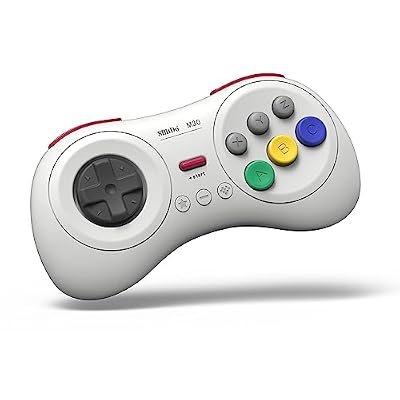
Sega CD games were designed around the six-button Genesis pad, and the M30 reproduces that layout with a proper pivot D-pad. It connects over Bluetooth or USB-C and works with Windows in X-input and D-input modes.
- Layout: six face buttons plus shoulders, Sega-style pivot D-pad
- Connection: Bluetooth, plus USB-C wired
- Battery: 480 mAh rechargeable, rated by the maker for about 18 hours
- Modes: X-input, D-input, Mac mode and Switch mode
LG GP65NB60 Portable DVD Writer

Ripping your own Sega CD discs starts with an optical drive, and this slim USB drive reads CDs at up to 24x. It is bus-powered and tray-loading, small enough to live in a drawer between sessions.
- Model: GP65NB60
- Interface: USB 2.0, bus powered
- Read speeds: CD up to 24x, DVD up to 8x as listed
- Write speeds: CD up to 24x, DVD up to 8x as listed
- Extras: M-DISC support
Samsung T7 Portable SSD 1TB

A full Sega CD library in CHD form still adds up, and a fast portable drive keeps the whole collection in one place with quick loading into any emulator here.
- Capacity: 1TB, model MU-PC1T0T/AM
- Interface: USB 3.2 Gen 2 over USB-C
- Speed: read speeds up to 1,050 MB/s as stated by Samsung
- Build: shock-resistant metal enclosure
ASUS TUF Gaming VG249Q1A Monitor

Sega CD games output a low-resolution picture that looks best with a good CRT shader, and a high-refresh panel gives those shaders room to work. This 23.8-inch IPS model is a sensible desk-sized match.
- Panel: 23.8-inch IPS, 1920 by 1080
- Refresh rate: 165 Hz, supports 144 Hz as listed
- Response time: 1 ms as listed by the maker
- Sync: FreeSync Premium, Extreme Low Motion Blur
UGREEN USB 3.0 SD Card Reader

On a handheld or Raspberry Pi setup, BIOS files and disc images move between machines on a microSD card. This dual-slot reader handles SD and microSD at USB 3.0 speeds, both slots at once.
- Model: 40752
- Interface: USB 3.0, up to 5 Gbps as listed
- Slots: SD and microSD, UHS-I, readable simultaneously
- Compatibility: Windows, macOS, Linux and Chrome OS
How to Choose
Decide by the rarest corner of your library. A plain Sega CD collection belongs in Genesis Plus GX: best accuracy, CHD support, and your library stays in one place. Add Kega Fusion if you own CD 32X titles or elderly ISO-plus-MP3 rips, because it takes both without complaint. On a handheld, a Pi or an old laptop, PicoDrive’s speed-first design is the pragmatic pick, and it still covers the 32X shelf. Keep BlastEm installed if you follow active development; its CD support is the newest here.
Who Should Skip
Skip this roundup if your Sega interest stops at cartridges: Genesis games need no BIOS and no disc images. Skip Fusion as your main emulator if your library is already converted to CHD, since it cannot open the format. Skip the whole category if you do not own a Sega CD or its games: every route here starts from a BIOS and discs dumped from hardware you own, and none of these programs supplies either.
FAQ
Do I need a BIOS file for Sega CD games in every emulator?
For the serious routes, yes. Genesis Plus GX, PicoDrive and Kega Fusion all require the BIOS for the region of the disc, dumped from your own Sega CD. Cartridge games on the same emulators need no BIOS at all.
Can I play my old ISO-plus-MP3 rips?
Only in Kega Fusion. Genesis Plus GX refuses that format, and PicoDrive expects a cue sheet or CHD. The better fix is to re-rip your own discs to BIN/CUE and verify them against Redump checksums.
Why does my Sega CD game have no music?
The usual cause is a single-file ISO rip, which drops the separate CD audio tracks many games use for their soundtracks. Re-rip the disc as BIN/CUE, or convert that rip to CHD, and the music returns.
Which emulator plays CD 32X games?
Kega Fusion, PicoDrive and BlastEm 1.0 cover the small CD 32X library. Genesis Plus GX cannot, because it has no 32X support of any kind. All three still need the region-matched BIOS from your own hardware.
Final Verdict
Genesis Plus GX is the Sega CD emulator to build around: the most careful CD emulation here, CHD support, and a home inside RetroArch and BizHawk. Kega Fusion remains the essential second install for CD 32X titles and old image formats, PicoDrive owns the low-powered end, and BlastEm is the project to watch. Sort your BIOS files by region, rip your discs to BIN/CUE, and the library just works.