

- Top Pick: HT03XL L11119-855 Laptop Battery for HP Pavilion 15-CS 15-DA 15-DB 15-DW | 17-by 17-CA 14-CE 14-CF 14-DF Series 15-CS0053CL 15-DW0033NR 15-DA0014DX L11421-542 L11421-2C2 HSTNN-UB7J HT03041XL
- Best Value: Fancy Buying HT03XL L11119-855 Laptop Battery for HP Pavilion 14-CE 14-CF 14-DF 14-DQ 14-DK 14M-DH 15-DA 15-DB 15-DW 15-DY 17-by 17-CA Series 15-DW0033NR 15-DA0014DX HSTNN-UB7J HSTNN-DB8R HT03041XL
- Premium Choice: 807956-001 Laptop Battery for HP Spare 807957-001 807612-421 807611-421 807611-131 HS04 HS03 HSTNN-LB6U 15-AY039WM 15-AY041WM 15-AY009DX 15-AY052NR TPN-I119 TPN-I120 TPN-I124 240 245 246 250 256 G4/G5
Shopping for the best replacement laptop battery is unlike shopping for almost any other gadget, because “best” depends on one stubborn fact: the pack has to be the right one for your exact machine. A battery for a Dell Latitude 5300 will not drop into an HP Pavilion 15, and even within a brand a slightly different model number can mean a different connector or voltage. So the useful question is not which pack is strongest, but which pack matches the part number and series printed on your original.
This guide is for owners of HP Pavilion and HP 250-series notebooks, plus Dell Latitude, Inspiron, Vostro and Precision users, whose machine now dies at the first unplugged meeting. It is also for office managers refreshing a fleet of aging laptops. As the year 2026 gets going, the listings below fall into two camps: HP packs identified by codes such as HT03XL, HS04, and JC03, and Dell packs identified by codes such as MXV9V, RJ40G, and V6W33. Each is judged purely on the compatibility text and electrical figures in its title.
Quick Picks
As an Amazon Associate we earn from qualifying purchases at no extra cost to you.

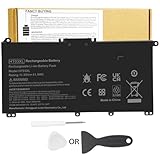


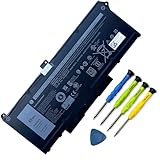


| Product | Best for | Key spec from the title |
|---|---|---|
| DMKAOLLK HT03XL | HP Pavilion 14, 15, and 17 owners | HT03XL, L11119-855, HSTNN-UB7J |
| Fancy Buying HT03XL | Wider Pavilion 14 coverage | Lists 14-DQ, 14-DK, 14M-DH, 15-DY |
| Fancy Buying 807956-001 | HP 240 to 256 G4/G5 and 15-AY | HS04, HS03, HSTNN-LB6U |
| DMKAOLLK MXV9V | Dell Latitude 5300 and 7300 series | 7.6V, 60Wh |
| Mobik RJ40G | Dell Latitude 5520, 5420, Precision 3560 | 4-cell, 63Wh, 15.2V, 3941mAh |
| Fancy Buying 919700-850 | HP 15-BS and 15-BW series | JC03, JC04, 919701-850 |
| ESTENGPRO HT03XL | Pavilion owners matching 15-CW1XXX | HT03XL, HSTNN-DB8R |
| VNYUNQWE V6W33 | Dell Latitude 3000 and Inspiron 3500 series | 54Wh, 15V |
How to Choose
Match the part number first
Flip the laptop over, remove the old pack if it comes out, and read the label. The part number, such as HT03XL, JC04, or MXV9V, is the safest key. A listing that names that exact code, or lists your full model number, is far more trustworthy than one that only says “HP battery.” If the code is not printed, find the model sticker and look up the compatible series before buying.
Voltage must match, capacity can vary slightly
Voltage is not negotiable: a 7.6V pack, a 15V pack, and a 15.2V pack are not interchangeable. Capacity in watt-hours is more forgiving. Choosing a pack within a few watt-hours of the original, such as 54Wh, 60Wh, or 63Wh, keeps runtime close to what you had. Ignore giant capacity claims that the original battery never offered, since the charging circuit is built around the original design.
Check cell count and the connector
Packs are built from several cells, and a 4-cell design is noticeably different from a 3-cell one. The connector and cell layout must fit the same bay. Some Dell packs are internal and require removing the bottom panel; some HP packs snap out from the side. Know which kind you own before ordering, and have a small screwdriver ready if needed.
What to ignore, and where budget packs cut corners
Ignore mAh numbers on their own, because they mean little without voltage. Budget replacements often skip protection details in the listing, and some list far more compatible models than seems plausible. A compact list of series that clearly includes yours is a better sign than a wall of numbers. Look for any statement of safety certification, and keep in mind that a pack that physically fits is not automatically the correct one. Treat any title that lists dozens of unrelated series with extra care, and compare the first few model strings against your own before relying on the rest.
The 8 Best Options
DMKAOLLK HT03XL for HP Pavilion
This pack targets Pavilion 15-CS, 15-DA, 15-DB, 15-DW, 17-by, 17-CA, 14-CE, 14-CF and 14-DF notebooks, and it lists several equivalent codes so you can match your label. It reads as the most direct choice for a standard Pavilion that has simply outlived its original pack.
- Strength: the title names HT03XL, L11119-855, and HSTNN-UB7J together.
- Strength: it also lists L11421-542 and L11421-2C2 alternates.
- Trade-off: it omits some of the newer series that rival listings name.
Skip it if your machine is a 14-DQ, 14-DK, or 15-DY and you want that stated on the page. Choose it when the code on your old pack reads HT03XL or L11119-855 and your series is in the list.
Fancy Buying HT03XL for HP Pavilion
Another HT03XL pack, with a compatibility list that stretches further into the 14-inch range. Owners of a Pavilion 14 with a less common model suffix have more reason to look here. The extra series names are the main difference from the neighboring listings, so read them against your own model sticker.
- Strength: it adds 14-DQ, 14-DK, 14M-DH, and 15-DY to the list.
- Strength: HSTNN-UB7J and HSTNN-DB8R are both named.
- Trade-off: the title does not state capacity or voltage.
Skip it if you need electrical figures before ordering. Choose it when your model suffix is one of the extra ones named, and confirm the voltage on your original label.
Fancy Buying 807956-001 for HP
Built for an earlier HP generation, this pack lists the 15-AY series and the 240, 245, 246, 250, and 256 G4 and G5 business notebooks, along with HS04 and HS03 codes. It suits offices that kept older HP fleets running and now face a drawer of drained packs.
- Strength: a long list of exact model strings makes matching easy.
- Strength: HSTNN-LB6U and TPN-I119 style codes are named.
- Trade-off: it targets older machines, and no capacity is given.
Skip it if your HP is a recent Pavilion. Choose it when your label shows 807956-001, 807957-001, or one of the HS-prefixed codes.
DMKAOLLK MXV9V for Dell Latitude
One of the few packs here that publishes its electrical figures: 7.6V and 60Wh, for Latitude 5300, 5310, 7300, 7400, E5300 and E7400 notebooks, and Inspiron 7300 and 7306 2-in-1 models. Technicians replacing packs across a mixed Latitude group will appreciate having the numbers up front.
- Strength: voltage and watt-hours are stated clearly.
- Strength: several Dell codes, including P96G and 5VC2M, are listed.
- Trade-off: it covers a narrow family of business notebooks.
Skip it if your Latitude is from the 3000 or 5400 range. Choose it when your old pack shows MXV9V, 5VC2M, or one of the P-series codes in the title.
Mobik RJ40G 4-Cell for Dell
The title gives the fullest electrical profile of any listing: 4-cell, 63Wh, 15.2V, and 3941mAh, for Latitude 15 5520, Latitude 14 5420, and Precision 15 3560. Buyers who like to compare numbers against the label on the old pack get the most to work with here.
- Strength: cell count, voltage, and capacity are all spelled out.
- Strength: M033W, WY9DX, and P137G codes help confirm the match.
- Trade-off: it fits a specific pair of Latitudes and one Precision.
Skip it if your Dell is not on that short list. Choose it when the old pack reads RJ40G, or when 15.2V and 4 cells match what is printed on yours.
Fancy Buying 919700-850 for HP
Designed for HP 15-BS and 15-BW machines, the title lists JC03 and JC04 along with 919681 and 919682 code variants. It is the listing to open first for a 15-inch HP from that generation.
- Strength: many 15-bs0xx model strings appear, which eases matching.
- Strength: JC03 and JC04 codes are named.
- Trade-off: no voltage or watt-hours appear in the title.
Skip it if your label shows a different code family. Choose it when your pack reads JC03 or JC04 and the machine is in the 15-bs or 15-bw line.
ESTENGPRO HT03XL for HP Pavilion
The third HT03XL option, with a Pavilion 15 emphasis and extra detail like 15-CW1XXX and 15-DB0004DX. A buyer whose laptop model string appears in the title can match it character by character.
- Strength: it names both HSTNN-UB7J and HSTNN-DB8R.
- Strength: 15-DY and 17-by coverage appears alongside the 14-inch series.
- Trade-off: like its siblings, it gives no capacity figure.
Skip it if you would rather choose a different brand from the other HT03XL listings. Choose it when your model string matches the details it names.
VNYUNQWE V6W33 54Wh for Dell
Covering Latitude 3320, 3330, 3420, 3520, and 3530, along with Inspiron 3511 and 3520, plus Vostro 3515 and 3525, it states 15V and 54Wh up front. Because the series span is broad, it suits households and small offices with several different Dell models.
- Strength: it covers a wide set of everyday Dell models.
- Strength: voltage and watt-hours are both stated.
- Trade-off: the very long compatibility list means you must verify your series carefully.
Skip it if your Dell uses 7.6V or 15.2V. Choose it when your Latitude or Inspiron is one of the names in the title and the old pack shows V6W33.
Which One Fits Your Situation
You own a mainstream HP Pavilion
Start with the HT03XL group and pick the one whose list names your exact suffix: the Fancy Buying listing for 14-DQ or 14-DK, the ESTENGPRO for 15-CW1XXX, the DMKAOLLK for L11421 codes.
You manage an office of older HP business laptops
The Fancy Buying 807956-001 covers the 240 to 256 G4 and G5 line, and the 919700-850 covers 15-BS and 15-BW machines. Sort the fleet by label code first, then order each pack type in one batch so the matching stays simple.
You carry a thin Dell Latitude
The DMKAOLLK MXV9V suits 5300 and 7300 owners, while the Mobik RJ40G suits 5520 and 5420 owners. Both publish voltage and watt-hours, so you can compare the numbers with your original label before ordering.
You have a Dell Latitude or Inspiron 3000 series
The VNYUNQWE V6W33 lists the broadest set of everyday Dell series, so it is the logical first check.
Common Mistakes
- Ordering by laptop brand alone instead of by the part number on the original pack.
- Assuming any pack with a similar capacity will work regardless of voltage.
- Skipping the connector check, then finding the pack does not seat.
- Believing a huge compatibility list means broader quality rather than looser matching.
- Replacing the battery when the real fault is a failing charger or a worn charging port.
Related guides
- Combination Smoke And Carbon Monoxide Detectors
- Aio Liquid Coolers For High Performance Gaming
- Graphics Cards For Low Wattage Power Supplies
Frequently Asked Questions
How do I find my battery part number?
Look at the label on the old pack, or in the system information on the laptop. If the pack is internal, the model number on the bottom case will lead you to a compatibility list.
Can I use a higher-capacity pack?
Only if the listing states it is designed for your model. Voltage must match exactly, and the charging circuit is built around the original design.
Why do several listings share one code?
Third-party brands make packs to the same specification. The code, such as HT03XL, tells you the fit, while the brand tells you who made this version. That is why three different sellers can list the same code with slightly different compatibility text.
Is it safe to replace the battery myself?
For removable packs, yes, with the laptop off and unplugged. For internal packs, follow the manufacturer’s service steps and take care with the cable.







