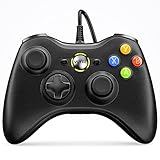
- Top Pick: HORI Fighting Stick Mini for PS5, PS4, and PC – Officially Licensed by Sony
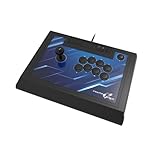
- Best Value: HORI PlayStation 5 Fighting Stick Alpha – Tournament Grade Fightstick for PS5, PS4, PC – Officially Licensed by Sony
- Premium Choice: Nonbliep Wired Arcade Stick for PS5/PS4/PC,Fight Stick with Programming Function, Turbo Function, 9.8FT Braided Cable Retro Game Stick
The best PS5 fight sticks are the Razer Kitsune for a premium low-profile leverless layout, the Victrix Pro KO for a tournament-style leverless build, the Nacon Daija for a traditional lever stick, and the HORI Fighting Stick Alpha or Qanba Sapphire S1 for lower-cost licensed options that also work on a gaming PC. The right pick depends on three decisions: lever or leverless, how much you will mod or travel with it, and whether it carries PS5 licensing for native games.
As an Amazon Associate we earn from qualifying purchases at no extra cost to you.



Quick picks
- Best premium leverless: Razer Kitsune.
- Best tournament-style leverless: Victrix Pro KO.
- Best traditional lever stick: Nacon Daija.
- Best value licensed stick: HORI Fighting Stick Alpha.
- Best affordable leverless with licensing: Qanba Sapphire S1.
- Best lever stick for tinkerers: Qanba Obsidian 2.
- Best lever stick from the Victrix line: Victrix Pro FS.
How we chose
This guide is based on research: manufacturer specification pages, community discussion among fighting-game players, and the way current buyer guides group sticks. No product was physically used for this article. We kept a model if it is sold in 2026, has PS5 support (and PC support for a gaming rig), and suits a clear buyer: premium leverless, tournament-ready, traditional lever, or entry-level licensed. Where a part or switch type could not be confirmed, we describe it by class and mark it as unconfirmed.
What matters in a PS5 fight stick
1. Lever versus leverless
A lever stick uses a joystick with a gate, usually a Sanwa-style part, for directions. A leverless stick, often called a hitbox style, uses four buttons for left, down, right and up, which your left hand presses. Leverless sticks reduce travel and allow very fast direction changes, and many modern players like them for that reason. Lever sticks keep the traditional feel that many players learned on and are easier to start with if you come from arcades.
2. PS5 licensing and mode support
Native PS5 games may require a controller that is licensed for PS5. Many older sticks work only in PS4 mode, which covers PS4 versions and some cross-generation games. A stick that lists PS5 support avoids menu and compatibility limits. Check the product page for “PS5” and confirm the model you intend to buy is the PS5 version.
3. Switches and buttons
Premium sticks often use mechanical keyboard-style switches or Sanwa-type buttons that can be replaced. Mechanical switches give a crisp click and short travel. Optical or low-profile switches reduce height. Hot-swappable switches let you change the feel without soldering.
4. Layout and size
A typical fighting-game layout has six attack buttons, system buttons and extras. Look for buttons that suit your hand, with a thumb-friendly spot for the extra input. Check the physical size and weight, because a heavy stick stays still on a lap or table, while a light one travels better.
5. Cable and build
A removable USB cable is more durable and can be replaced. A stick with a built-in storage space for the cable is good for travel. A metal base adds weight and stability, and a plastic body keeps the price lower.
6. Tournament legality and SOCD
Leverless sticks need to handle simultaneous opposing cardinal directions (SOCD), meaning left plus right or up plus down pressed at once. Different controllers resolve this differently, and tournaments often specify the accepted behavior. Buy a stick that follows the rules of the games and events you care about.
Spec comparison table
| Stick | Type | Platforms | Buttons and switches | Connection | Tier |
|---|---|---|---|---|---|
| Razer Kitsune | Leverless, low-profile | PS5, PC | Razer’s own low-profile switch class, 6 main buttons | Wired | Premium |
| Victrix Pro KO | Leverless | PS5, PC | Cherry MX Speed Silver class switches, 16 customizable buttons | Wired | Premium |
| Nacon Daija | Lever | PS5, PC | Arcade-style parts | Wired | Premium |
| HORI Fighting Stick Alpha | Lever | PS5, PC | Arcade-style parts | Wired | Mid-range |
| Qanba Sapphire S1 | Leverless | PS5, PS4, PC | Cherry MX Silver class switches, 18 programmable buttons | Wired | Mid-range |
| Qanba Obsidian 2 | Lever | PS5, PS4, PC | Sanwa-style class parts | Wired | Mid-range |
| Victrix Pro FS | Lever | PS5, PC | Arcade-style parts | Wired | Mid-range to premium |
The best PS5 fight sticks
1. Razer Kitsune
Spec line: leverless · PS5 and PC · low-profile design · wired · native PS5 support.
Best for: players who want a compact leverless stick with a polished look and are happy to spend premium money.
Skip if: you want a lever or you plan to mod the parts heavily.
Pros: low height reduces wrist strain; native PS5 support; clean build and software.
Cons: premium tier; the layout is tight if you have large hands.
2. Victrix Pro KO
Spec line: leverless · PS5 and PC · Cherry MX Speed Silver class switches · 16 customizable buttons · wired.
Best for: tournament-minded players who like a keyboard-style switch feel and a customizable layout.
Skip if: you prefer a lever or a lighter body.
Pros: highly customizable; excellent switches; strong reputation among leverless players.
Cons: premium tier; high stance on a lap; not for beginners learning directions.
3. Nacon Daija
Spec line: lever · PS5 and PC · arcade-style parts · wired · full-size case.
Best for: players who want a traditional arcade stick that is ready for PS5 without modification.
Skip if: you want a leverless layout or a lower price.
Pros: arcade feel; stable body; good for long sessions.
Cons: premium tier; large and heavy for travel.
4. HORI Fighting Stick Alpha
Spec line: lever · PS5 and PC · arcade-style parts · wired · licensed.
Best for: beginners and players who want a licensed stick that is easier on the budget.
Skip if: you plan to replace parts and customize heavily.
Pros: licensed; good first stick; wide availability.
Cons: plastic body; limited customization compared with premium models.
5. Qanba Sapphire S1
Spec line: leverless · PS5, PS4 and PC · Cherry MX Silver class switches · 18 programmable buttons · wired.
Best for: players who want a licensed leverless stick without the top-tier price.
Skip if: you want a lever.
Pros: licensed; programmable; strong value for a leverless build.
Cons: the button count and layout take time to learn; check that the unit you buy is the PS5 version.
6. Qanba Obsidian 2
Spec line: lever · PS5, PS4 and PC · Sanwa-style class parts · wired · modifiable body. We could not fully confirm the part list, so check the current product page.
Best for: players who want a lever stick with parts that can be swapped for a different gate or buttons.
Skip if: you want leverless or an all-in-one without tinkering.
Pros: easy to mod; widely used in the community; stable.
Cons: mid-range tier; moving parts can need adjustment.
7. Victrix Pro FS
Spec line: lever · PS5 and PC · arcade-style parts · wired · licensed design.
Best for: players who want a lever stick from a brand known for tournament gear.
Skip if: you want a leverless layout.
Pros: solid build; good layout; PS5 support.
Cons: price sits above entry-level models; parts may need tuning.
Decision matrix
| If you are… | Choose | Reason |
|---|---|---|
| New to sticks | HORI Fighting Stick Alpha | Lever feel, licensed, lower cost |
| Moving from pad to leverless | Qanba Sapphire S1 | Licensed leverless without top-tier cost |
| Competing locally | Victrix Pro KO or Nacon Daija | Tournament-style build |
| Traveling with your stick | Razer Kitsune | Low-profile body |
| Modding parts | Qanba Obsidian 2 | Replaceable lever and buttons |
Worked example: motion inputs on lever versus leverless
A dragon-punch motion is forward, down, then down-forward plus a button. On a lever stick, your hand moves the gate through three positions, which is a physical sweep. On a leverless stick, you press right, down and down plus right with your fingers, which can be done with a shorter movement. If a game gives you a window of about 16.7 milliseconds per frame, saving even a few milliseconds of movement is helpful, but practice and consistency matter more.
Opposing directions matter too. If you press left and right at the same time on a leverless stick, the controller must decide what to send. Some use neutral, some prefer the last input. Tournament rules specify acceptable behavior. If you compete, check the rule of the stick against the event before you buy.
Step-by-step: choosing your stick
- Decide lever or leverless. If you are unsure, try a friend’s stick or a store model for an hour.
- Check PS5 support in the product listing and confirm the games you play are covered.
- Set a tier. Entry-level lever sticks are good first purchases, and leverless models start in the mid-range.
- Consider size and weight against your desk, lap and travel needs.
- Pick a stick whose parts you can replace. Buttons and switches wear over time.
Setup tips for PS5 and gaming PC
- Connect the stick directly to a USB port on the console or a rear PC port, not a hub.
- Check the system’s controller settings after connecting, and set the correct mode (PS5, PS4 or PC) before you start.
- Use a non-slip mat or a stable table, so the stick does not slide during matches.
- Lay out the six main attack buttons the same way across games.
- Keep a spare USB cable in your bag if you travel.
Common mistakes to avoid
- Buying a stick without checking PS5 support.
- Choosing leverless only because it looks modern, without checking you can adapt.
- Buying a heavy stick when you travel often.
- Ignoring SOCD behavior when you plan to enter events.
- Skipping a return policy. Fit is personal and a trial matters.
Frequently asked questions
Are fight sticks better than controllers?
They are not required, but many players prefer them for precision and for the consistent button layout. A stick adds comfort in long sessions and for six-button games.
Is leverless easier than a lever stick?
Not always. Leverless is faster for some inputs but takes time to learn, especially for players who are used to a lever. Practice either way.
Do PS5 fight sticks work on PC?
Most do, usually through a mode switch or automatically. Check the product page for PC support.
Do I need a PS5-licensed stick?
For native PS5 games, a licensed stick is the safest. Some PS4-mode sticks work only with PS4 versions, so confirm before buying.
What switches are best for a leverless stick?
Mechanical switches with short travel are popular. Cherry-style and optical types are both common, and the best choice depends on your preferred feel.
Are fight sticks allowed at tournaments?
Generally yes, but each event has its own rules on buttons, macros and SOCD. Read the rules of the event you plan to enter.
Can I replace parts on a fight stick?
On many lever sticks, yes. Replacing the lever, gate or buttons is common. Leverless sticks vary, with some offering hot-swappable switches.
How much space do I need?
A full-size stick needs a table or a lap board. Compact leverless sticks fit in a bag and work on a lap or a small desk.
Who should skip a fight stick
Players who mostly use a pad for other genres
If your library is mostly shooters, racing or action games, a stick adds little. A good pad with a strong D-pad covers fighting games well enough, and a stick can come later if fighters become your main hobby.
Players with limited desk space
A full-size lever stick needs a table or lap board. If your gaming desk is crowded with a keyboard, mouse and monitor stand, a compact leverless stick is the practical choice, or a fightpad.
Players who change platforms often
Switching between PS5, PC and other systems means confirming mode support each time. Choose a stick that lists all your platforms, and keep the mode switch instructions handy.
Maintenance and care
- Check the base screws and the lever dust cover every few months, since vibration loosens them.
- Keep drinks away from the stick. Liquid in a switch or circuit board can damage it permanently.
- Replace worn buttons or switches rather than forcing them. A sticky button costs inputs at the worst moment.
- Store the stick in a bag or on a shelf, away from heat. Do not leave it in a hot car.
- Use the original or a high-quality USB cable. A loose connector can cause dropped inputs and random disconnects.
- Do not open a licensed stick unless you know how, because some warranties and licensing details depend on the sealed case.
Where to spend and where to save
Spend on the parts you touch the most: the buttons, the lever or direction buttons, and the build quality that keeps the stick steady. Save on extras such as decorative artwork, since you can replace plates later. If you plan to mod, a mid-range stick with replaceable parts can become a premium setup over time for less than buying a flagship now. If you want a stick that works out of the box and does not need tuning, spend a little more on a model with a strong factory build.
Final recommendation
If you want one premium leverless stick for PS5 and PC, buy the Razer Kitsune for its low-profile design or the Victrix Pro KO for its customization. If you prefer a lever, the Nacon Daija is the premium pick and the HORI Fighting Stick Alpha is the sensible entry. For a lower-cost leverless with licensing, the Qanba Sapphire S1 is the choice. Confirm PS5 support and SOCD behavior, pick the layout you can adapt to, and treat the stick as a long-term piece of gear that you may mod and maintain.