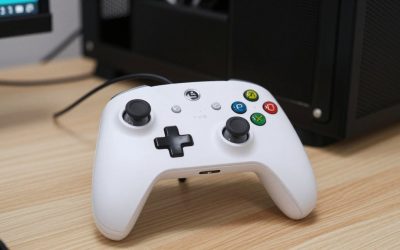
- Top Pick: XBOX Wireless Gaming Controller | Pulse Red | Textured triggers and bumpers, Hybrid D-pad, XBOX Wireless, Bluetooth, USB-C, Play across Console & PC & Cloud Devices
- Best Value: Xbox Wireless Gaming Controller | Elite Series 2 Core | White | Console, PC, and Android | Adjustable Thumbsticks | Trigger Locks
- Premium Choice: Xbox Wireless Controller – Black
For most people the best wireless controller for PC gaming is still the Xbox Wireless Controller, because Windows supports it natively and nearly every PC game shows the right button prompts; if you care most about low latency and stick drift resistance, a 2.4 GHz dongle controller with Hall effect or TMR sticks, such as the 8BitDo Ultimate 2 Wireless, is the better pick. Which one is right depends on how you connect, what games you play, and how much you trust Steam Input to do the translation work.
As an Amazon Associate we earn from qualifying purchases at no extra cost to you.



The Three Things That Actually Separate PC Controllers
Spec sheets list button counts and RGB zones. The differences that matter on a PC are less obvious.
- Connection method: Bluetooth, a proprietary 2.4 GHz USB dongle, or a cable. This decides latency, range and how many devices can share your desk without interference.
- Input protocol: XInput controllers work everywhere instantly. DirectInput or Switch-style controllers often need Steam Input or a mode switch to behave properly outside Steam.
- Stick technology: classic potentiometer sticks wear and drift over time. Hall effect and TMR (tunnel magnetoresistance) sticks use magnets and sensors with no rubbing contact, so drift is far less likely.
Connection Latency: What the Numbers Look Like
Input latency on a controller comes from the polling rate plus radio overhead. Typical figures by connection type look like this:
| Connection | Typical polling rate | Polling interval | Typical added latency | Notes |
|---|---|---|---|---|
| Bluetooth (standard) | 125–250 Hz | 4–8 ms | 8–15 ms | Shares the band with headsets and Wi-Fi; quality of the PC’s Bluetooth chip matters |
| Proprietary 2.4 GHz dongle | 250–1000 Hz | 1–4 ms | 2–8 ms | Best wireless option for a low latency PC controller |
| Xbox Wireless Adapter | About 125–250 Hz | 4–8 ms | 5–10 ms | More stable than Bluetooth, supports headset audio through the controller |
| USB cable | 250–1000 Hz | 1–4 ms | 1–4 ms | Lowest latency and no battery to manage |
Put those numbers in context. At 60 fps a frame lasts 16.7 ms, so the gap between Bluetooth at about 12 ms and a dongle at about 4 ms is roughly half a frame. At 144 fps a frame lasts 6.9 ms, and the same 8 ms gap becomes more than a full frame. In a single-player adventure you will never notice; in a fighting game, rhythm game or competitive shooter played on a controller, the dongle is worth it.
The Main Contenders
Xbox Wireless Controller
The default for good reason. It connects over Bluetooth or the Xbox Wireless Adapter, every Windows game recognizes it as XInput, and the shape suits most hand sizes. Its weaknesses are AA batteries by default and potentiometer sticks that can develop drift after heavy use. It usually sells for $50–$65.
Xbox Elite Wireless Controller Series 2
Adds four rear paddles, adjustable stick tension, trigger stops and a built-in rechargeable battery rated for up to around 40 hours. It is excellent for long sessions, but at a usual $150–$180 it is a big premium, and its reputation for bumper and stick wear means it is not a buy-once-for-life purchase.
Sony DualSense
Many PC ports support its adaptive triggers and haptics when connected by cable. Over Bluetooth those features are often limited, and outside Steam it may need extra configuration. It suits players who mainly play Sony’s PC releases. Usually $60–$75.
8BitDo Ultimate 2 Wireless
A strong value pick with TMR sticks, Hall effect triggers, extra back buttons, a charging dock and a 2.4 GHz dongle. It is the kind of controller that removes most of the drift worry for a usual price range of $50–$70.
Razer Wolverine V3 Pro
Aimed at competitive players with Hall effect sticks, mouse-click style face buttons, trigger stops and a 2.4 GHz dongle. It feels more like a tournament tool than a couch controller and usually sits around $170–$200.
Decision Matrix: Pick by Situation
| If you mostly… | Choose | Connect with |
|---|---|---|
| Play Game Pass and launch games outside Steam | Xbox Wireless Controller | Bluetooth or Xbox Wireless Adapter |
| Play from a couch on a TV 3–5 m away | Any dongle controller | 2.4 GHz dongle on a front USB port or extension cable |
| Play fighters, rhythm or competitive shooters | 8BitDo Ultimate 2 Wireless or Razer Wolverine V3 Pro | 2.4 GHz dongle or cable |
| Play Sony PC ports for immersion | DualSense | USB-C cable for full haptics |
| Have had stick drift before | Any Hall effect or TMR controller | Any |
| Want paddles for long RPG sessions | Xbox Elite Series 2 or a budget paddle controller | Bluetooth or adapter |
Making Any Wireless Controller Work Well With Steam
If you buy a wireless controller for Steam, a few settings make a noticeable difference.
- Enable the right Steam Input toggle. In Steam’s Settings > Controller, enable support for PlayStation or Switch-style controllers only if you use them. Xbox controllers work without Steam Input, which avoids double inputs in some games.
- Set per-game Steam Input. If a game shows doubled actions or wrong prompts, open its controller properties and set Steam Input to “Disabled” for XInput controllers, or “Enabled” for DualSense and generic pads.
- Raise stick deadzone slightly on older pads. If the camera drifts, raise the inner deadzone from the default to around 8–10%. Hall effect sticks can usually go as low as 2–4%.
- Move the dongle closer. A dongle plugged into a rear port behind a metal case can drop packets. A short USB extension to the desk surface fixes most stutter.
- Keep Bluetooth drivers current. Many Bluetooth latency complaints trace back to an old motherboard Bluetooth driver rather than the controller.
Battery Life in Real Sessions
Battery claims assume rumble and lighting are off. A quick estimate: a controller with a 1,000 mAh battery drawing about 40 mA without rumble lasts roughly 25 hours; with heavy rumble pushing average draw to 80 mA, the same battery lasts about 12 hours. If you play three hours a night, that is the difference between charging weekly and charging every four days. Controllers with a charging dock make this a non-issue because they top up every time you set them down.
Bottom Line
If you want the safest best PC controller with zero setup, buy the Xbox Wireless Controller. If you want lower latency and protection against drift, a dongle controller with Hall effect or TMR sticks gives you more for similar money. Spend on an Elite-class or pro-style controller only if you will genuinely use paddles, trigger stops and swappable parts.