

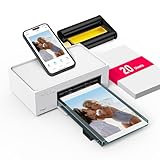
- Top Pick: Liene M100 4×6'' Photo Printer, Phone Printer 100 Sheets & 3 Cartridges, Full-Color Photo, Portable Instant Photo Printer for iPhone Android, Thermal Dye Sublimation, Wi-Fi Picture Printer 100 Papers
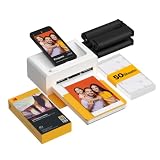
- Best Value: KODAK Dock Plus 4×6 Photo Printer, Smartphone Docking, 4PASS, 50 Sheets | Bluetooth, iPhone & Android Smartphone Compatible, Charge While Printing, Water, Fingerprint and Fade Resistant
- Premium Choice: HP Envy Photo 7975 Wireless Color Inkjet Photo Printer, Print, scan, Copy, Easy Setup, Mobile Printing, Best-for-Home, 3 Month Instant Ink Trial Included, AI-Enabled (B63K3A)
A photo printer under 100 dollars forces a choice that bigger budgets can dodge: do you want pocket-size prints that come straight off a phone, or a do-it-all inkjet that also scans, copies and handles homework? The first group, thermal dye sublimation printers, makes 4×6 snapshots or even sticker-backed minis with almost no setup. The second group, color inkjets from Canon and HP, prints photos on regular paper sizes and doubles as an office machine. Which path suits you depends on where your pictures live and how you plan to use them.
This guide is for parents printing school pictures, crafters making sticker photos, students who need a scanner on hand, and anyone building a shelf of family snapshots in 2026. Nine listings are compared by what their titles state: paper size, sheet counts, wireless options, bundled supplies and printing functions. Because current listing amounts shift often, confirm that the specific bundle you pick still falls under the 100 dollar cap before checking out. Bundles are often re-packaged with different sheet counts, so the exact listing you click matters more than the model name alone.
Quick Picks
As an Amazon Associate we earn from qualifying purchases at no extra cost to you.




| Product | Best for | Key spec from the title |
|---|---|---|
| Liene M100 (100 sheets) | High-volume 4×6 snapshots | 100 sheets, 3 cartridges, Wi-Fi |
| KODAK Dock Plus | Docking and charging a phone | 4×6, 4PASS, 50 sheets, Bluetooth |
| HP Envy Photo 7975 | Home printing, scanning and copying | Wireless inkjet, 3 month Instant Ink trial |
| Liene M100 (20 sheets) | Light, occasional printing | 4×6, Wi-Fi, 20 sheets |
| Canon PIXMA TS4320 | Compact household all-in-one | Wireless, print, copy, scan |
| Nelko PP01 | Sticker photos and journaling | 2×3 prints, sticky-back, Bluetooth |
| Canon PIXMA TS7720 | Fast, double-sided household output | Auto duplex, 2.7 inch touchscreen |
| Liene Amber M110 | Photos plus square stickers | 80 sheets, Bluetooth, 2 cartridges |
| HPRT CP4100 | Large 4×6 sheet bundle | 108 sheets, 2 ribbons, Wi-Fi |
How to Choose
Thermal versus inkjet
Thermal dye sublimation devices lay down color in layers using a ribbon or cartridge and finish with a protective coat, producing dry, smudge-resistant prints at fixed sizes such as 4×6. Inkjets spray liquid ink, handle many paper sizes and also scan or copy, but photo output depends on paper choice and print settings. If your main goal is a stack of small snapshots, go thermal. If you need documents, school forms and the occasional photo, an inkjet makes more sense.
Check what is in the box
The bundle matters as much as the printer. Titles in this group state sheet counts and cartridges or ribbons, such as 100 sheets with 3 cartridges or 108 sheets with 2 ribbons. Higher counts mean more prints before you need refills, and the supply type must match the printer model. Always verify refill availability for the exact model, since proprietary cartridges and paper are common in this class and only fit that printer line.
Connectivity and app support
Wi-Fi lets several phones and laptops print to the same device, while Bluetooth pairs one phone at a time and is quicker for a single user. A docking design, as on the Kodak, adds charging while printing. Look for iOS and Android support in the title and a maker app, because poor apps are a common complaint with budget photo printers. Inkjet all-in-ones typically add mobile printing and a driver for computers. Before committing, confirm that the printer works with your phone’s current operating system version and that the app does not require an account you would rather avoid creating.
Print size and finish
A 4×6 print suits frames and albums, 2×3 suits stickers and planners, and a 3-inch square suits sticker projects. Fade, water and fingerprint resistance, which the Kodak lists, matter for prints that will be handled or displayed. Ignore AI editing labels unless you actually plan to use the app tools. For inkjets, 15/10 PPM style figures describe document speed, not photo speed, so do not equate them with snapshot output. If photos are the priority, read the paper sizes and borderless options in the full specifications, and plan to buy matching photo paper from the maker.
The 9 Best Options
Liene M100 (100 sheets)
A phone printer built for volume, with a 4×6 format, 100 sheets and 3 cartridges in the listing. It uses thermal dye sublimation and Wi-Fi, and it lists iPhone and Android support. A kit this generous suits a family that wants a drawer of prints for grandparents, school projects and refrigerator doors without constantly reordering paper.
- Large paper bundle reduces early reordering
- Wi-Fi allows multiple phones to share it
- Trade-off: a fixed 4×6 size, with no scanning or document features
Skip it if you need a printer for school forms or larger photos.
KODAK Dock Plus
Designed around a smartphone docking cradle, it charges your phone while printing 4×6 photos. The title lists 4PASS, 50 sheets, Bluetooth, iPhone and Android compatibility, and water, fingerprint and fade resistance. The dock turns it into a bedside or desk accessory, since the phone stays powered and upright while the print rolls out.
- Docking and charging in one step
- Prints described as water, fingerprint and fade resistant
- Trade-off: Bluetooth connects one device at a time
Skip it if you want Wi-Fi sharing across a household.
HP Envy Photo 7975
A wireless color inkjet that prints, scans and copies, with mobile printing and easy setup mentioned. The title adds a 3 month Instant Ink trial and an AI-enabled label. It is the pick for a household that wants one device on the desk for permits, school forms, boarding passes and the odd family picture on photo paper.
- All-in-one functions for home use
- Subscription trial can ease early refills
- Trade-off: the title does not state a photo paper size range or sheet bundle
Skip it if you want a pocket printer without ink supplies.
Liene M100 (20 sheets)
The smaller bundle of the same 4×6 phone printer line, with Wi-Fi, thermal dye sublimation and 20 sheets. It suits people who print a few photos each month and do not want a big paper stack. Because the printing method matches the larger kit, you get the same snapshot look in a lighter starter package.
- Same compact thermal approach as the larger kit
- Wi-Fi works with iPhone and Android
- Trade-off: only 20 sheets, so refills come sooner
Skip it if you plan to print a lot of photos.
Canon PIXMA TS4320
A compact wireless inkjet with print, copy and scan, described in the title as a multi-function photo printer for home use with easy setup. The compact design suits a shelf or a dorm desk, and a copier and scanner on board means paper homework and receipts do not need a separate machine.
- Print, copy and scan in a small footprint
- Wireless and simple setup
- Trade-off: the title does not list duplex or a touchscreen
Skip it if you want hands-free double-sided printing.
Nelko PP01
A tiny 2×3 portable printer that produces sticky-back photos. The title lists Bluetooth for iOS and Android, an instant color sticker format and AI app editing. It is more of a craft tool than a snapshot printer, so think scrapbooks, labels, laptop decals and planner pages rather than wall displays.
- Sticker prints for journals, planners and crafts
- Pocket-size and phone driven
- Trade-off: small 2×3 format, not suitable for framed photos
Skip it if you need 4×6 prints.
Canon PIXMA TS7720
This wireless all-in-one lists auto duplex, 15/10 PPM, a 2.7 inch touchscreen and a compact home photo printer design. Households that print recipes, forms and worksheets alongside the occasional photo get the most from the touchscreen and duplex combination. It suits families that print documents more often than photos.
- Auto duplex for double-sided pages
- Touchscreen simplifies copying and scanning
- Trade-off: PPM figures describe document output, not photo speed
Skip it if you want a tiny phone-only printer.
Liene Amber M110
A Bluetooth portable printer whose bundle covers 80 sheets: 60 4×6 sheets plus 20 3-inch square sticker sheets, with 2 cartridges included. The title says thermal dye sublimation. Having both full-size snapshots and square stickers in one box covers invitations, scrapbooks and gift tags, so you can start crafting right away.
- Mixed paper bundle covers photos and stickers
- Bluetooth pairing for iPhone
- Trade-off: the title names iPhone, so Android support needs checking
Skip it if you use an Android phone and want that confirmed in the listing.
HPRT CP4100
A 4×6 portable photo printer with 108 sheets, 2 ribbons and Wi-Fi. The title also lists thermal-sublimation printing, phone and laptop use, and 15-second AR video printing. Beyond the gimmick, the large paper and ribbon count and Wi-Fi support make it a practical bulk printer for a household with several phones.
- Large sheet and ribbon bundle for a long runway
- Laptop and phone support with Wi-Fi
- Trade-off: AR video printing is a novelty feature that needs the app
Skip it if you want an all-in-one with scanning.
Which One Fits Your Situation
You print family photos every week
The HPRT CP4100 and the larger Liene M100 bundle lead on sheet counts, with Wi-Fi so that several people can share them. Keep one shared app login or hotspot name handy so relatives can add themselves quickly, and store spare paper flat and dry between print sessions.
You need a printer for school and photos
Choose between the Canon PIXMA TS4320 for a compact build and the Canon PIXMA TS7720 for auto duplex and a touchscreen, or the HP Envy Photo 7975 for mobile printing and a subscription trial.
You make planners and stickers
The Nelko PP01 produces 2×3 sticky-back prints, and the Liene Amber M110 mixes 4×6 sheets with 3-inch square sticker sheets.
You want to print while charging
The KODAK Dock Plus is the only listing built around a docking cradle that charges the phone mid-print. It is a good fit for a teen who prints between messages and needs the phone topped up at the same time, or for a desk where cables are already limited.
Common Mistakes
- Assuming the starter bundle covers future refills when proprietary cartridges and paper are required.
- Choosing a thermal printer when larger sheets or document printing are needed.
- Forgetting to check iPhone versus Android support, which differs by listing.
- Confusing document PPM figures with photo print speed.
- Overlooking that 2×3 sticker prints are too small for frames and albums, and the sticky back suits journals better than wall displays.
Related guides
- Battery Operated Smoke And Carbon Monoxide Detectors
- Combination Smoke And Carbon Monoxide Detectors
- Aio Liquid Coolers For High Performance Gaming
Frequently Asked Questions
Can an inkjet all-in-one print real photos?
Yes, with photo paper and the right settings. Results depend on the paper and the print mode you choose.
Do thermal photo printers need ink?
No liquid ink is used. They rely on color ribbons or cartridges and matching paper that come bundled in the kit.
Is Wi-Fi better than Bluetooth?
Wi-Fi suits shared use, while Bluetooth is quicker for one phone. Pick based on how many devices will print.
Do these prints last?
Thermal prints usually resist smudging, and the Kodak lists water, fingerprint and fade resistance. Keep any photo out of direct sunlight to slow fading.







