A casual gaming mouse does not need esports specifications. It needs to feel comfortable for an evening of relaxed play, work on the games you actually open — a bit of Minecraft, some indie titles, a co-op session with friends — and then behave itself on the desktop the next morning. The real decision is between the freedom of wireless and the zero-maintenance life of a wired mouse, and how much complexity you want in buttons and software.


The five mice below were picked from their own Amazon listings for forgiving shapes and simple setups: the Logitech G305 for its long battery life on a single AA, the Razer Cobra and Orochi V2 as light options in wired and wireless forms, the Redragon M711 as a colourful wired all-rounder, and the MSI Clutch GM08 with its adjustable weights for players who like to tune how a mouse feels.
Quick Picks
As an Amazon Associate we earn from qualifying purchases.
| Product | Best for | Key spec from title |
|---|---|---|
| Logitech G305 LIGHTSPEED | Wireless play with rare battery changes | HERO 12K sensor with 250h battery life |
| Razer Cobra | A light wired mouse for any desk | 58g lightweight design |
| Razer Orochi V2 | Small, portable wireless gaming | Ultra lightweight with up to 950hrs battery |
| Redragon M711 COBRA | Colourful wired all-round play | 10,000 DPI with 7 programmable buttons |
| MSI Clutch GM08 | Tuning the feel with weights | 4200 DPI with 3 adjustable weights |
How to Choose
Wireless Freedom or Wired Simplicity
Casual players feel this choice more than anyone, because the mouse also handles everyday computing. A wireless mouse such as the G305 or Orochi V2 keeps the desk tidy and travels easily between rooms or laptops, at the cost of watching a battery indicator now and then. A wired mouse never sleeps, never needs a charge and is ready the second you sit down, which suits a fixed gaming corner. Neither is more accurate for relaxed play, so decide by lifestyle: tidy and flexible, or plugged in and forgotten about.
Comfort Over Raw Specification
For casual sessions, the sensor numbers in a listing matter far less than whether the mouse disappears under your hand. All five mice here track well beyond the sensitivity relaxed gaming needs, so spend your attention on shape, size and weight instead. A mouse that fits your grip lets you play longer without thinking about your hand, while an uncomfortable flagship will annoy you every session. If your hands are small, the compact options deserve priority; if you share the mouse with family members, a medium ambidextrous shape usually pleases everyone.
Buttons You Will Actually Use
Extra buttons only help if your games use them. Six or seven programmable buttons cover the needs of most casual players: a couple of side buttons for push-to-talk, item use or a browser back command, plus the standard clicks and wheel. Mice with more buttons suit players drifting into MMOs or heavy keybind games, which is a different roundup. Be honest about your library — if your evenings are platformers, farming sims and party games, a simple six-button layout is easier to learn and harder to press by accident mid-jump.
Battery Style and Everyday Upkeep
Wireless mice here handle power differently, and the difference shows up in daily life. The G305 runs up to 250 hours on a single AA battery as listed, so a spare battery in a drawer is the whole maintenance plan. The Orochi V2 accepts either one AA or one AAA in its hybrid slot and stretches far longer on Bluetooth for desktop use. Rechargeable models remove battery swaps but add cable time. For casual play, pick the system that matches your habits rather than the biggest hour figure in a title.
The 5 Best Options
Logitech G305 LIGHTSPEED
The G305 is the default recommendation for casual wireless gaming because it removes nearly every friction point. Its HERO sensor is listed at up to 12,000 DPI, the LIGHTSPEED connection reports at 1 ms, and a single AA battery delivers up to 250 hours of play, so battery changes become a rare event rather than a routine. Six programmable buttons cover side-button duties in most games, on-board memory keeps your settings on the mouse, and the compact shape works for a wide range of hand sizes. It is equally at home on a work laptop the morning after a gaming session.
Specs
- Sensor: HERO, up to 12,000 DPI
- Weight: 99 g
- Report rate: 1 ms, LIGHTSPEED
- Connection: LIGHTSPEED wireless, USB receiver
- Battery: Up to 250 hours on a single AA
- Buttons: 6 programmable
- Memory: On-board memory
Best for: Casual players who want one wireless mouse for gaming and everyday computing.
Watch out for: It runs on a replaceable AA rather than a rechargeable cell, so keep a spare battery handy if you dislike surprise swaps mid-session.
Razer Cobra
The Cobra keeps casual gaming refreshingly simple: plug in the Speedflex cable and play, with no battery, dongle or pairing step ever involved. At 58 grams it is the joint-lightest mouse here, so it feels easy to move during relaxed sessions and does not drag on the desk thanks to its 100 percent PTFE feet. The listed optical sensor reaches 8500 DPI, comfortably above casual needs, and the Gen-3 optical switches are rated for 90M clicks, which bodes well for years of undemanding service. Six programmable buttons round out a mouse that asks almost nothing of its owner.
Specs
- Sensor: Optical, 8500 DPI, 300 IPS
- Weight: 58 g
- Switches: Optical Gen-3, 90M clicks
- Connection: Wired, Speedflex cable
- Buttons: 6 programmable
- Feet: 100 percent PTFE mouse feet
- Dimensions: 4.71 x 2.46 x 1.5 in
Best for: Players who want a light wired mouse that is ready every time they sit down.
Watch out for: The cable is permanent, so route it with some slack or a bungee if your desk layout makes drag noticeable during wide movements.
Razer Orochi V2

The Orochi V2 is the small wireless option for players who game on a laptop, a sofa-side setup or a cramped desk. Listed at 60 grams excluding its battery, it connects over HyperSpeed 2.4 GHz for gaming or Bluetooth for everyday use, and its hybrid battery slot accepts a single AA or AAA cell, whichever you have in a drawer. Battery life stretches up to 950 hours on Bluetooth or up to 425 hours on HyperSpeed as listed, so it can go months between swaps in mixed use. Its 18,000 DPI 5G Advanced sensor is far more than casual play demands.
Specs
- Sensor: Razer 5G Advanced optical, 18,000 DPI
- Weight: 60 g excluding battery
- Switches: 2nd-gen Razer Mechanical, up to 60M clicks
- Connection: HyperSpeed 2.4 GHz and Bluetooth
- Battery: One AA or AAA; up to 950 hours on Bluetooth, up to 425 hours on HyperSpeed
- Dimensions: 4.26 x 1.52 x 2.47 in
Best for: Laptop and small-desk gamers who want a tiny wireless mouse with very long battery life.
Watch out for: The headline 950-hour figure applies to Bluetooth mode; HyperSpeed gaming use is listed at up to 425 hours, so expect that lower figure during play.
Redragon M711 COBRA

The M711 COBRA is the colourful wired all-rounder of the group, built for players who enjoy a bit of flair with their evening sessions. Its backlighting offers 16.8 million Chroma RGB colours per the listing, and the optical sensor adjusts up to 10,000 DPI, which lets you slow the cursor for careful building games or speed it up for action titles. Seven programmable buttons give casual MMO and MOBA players a few extra binds without overwhelming the sides of the mouse. As a wired USB design it needs no charging, and it suits a first gaming mouse for a younger player.
Specs
- Sensor: Optical, adjustable up to 10,000 DPI
- Connection: Wired USB
- Buttons: 7 programmable
- Lighting: 16.8 million colour Chroma RGB backlight
Best for: Players who want RGB flair and extra buttons in a simple wired mouse.
Watch out for: The listing does not state weight, switch type or polling in the captured details, so check the live page if any of those specifics matter to you.
MSI Clutch GM08
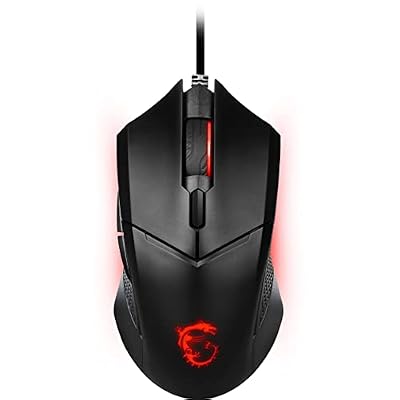
The GM08 takes a different approach to comfort: instead of chasing the lowest weight, it includes three adjustable weights so you can change how the mouse feels in hand. Some casual players prefer a slightly heavier mouse for calm, deliberate games such as city builders and turn-based strategy, and this system lets you experiment without buying twice. The optical sensor is listed at a maximum of 4,200 DPI, which is modest on paper but entirely sufficient for relaxed gaming at typical sensitivities. Red LED lighting and a symmetrical design keep it simple, and the wired USB connection means it is always ready.
Specs
- Sensor: Optical, maximum 4,200 DPI
- Connection: USB wired
- Buttons: 6
- Weight system: 3 adjustable weights
- Lighting: Red LED
- Design: Symmetrical
Best for: Players who like a slightly weightier, settled feel for slower-paced games.
Watch out for: The 4,200 DPI ceiling is the lowest here, so confirm your preferred sensitivity sits comfortably below it if you play on a large high-resolution monitor.
Which One Fits Your Situation
You Game on the Family PC in the Evening
The G305 fits this life best. It connects through a small USB receiver that can simply stay in the PC, the battery lasts for months of evening sessions as listed, and the shape suits different hands in the household. When the gaming ends it is an ordinary, comfortable wireless mouse for homework, browsing and everything else the family computer handles.
You Play on a Laptop Around the House
Choose the Orochi V2. Its compact body travels well, Bluetooth mode pairs with the laptop for everyday use, and switching to the HyperSpeed dongle gives it a gaming-grade connection when you settle in to play. The AA or AAA flexibility means a flat battery is a thirty-second fix with whatever cell the kitchen drawer holds.
You Want Zero Maintenance at a Fixed Desk
The Cobra or the M711 COBRA both deliver plug-and-play evenings with no batteries at all. Pick the Cobra if you prefer a light, understated mouse with smooth PTFE feet, or the Redragon if you want RGB lighting and a seventh button for extra binds. Either way, your only upkeep is the occasional wipe of the mouse pad.
You Mostly Play Slow, Relaxed Games
The GM08 deserves a look. Strategy, simulation and adventure games reward a calm, weighted feel more than a featherlight shell, and the three included weights let you settle on the balance you like. Its sensor ceiling is modest but irrelevant at the sensitivities these genres use, and the symmetrical shape is easy to share between players.
Common Mistakes
- Buying an esports flagship for casual play and paying for specifications your games will never use.
- Choosing a tiny travel mouse for a large hand, then wondering why evening sessions end with a cramped grip.
- Forgetting that a wireless mouse needs a battery plan, whether that is a spare AA or a charging habit.
- Judging a mouse only by its maximum DPI figure, when comfort and shape decide how it feels after an hour.
- Leaving a wired mouse cable unmanaged so it snags on desk edges during relaxed play.
Frequently Asked Questions
What DPI do casual gamers actually need?
Far less than most listings advertise. Everyday desktop work and relaxed gaming typically use sensitivities covered comfortably by every mouse here, including the GM08 with its 4,200 DPI maximum as listed. Higher ceilings exist for players who run very high sensitivities on large monitors. If a mouse feels responsive and controllable at your setting, its maximum figure is not a limitation in practice.
Is wireless reliable enough for casual gaming?
Yes. The wireless mice here use gaming connections — LIGHTSPEED on the G305 and HyperSpeed on the Orochi V2 — that are designed for responsive play, and casual sessions place even gentler demands on them than competitive matches do. The practical differences are battery management and desk tidiness rather than performance, so choose based on how you like to live with the mouse day to day.
How long should a casual gaming mouse last?
A well-kept mouse should serve for years. Switch ratings listed here run from 60M clicks on the Orochi V2 to 90M on the Cobra, figures far beyond what relaxed play accumulates. In practice, batteries, worn feet and general grime end a mouse’s comfortable life before its switches do, so basic cleaning and a decent mouse pad extend its service more than any specification.
Can one mouse cover both work and gaming?
Absolutely, and for casual players that is usually the smartest purchase. The G305 and Orochi V2 both handle office work all day and gaming all evening, with programmable side buttons that serve as browser shortcuts at work and game binds at night. A single comfortable mouse you know well beats rotating between a dull office mouse and an unfamiliar gaming one.