A full-cover water block is the part of a custom loop that changes how a graphics card behaves day to day. Core and memory temperatures fall well below what a large air cooler manages, fan noise moves from the card to slower radiator fans, and the card often shrinks to a single slot. That makes room for cleaner tubing runs and, in small cases, for hardware that would never fit under a triple-slot air cooler.
The catch is that GPU water blocks are the least forgiving parts in the whole loop. Each block is machined for one exact circuit board layout, so a block built for a Founders Edition card will not fit a partner card with a taller board or moved power connector, even when both cards carry the same chip name. This guide covers five verified blocks across the main classes, explains how fitment works, and sets out the full cost and upkeep of loop ownership before you commit.
As an Amazon Associate, we earn from qualifying purchases.
Quick answer
Begin with fitment, not looks. The EK-Quantum Vector² FE block suits the RTX 4090 Founders Edition, the EK Vector² RX 7900 XTX block covers reference Radeon boards, the EK Trio and Strix/TUF ABP sets serve premium partner cards, and the Bykski block brings MSI RTX 4070 Ti Gaming Trio cards into a loop for less.
EK-Quantum Vector² FE RTX 4090 D-RGB – Nickel + Plexi
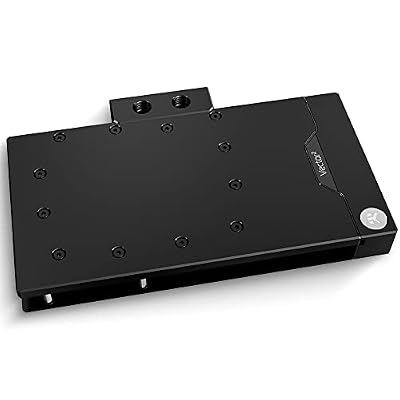
This block is built for one card only: the NVIDIA GeForce RTX 4090 Founders Edition with its reference board layout. It is a full-cover design, meaning the nickel-plated copper cold plate contacts the GPU core, the GDDR6X memory modules and the voltage regulation stages, so every major heat source on the board feeds into the coolant instead of heating the air inside the case.
The top is clear plexi with addressable D-RGB lighting along the edge, and the port terminal follows the EK-Matrix7 spacing standard, which lines the block up neatly with EK distribution plates and vertical mounts. A machined backplate is included and passively cools hotspots on the rear of the board through thermal pads. Because the Founders Edition uses a compact board with an angled power connector, EK routes the terminal to keep tubing clear of that connector, a detail that matters in tight builds.
Choose this block if you own the Founders Edition card and want the reference premium option with broad loop accessory support. Do not order it for any partner RTX 4090, no matter how similar the cooler shroud looks, because the board underneath is different.
EK-Quantum Vector² RX 7900 XTX D-RGB – Nickel + Plexi

Radeon owners get a dedicated design here. This Vector² block fits AMD Radeon RX 7900 XTX cards built on the reference board layout, including reference-layout cards sold under partner names. It actively cools the graphics compute die, the memory modules, the memory cache dies, the power stages and the voltage controllers, which is a longer contact list than on most GeForce blocks because of the chiplet layout of the RX 7900 XTX.
The cold plate is CNC-machined copper with a nickel finish, the top is plexi with D-RGB lighting, and a full-length backplate comes in the box. The cooling engine uses a revised fin structure and jet plate arrangement aimed at even coolant distribution across the large die area, and the block follows the same Matrix7 port spacing as the rest of the Vector² line, so it pairs cleanly with EK reservoirs and distribution plates.
The important check is the board, not the box art. Several partner RX 7900 XTX cards use custom boards with different component placement, and those cards need their own specific blocks. If your card follows the AMD reference layout, this is the established premium route into a custom loop.
EK-Quantum Vector² Trio RTX 4090 D-RGB – Nickel + Plexi

MSI flagship cards use a wide custom board, and this block is machined for exactly that family: the MSI GeForce RTX 4090 Gaming Trio, Gaming X Trio and SUPRIM cards that share the same board layout. It is a premium full-cover block with a nickel-plated copper cold plate covering the core, GDDR6X memory and power delivery, topped with plexi and D-RGB lighting.
A thick copper cold plate and a full-size backplate give the card a rigid, single-slot finished form, and the backplate passively draws heat from the rear of the board. Port placement follows the Matrix7 standard, which helps when the loop also uses an EK distribution plate, because the tubing runs line up in straight lines rather than bending around offsets.
This is the block to pick when the card in your case is an MSI Trio or SUPRIM model and you want fitment certainty from the premium end of the market. It will not fit the Founders Edition or ASUS boards, and MSI’s smaller Ventus cards use yet another layout again. Confirm the exact model name on your card against the maker’s compatibility list before ordering, since Trio and SUPRIM variants look alike on a shelf.
EK-Quantum Vector² Strix/TUF RTX 4090 ABP Set D-RGB – Nickel + Acetal

The ABP Set is the active backplate option in this guide. It fits ASUS ROG Strix and ASUS TUF Gaming GeForce RTX 4090 cards, and instead of a plain metal plate on the rear of the board, it mounts a second water block there. Coolant flows through the backplate section as well, actively cooling the memory modules and board hotspots on the back side of the card, which run warm on RTX 4090 boards under long loads.
The front block uses a nickel-plated cold plate with an acetal top. Acetal is the tougher, opaque material choice: it shrugs off knocks that can crack plexi, hides the coolant channel for a clean black look, and suits builders who prefer function over a window into the loop. The two halves form a single enclosure around the card, so the finished card is thicker than a standard block and backplate pairing, and case clearance for the terminal side deserves a measurement before you build.
Pick the ABP Set if your Strix or TUF card spends hours under rendering, training or high-refresh gaming loads and rear board temperatures are part of why you are building the loop. If your card is a different RTX 4090 model, this set does not fit it.
Bykski Copper GPU Water Block for MSI RTX 4070 Ti Gaming Trio

Bykski covers the value end of the market, and this block brings the MSI GeForce RTX 4070 Ti Gaming Trio 12G into a custom loop without paying premium-brand money. It is a full-coverage copper block with a clear acrylic top, an included aluminium backplate, and 5V addressable RGB lighting that syncs with common motherboard lighting software.
The cold plate covers the core, memory and voltage regulation areas, and the channel design follows the same full-cover layout as the bigger brands. What you give up for the lower cost is mostly polish: documentation is thinner, the fitting finish is plainer, and compatibility guidance leans on the model code in the product name, so reading that code carefully matters. This block is coded for the Gaming Trio board only, and MSI’s Ventus version of the same GPU uses a different board with its own separate Bykski block.
For a first loop built around a mid-range card, this is a sensible way to learn the process, because the same skills transfer when you move to a flagship card later. Budget for quality thermal pads and take extra time on the first assembly and leak check.
How to choose
Begin with the exact board. Write down the full model name of your card, including the partner brand and sub-model, then match it against the block maker’s compatibility list or configurator. Reference boards and partner boards differ in height, component placement and power connector position, and a block that seats even slightly wrong can leave a memory module without contact or crack a solder joint under mounting pressure. If your exact card is not named, the block does not fit, whatever the GPU chip is called.
Next, decide on materials. Nickel-plated copper cold plates resist corrosion and suit mixed loop metals better than bare copper. Plexi tops show the coolant and lighting but can crack if ports are overtightened. Acetal tops are opaque and far more forgiving of heavy fittings and frequent maintenance. Then decide whether an active backplate is worth it for your card: it helps most on boards with memory or hot components on the rear, and adds cost, thickness and one more part to seal.
Finally, plan the whole loop, not just the block. You still need a pump, at least one radiator with fans, tubing, fittings for every port, coolant and a way to fill and drain the loop. Those parts together routinely cost more than the block itself, and radiator space in your case decides how quiet the finished system can be.
Who should skip
Skip GPU water blocks if your card’s air cooler already keeps temperatures and noise where you want them, because a loop adds cost and maintenance without changing frame rates in any meaningful way for most players. Skip them if you change graphics cards every generation, since each new card usually needs a new block machined for its board.
Also think carefully before removing a stock cooler if your card is still under warranty and the card maker’s policy treats cooler removal as a problem. Policies differ by brand and region, so check the current terms for your exact card before the first screw comes out. And if the idea of draining coolant, inspecting seals and checking for leaks once or twice a year sounds like a chore rather than part of the hobby, an air-cooled card or a factory liquid-cooled model will suit you better.
Frequently Asked Questions
Will a block for one RTX 4090 fit a different RTX 4090?
No. Blocks are machined for one board layout, and partner boards differ from the reference board in size and component placement. A Founders Edition block fits only the Founders Edition, a Trio block fits only the named MSI boards, and so on. Always match the full card model name against the compatibility list.
Does removing the stock cooler void the card warranty?
It can, depending on the card maker and your region. Some brands allow cooler removal if the card is returned in original condition, while others treat it as grounds to refuse service. Read the current policy for your exact card before you begin, and keep every screw, pad and the original cooler stored safely.
How much radiator does a water-cooled GPU need?
A single 360 mm radiator can carry a flagship GPU in a loop on its own, but sharing that radiator with a high-end CPU raises coolant temperature and fan speed. Many builders use two radiators, or one large radiator with generous case airflow, so the loop stays quiet under long gaming sessions.
What maintenance does a GPU block need?
Plan on inspecting fittings and seals whenever you open the case, checking coolant level and clarity every few months, and replacing coolant on the schedule the coolant maker gives, commonly once a year. Blocks with plexi tops also deserve a look for fine cracks around the ports when you drain the loop.
Final verdict
GPU water blocks reward exact homework. The EK FE block is the clean choice for the RTX 4090 Founders Edition, the EK RX 7900 XTX block serves reference Radeon boards, the Trio block covers MSI flagship cards, the Strix/TUF ABP Set adds active rear cooling for ASUS flagships, and the Bykski block opens the hobby to RTX 4070 Ti Gaming Trio owners for less. Match the board first, budget for the whole loop, and the result is a quieter, cooler card that holds its boost behaviour through the longest sessions.
Product and ASIN Reference
| Product | ASIN |
|---|---|
| EK-Quantum Vector² FE RTX 4090 D-RGB – Nickel + Plexi | B0BK58H3LP |
| EK-Quantum Vector² RX 7900 XTX D-RGB – Nickel + Plexi | B0BM4NGNC5 |
| EK-Quantum Vector² Trio RTX 4090 D-RGB – Nickel + Plexi | B0BLF856FL |
| EK-Quantum Vector² Strix/TUF RTX 4090 ABP Set D-RGB – Nickel + Acetal | B0BK5D2DHD |
| Bykski Copper GPU Water Block for MSI RTX 4070 Ti Gaming Trio | B0BW9L1M2Y |