A modern gaming case can hold eight, ten, or even more fans, yet most motherboards offer only a handful of fan headers and one or two addressable lighting headers. Fan hubs close that gap. A hub takes power from the power supply, takes one control signal from the motherboard, and repeats that signal to a bank of ports, so a whole group of fans can run from a single header and the cables can gather in one tidy place behind the motherboard tray.

The five hubs below cover the main shapes this product takes: a plain PWM hub with ten SATA powered ports, a lighting-only ARGB hub, a combined hub that handles speed and lighting together, a hub that answers to a handheld remote, and a compact hub that snaps onto steel with magnets. The right pick depends on whether your fans need speed control, lighting control, or both.
As an Amazon Associate, we earn from qualifying purchases.
Quick answer
For most builds, a combined PWM and ARGB hub such as the Thermalright Fan and ARGB HUB X8 is the simplest route, because one unit handles speed and lighting for eight fans. Choose the DeepCool FH-10 for plain PWM duty, the Noctua NA-FH1 for a compact magnetic fit, and the Razer Chroma hub for lighting only.
DeepCool FH-10: ten PWM ports on SATA power
The DeepCool FH-10 is the classic answer to a simple problem: too many fans, too few headers. It offers ten 4-pin ports, draws its power from a SATA connector on the power supply, and takes its speed signal from a single motherboard fan header. Because the power comes from the supply rather than the board, ten fans do not strain one header the way a stack of plain splitter cables would.
Every port receives the same PWM signal, and the motherboard reads back the speed of the fan plugged into the marked first port only. That is normal hub behavior, and it means the FH-10 suits banks of matching fans, such as a row of intake fans or a pair of radiator fans, that you are happy to run as one group. The board is small and flat, mounts with screws or adhesive pads, and has no lighting circuitry at all, which keeps it simple to wire.
Two cautions apply. Three-pin fans plugged into this hub receive a constant full voltage signal path in PWM mode and will run at full speed, so use 4-pin PWM fans if you want speed control. And while ten ports invite ten fans, check the combined draw of your fan set against the total figure in the manual before filling every port. ASIN: B077YHLDSP.
Razer Chroma Addressable RGB Controller: lighting only, done properly
The Razer Chroma Addressable RGB Controller ignores fan speed entirely and concentrates on light. It provides six 3-pin 5V addressable headers, connects to the motherboard through an internal USB lead, draws power from a separate supply lead rather than the board, and hands control to Razer Synapse software. Each header can drive its own run of ARGB fans, strips, or other addressable gear, and the software treats the connected devices as lighting zones you can color and animate independently.
That independence is the point. A plain ARGB splitter or repeating hub shows the same effect on every device at once, while this controller lets a strip, a set of fan rings, and a light bar run different colors or patterns from one box. It mounts in a 2.5-inch drive bay footprint or anywhere flat, which suits cases with a spare SSD mount behind the tray.
The limits are equally plain. It does nothing for fan speed, so your fans still need headers or a separate PWM hub for power and control. It also speaks only the 3-pin 5V addressable language; older 4-pin 12V RGB gear uses a different connector and voltage and must never be forced onto these headers. If your build already has speed control sorted and lighting is the remaining tangle, this is the tidy fix. ASIN: B08K3TYWP6.
Thermalright Fan and ARGB HUB X8: speed and light in one box
The Thermalright Fan and ARGB HUB X8 combines the two jobs most builders need. One side carries eight 4-pin PWM fan ports, the other carries eight 3-pin 5V ARGB ports, and a SATA lead feeds power from the supply so neither the fan header nor the lighting header has to feed eight devices on its own. Two signal leads run to the motherboard, one for speed and one for lighting, and the board then repeats each signal across its ports.
Wiring a full ARGB fan set through one of these is the cleanest route in a mid-tower: eight fans plug in along the hub, two cables leave for the board, one SATA lead arrives from the supply, and the rest of the case stays empty. Motherboard lighting software sees the ARGB side as one device chain, and the fan curve you set applies to the whole bank at once.
Thermalright marks one fan port in red, and that is the only port whose speed reading travels back to the motherboard, so put a representative fan there, ideally the model you care about most. The hub also repeats rather than generates, which means it adds no effects or curves of its own; if the motherboard header does not offer a feature, the hub cannot invent it. ASIN: B09SZBJ5JZ.
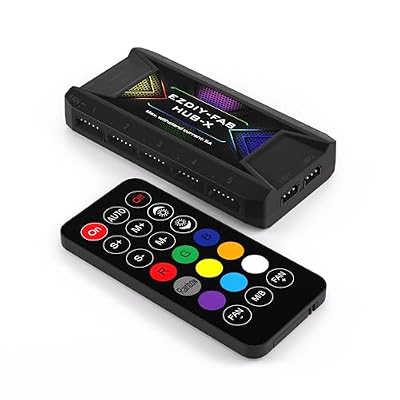
EZDIY-FAB Fan Hub X: control from a handheld remote
The EZDIY-FAB Fan Hub X takes a different path: instead of leaning on motherboard software, it ships with an RF remote that adjusts lighting color, effects, and fan speed steps from outside the case. The hub provides ten ports, takes SATA power, and can also hand control over to a motherboard ARGB header when you would rather sync with the rest of the system. For a build on a board with weak lighting software, or a living-room PC where opening an app to dim the lights feels like a chore, the remote is a genuine convenience.
The trade-off is the connector. Those ten ports use a proprietary 6-pin plug that combines power and lighting in one lead, which means this hub works with EZDIY-FAB fans and other fans built to the same 6-pin scheme, not with the standard separate 4-pin PWM and 3-pin ARGB plugs most brands use. Treat it as the center of a matched fan kit rather than a universal hub for a drawer of mixed fans.
Speed control through the remote also works in steps rather than a temperature-linked curve, so the fans will not rise and fall with load the way a motherboard curve makes them. If quiet, load-aware behavior matters most, let the motherboard lead. If instant control from the sofa matters most, this hub earns its place. ASIN: B07XFP767W.
Noctua NA-FH1: the compact magnetic option

The Noctua NA-FH1 is a small, dense eight-channel PWM hub built around protection and easy mounting. Four strong magnets on its back let it snap onto any steel surface inside the case, so it can live on the back of the motherboard tray or the floor of the power supply shroud with no screws, tape, or brackets. It accepts up to eight 4-pin PWM or 3-pin fans, and per-port status LEDs confirm at a glance that each channel is live.
Power can come from the motherboard header for light loads, or from a SATA input for heavier banks, and Noctua rates the SATA path at up to 54 W in the maker’s figures. Resettable fuses guard against overcurrent and short circuits on the outputs, a level of protection plain splitter boards do not offer, and the hub cleans up the incoming PWM signal so speed readings stay reliable even when the source signal is weak.
There is no lighting support of any kind, and no remote or software layer; the NA-FH1 is purely a power and signal distributor for fan speed. Within that narrow job, it is the most carefully engineered hub in this roundup. ASIN: B0BZQ3NXMD.
How to choose
Begin by counting what you actually need to connect, and separate the two jobs. Fan speed control uses 4-pin PWM plugs, or 3-pin plugs with no speed signal. Lighting control uses 3-pin 5V addressable plugs on most current gear, while older 4-pin 12V RGB uses a different plug and voltage. A hub must match both the plug shapes and the jobs on your fan set, so list your fans by connector before you buy anything.
Next, understand what a hub does and does not do. A hub repeats one motherboard signal to every connected fan. All fans on the hub follow the same curve and report back as one fan, usually the one on the marked port. There are no per-fan curves on a hub, so group fans that do the same job, such as all intakes together, and keep a fan you want to run differently, such as a rear exhaust, on its own header.
Power is the third check. A powered hub draws from a SATA lead, which is why it can feed eight or ten fans safely, but the hub itself still has a total amp limit in the maker’s figures, and a hub powered only through the header is bound by that header’s limit, commonly around one amp. Add up the draw printed on your fan labels and stay under the lower of the two figures. Finally, be clear about vocabulary: a hub is a distributor, not a fan controller. A controller, whether a knob box, a bay device, or a software-driven unit, sets speeds itself. A hub only passes along what the motherboard decides, and that simplicity is why it keeps a build clean.
Who should skip
Skip a hub if your case holds three or four fans and your board has enough headers; direct connections are simpler and give each fan its own curve. Skip a repeating hub if you want different speeds on different fans, such as a slow front bank and an aggressive radiator bank, because every port follows one signal. Skip the proprietary remote hubs if your fans use standard separate plugs, and skip lighting hubs entirely if your fans have no ARGB leads to connect. Builders chasing fully independent zones for every fan should look at software-driven controller ecosystems instead, and accept their extra wiring and cost.
Frequently Asked Questions
Can one hub give each fan its own speed curve?
No. A hub repeats a single PWM signal to every port, so all connected fans follow the same curve and the motherboard sees one speed reading, from the marked port. Fans that need different behavior belong on separate headers or on a true controller.
What happens if I plug 3-pin fans into a PWM hub?
A 3-pin fan has no PWM control wire, so on a hub fed by a PWM signal it simply receives full voltage and runs at full speed. It will still spin and cool, but quietly it will not be. For speed control over 3-pin fans you need voltage control from the header or a dedicated controller.
Is a fan hub the same thing as a fan controller?
No. A hub is a powered distributor: it copies one signal to many ports and adds ports, not intelligence. A controller, whether it uses knobs, a bay panel, or software, decides speeds itself and often offers a separate channel per fan. Many builds use a hub for tidy groups and let the motherboard remain the controller.
Can I mix 5V ARGB and 12V RGB gear on one hub?
No. Addressable 5V gear uses a 3-pin plug and a data signal, while older 12V RGB uses a 4-pin plug and a higher voltage. The plugs are keyed differently for a reason, and forcing the connection can damage the lighting hardware. Keep each type on its own matching header or hub.
Final verdict
For a typical gaming build with a full set of ARGB fans, the Thermalright Fan and ARGB HUB X8 is the easiest single purchase: eight speed ports, eight lighting ports, SATA power, and two signal leads to the board. If your fans have no lighting, the DeepCool FH-10 covers ten PWM fans with the least fuss, and the Noctua NA-FH1 is the premium compact pick where its magnets and fuses suit a tight case. The Razer Chroma controller is the lighting specialist for independent zones in software, and the EZDIY-FAB Fan Hub X serves the narrower niche of matched 6-pin fan kits that benefit from a remote. Match the hub to your connectors first, respect the power limits, and any of the five will leave your build cleaner than a nest of splitters.
Product and ASIN Reference
| Product | ASIN |
|---|---|
| DeepCool FH-10 10-Port PWM Fan Hub | B077YHLDSP |
| Razer Chroma Addressable RGB Controller | B08K3TYWP6 |
| Thermalright Fan and ARGB HUB X8 | B09SZBJ5JZ |
| EZDIY-FAB Fan Hub X with RF Remote | B07XFP767W |
| Noctua NA-FH1 8-Channel PWM Fan Hub | B0BZQ3NXMD |