

‘Keyboard’ means two very different things in a music-production setup, and getting the distinction right saves money and frustration. There is the MIDI keyboard you play notes on to trigger virtual instruments, and there is the computer keyboard you use to drive your DAW — hitting transport controls, triggering shortcuts, and firing macros for editing. This guide is upfront about that split: it rounds up the best keyboards for music production in 2026 across both meanings, leading with a genuine MIDI controller and then covering computer keyboards whose media keys and programmable macros make a DAW faster to operate.
- Best Music-Production Keyboards at a Glance
- 1. Akai Professional MPK Mini MK3 – 25 Key USB MIDI Keyboard Controller
- 2. Alesis Recital – 88 Key Digital Piano with Semi-Weighted Keys and Speakers
- 3. Razer Ornata Chroma Gaming Keyboard with Programmable Keys
- 4. Redragon K556 RGB Mechanical Keyboard, 104 Keys with Macro Support
- 5. SteelSeries Apex 3 RGB Keyboard with Dedicated Media Controls
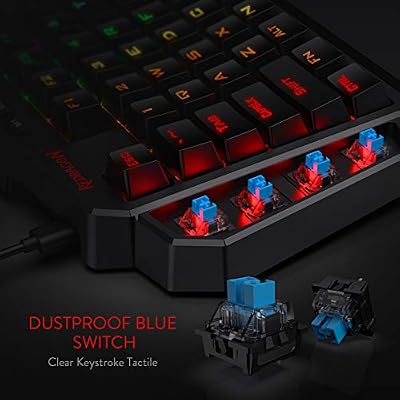
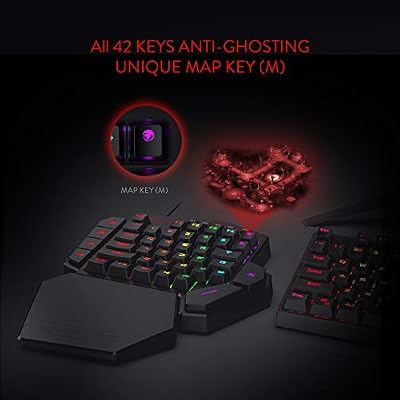
- 6. Redragon K585 DITI One-Handed RGB Mechanical Keyboard, 42 Keys
- How to Choose a Keyboard for Music Production
- Frequently Asked Questions
- Related Guides
- Related Articles
- Related Guides
Our picks were chosen on what each tool actually contributes to a production workflow: for the MIDI controller, playable keys and hands-on controls; for the computer keyboards, media-key transport access and macro/remap programmability for DAW shortcuts. We are scrupulously honest about category — only one item here plays notes, and the rest are typing keyboards that speed up your software, not instruments. Prices run from around $32 to around $259. Below is an at-a-glance comparison, then a closer look at each and a buyer’s guide that, above all, helps you buy the right kind of keyboard for the job.
As an Amazon Associate we earn from qualifying purchases at no extra cost to you.


🛒 Best Price Today on Amazon
Prime members get fast, free shipping on everything above, plus member-only deals. New members get a 30-day free trial — cancel anytime.
Best Music-Production Keyboards at a Glance
| Keyboard | Best For | Standout Spec | Approx Price |
|---|---|---|---|
| Akai MPK Mini MK3 | Playing notes (true MIDI) | 25 keys, 8 pads, USB MIDI | around $99.00 |
| Alesis Recital | Learning piano alongside | 88 semi-weighted keys, speakers | around $259.99 |
| Razer Ornata Chroma | Macro-driven DAW control | Hybrid switches, programmable keys | around $199.99 |
| Redragon K556 | Customizable shortcut board | Hot-swap, full macro support | around $44.99 |
| SteelSeries Apex 3 | Media keys for transport | Dedicated media controls, IP32 | around $49.99 |
| Redragon K585 DITI | One-handed macro pad | 42 keys, programmable macros | around $32.99 |
1. Akai Professional MPK Mini MK3 – 25 Key USB MIDI Keyboard Controller

Akai Professional MPK Mini MK3 25-Key USB MIDI Keyboard Controller




As an Amazon Associate we earn from qualifying purchases. Product prices and availability are accurate as of the date/time indicated.
The Akai MPK Mini MK3 is the only true musical instrument on this list, and for actually producing music it is the one to start with. It is a compact 25-key USB MIDI controller with eight backlit drum pads, eight assignable knobs and a four-way joystick for pitch and modulation — the hands-on interface for playing melodies, programming beats and tweaking software synths inside your DAW. At around $99.00 it is a hugely popular entry into MIDI production.
For music production this is the keyboard that lets you perform rather than type notes in with a mouse. The velocity-sensitive keys capture expressive playing, the pads are ideal for finger-drumming and triggering samples, and the assignable knobs map to synth parameters and mixer controls for tactile, real-time tweaking. It connects over a single USB cable and works with effectively every major DAW. If your goal is genuinely making music, the MPK Mini MK3 is the essential tool here — the rest of this list complements it, but does not replace it.
Pros: True USB MIDI controller, velocity keys, 8 pads and 8 knobs, works with all DAWs.
Cons: Only 25 keys; it triggers virtual instruments, not built-in sounds.
2. Alesis Recital – 88 Key Digital Piano with Semi-Weighted Keys and Speakers

Alesis Recital Digital Piano 88-Key Semi-Weighted





As an Amazon Associate we earn from qualifying purchases. Product prices and availability are accurate as of the date/time indicated.
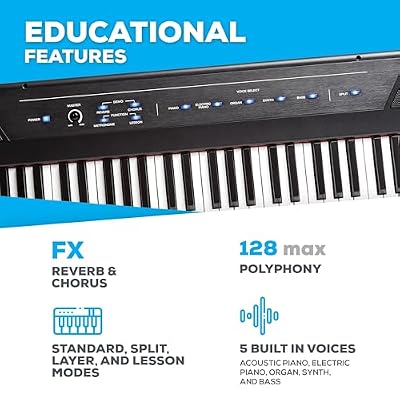
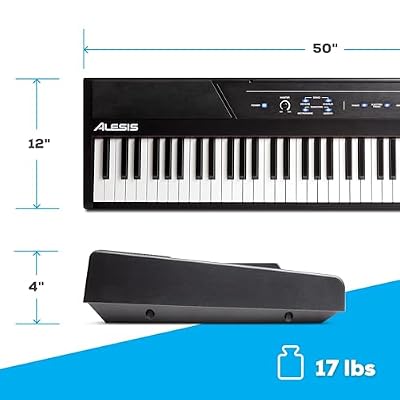
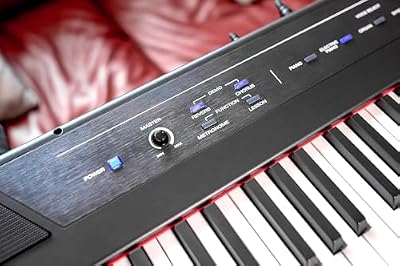
The Alesis Recital is the pick for producers who also want to play and learn piano. It is an 88-key digital piano with full-size semi-weighted keys, built-in voices, and a pair of 20W speakers, and crucially it can act as a USB-MIDI controller for your computer too. At around $259.99 it is the premium option here and a genuine instrument in its own right.
For a production setup its appeal is the full 88-key range and weighted-style feel that a compact controller cannot match — ideal if you play piano parts, want proper two-handed range, or are learning the instrument alongside producing. It can be used standalone with its own sounds and speakers, then connected over USB to drive virtual instruments in your DAW when you sit down to record. To be clear about category, this is a digital piano with MIDI capability, not a knob-and-pad controller like the Akai — choose it when keys and feel matter most.
Pros: Full 88 semi-weighted keys, built-in sounds and speakers, doubles as a USB-MIDI controller.
Cons: Large and the priciest here; fewer hands-on controls than a dedicated controller.
3. Razer Ornata Chroma Gaming Keyboard with Programmable Keys
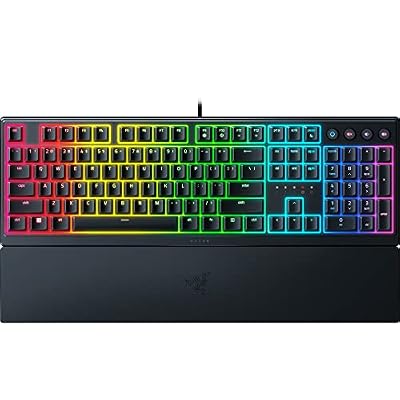
Razer Ornata V3 Gaming Keyboard, Low-Profile Keys, Black


As an Amazon Associate we earn from qualifying purchases. Product prices and availability are accurate as of the date/time indicated.
The Razer Ornata Chroma is the macro-driven control pick — a computer keyboard, not an instrument, chosen for how much faster it can make operating a DAW. Its hybrid mecha-membrane switches give a crisp, comfortable typing feel, and through Razer Synapse every key can be remapped or loaded with a macro, so complex editing chains become single keystrokes. At around $199.99 it is the premium typing keyboard on the list.
For music production its value is workflow speed: map macros to bounce, normalise, split, fade or open a specific plugin, and assign Hypershift layers so one keyboard drives dozens of DAW commands. The comfortable hybrid switches and cushioned wrist rest suit long mixing sessions, and per-key Chroma lighting can highlight your most used shortcuts. It will not play a single note — that is the Akai’s job — but as a programmable command surface for your software, it is powerful.
Pros: Fully programmable keys for DAW macros, comfortable hybrid switches, Synapse software, wrist rest.
Cons: A typing keyboard, not a MIDI instrument; premium price.
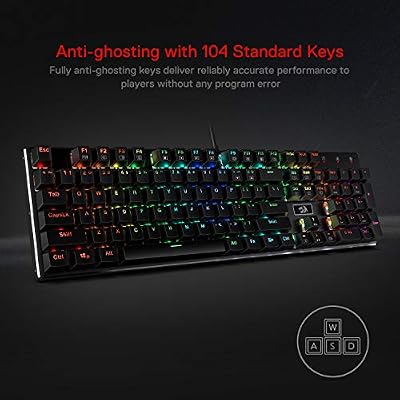
4. Redragon K556 RGB Mechanical Keyboard, 104 Keys with Macro Support
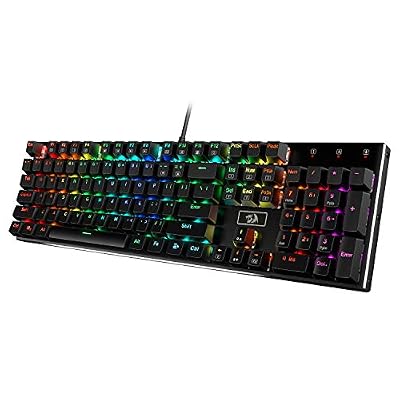
Redragon K556 Wired RGB Mechanical Gaming Keyboard, 104-Key Aluminum Board


As an Amazon Associate we earn from qualifying purchases. Product prices and availability are accurate as of the date/time indicated.
The Redragon K556 is the customizable shortcut board — a full mechanical computer keyboard whose macro support and hot-swappable switches make it a flexible DAW command surface. It offers crisp mechanical typing across 104 keys, onboard macro recording, and per-key RGB, and at around $44.99 it brings serious programmability at a value price.
For production its strength is configurable shortcuts without a flagship cost: record macros for repetitive edits, remap keys to your DAW’s most-used functions, and use RGB to colour-code transport, editing and mixing zones. The mechanical switches give a satisfying, durable action for long sessions, and the hot-swap sockets let you tune the feel over time. Like the other typing keyboards here it does not generate MIDI notes, but as an affordable, macro-capable board for driving your software quickly, it is excellent value.
Pros: Affordable macro support, crisp mechanical keys, hot-swap sockets, RGB for shortcut zoning.
Cons: Not a MIDI keyboard; macro setup needs some configuration.
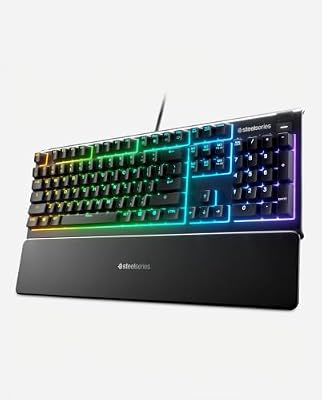
5. SteelSeries Apex 3 RGB Keyboard with Dedicated Media Controls

SteelSeries Apex 3 Gaming Keyboard - Black


As an Amazon Associate we earn from qualifying purchases. Product prices and availability are accurate as of the date/time indicated.
The SteelSeries Apex 3 is the media-keys pick, chosen for the dedicated multimedia controls that map naturally onto a producer’s transport needs. It includes a physical volume roller and dedicated media buttons for play, pause and track skip, plus ten-zone RGB and an IP32 spill-resistant build. At around $49.99 it is an affordable, convenient typing keyboard for the studio desk.
For music production its appeal is hands-on transport and monitoring control without diving into menus: the volume roller is perfect for quick monitor-level changes, and the media keys give immediate play/pause access that pairs intuitively with playback in many setups. The IP32 spill resistance is reassuring around drinks at a long session, and the quiet switches keep things calm. It is a computer keyboard rather than an instrument, but for tactile media and volume control on the desk, it is a smart, low-cost choice.
Pros: Dedicated media keys and volume roller, IP32 spill resistance, quiet switches, affordable.
Cons: A computer keyboard, not a MIDI controller; membrane-style feel.
6. Redragon K585 DITI One-Handed RGB Mechanical Keyboard, 42 Keys

Redragon K585 Wired One-Handed RGB Gaming Keypad, Tactical 42-Key Layout





As an Amazon Associate we earn from qualifying purchases. Product prices and availability are accurate as of the date/time indicated.
Rounding out the list is the Redragon K585 DITI, a one-handed mechanical keypad that makes a clever, affordable macro deck for production work. It packs 42 mechanical keys, six large programmable macro keys, onboard memory and RGB into a compact pad you sit beside your main keyboard or controller. At around $32.99 it is the cheapest pick here.
For a producer its value is a dedicated bank of shortcut and macro keys within easy reach of your non-mouse hand: assign frequent DAW commands, editing chains or plugin toggles to the six macro keys and the rest of the pad, and keep them separate from your typing keyboard. It pairs especially well with the Akai MPK Mini for a compact, controller-plus-macro-pad setup. It is emphatically not a MIDI device and plays no notes — it is a programmable input pad — but as a low-cost, hands-on macro surface, it punches above its price.
Pros: Compact one-handed macro pad, six large programmable keys, onboard memory, very affordable.
Cons: Not a MIDI keyboard and not a full keyboard; a supplementary macro pad only.
How to Choose a Keyboard for Music Production
The first and most important decision is which kind of keyboard you actually need, because the word covers two completely different tools. If you want to play notes, program beats and perform parts into virtual instruments, you need a MIDI controller like the Akai MPK Mini or the Alesis Recital — these are instruments. If you instead want to operate your DAW faster, you need a computer keyboard with media keys or programmable macros. Many producers end up wanting both, and there is no shame in buying a controller for playing and a separate typing keyboard for driving the software.
If you are buying a MIDI controller, weigh key count and feel against desk space. A compact 25-key controller like the MPK Mini is portable and beat-focused, with pads and knobs for hands-on control, and is ideal when you mostly trigger samples and tweak synths. A full 88-key instrument like the Alesis Recital gives proper two-handed piano range and a weighted-style feel for playing real parts, at the cost of size and price. Match the keys to how musically you intend to play.
If you are buying a computer keyboard for the DAW, prioritise programmability and transport access. Programmable macros — as on the Razer Ornata, Redragon K556 or the K585 macro pad — let you collapse multi-step editing chains into single keystrokes, which genuinely speeds up mixing and editing. Dedicated media keys and a volume roller, like the SteelSeries Apex 3’s, give quick monitor-level and playback control. Decide how many shortcuts you will really program and whether physical transport controls matter to you.
Finally, set your budget honestly around the right category rather than overspending on the wrong one. A pricey gaming keyboard with macros will never play a melody, and a 25-key controller will not type your emails — so do not expect either to do the other’s job. Decide whether your priority this purchase is making music or operating software faster, pick the matching tool from this list, and consider pairing a controller with a macro-capable board or pad for the complete production setup.
Frequently Asked Questions
Is a gaming keyboard the same as a MIDI keyboard for music?
No, and the difference is fundamental. A MIDI keyboard like the Akai MPK Mini plays notes and triggers virtual instruments — it is a musical instrument. A gaming or computer keyboard like the Razer Ornata or Redragon K556 types and fires DAW macros and shortcuts — it controls your software but cannot play a single note. For making music you need a MIDI controller; for operating your DAW faster you want a macro-capable typing keyboard.
Which item here can I actually play notes on?
Two: the Akai MPK Mini MK3, a true 25-key USB MIDI controller built for performing and beat-making, and the Alesis Recital, an 88-key digital piano that also functions as a USB-MIDI controller. Everything else on the list — the Razer Ornata, Redragon K556, SteelSeries Apex 3 and Redragon K585 — is a computer keyboard or macro pad for driving your DAW, not for playing musical notes.
Do media keys and macros really speed up a DAW workflow?
Yes, meaningfully. A dedicated volume roller and media keys, like the Apex 3’s, give instant monitor-level and playback control without hunting through menus. Programmable macros on the Ornata, K556 or the K585 macro pad let you turn multi-step actions — bounce, normalise, split, open a plugin — into single keystrokes. Over a long session those small savings add up to a noticeably faster, smoother workflow.
Should I get an 88-key controller or a compact 25-key one?
It depends on how you play. A compact 25-key controller like the MPK Mini is portable, beat- and synth-focused, and great when you mostly trigger samples and tweak parameters. A full 88-key instrument like the Alesis Recital gives proper two-handed piano range and a weighted-style feel for performing real parts, but takes more space and costs more. Choose by whether you play piano-style parts or mainly program and tweak.
Related Guides
- Best Mechanical Keyboards
- Best Gaming Headsets
- Best Studio Monitors
- Best USB Microphones
- Best Gaming PCs
- Best Monitors
Affiliate Disclosure: As an Amazon Associate, we earn from qualifying purchases. If you click a link and make a purchase, we may earn a small commission at no extra cost to you. Prices and availability are accurate as of publication and may change.
Ready to decide? Our #1 pick for 2026 is the Akai MPK Mini MK3.
Live price & availability on Amazon.


