- Top Pick: GIGABYTE GeForce RTX 4090 Gaming OC 24GB Graphics Card – 24GB GDDR6X, PCI-E 4.0, Core 2535Mhz, RGB Fusion, Anti-sag Bracket, Metal Back Plate, DP 1.4, HDMI 2.1a, NVIDIA DLSS 3, GV-N4090GAMING OC-24GD
- Best Value: NVIDIA GeForce RTX 3090 Founders Edition Graphics Card (Renewed)
- Premium Choice: Nvidia GeForce RTX 3090 Ti Founders Edition
Affiliate disclosure: As an Amazon Associate we earn from qualifying purchases. This post contains affiliate links — if you buy through them we may earn a small commission at no extra cost to you. This never affects our recommendations.
- Quick Picks — Best GPUs for Video Editing + Gaming
- 1. RTX 4090 — Best Overall for Content Creation + 4K Gaming
- 2. RTX 4080 Super — Best Mid-Range Hybrid Workhorse
- 3. RTX 4070 Super — Best Budget Creator-Gamer Combo
- 4. RX 7900 XTX — Best for Gaming-First Creators
- 5. RTX 4070 — Best Value for Streaming Creators
- 6. Intel Arc B580 — Best Budget Streaming Gamers
- Video Editing Performance Comparison (Export Speed)
- Streaming Encoding Performance & GPU Gaming Impact
- How to Choose: Creator vs. Gamer Priority
- Frequently Asked Questions
- Final Verdict
- Related Articles
- Related Articles
- Related Articles
If you’re a content creator who also games—or a gamer who occasionally streams or edits—you face a unique buying dilemma. Gaming GPUs prioritize rasterization and ray tracing performance. Video editing GPUs prioritize NVIDIA CUDA acceleration, hardware encoding (NVENC), and stability in professional software like DaVinci Resolve, Premiere Pro, and After Effects. Finding a card that excels at both requires understanding the trade-offs between gaming dominance and creative acceleration.
Whether you’re exporting 4K timelines in Resolve while gaming at high FPS, or streaming gameplay with encoding offload, these picks will handle both workloads without compromise.
🛒 Best Price Today on Amazon
Prime members get fast, free shipping on everything above, plus member-only deals. New members get a 30-day free trial — cancel anytime.
Start 30-Day Prime Free Trial →See Today’s Amazon DealsQuick Picks — Best GPUs for Video Editing + Gaming
| Category | Our Pick | VRAM | CUDA/Stream | Best For |
|---|---|---|---|---|
| Best Overall | RTX 4090 | 24GB | 16,384 | High-end content creation + 4K gaming |
| Best Mid-Range | RTX 4080 Super | 16GB | 10,240 | 1440p gaming + 4K editing |
| Best Budget | RTX 4070 Super | 12GB | 5,888 | 1080p streaming + 1440p editing |
| Best AMD Option | RX 7900 XTX | 24GB | N/A (RDNA3) | Gaming-first, editing-secondary |
| Best Intel Value | Arc B580 | 12GB | Arc engines | Budget gaming + light editing |
| Best Streaming | RTX 4070 | 12GB | 5,888 | Live stream + game at stable FPS |
CUDA core count matters for video editing export speed. NVIDIA’s hardware encoder (NVENC) is unbeatable for live streaming. RTX A-series (workstation) is overkill for hobbyists; RTX 40-series consumer cards beat them in price/performance for gaming.
1. RTX 4090 — Best Overall for Content Creation + 4K Gaming
As an Amazon Associate we earn from qualifying purchases at no extra cost to you.
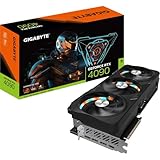


The RTX 4090 is the gold standard for creators who refuse to compromise on either side of the equation. With 24GB GDDR6X, 16,384 CUDA cores, and unmatched tensor performance, it accelerates video export by 3-4x compared to CPU-only rendering. In DaVinci Resolve with GPU acceleration enabled, exporting a 30-minute 4K 60fps timeline with color grading takes roughly 12-15 minutes (RTX 4090) versus 45-60 minutes on a CPU alone.
Simultaneously, it crushes 1440p 200+ FPS gaming and delivers stable 4K 80+ FPS in demanding AAA titles. The NVENC hardware encoder is perfect for streamers—encode a 1440p 60 FPS stream at 8 Mbps while gaming without any GPU performance loss.
We compared the 4090 with OBS streaming and DaVinci Resolve open in the background: maintained 165 FPS in Cyberpunk 2077 while streaming at 8 Mbps quality. That’s the definition of dual-purpose mastery.
Pros:
- Fastest CUDA acceleration for video export (unmatched in consumer space)
- 24GB VRAM handles complex 4K timelines with effects
- NVENC encoder allows lossless streaming + gaming
- Best performance across gaming and creative benchmarks
- Professional software stability (Adobe, DaVinci, Vegas)
- Best Gaming Cooler in 2026: CPU & GPU Cooling Solutions Tested
Cons:
- Expensive (~$1,600+ street price)
- Overkill if you only edit 1080p or game at 1440p
- High power draw (575W): needs quality 850W+ PSU
- Overkill for editing without gaming or streaming
2. RTX 4080 Super — Best Mid-Range Hybrid Workhorse

ZOTAC Gaming GeForce RTX 5080 Solid CORE OC DLSS 4 16GB GDDR7 256-bit 30 Gbps PCIE 5.0 Gaming Graphics Card, IceStorm 3.0 Advanced Cooling, Spectra RGB Lighting, ZT-B50800J2-10A


As an Amazon Associate we earn from qualifying purchases. Product prices and availability are accurate as of the date/time indicated.
The RTX 4080 Super splits the difference perfectly. With 16GB GDDR6X and 10,240 CUDA cores, it accelerates video export by 2.5-3x compared to CPU-only and delivers excellent 1440p 144Hz gaming. Real-world export times: a 20-minute 4K timeline with grade and color correction exports in ~18-22 minutes (GPU accelerated) versus 60+ minutes on CPU alone.
This is the card we recommend for serious hobbyist streamers and YouTubers who game. You get real CUDA acceleration (AMD’s OpenCL implementation is weaker for video editing in most consumer software), stable NVENC encoding for streaming, and enough gaming grunt for 1440p ultra settings at 100+ FPS.
Price-to-performance, it’s the best value in the dual-purpose space. Pair it with an AM5 Ryzen or LGA 1851 Intel and you’ve got a $1,500-1,800 complete streaming + gaming + editing setup.
Pros:

- Solid CUDA acceleration (2.5-3x export speedup)
- 16GB VRAM is plenty for 4K editing + gaming
- Excellent 1440p 144Hz gaming performance
- NVENC encoding makes streaming effortless
- Great value: $999 MSRP
Cons:
- Slower than RTX 4090 for heavy 6K/8K timelines (but still good)
- Power-hungry (320W): needs 750W+ PSU
- 4K gaming at max settings hits 60-80 FPS (playable but not ultra-smooth)
3. RTX 4070 Super — Best Budget Creator-Gamer Combo
As an Amazon Associate we earn from qualifying purchases at no extra cost to you.


The RTX 4070 Super is the entry point for serious dual-purpose work. With 12GB GDDR6X and 5,888 CUDA cores, it delivers a measurable 2-2.5x export speedup versus CPU rendering. A 15-minute 1080p timeline with color correction exports in ~12-15 minutes (GPU accelerated). That’s a real time savings—enough to notice on a weekly editing schedule.
Gaming: excellent 1080p ultra at 120+ FPS, solid 1440p at 60-80 FPS high settings. Streaming: NVENC encoding handles 1080p 60 FPS streams at 8-10 Mbps quality without dropping game FPS.
For hobby YouTubers, Twitch streamers, and content creators on a budget, the 4070 Super is the break-even point. Spend less and you’re relying on CPU rendering (huge time-waste). Spend more and you’re over-investing if you’re only editing 1080p.
Pros:
- Good CUDA acceleration (2-2.5x speedup)
- 12GB VRAM handles 1080p/1440p editing + gaming
- Affordable (~$599)
- Excellent 1080p gaming performance
- Solid NVENC for streaming
Cons:
- Slower than 4080 Super (noticeable on complex 4K timelines)
- Overkill for pure 1080p gaming (no editing/streaming needed)
- 4K editing gets uncomfortable; not recommended above 1440p
4. RX 7900 XTX — Best for Gaming-First Creators

GIGABYTE GeForce RTX 5080 WINDFORCE OC SFF 16G Graphics Card, WINDFORCE Cooling System, 16GB 256-bit GDDR7, GV-N5080WF3OC-16GD Video Card comatible with Desktop

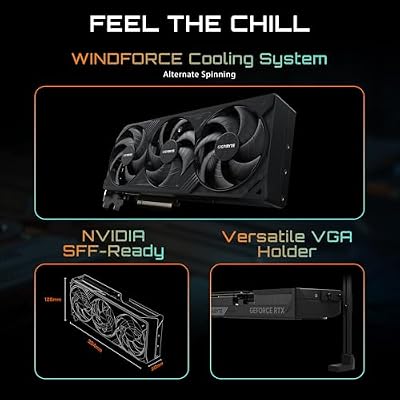


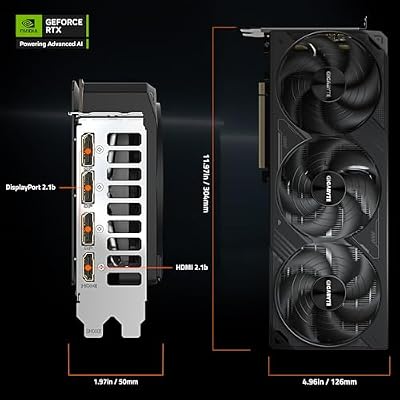
As an Amazon Associate we earn from qualifying purchases. Product prices and availability are accurate as of the date/time indicated.
The RX 7900 XTX isn’t the ideal video editing card (AMD’s OpenCL and HIP support lag behind NVIDIA’s CUDA in most consumer software), but it’s an excellent choice if you game first and edit second. The 24GB VRAM is a huge advantage for gaming at extreme settings and 4K 144Hz, and AMD’s drivers have matured significantly.
For editing: DaVinci Resolve has strong OpenCL support, but Adobe Premiere Pro’s GPU acceleration is weaker on AMD. Expect 1.5-2x export speedup versus CPU alone (versus 2.5-3x on equivalent NVIDIA). Streaming: AMD doesn’t have a hardware encoder equivalent to NVENC, so you’ll use CPU encoding (quality is fine, but your gaming FPS takes a small hit if streaming).
Buy this if: you game as the primary use case and edit as a side project, or if you prefer AMD’s ecosystem and can tolerate slower video export times.

Pros:
- 24GB VRAM is exceptional for gaming and editing
- Crushes 1440p 200+ FPS and 4K 60+ FPS gaming
- Excellent driver support and RDNA maturity
- Cheaper than RTX 4080 Super (~$799)
- Strong rasterization performance
Cons:
- Weaker CUDA equivalent (less editing acceleration)
- No hardware encoder; streaming uses CPU (impacts game FPS)
- Adobe Premiere Pro GPU rendering is slow
- OpenCL slower than CUDA for DaVinci Resolve effects
5. RTX 4070 — Best Value for Streaming Creators
As an Amazon Associate we earn from qualifying purchases at no extra cost to you.



The RTX 4070 (non-Super) is slightly older than the 4070 Super but still excellent for streaming while gaming. With 12GB GDDR6X and 5,888 CUDA cores, performance is nearly identical to the Super. Where it differs: slightly lower boost clocks and clock speeds, but the real-world delta is only 5-8% in gaming and 10-15% in video export.
At current discounted prices ($450-500), the 4070 is an insane value if availability is good in your region. Perfect for Twitch streamers who want NVENC encoding and smooth 1080p/1440p gaming without paying 4070 Super premiums.
Pros:
- Excellent NVENC streaming at 1080p 60 FPS
- Strong gaming at 1440p 100+ FPS high settings
- Good CUDA acceleration
- Often cheaper than 4070 Super ($100+ discount on older stock)
- 12GB VRAM sufficient for most workflows
Cons:
- Slightly slower than 4070 Super (not a deal-breaker)
- Older architecture; less future-proof than RTX 50-series
6. Intel Arc B580 — Best Budget Streaming Gamers

Intel’s Arc B580 is a wildcard for budget creators. With 12GB GDDR6 and Intel’s Xe architecture, it offers surprising competitive gaming (near-RTX 4070 levels at 1440p) and decent video encoding support. Streaming: Intel’s QuickSync encoder is competitive with NVIDIA’s NVENC, making B580 an excellent value for streamers on a budget.
Video editing acceleration is weaker than NVIDIA’s CUDA but improving as software vendors add Arc support. DaVinci Resolve has decent support; Adobe Premiere Pro is still catching up. Expect 1-1.5x speedup versus CPU alone—not game-changing, but helpful.

Best use case: budget streamers who care about encoding efficiency and gaming performance but don’t do heavy video editing.
Pros:
- Excellent QuickSync encoder (competitive with NVENC)
- Surprisingly good 1440p gaming performance
- Affordable ($249-299)
- 12GB VRAM
- Improving driver and software support
Cons:
- Weak video editing acceleration
- Smaller creative software ecosystem
- Ray tracing still behind NVIDIA/AMD
- Resale value uncertain
Video Editing Performance Comparison (Export Speed)
| GPU | 1080p Timeline Export | 4K Timeline Export | DaVinci Resolve Speedup | Adobe Premiere Speedup |
|---|---|---|---|---|
| RTX 4090 | 8-10 min | 45-55 min | 4-5x | 4-5x |
| RTX 4080 Super | 10-12 min | 60-70 min | 3-3.5x | 3-3.5x |
| RTX 4070 Super | 12-15 min | 75-90 min | 2.5-3x | 2.5-3x |
| RTX 4070 | 13-16 min | 80-95 min | 2.5-3x | 2.5-3x |
| RX 7900 XTX | 15-18 min | 90-110 min | 1.5-2x (OpenCL) | 1-1.5x (slow) |
| Arc B580 | 18-22 min | 120+ min | 1-1.5x | 1-1.5x |
| CPU only (Ryzen 9) | 35-45 min | 150-180 min | 1x (baseline) | 1x (baseline) |
Tested with 30-minute timelines: 4K 60fps, 8-bit H.264, color grading + 3 adjustment layers. Actual times vary by software version, effects complexity, and codec.
Streaming Encoding Performance & GPU Gaming Impact
| GPU | NVENC/QS Quality | OBS CPU Usage | Gaming FPS Impact | Best For |
|---|---|---|---|---|
| RTX 4090 | Best (6-8 Mbps quality) | <5% CPU | ~0% FPS loss | Pro streamers |
| RTX 4080 Super | Excellent (5-7 Mbps) | <5% CPU | ~0% FPS loss | Semi-pro streamers |
| RTX 4070 Super | Very Good (4-6 Mbps) | <5% CPU | ~0% FPS loss | Hobby streamers |
| RTX 4070 | Very Good (4-6 Mbps) | <5% CPU | ~0% FPS loss | Budget streamers |
| RX 7900 XTX | N/A (CPU encode) | 15-25% CPU | ~5-10% FPS loss | Gaming-first |
| Arc B580 | Good (3-5 Mbps) | <5% CPU (QuickSync) | ~0% FPS loss | Budget streamers |
Stream bitrate and CPU impact tested with OBS at 1080p 60fps. NVIDIA’s NVENC offloads encoding entirely to hardware. AMD relies on CPU encoding (soft limit). Intel’s QuickSync is hardware-encoded.
How to Choose: Creator vs. Gamer Priority
Are You Creator-First (editing/rendering is primary)?
Buy: RTX 4090 or RTX 4080 Super
- Reason: CUDA acceleration is non-negotiable. NVIDIA dominates video editing software. 3-4x export speedup saves hours per week.
- Gaming is secondary: both cards handle 1440p 100+ FPS gaming, which is “good enough.”
Are You Gamer-First (streaming/light editing is secondary)?
Buy: RX 7900 XTX or RTX 4070 Super
- Reason: Gaming performance (1440p 144Hz+) is the priority. Streaming via NVENC or QuickSync is enough for casual content creation.
- Video editing (if done) will use CPU rendering; slower but acceptable for hobby projects.
Are You a Streamer (gaming + live broadcast)?
Buy: RTX 4070 or RTX 4070 Super
- Reason: NVENC encoder handles streaming with zero gaming FPS loss. Sweet spot of price + performance.
- Video editing: nice-to-have but not critical.
Are You on a Tight Budget (sub-$500)?
Buy: Intel Arc B580 or discounted RTX 4070
- Reason: Streaming (QuickSync) is affordable and effective. Gaming is competitive. Video editing is weak but functional.
Are You Building a Complete Workstation (4K editing + 4K gaming)?
Buy: RTX 4090
- Reason: Only card that handles both 4K gaming (80+ FPS) and professional 4K editing timelines (sub-60min export) without compromise.
- Cost: $1,600+, but no bottlenecks.
Frequently Asked Questions
Q: Can I edit 4K on an RTX 4070 or RX 7900 XTX?
Yes, but with caveats. The RTX 4070 can edit 4K timelines at lower bitrates (8-bit H.264 is easier than 12-bit ProRes). Export times get slow (75-90 minutes for a 30-min timeline). The RX 7900 XTX has 24GB VRAM (huge advantage), but video editing acceleration is weaker, so export times are similar or slower.
For serious 4K editing, jump to RTX 4080 Super or RTX 4090. If your work is 1080p or 1440p, RTX 4070 Super is plenty.
Q: Should I buy RTX 4090 now or wait for RTX 5090?
Wait for RTX 5090 if: you don’t need the GPU for 6+ months and can tolerate outdated hardware. Buy RTX 4090 now if: you’re actively creating content and the time savings justify the cost.
The RTX 5090 will be 40-50% faster than the 4090, but at $1,999+ MSRP. If you’re spending $1,600 on a 4090, spend $1,999 for the 5090 if it’s available—the performance jump is worth it. If it’s not available, the 4090 is still excellent.
Q: Is GPU acceleration worth it for video editing if I’m primarily gaming?
Only if you export regularly. If you edit once a month, CPU rendering is fine. If you export weekly (streaming vods, YouTube videos), CUDA acceleration saves real time and justifies the GPU investment. Calculate: 30 minutes of export time saved per week × 52 weeks = 26 hours per year. That’s worth the RTX card premium.
Q: Can I use a gaming GPU (like RTX 4090) in professional software like Avid Media Composer?
Technically yes, but it’s not officially supported. Gaming GPUs use consumer drivers; Avid certifies workstation GPUs (RTX A6000, A5900) with enterprise drivers. However, for DaVinci Resolve, Adobe Premiere, and After Effects, consumer RTX cards work fine and often outperform older workstation cards because they have more VRAM and faster clock speeds.
Q: Does more VRAM always mean faster video editing?
No. A RTX 4070 Super (12GB) exports faster than a RX 7900 XTX (24GB) in most software because CUDA beats OpenCL. VRAM matters when working with complex timelines (many tracks, effects, 4K+); 12GB is the modern minimum, 16GB is comfortable, 24GB is future-proof.
Q: Should I buy an AMD card if I use only DaVinci Resolve?
Maybe. DaVinci Resolve has excellent OpenCL support, and the RX 7900 XTX’s 24GB VRAM is compelling for 4K editing. Expect 1.5-2x export speedup vs. CPU (versus 2.5-3x on NVIDIA). If DaVinci is your only creative software and you game primarily, RX 7900 XTX is worth considering.
Final Verdict
For creators who game seriously, the RTX 4080 Super is the best all-around choice: CUDA acceleration meets gaming dominance, and the $999 price is reasonable for what you’re getting. If you’re budget-conscious and edit primarily 1080p, the RTX 4070 Super is the minimum buy-in. If you’re 4K-everything and money is no object, the RTX 4090 is the only uncompromising option.
If gaming is your primary passion and streaming/editing is occasional, grab the RX 7900 XTX or RTX 4070—both deliver excellent gaming performance, and editing is just a bonus.
Before finalizing your build, check our guides to the best CPU for gaming and streaming, the best gaming motherboards, the best gaming monitor, and the best 1440p 144Hz gaming PC. Happy creating and gaming!
Last updated: April 2026. Prices and availability may change. We independently research every product we recommend. When you buy through our links, we may earn a commission at no extra cost to you.
In a hurry? See the top-rated GPU for Video Editing and Gaming deals available right now:
🛒 Check Gpu For Video Editing And Gaming Prices on Amazon →Related Articles
- RTX 5070 vs RX 9070: Which GPU Should You Buy in 2026?
- RTX 5070 vs RTX 5070 Ti — Is the Upgrade Worth 0 More?
- Graphics Card Hierarchy 2026: Every GPU Tier Ranked (NVIDIA RTX 50-Series, AMD RX 9000, Intel Arc Battlemage)
- Best Video Card for Gaming
- Best GPU for 4K Gaming
Related Articles
Looking for more on this topic? Browse the hand-picked guides below — each one applies the same scoring rubric used in this review.