

Affiliate disclosure: As an Amazon Associate we earn from qualifying purchases. This post contains affiliate links — if you buy through them we may earn a small commission at no extra cost to you. This never affects our recommendations.
- Setup Idea 1: The Minimalist Battlestation ($800
- Setup Idea 2: The RGB Battlestation ($1,200
- Setup Idea 3: The Dual-Monitor Productivity Hybrid ($1,500
- Setup Idea 4: The Ultrawide Cockpit ($1,800
- Setup Idea 5: The Console + PC Hybrid
- Essential Setup Elements
- Frequently Asked Questions
- Related Articles
- Related Articles
Your gaming setup is more than just a PC and monitor — it’s a personalized environment that enhances immersion, reduces fatigue, and reflects your personality as a gamer. Whether you’re working with a corner desk in a studio apartment or designing a dedicated gaming room, the right setup ideas transform any space into an inspiring battlestation. Here are the best gaming setup concepts for every budget and style in 2025.
As an Amazon Associate we earn from qualifying purchases at no extra cost to you.


In a hurry? See the top-rated Gaming Setup Ideas deals available right now:
🛒 Check Gaming Setup Ideas Prices on Amazon →🛒 Best Price Today on Amazon
Prime members get fast, free shipping on everything above, plus member-only deals. New members get a 30-day free trial — cancel anytime.
Start 30-Day Prime Free Trial →See Today’s Amazon DealsSetup Idea 1: The Minimalist Battlestation ($800
Less is more in the minimalist gaming setup. A single 27-inch 1440p monitor on an Ergotron LX arm, a clean 60% mechanical keyboard, wireless mouse, and a white or black desk with zero visible cables. No RGB — just clean lines and functional hardware. The minimalist setup photographs beautifully and reduces visual clutter that can be mentally fatiguing during long sessions. Key upgrades: cable raceways to hide all cables, a cable management box for power strips, and a matching color-scheme for all peripherals.
Setup Idea 2: The RGB Battlestation ($1,200
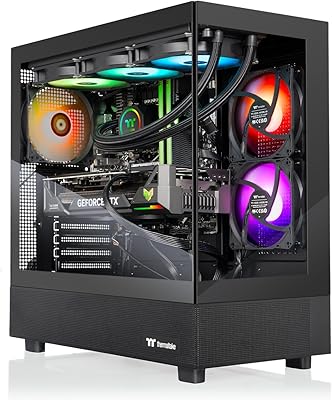
Full ecosystem RGB synchronization creates a cohesive light show that transforms gaming into an experience. Corsair iCUE or Razer Chroma ecosystems synchronize keyboard, mouse, headset stand, mouse pad, fans, and RAM lighting to pulse, react to in-game events, or cycle through custom animations. Add LED strips behind monitors and desk edges for ambient bias lighting. The RGB battlestation is the quintessential “gaming setup” aesthetic — maximalist, colorful, and undeniably impressive.

Setup Idea 3: The Dual-Monitor Productivity Hybrid ($1,500
For gamers who also work or create content, a dual-monitor setup with a primary 27-inch 1440p gaming panel and a secondary 24-inch 1080p display for reference material, Discord, and productivity apps creates the ultimate hybrid workspace. A microphone arm, webcam, and stream deck complete the content creator angle. Cable management is critical — use a monitor arm for both screens, route all cables through the arm, and use a cable raceway along the desk back.
Setup Idea 4: The Ultrawide Cockpit ($1,800
A single 34-inch ultrawide OLED monitor replaces the dual-monitor setup with a seamless, curved screen that feels like a cockpit. Combined with a curved gaming chair positioned at the desk center, the ultrawide setup creates unparalleled immersion for racing games, space sims, and story-driven titles. Add a racing wheel mount and pedal set for the full sim experience. The ultrawide cockpit is the most immersive single-game setup possible.
Setup Idea 5: The Console + PC Hybrid
Many gamers maintain both a gaming PC and a PlayStation 5 or Xbox Series X. A TV or large OLED monitor (48″+ LG C4) serves as the centerpiece, connected to both systems via HDMI switch. A KVM switch manages keyboard/mouse for PC and controller holder for console. The hybrid setup requires careful planning: monitor must support both HDMI 2.1 (for console) and DisplayPort (for PC), and audio switching between headset and TV speakers needs consideration.
Essential Setup Elements
Cable Management: The Most Overlooked Element
A stunning gaming setup with visible cable chaos undermines the entire aesthetic. Prioritize: cable raceways along desk edges, velcro ties to bundle cables together, cable management boxes for power strips, and wireless peripherals where possible. Spend 1–2 hours on cable management after your setup is complete — the visual improvement is dramatic.

Desk Lighting and Bias Lighting
Ambient bias lighting (LED strips behind monitors) reduces eye strain during dark-room gaming by creating a luminous border around the screen. The Govee T2 or Philips Hue Play Gradient Lightstrip (for Sync Box integration) automatically matches colors to on-screen content, creating immersive ambient effects that sync with games and movies.
Acoustic Treatment
For streamers and those who spend long hours gaming, acoustic panels on walls behind and beside the setup reduce echo and room reverb for better audio quality in calls and recordings. Artnovion or Acoustimac foam panels in gaming-appropriate colors serve both functional and aesthetic purposes.
Frequently Asked Questions
What does a good gaming setup include?
Core: Gaming PC or console, monitor (1440p 144Hz recommended), keyboard, mouse, headset. Enhancement: Monitor arm, gaming chair, desk with cable management, proper lighting. Advanced: Standing desk, stream deck, capture card, acoustic treatment.
How much does a complete gaming setup cost?
Entry-level complete setup: $800–$1,200 (PC + monitor + peripherals + desk + chair). Mid-range battlestation: $2,000–$3,500. Premium enthusiast setup: $5,000+. Most gamers start at entry level and upgrade individual components over 2–3 years.
What color scheme works best for gaming setups?
The most popular gaming setup color schemes: All-black with RGB accents (timeless), white/black monochrome with minimal RGB (clean and modern), blue/purple ambient (cyberpunk aesthetic), and all-white/pink (popular among variety streamers). Choose a scheme that you’ll enjoy looking at daily — setup aesthetics are personal.
Related Articles
Looking for more on this topic? Browse the hand-picked guides below — each one applies the same scoring rubric used in this review.


