

- Top Pick: Sceptre New 22-Inch Gaming Monitor, FHD 1080p, Up to 144Hz, HDMI, DisplayPort, Built-in Speakers, Machine Black (E225W-FW144 Series, 2026)
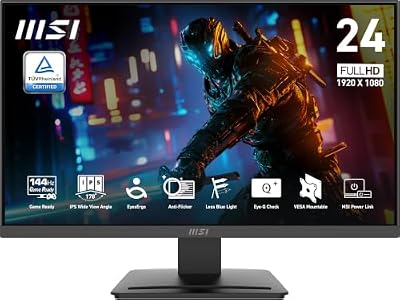
- Best Value: msi PRO MP243L E14 24-inch IPS 1920 x 1080 (FHD) Gaming Office Monitor, 144Hz, Free-Synch, HDR Ready, HDMI, VGA Port,VESA Mountable, Tilt, 4-Side Slim Bezel,1ms, Black
- Premium Choice: ASUS TUF Gaming 24” (23.8” viewable) 1080P Monitor (VG249QE5A) – FHD, 144Hz Overclock to 146Hz, IPS, Extreme Low Motion Blur Sync, 1ms, Speakers, Variable Overdrive, DisplayWidget Center, 3yr Warranty
Under $200 buys you a lot more monitor than it did three years ago. 144Hz panels that used to cost $300 are now routine at this price, and the real decision isn’t whether you can get a fast refresh rate, it’s which panel type and resolution tradeoffs you’re willing to live with. Here’s what actually matters at this budget, and where corners get cut.
As an Amazon Associate we earn from qualifying purchases at no extra cost to you.



Panel types: what you’re really choosing between
At under $200, you’re almost always picking between VA and IPS panels. TN panels still exist but they’re fading out of this bracket because VA now matches or beats TN on response time while looking far better. Here’s the practical difference:
IPS gives you better color accuracy and wider viewing angles, which matters if you ever shift in your chair or have someone watching beside you. The tradeoff is contrast, usually around 1000:1, so blacks look more like dark gray in a dim room. VA panels flip that: contrast often hits 3000:1 or higher, so dark scenes in games actually look dark, but you give up some color consistency off-angle and can run into smearing in fast, dark-to-light transitions. That smearing is the one real failure mode to watch for with budget VA panels — it shows up most in games with lots of shadow detail, like horror titles or anything with night maps.
For competitive shooters, IPS is the safer pick because of its more predictable pixel response across the whole screen. For single-player and mixed-use gaming where you want punchy visuals, VA is often the better deal at this price because you get higher contrast without paying extra.
Resolution and size: the real budget tradeoff
This is where the $200 ceiling forces a choice. You can get 1080p at 24-27 inches with 144Hz comfortably, or you can step up to 1440p at 144Hz if you shop carefully near the top of the budget, but you’ll rarely get both 1440p and a larger panel (27″+) with a high-quality panel at this price without compromises elsewhere, like a weaker stand or no height adjustment.
1080p at 144Hz is still the safer, more consistent experience under $200. The GPU demands are lower too — a mid-range card can actually push 144 fps at 1080p in most competitive games, whereas 1440p at 144Hz needs more GPU horsepower to actually benefit from the panel. If your graphics card is a few years old, buying a 1440p monitor at this price and not being able to hit the refresh rate most of the time is a common and avoidable mistake.
Quick comparison: what you get at each tier
| Spec | Budget 1080p 144Hz | Stretch 1440p 144Hz |
|---|---|---|
| Panel type | IPS or VA | Usually VA, sometimes IPS |
| Typical size | 24-25″ | 27″ |
| GPU needed for full refresh | Mid-range (e.g. RTX 3060 class) | Upper mid-range or better |
| Build extras | Height/tilt adjustment common | Often tilt-only, basic stand |
| Best use case | Competitive/esports titles | Single-player, visual-heavy games |
Adaptive sync: don’t skip this check
Nearly every monitor in this range advertises some form of adaptive sync, usually AMD FreeSync, sometimes with “G-Sync Compatible” branding. Both work the same way in practice: they match the monitor’s refresh rate to your GPU’s frame output to kill screen tearing. What varies is the certified range. Some budget panels only sync from 48Hz to 144Hz, which means if your frame rate dips below 48 in a demanding game, you’re back to tearing or stutter. Check the specific sync range before buying rather than assuming “FreeSync” alone covers you — it’s a label, not a guarantee of a wide window.
Response time numbers are mostly marketing
You’ll see “1ms response time” plastered on nearly every box in this category. That number is almost always the best-case gray-to-gray figure under ideal driving conditions, not what you’ll experience in actual gameplay. It’s a rough signal more than a precise spec. A better use of your time is reading a handful of actual review measurements or watching motion test footage before buying, rather than comparing the marketed number across models — they’re not measured the same way between brands.
What to actually buy
If your GPU is a few years old or you play mostly competitive shooters, go with a 24-inch 1080p 144Hz IPS monitor. It’s the safest, most predictable buy at this price and you won’t be leaving performance on the table because your hardware can’t drive it.
If you want more immersive visuals and don’t mind VA’s quirks in dark scenes, a 27-inch 1080p 144Hz VA monitor gives you a bigger screen and better contrast for the same budget, trading off some pixel density since you’re stretching 1080p over a larger panel.
If your GPU can realistically push over 100fps at 1440p already, it’s worth checking a 27-inch 1440p 144Hz monitor near the top of your budget, but go in expecting a more basic stand and fewer ergonomic adjustments than you’d get on a cheaper 1080p model.
None of these are the wrong choice. The mistake isn’t picking VA over IPS or 1080p over 1440p, it’s buying a panel your GPU can’t actually drive at its advertised refresh rate, or ignoring the adaptive sync range and ending up with tearing in exactly the games where you wanted smooth motion most.














