The real decision when buying a mouse for Dota 2 is not which sensor tops a specification sheet. It is how you handle six item slots, four or more abilities, control groups and constant camera movement during a forty-minute match. A mouse that moves two or three of those actions onto your thumb changes how fights feel, while a shape that fights your grip makes every last hit harder. Button layout and click feel matter more here than headline sensitivity figures.
This guide serves three kinds of Dota 2 players: those who bind items and abilities to side buttons, those who want a proven ergonomic shape for long ranked sessions, and those who need one light wireless mouse for a desk and a laptop bag. Every pick below was chosen from the product names and specifications printed on its Amazon page, including button counts, sensor models, weights and connection types.
Quick Picks
As an Amazon Associate we earn from qualifying purchases
| Product | Best for | Key spec from title |
|---|---|---|
| Razer DeathAdder V3 | Palm and claw players who want a light wired mouse with fast, clean clicks | 59 g with 8K Hz HyperPolling |
| Razer Naga V2 Pro | Players who move item slots and abilities onto the thumb | Swappable 2, 6 and 12-button side plates |
| Logitech G502 X Plus | Players who want many buttons plus a free-spin wheel for long sessions | HERO 25K sensor and 13 programmable buttons |
| SteelSeries Aerox 5 Wireless | Players who want a light wireless mouse with an extra side panel | 74 g with 9 buttons and an 18K DPI TrueMove Air sensor |
| SteelSeries Aerox 9 Wireless | Players who want a full thumb grid without giving up wireless freedom | 18 buttons with an 18K DPI TrueMove Air sensor |
How to Choose
Decide how many buttons you will actually bind
Count the actions you want off the keyboard before you shop. Most Dota 2 players need, at most, two side buttons for items such as a Blink Dagger and a Black King Bar. Players who also bind control groups, the courier and push-to-talk can use six or more. The Naga V2 Pro solves this with swappable 2, 6 and 12-button side plates, so the mouse grows with your bindings. The Aerox 9 Wireless commits fully to an 18-button layout. Buying a full thumb grid you never program adds weight and accidental presses, so match the panel to bindings you will genuinely set up in the settings menu.
Match the shape to your grip and session length
Dota 2 matches run long, and most players hold the mouse in a relaxed palm or claw grip rather than the fingertip grip used for wide shooter swipes. A right-handed ergonomic shell such as the DeathAdder V3 or the G502 X Plus supports the palm through a full evening of games. Symmetrical shells such as the Aerox 5 Wireless suit smaller hands and mixed grips. Check the listed weight as well: the 59 g DeathAdder V3 reduces wrist load during camera dragging, while heavier button-dense models trade that lightness for controls. Your hand size and grip decide which trade is right.
Choose wired or wireless, then check polling behaviour
A wired mouse never needs charging mid-match and the DeathAdder V3 adds 8K Hz HyperPolling for very frequent position reports. Modern 2.4 GHz wireless from Razer, Logitech and SteelSeries is fast enough that connection type alone will not lose a team fight, and it keeps the desk clear during camera pans. Whichever you pick, confirm the polling setting in the companion software before a ranked session, because a mouse left at a low setting feels sluggish. Frame delivery matters just as much, so pair the mouse with a processor that holds steady frame times; our guide to the best CPU for Dota 2 explains what to look for.
Set sensitivity for a top-down camera, not a shooter
Dota 2 camera work is short, repeated movements: edge pans, minimap jumps and small corrections around a hero. Most players settle between 800 and 2,400 DPI, where the pointer stays controllable on a 1440p screen. Every mouse here offers far more range than that, from the 18,000 DPI TrueMove Air in the Aerox models to the 30,000 DPI Focus Pro in the Razer pair, so sensor headroom is not the deciding factor. What matters is a sensor with no visible smoothing at low settings and software that saves your DPI steps to the mouse itself.
The 5 Best Options
Razer DeathAdder V3

The DeathAdder shape has been a default recommendation for right-handed players for years, and this wired version trims it to 59 g with a Focus Pro 30K optical sensor and Razer Optical Mouse Switches Gen-3 rated for fast, consistent clicks. Six programmable buttons keep the layout simple: two side buttons for your most-used items and nothing extra to press by accident during a fight. The 8K Hz HyperPolling and the flexible Speedflex cable suit players who drag the camera constantly and want the pointer to track every small correction without battery management entering the picture.
Specs
- Sensor: Focus Pro 30K optical sensor
- Switches: Razer Optical Mouse Switches Gen-3
- Polling: 8K Hz HyperPolling
- Programmable buttons: 6
- Weight: 59 g
- Cable: Speedflex cable
- Model number: RZ01-04640100-R3U1
Best for: right-handed palm and claw players who want a light, simple wired mouse for long sessions.
Watch out for: the ergonomic shell is right-handed only, and the wired connection means the cable needs clear desk space.
Razer Naga V2 Pro

The Naga V2 Pro is the flexible answer to the button question, because its side panel swaps between 2, 6 and 12-button plates in the box. A Dota 2 player can start with the 6-button plate for items and control groups, then move to the full grid when bindings grow. It pairs that layout with a Focus Pro 30K optical sensor, Optical Mouse Switches Gen-3 and a HyperScroll Pro wheel that switches between stepped and free scrolling. HyperSpeed wireless, Bluetooth and wired USB-C connections cover desk and travel use in one mouse.
Specs
- Sensor: Focus Pro 30K optical sensor
- Switches: Optical Mouse Switches Gen-3
- Programmable buttons: 19+1 with swappable 2, 6 and 12-button side plates
- Scroll wheel: HyperScroll Pro wheel
- Connection: HyperSpeed wireless, Bluetooth and USB-C wired
- Battery life: up to 300 hours as listed
- Model number: RZ01-04400100-R3U1
Best for: players who bind several item slots, control groups and the courier to the thumb.
Watch out for: the button-dense body is heavier than the light options here, and the extra plates only help if you actually program them.
Logitech G502 X Plus

The G502 line built its following on a sculpted right-handed shape, a dual-mode scroll wheel and more buttons than a basic esports mouse, and the X Plus updates it with LIGHTFORCE hybrid optical-mechanical switches and the HERO 25K sensor. Thirteen programmable buttons give Dota 2 players room for items, control groups and a push-to-talk key while keeping two buttons beside the left click for quick actions. LIGHTSPEED wireless, LIGHTSYNC RGB and POWERPLAY compatibility suit a permanent desk setup, and USB-C charging ends the hunt for older cables between matches.
Specs
- Sensor: HERO 25K sensor
- Switches: LIGHTFORCE hybrid optical-mechanical switches
- Programmable buttons: 13
- Connection: LIGHTSPEED wireless and USB-C wired
- Lighting: LIGHTSYNC RGB
- Charging: USB-C, POWERPLAY compatible
- Model number: 910-006160
Best for: palm-grip players who want a fuller button set and a free-spin wheel in one wireless mouse.
Watch out for: the sculpted shell and added features make it one of the heavier picks here, so fingertip-grip players should look at the lighter models first.
SteelSeries Aerox 5 Wireless

The Aerox 5 Wireless splits the difference between an esports mouse and a MOBA mouse: 74 g, nine programmable buttons with a five-button side panel, and a TrueMove Air optical sensor rated to 18,000 DPI. That side panel is enough for two items, a control group and push-to-talk without the commitment of a full grid. Quantum 2.0 wireless offers 2.4 GHz for play and Bluetooth for a laptop, and the AquaBarrier design carries IP54 protection against splashes and dust, which suits shared desks and drink-heavy gaming rooms more than most players expect.
Specs
- Sensor: TrueMove Air optical sensor, up to 18,000 DPI
- Programmable buttons: 9, including a 5-button side panel
- Connection: Quantum 2.0 wireless (2.4 GHz), Bluetooth and USB-C wired
- Weight: 74 g
- Protection: AquaBarrier IP54 water and dust resistance
- Battery life: up to 180 hours as listed
- Model number: 62406
Best for: players who want a light wireless mouse with a useful side panel for items and control groups.
Watch out for: the holey shell collects dust over time and needs occasional cleaning, and the side panel layout takes a few games to memorise.
SteelSeries Aerox 9 Wireless
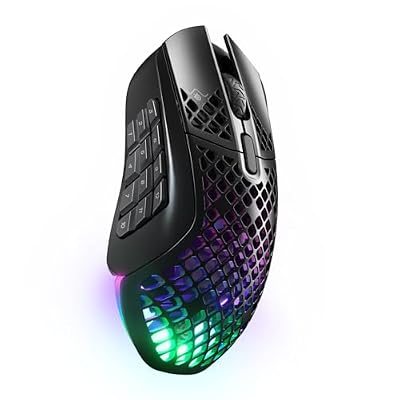
The Aerox 9 Wireless takes the same light holey design and stretches it to 18 buttons, with a 12-button side panel aimed squarely at MOBA and MMO players. At 89 g it stays far lighter than most button-grid mice, which matters when a match passes the hour mark. The TrueMove Air sensor reaches 18,000 DPI, and Quantum 2.0 wireless provides 2.4 GHz and Bluetooth connections, so the same mouse can run a desktop setup and a laptop without a cable swap. It is the pick for players who treat the mouse as a second keyboard for Dota 2 bindings.
Specs
- Sensor: TrueMove Air optical sensor, up to 18,000 DPI
- Programmable buttons: 18, including a 12-button side panel
- Connection: Quantum 2.0 wireless (2.4 GHz), Bluetooth and USB-C wired
- Weight: 89 g
- Design: holey ultra-lightweight shell with RGB
- Model number: 62618
Best for: players who bind a full set of items, abilities and control groups to the mouse.
Watch out for: a 12-button grid has a real learning curve, and pressing the wrong row under pressure is common during the first week.
Which One Fits Your Situation
You bind most of your items to your thumb
Start with the Naga V2 Pro, because its swappable plates let you test a 6-button layout before committing to the full 12-button grid. If you already know you want every item, the courier and control groups under your thumb, go straight to the Aerox 9 Wireless, which keeps that grid in an 89 g wireless body.
You play long ranked sessions with a palm grip
The DeathAdder V3 is the safest shape here for extended play: a proven right-handed shell, 59 g and a cable that never needs charging. Players who want the same palm support with wireless freedom and more buttons should pick the G502 X Plus instead, accepting the extra weight as the trade.
You split time between a desktop and a laptop
The Aerox 5 Wireless handles both roles with one purchase: 2.4 GHz for the gaming desk, Bluetooth for the laptop, and USB-C wired as a fallback. Its nine buttons cover the bindings most Dota 2 players use, and the IP54-rated shell shrugs off the spills that happen around shared workspaces.
You want one mouse for Dota 2 and everything else
The G502 X Plus is the generalist of this list. The button count, dual-mode wheel and sculpted shape work for shooters, work documents and MOBA matches alike, and LIGHTSPEED wireless plus POWERPLAY support fit a permanent setup. It gives up the ultra-light feel of the DeathAdder V3 but gains flexibility everywhere else.
Common Mistakes
- Buying a 12 or 18-button mouse and never programming the side panel, which leaves you carrying extra weight for nothing.
- Setting DPI far above your usable range, so small camera corrections overshoot during fights.
- Choosing a symmetrical shell when your palm grip needs an ergonomic shape, or the reverse.
- Ignoring the side-button layout: buttons you cannot reach without shifting your grip will not get used in a team fight.
- Leaving a wireless mouse on a low polling setting or letting the battery die before a ranked session.
Frequently Asked Questions
How many buttons does a Dota 2 mouse really need?
Two side buttons cover the most common setup: one for a Blink Dagger or mobility item and one for a defensive item such as a Black King Bar. Players who also bind control groups, the courier and voice chat benefit from six or more, which is where the Naga V2 Pro and Aerox 9 Wireless earn their place.
Is wireless fast enough for Dota 2?
Yes. Current 2.4 GHz systems from Razer, Logitech and SteelSeries report fast enough that connection type is not what decides a fight in a MOBA. The practical differences are charging and desk clutter. Wired models such as the DeathAdder V3 remove battery management entirely, which some players still prefer for ranked play.
What DPI should I set for Dota 2?
Most players settle between 800 and 2,400 DPI, adjusted so a short wrist movement crosses the screen without losing control near the hero. Set the value in the mouse software, save it to the device, and keep Windows pointer settings at their default so the in-game feel stays consistent between machines and patches.
Does polling rate matter in a MOBA?
It matters less than in a shooter, because Dota 2 actions are clicks and short movements rather than long tracking swipes. A standard 1,000 Hz setting is plenty for almost everyone. Higher settings, such as the DeathAdder V3’s 8K Hz HyperPolling, smooth the pointer further but should never come before shape and button fit.
Conclusion
Pick by bindings first and shape second. The Naga V2 Pro and Aerox 9 Wireless serve players who move actions onto the thumb, the DeathAdder V3 serves players who want a light and proven ergonomic shape, and the G502 X Plus and Aerox 5 Wireless cover the middle ground of buttons, comfort and wireless use. Any of the five will handle Dota 2’s clicking demands; the right one is the one whose buttons you will actually use.