The real decision with a mini gaming keyboard is not how much desk space you save. It is which keys you are willing to lose and which switch technology you commit to for the next few years. A 60% board drops the function row, the navigation cluster and often the arrow keys, so every pick below trades something away. At the same time, optical, magnetic and mechanical switches now behave very differently in fast games, and the wrong pick cannot be fixed in software later.
This guide is for competitive FPS players who want faster key response, small-desk and dorm setups that need room for wide mouse movement, and players who type on the same board all day. The five keyboards below cover wired and wireless models in 60% and 65% layouts. Every pick was chosen from the product name and specification details printed on its Amazon listing, so the switch type, layout and connection you see here match what the seller page states.
Quick Picks
As an Amazon Associate we earn from qualifying purchases
| Product | Best for | Key spec from title |
|---|---|---|
| Razer Huntsman Mini | Wired optical speed for FPS play | Linear optical switches with Rapid Trigger and Snap Tap |
| SteelSeries Apex Pro Mini | Tuning actuation point key by key | HyperMagnetic switches with adjustable actuation |
| ASUS ROG Falchion Ace HFX | A 65% layout that keeps arrow keys | Hall effect switches with 8000 Hz polling |
| HyperX Alloy Origins 60 | A straightforward mechanical 60% board | HyperX Red linear switches across 61 keys |
| Logitech G PRO X 60 | Wireless play with no cable drag | LIGHTSPEED wireless with GX optical tactile switches |
How to Choose
Pick the Layout First: 60% or 65%
Layout decides what you give up. A 60% board such as the Huntsman Mini or the Alloy Origins 60 keeps only the main key block, so the arrow keys, the function row and the navigation cluster all sit on an Fn layer. That works well in shooters, where WASD and a handful of binds do most of the work, but it slows down strategy games, coding and spreadsheet work. A 65% board such as the Falchion Ace HFX adds back dedicated arrow keys and usually a Delete key, in exchange for a slightly wider case. Pick 65% if you edit text daily or play titles that lean on arrow input.
Choose the Switch Technology
Switch type shapes how a mini board plays. Optical switches, like the ones in the Huntsman Mini and the PRO X 60, actuate with light and suit players who want a fast, consistent press. Magnetic Hall effect switches go further: the Falchion Ace HFX and the Apex Pro Mini let you set the actuation point per key and use rapid trigger, so a key resets the moment you lift your finger, which helps with counter-strafing. Traditional mechanical switches, like the HyperX Red linears in the Alloy Origins 60, feel familiar and are easy to live with, but they offer no actuation tuning.
Decide How It Connects
Connection matters more on a small board because there is no spare room for extra hardware. Wired USB-C models such as the Huntsman Mini and the Alloy Origins 60 stay simple and consistent, and the Falchion Ace HFX pushes wired polling to 8000 Hz for players chasing the lowest latency. The PRO X 60 instead uses LIGHTSPEED wireless, which frees the desk and suits couch or laptop setups, at the expense of charging and a receiver taking up a port. If you compete or record, wired removes one variable. If your desk doubles as a workspace, wireless keeps it clear.
Check Keycaps, Software and Platform Support
The details decide how the board ages. Doubleshot PBT keycaps, fitted to all five picks here, resist shine and keep legends readable far longer than thin ABS caps. Remapping, macros and lighting live in each brand’s software, such as Razer Synapse, SteelSeries GG, Armoury Crate, HyperX NGENUITY or Logitech G Hub, and several of these tools run on Windows only, so check your operating system before buying. Onboard memory, listed on the Huntsman Mini, stores profiles on the keyboard itself, which helps if you switch between a gaming PC and a work laptop.
The 5 Best Options
Razer Huntsman Mini
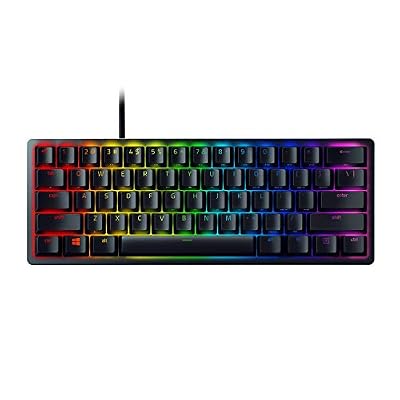
The Huntsman Mini suits FPS players who want optical speed in the smallest wired footprint. Its linear optical switches pair with Rapid Trigger Mode, so keys reset as soon as pressure lifts, and Snap Tap helps with clean directional changes in shooters. The current listing keeps the formula focused: doubleshot PBT keycaps, Chroma RGB lighting and onboard memory for profiles, in a 60% case that leaves maximum room for low-sensitivity mouse swings. There is no wireless mode and no hot-swap socket, so this is a board you buy for one job and keep. Players who split time between shooters and heavy typing may prefer the 65% option below instead.
Specs
- Layout: 60% compact form factor
- Switch: Razer Linear Optical switches
- Features: Rapid Trigger Mode and Snap Tap
- Lighting: Chroma RGB
- Keycaps: Doubleshot PBT
- Memory: Onboard memory for saved profiles
- Model: RZ03-03393200-R3U1
Best for: FPS players who want a wired 60% board with optical switches and rapid trigger.
Watch out for: It is wired only, and the optical switches are not hot-swappable, so the linear feel is fixed for the life of the board.
SteelSeries Apex Pro Mini

The Apex Pro Mini is built around control rather than raw size. Its HyperMagnetic switches offer adjustable actuation, so you can set movement keys to fire on a shallow press while keeping rarely used keys deeper and harder to trigger by accident. That flexibility makes it a strong fit for players who move between fast shooters and slower titles on the same board. This listing is the wired USB-C model with PBT keycaps and per-key RGB, in a compact 60% frame. If you want the same tuning without a cable, note that the wireless version is sold under a separate listing.
Specs
- Layout: Compact 60% form factor
- Switch: HyperMagnetic switches with adjustable actuation
- Keycaps: PBT
- Lighting: RGB
- Connection: Wired USB-C
- Model: 64820
Best for: Players who want per-key actuation control on a wired mini board.
Watch out for: This ASIN is the wired model; the Apex Pro Mini Wireless is a different listing, so confirm the connection type on the page before ordering.
ASUS ROG Falchion Ace HFX

The Falchion Ace HFX is the pick for players who refuse to give up arrow keys. Its 65% layout keeps a dedicated arrow cluster, while ROG HFX magnetic switches deliver rapid trigger, Speed Tap and an 8000 Hz polling rate over a wired connection. Dual USB-C ports let it serve two machines, and the interactive touch panel handles volume and settings without reaching for software. A protective cover and PBT keycaps suit a board that travels to LANs. This listing is the ZywOo edition, which carries player branding on the case, so the styling is part of the decision.
Specs
- Layout: 65% with dedicated arrow keys
- Switch: ROG HFX magnetic (Hall effect) switches
- Polling rate: 8000 Hz
- Features: Rapid Trigger and Speed Tap
- Ports: Dual USB-C
- Extras: Interactive touch panel and protective cover
- Keycaps: PBT
- Model: M606 ROG FALCHION ACE HFX (ZywOo Edition)
Best for: Competitive players who want a 65% board with arrow keys and top-end wired polling.
Watch out for: It is wired only despite the dual USB-C ports, and the ZywOo edition branding will not suit every desk, so check the look before you commit.
HyperX Alloy Origins 60

The Alloy Origins 60 keeps things simple: a 61-key mechanical board with HyperX Red linear switches, doubleshot PBT keycaps and RGB backlighting, connected by a detachable USB-C to USB-A cable. There is no rapid trigger and no actuation tuning, which is exactly the point for players who want a solid 60% board that behaves the same way every session. Secondary functions are printed on the keycap sides, which makes the Fn layer easier to learn than on most mini boards. Customisation runs through HyperX NGENUITY. For a first mini keyboard, or a dependable spare for a second setup, this is the least complicated option here.
Specs
- Layout: 60% form factor, 61 keys
- Switch: HyperX Red linear mechanical switches
- Keycaps: Double shot PBT
- Lighting: RGB LED backlit
- Connection: Detachable USB-C to USB-A cable
- Software: HyperX NGENUITY compatible
- Model: HKBO1S-RB-US/G
Best for: Players who want a simple, sturdy mechanical 60% board without rapid-trigger extras.
Watch out for: The switches are soldered rather than hot-swappable, and NGENUITY runs on Windows only, so Mac users get the keyboard without the software.
Logitech G PRO X 60

The PRO X 60 is the wireless option in this group, built for players who want a 60% board without a cable crossing the desk. It uses Logitech’s LIGHTSPEED wireless connection with GX optical tactile switches, LIGHTSYNC RGB and dual-shot PBT keycaps, and it is aimed at Windows PC gaming. The tactile switch gives a defined bump on each press, which some players prefer for mixed gaming and typing. This listing is the black tactile version; linear-switch and white versions sit on separate listings. If your setup moves between a desk and a living-room PC, this is the easiest pick to relocate.
Specs
- Layout: Ultra-compact 60% form factor
- Switch: GX Optical Tactile switches
- Connection: LIGHTSPEED wireless
- Lighting: LIGHTSYNC RGB
- Keycaps: Dual-shot PBT
- Platform: Windows PC
- Colour: Black
Best for: Players who want a cable-free 60% board for a clean desk or a portable setup.
Watch out for: This listing is the tactile switch version in black, so confirm the switch type and colour on the page, since the variants are separate listings.
Which One Fits Your Situation
You Play Competitive FPS Titles
Choose between the Falchion Ace HFX and the Huntsman Mini. The ASUS board pairs rapid trigger with 8000 Hz polling and keeps arrow keys for menus and replays, while the Razer board is smaller and built purely around optical speed with Snap Tap. Both are wired on purpose: at this level, a cable is one less thing to manage before a match.
Your Desk Is Small or Shared
A 60% board frees real space for mouse movement and leaves room for a notebook or a second screen stand. The Alloy Origins 60 and the Huntsman Mini are the smallest footprints here. If the keyboard is one part of a compact build, pair it with one of the best mini PCs for gaming so the whole setup stays in proportion.
You Want a Cable-Free Setup
The Logitech G PRO X 60 is the only wireless pick in this guide, and its LIGHTSPEED connection is made for gaming rather than office duty. It suits desks that also serve as workspaces, laptop stations and living-room PCs, where a cable run looks messy and gets in the way. Just keep the receiver close and a charging cable within reach.
You Type All Day on the Same Board
Look at the Apex Pro Mini or the PRO X 60. Adjustable actuation on the SteelSeries board lets you deepen the press on typing keys to cut accidental inputs, while the Logitech board’s tactile switches give clear feedback for long writing sessions. If you rely on arrow keys for editing, though, the 65% Falchion Ace HFX is the safer daily driver.
Common Mistakes
- Buying a 60% board, then realising your main games or work apps lean on dedicated arrow keys and a function row.
- Mixing up wired and wireless versions of the same model name, since boards like the Apex Pro Mini sell both under separate listings.
- Choosing a clicky switch variant for a shared room or an open office, where the noise becomes a problem for everyone nearby.
- Assuming every mini keyboard is hot-swappable, when many gaming models, including several picks here, use soldered or fixed optical switches.
- Skipping the software check and finding out the remapping tool does not support your operating system after the board arrives.
Frequently Asked Questions
Is a 60% keyboard good for gaming?
Yes, for most game genres. A 60% board keeps every key used in shooters, MOBAs and action games, and the smaller footprint leaves more room for mouse movement. The trade-off is layered access to arrows and the function row, which matters more in strategy titles, simulation games and productivity apps than in fast-paced play.
What does rapid trigger actually do?
Rapid trigger lets a key reset the instant you start releasing it, instead of at a fixed point in the travel. On magnetic and some optical boards, that means faster repeated inputs and cleaner counter-strafing in shooters. It only exists on certain switch types, so check the listing for the feature by name before buying.
Wired or wireless: which suits a mini keyboard better?
Wired suits players who want zero charging and the highest polling options, including the 8000 Hz mode on the Falchion Ace HFX. Wireless suits clean desks and portable setups, and modern gaming connections like LIGHTSPEED are built to keep latency low. The right answer depends on whether your board stays in one place or moves with you.
Can a mini keyboard replace a full-size board for work?
It can, if you learn the Fn layer for arrows, navigation and function keys, or choose a 65% model that keeps the arrows. Typists who live in spreadsheets or code editors often miss the number pad and dedicated keys, though. Many people run a mini board for gaming and keep a larger board for heavy work sessions.