Nightingale’s printed recommended spec looks modest — an RTX 2060 Super and 16GB of RAM — but Inflexion’s own published tier chart ties that hardware to 1080p with upscaling switched on, and asks for RTX 3070-class graphics at 1440p. So the real decision is not whether a laptop clears the minimum line; it is how much graphics and memory headroom you buy above it, because this Unreal Engine 5 survival game streams dense realms, weather and player-built bases that punish borderline hardware.
This guide serves three kinds of buyer: console players moving to PC for Nightingale, co-op regulars who host realms for friends, and returning players who want 1440p headroom for future updates. Every pick was chosen from the model names and specifications printed on its Amazon product page, then checked for processor, graphics power limit, display, memory, storage, ports and upgrade options.
Quick Picks
As an Amazon Associate we earn from qualifying purchases.
| Product | Best for | Key spec from title |
|---|---|---|
| MSI Katana A15 AI (B8VG-450US) | Hosting co-op realms with memory headroom from day one | RTX 4070, 32GB DDR5, 15.6″ QHD 165Hz |
| Dell G16 7630 | A big, sharp screen for desk-based play | RTX 4070, 16″ QHD+ 165Hz, Core i9-13900HX |
| Acer Predator Helios Neo 16 | Full-power graphics and cooling for long sessions | RTX 4060 at 140W, 16″ WUXGA 165Hz |
| MSI Katana 15 (B13VGK-2000US) | RTX 4070 graphics and a QHD screen in a lighter chassis | RTX 4070, 15.6″ QHD 165Hz, 1TB SSD |
| GIGABYTE AORUS 16X (ASG-53USC64SH) | Gaming mixed with streaming and creative apps | RTX 4070, 32GB DDR5, 2560×1600 165Hz |
How to Choose
Start from the game’s published requirements, not the genre
Survival games have a reputation for running on anything, but Nightingale’s Steam listing asks for 16GB of RAM and an SSD even at minimum, with a GeForce RTX 2060 Super or Radeon RX 5700 XT recommended. Inflexion’s tier chart then ties that recommended hardware to 1080p at balanced settings with upscaling, and lists an RTX 3070 for its 1440p High tier. Read the chart before you shop: it tells you the printed recommended line is a starting point for 1080p, not a guarantee of high settings at higher resolutions.
Give the graphics card and its VRAM room above the recommended line
Every laptop here carries an RTX 4060 or RTX 4070 with 8GB of GDDR6, a clear step past the recommended RTX 2060 Super, and both chips support the DLSS 3 frame generation that Nightingale ships with. The chip name alone is not the whole story, though. The same RTX 4070 appears at a 105W power limit in the two Katana models and at up to 140W in the AORUS 16X, and wattage decides how much of the silicon you actually get during a long realm session. Check the wattage on the listing, not just the badge.
Treat 16GB of RAM as the floor and check the upgrade path
Nightingale’s 16GB requirement matches the memory in three of these laptops exactly, which leaves little spare capacity when Discord, a browser and the game run together, or when your machine hosts the realm. The Katana A15 AI and the AORUS 16X ship with 32GB and skip the problem entirely. If you buy a 16GB model, confirm it uses two SO-DIMM slots rather than soldered memory, and look for a second M.2 slot: the game needs 70GB of SSD space, so a 512GB drive fills faster than buyers expect.
Match the display, cooling and warranty to how you actually play
A 165Hz panel at 1920 x 1200 suits the RTX 4060 Helios Neo 16, while the QHD and QHD+ screens on the RTX 4070 models give Nightingale’s gaslamp realms more detail at the cost of heavier GPU load. Realm sessions run for hours, so dual-fan cooling designs such as Cooler Boost 5 and Acer’s AeroBlade fans matter more here than in short esports matches. Finally, check the warranty term on the listing and whether opening the base to add memory or storage affects it, and prefer a model with an Ethernet port, since the game needs a broadband connection throughout.
The 5 Best Options
MSI Katana A15 AI (B8VG-450US)
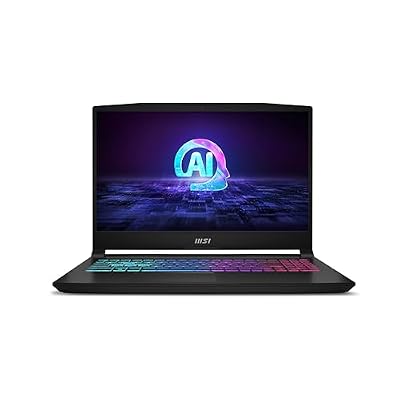
This is the pick for players who never want to think about memory. Its Ryzen 9 8945HS and RTX 4070 are paired with 32GB of DDR5 as standard, double the game’s published requirement, which suits hosting a co-op realm while voice chat and a wiki sit open beside it. The 15.6-inch QHD 165Hz panel matches the resolution Inflexion’s chart reserves for stronger hardware, and a MUX switch lets the GPU drive it directly. Buyers comparing AMD-based machines more widely can also work through our guide to the best gaming laptops with AMD Ryzen processors before deciding.
Specs
- Processor: AMD Ryzen 9 8945HS
- Graphics: NVIDIA GeForce RTX 4070 Laptop GPU, 8GB GDDR6
- Display: 15.6-inch QHD, 165Hz
- Memory: 32GB DDR5
- Storage: 1TB NVMe SSD
- Cooling: Cooler Boost 5
- Operating system: Windows 11 Home
Best for: Co-op hosts and heavy multitaskers who want 32GB of RAM without an upgrade project.
Watch out for: MSI rates this model’s RTX 4070 at a 105W power limit, so compare wattage rather than the GPU name alone.
ASIN: B0CXV9CTM8
Dell G16 7630

The G16 brings the strongest processor in this group, a 24-core Core i9-13900HX, alongside a full-power RTX 4070 and the joint-sharpest screen here: a 16-inch QHD+ 165Hz panel with a 3ms response time. That combination suits players who will explore at 1440p-class settings and keep the laptop on a desk, where its Alienware-inspired vapor chamber cooling can stretch its legs. Both memory slots and the storage bay are accessible for later upgrades, which extends its life well past the game’s current requirements.
Specs
- Processor: Intel Core i9-13900HX, up to 5.4 GHz
- Graphics: NVIDIA GeForce RTX 4070, 8GB GDDR6
- Display: 16-inch QHD+ 2560 x 1600, 165Hz, 3ms
- Memory: 16GB DDR5
- Storage: 1TB SSD
- Wireless: Wi-Fi 6 (802.11ax)
- Weight: 6.01 pounds
- Operating system: Windows 11 Home
Best for: Desk-based players who want the sharpest screen and the strongest processor in this group.
Watch out for: At just over six pounds before the power adapter, check the total carry weight if it will ever leave the house.
ASIN: B0C3HZ6PV4
Acer Predator Helios Neo 16

Acer’s listing states a 140W maximum graphics power for this model’s RTX 4060, which closes much of the gap to lower-wattage RTX 4070 machines and gives Nightingale’s recommended tier comfortable clearance at 1080p and 1200p. The Core i7-13650HX, G-SYNC display with Advanced Optimus, and liquid metal cooling with AeroBlade fans are built for the long sessions this game encourages. The compromise is storage: 512GB is tight, although a second M.2 slot sits empty for a later drive, and the two memory slots accept up to 32GB.
Specs
- Processor: Intel Core i7-13650HX
- Graphics: NVIDIA GeForce RTX 4060 Laptop GPU, 140W maximum graphics power
- Display: 16-inch WUXGA 1920 x 1200 IPS, 165Hz, 3ms, G-SYNC
- Memory: 16GB DDR5, maximum 32GB
- Storage: 512GB PCIe Gen 4 SSD, second M.2 slot free
- Networking: Killer Wi-Fi 6E and Killer Ethernet E2600
- Ports: 2x Thunderbolt 4, HDMI 2.1, RJ-45 Ethernet
- Battery: 90Wh
Best for: Players who want full-power graphics and cooling designed for long realm sessions.
Watch out for: The 512GB SSD fills quickly once a 70GB game and a second library title are installed, so plan on using the free M.2 slot.
ASIN: B0CX27GY7N
MSI Katana 15 (B13VGK-2000US)

The Katana 15 puts an RTX 4070 and a QHD 165Hz screen into the lightest chassis in this roundup, at five pounds, which makes it the easiest of these machines to move between rooms or buildings. The Core i7-13620H is a step below the HX processors elsewhere here, but it stays well clear of the game’s recommended Core i5-8600. Memory sits in two slots and can grow to 64GB, and the listing shows a spare M.2 slot beside the 1TB drive. The trade-offs are a plastic chassis and the 105W GPU limit shared with its A15 AI sibling.
Specs
- Processor: Intel Core i7-13620H, up to 4.9 GHz
- Graphics: NVIDIA GeForce RTX 4070, 8GB GDDR6
- Display: 15.6-inch QHD, 165Hz
- Memory: 16GB DDR5, 2 slots, up to 64GB
- Storage: 1TB NVMe SSD
- Cooling: Cooler Boost 5
- Weight: 5 pounds
- Operating system: Windows 11 Home
Best for: Players who want RTX 4070 graphics and a 1440p-class screen in a laptop that is easy to carry.
Watch out for: The chassis is plastic rather than metal, so handle it more carefully than the heavier machines in this list.
ASIN: B0CT4BHS2M
GIGABYTE AORUS 16X (ASG-53USC64SH)

The AORUS 16X has the most complete specification sheet here: a Core i7-14650HX, an RTX 4070 that Gigabyte rates at up to 140W, 32GB of DDR5 in two SO-DIMM slots, and a second Gen4 M.2 slot beside the 1TB drive. Its 2560 x 1600 165Hz display matches the resolution tier where Nightingale starts asking for stronger graphics, and Wi-Fi 7 plus Thunderbolt 4 cover both the game’s always-online requirement and fast external storage. It suits players whose laptop also handles streaming, editing or coursework between realm sessions.
Specs
- Processor: Intel Core i7-14650HX
- Graphics: NVIDIA GeForce RTX 4070 Laptop GPU, 8GB GDDR6
- Display: 16-inch WQXGA 2560 x 1600, 165Hz
- Memory: 32GB DDR5
- Storage: 1TB SSD
- Wireless: Wi-Fi 7
- Operating system: Windows 11 Home
Best for: Players who also stream or edit video and want 32GB of RAM plus current wireless in one machine.
Watch out for: AORUS 16X models ship in several similar variants, so confirm the exact memory and storage configuration on the listing before ordering.
ASIN: B0CW27V4HC
Which One Fits Your Situation
You are leaving a console behind and this is your first gaming PC
Choose the Dell G16 7630. Its 16-inch QHD+ screen is the most forgiving step up from a television, the Core i9-13900HX leaves nothing to configure or upgrade on day one, and the RTX 4070 clears the game’s recommended tier with room to spare. It is heavy, but a first gaming laptop usually lives on one desk, where the vapor chamber cooling and big display matter more than portability.
You host the realm your friends join
Choose the MSI Katana A15 AI. Hosting adds memory pressure on top of the game’s own 16GB requirement, and this is one of only two picks that ships with 32GB fitted. The Ryzen 9 8945HS handles the extra background work, the RTX 4070 keeps your own view smooth at QHD, and the wired Ethernet port gives the session a steadier connection than Wi-Fi alone.
You play on a 1440p external monitor
Choose the GIGABYTE AORUS 16X. Nightingale’s own tier chart asks for RTX 3070-class graphics at 1440p, and this model’s RTX 4070 runs at up to 140W, the joint-highest limit here. Its 32GB of memory and Wi-Fi 7 help when the monitor, a capture app and voice chat all run at once, and Thunderbolt 4 keeps a desk dock to a single cable.
Your laptop travels between home, campus and work
Choose the MSI Katana 15. At five pounds it is the lightest machine in this group, yet it still carries an RTX 4070, a QHD 165Hz screen and a 1TB drive, so nothing about Nightingale has to be compromised for the commute. Memory can later grow to 64GB in its two slots, which gives the laptop a second life as your needs change.
Common Mistakes
- Buying to the minimum spec instead of the recommended tier, which leaves an Unreal Engine 5 game with no headroom for updates or busier realms.
- Comparing graphics cards by name alone and missing that the same RTX 4070 ships at 105W in some laptops and 140W in others.
- Choosing a laptop with 8GB of RAM, or with soldered memory that can never grow past the game’s 16GB requirement.
- Forgetting that Nightingale needs 70GB of SSD space and a constant broadband connection, then pairing it with a nearly full 512GB drive on congested Wi-Fi.
- Assuming storage is fixed and overlooking models with a second M.2 slot, which are far cheaper to expand later.
Frequently Asked Questions
Can a laptop with an RTX 4060 run Nightingale well?
Yes. The game’s recommended graphics card is the desktop RTX 2060 Super, and a full-power laptop RTX 4060 such as the one in the Predator Helios Neo 16 sits a generation ahead of it. Nightingale also supports DLSS 3, which the RTX 4060 can use. Expect the smoothest results at 1080p or 1200p with upscaling enabled, following the balance Inflexion’s own tier chart describes.
Is 16GB of RAM enough for Nightingale on a laptop?
Sixteen gigabytes matches the published requirement exactly, so the game runs as the developer intends. The margin disappears when you host a co-op realm, stream, or keep a browser and voice chat open, because everything shares the same pool. That is why two picks here ship with 32GB, and why the 16GB models were only included if their memory sits in upgradeable SO-DIMM slots.
Does Nightingale need an SSD and an internet connection?
Both, according to the Steam listing. The system requirements state that an SSD is required and list 70GB of available space, and the additional notes make a broadband internet connection part of the specification rather than an option. On a laptop, that means checking your free drive space before install and preferring a model with an Ethernet port or strong Wi-Fi for realm sessions.
Should I buy for the minimum or the recommended spec?
Buy above the recommended spec. Inflexion’s tier chart ties the recommended hardware to 1080p with upscaling and balanced settings, so a laptop that merely matches it has no reserve for busier realms, new content or a higher-resolution monitor later. Every model in this guide clears the recommended line on graphics, processor and memory at once, which is the combination that keeps the game comfortable over time.