FiveM runs on top of GTA V, and a busy roleplay server is a very different load from story mode: dozens of player cars, custom liveries, streamed map assets and voice chat all land on the processor at once. The buying decision that matters is not the badge on the lid but whether the CPU can hold steady frame times in a crowded city block while the cooling system keeps clocks up through long sessions. A strong graphics card helps, yet it cannot rescue a laptop whose processor throttles or whose memory fills up.
This guide is for three kinds of buyer: new roleplayers speccing their first gaming laptop, regulars whose current machine stutters in populated areas, and players who stream or record their sessions. Every pick below was chosen from the names and specifications printed on its Amazon product page, and each one pairs RTX 5070 graphics with at least a 165Hz display and memory you can upgrade later.
Quick Picks
As an Amazon Associate we earn from qualifying purchases.
| Product | Best for | Key spec from title |
|---|---|---|
| Lenovo Legion Pro 5i Gen 10 | Streaming your roleplay sessions while you play | Core Ultra 9 275HX and RTX 5070 8GB |
| MSI Crosshair 18 HX AI | A fixed desk setup that replaces a desktop PC | 18-inch QHD+ 240Hz IPS display |
| ASUS ROG Strix G16 (2025) | High-refresh 2.5K play in a 16-inch laptop | Ryzen 9 9955HX and RTX 5070 |
| Lenovo Legion 5i Gen 10 | A first FiveM laptop with a full-power GPU | 15-inch 2.5K OLED display at 165Hz |
| Gigabyte Gaming A16 | Casual roleplay a few nights a week | RTX 5070 with 32GB DDR5 RAM |
How to Choose
Processor and GPU power come first
GTA V’s engine leans hard on the CPU, and FiveM adds server scripts, custom vehicles and streamed assets on top, so per-core speed and cache matter more than core count alone. Look for HX-series Intel chips or their AMD equivalents rather than thin-and-light H or U parts. The graphics card needs the same scrutiny: an RTX 5070 laptop GPU can be configured anywhere from 80W to 115W, and the higher figure sustains noticeably better frame rates at 1440p and 1600p. Manufacturers publish the wattage on their own spec pages even when a store listing omits it. Readers set on an AMD processor can compare the best gaming laptops with AMD Ryzen chips before deciding.
A display that keeps up with the hardware
Every laptop in this guide pairs at least a 165Hz panel with a 1440p-class or 1600p resolution, which is the right match for an RTX 5070: the GPU can feed those pixels without the waste of a 4K screen it cannot drive in busy scenes. OLED panels, fitted to both Lenovos here, give faster pixel response and deeper blacks for night driving, while IPS panels avoid any burn-in worry during long static HUD hours. Check the response time and brightness figures on the listing too; 500 nits keeps daytime sessions comfortable, and a matte finish cuts reflections from desk lamps.
Memory, storage and the upgrade path
Sixteen gigabytes of RAM is the working minimum for FiveM once Discord, a browser and the Rockstar launcher sit alongside the game, and 32GB is the comfortable figure for anyone streaming or running heavy mod packs. Prefer two SO-DIMM slots over soldered memory so a simple upgrade stays possible in two years. Storage fills faster than buyers expect: GTA V alone takes well over 100GB, and FiveM server caches grow steadily. A 1TB drive is the sensible starting point, and a second, empty M.2 slot — fitted to every pick here — turns a future storage upgrade into a ten-minute job.
Cooling, ports and warranty for long sessions
Roleplay sessions run for hours, so sustained cooling matters more than short benchmark bursts: larger chassis with dual fans hold boost clocks longer, which is why the 18-inch MSI and the Legion Pro run cooler than slim designs under the same load. Wired networking deserves a hard look as well — FiveM is an online client, and an RJ45 Ethernet port removes Wi-Fi jitter from the equation entirely. HDMI output for a second screen, enough USB ports for a wheel or stream deck, and at least a one-year manufacturer warranty round out the checklist; accidental-damage cover is worth adding if the laptop travels.
The 5 Best Options
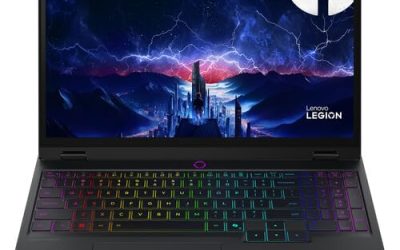
Lenovo Legion Pro 5i Gen 10

This is the pick for players who want one machine to do everything well. The Core Ultra 9 275HX is among the fastest mobile processors Intel sells, and Lenovo feeds its RTX 5070 the full 115W power limit, so crowded downtown scenes stay fluid instead of dipping when thirty players converge. The 32GB of memory leaves genuine headroom for OBS, Discord and a browser full of server documentation, while the 16-inch OLED panel keeps night patrols looking deep and clean. Both memory slots and both M.2 bays are user-accessible, and the listing confirms a one-year limited warranty.
Specs
- Processor: Intel Core Ultra 9 275HX, up to 5.4 GHz
- Graphics: NVIDIA GeForce RTX 5070, 8GB GDDR7
- Display: 16-inch WQXGA (2560 x 1600) OLED, 165Hz, 500 nits
- Memory: 32GB DDR5-5600, up to 64GB
- Storage: 1TB SSD
- Wireless: Wi-Fi 7, Bluetooth 5.4
- Ports: 5 USB ports, Thunderbolt, HDMI, Ethernet
- Warranty: 1 year limited
Best for: Streamers and heavy multitaskers who roleplay in long sessions.
Watch out for: The listing rates the OLED at 165Hz, so confirm the panel specification on the exact configuration before ordering.
ASIN: B0G2MK96YG
MSI Crosshair 18 HX AI

MSI’s Crosshair is the big-screen play in this guide. The 18-inch QHD+ panel refreshes at 240Hz with full DCI-P3 coverage, so pursuits and highway driving stay clear, and the large chassis gives the Core Ultra 9 275HX and RTX 5070 the thermal room to hold boost clocks through marathon sessions. You get 32GB of memory across two SO-DIMM slots and a 1TB SSD with a second M.2 bay standing empty, plus the port spread a fixed desk wants: Thunderbolt 4, HDMI 2.1 and a wired Ethernet jack.
Specs
- Display: 18-inch QHD+ (2560 x 1600) IPS, 240Hz, 100% DCI-P3
- Processor: Intel Core Ultra 9 275HX, 24 cores, up to 5.4 GHz
- Graphics: NVIDIA GeForce RTX 5070, 8GB GDDR7
- Memory: 32GB (2 x 16GB) DDR5-5600
- Storage: 1TB NVMe SSD
- Wireless: Wi-Fi 6E, Bluetooth 5.3
- Ports: Thunderbolt 4, HDMI 2.1, USB-A, RJ45 Ethernet
- Battery: 90Wh
- Weight: 6.83 lb
- Operating system: Windows 11 Home
Best for: A permanent desk setup that replaces a desktop and a monitor.
Watch out for: At 6.83 pounds before its 240W power adapter, this is a desk-bound machine; measure your desk depth and your bag before choosing it over a 16-inch model.
ASIN: B0FQ4C7WY6
ASUS ROG Strix G16 (2025)

The Strix G16 is the AMD route through this guide, and its Ryzen 9 9955HX is a genuine 16-core desktop-class chip with the per-core speed FiveM rewards. ASUS runs the RTX 5070 at a full 115W here, the 16-inch 2.5K panel refreshes at 240Hz with a 3ms response time, and the 32GB of memory sits in two SO-DIMM slots with a second M.2 bay free for another drive. At about five and a half pounds it is the most powerful pick here that still travels in a normal backpack.
Specs
- Processor: AMD Ryzen 9 9955HX, 16 cores, up to 5.4 GHz
- Graphics: NVIDIA GeForce RTX 5070, 8GB GDDR7
- Display: 16-inch 2.5K (2560 x 1600), 240Hz, 3ms, 100% DCI-P3
- Memory: 32GB (2 x 16GB) DDR5-5600
- Storage: 1TB PCIe 4.0 NVMe SSD
- Operating system: Windows 11 Home
- Weight: 5.51 lb
- Warranty: 1 year ASUS
Best for: Players who want full-power 2.5K performance in a laptop that still fits a backpack.
Watch out for: Strix G16 listings also come in 16GB and RTX 5070 Ti variants under similar names, so confirm the exact configuration on the page before ordering.
ASIN: B0FC5S9PZR
Lenovo Legion 5i Gen 10

The smaller Legion is the smart way into this hardware tier. Its Core i7-14700HX is a genuine desktop-class HX chip, Lenovo gives the RTX 5070 the same 115W power limit as the Pro model, and the 15.1-inch OLED screen runs at 165Hz with the deep blacks that make Los Santos at night look superb. The compromise is memory: 16GB is enough for FiveM alone, but it sits in two SO-DIMM slots, so moving to 32GB later is straightforward. A second M.2 slot also stands empty for more games, and the listing bundles three months of PC Game Pass.
Specs
- Processor: Intel Core i7-14700HX
- Graphics: NVIDIA GeForce RTX 5070
- Display: 15-inch 2.5K WQXGA PureSight OLED, 165Hz
- Memory: 16GB
- Storage: 1TB
- Included: 3 months of PC Game Pass
- Model year: 2025
Best for: First-time gaming laptop buyers who want full-power RTX 5070 performance and an OLED screen.
Watch out for: 16GB of RAM is the floor for modded servers; plan on using both SO-DIMM slots for a 32GB upgrade.
ASIN: B0F6NRYPPG
Gigabyte Gaming A16

Gigabyte’s Gaming A16 is the value route to an RTX 5070 badge, and it makes its compromises in places casual players may never notice. You still get 32GB of memory and a 1TB drive, both upgradeable through two SO-DIMM and two M.2 slots, plus a 165Hz screen and a proper Ethernet port. The trade-offs are real, though: the Core i7-13620H is an older, smaller processor than the HX chips elsewhere here, the display is a 1920 x 1200 IPS panel, and Gigabyte rates the GPU’s maximum graphics power at 80W rather than the 115W the other picks run.
Specs
- Processor: Intel Core i7-13620H
- Graphics: NVIDIA GeForce RTX 5070 Laptop GPU, 8GB GDDR7
- Display: 16-inch IPS WUXGA (1920 x 1200), 165Hz, 300 nits
- Memory: 32GB (2 x 16GB) DDR5-5200, up to 64GB
- Storage: 1TB PCIe Gen4 NVMe M.2 SSD
- Battery: 76Wh
- Ports: 4 USB ports, HDMI, Ethernet
- Warranty: 1 year manufacturer
Best for: Casual roleplayers who want RTX 5070 graphics and 32GB of memory without flagship extras.
Watch out for: Gigabyte lists maximum graphics power at 80W, so check the wattage figure on the model page before comparing it with 115W rivals.
ASIN: B0FDM3M1WF
Which One Fits Your Situation
You stream or record your roleplay sessions
Choose the Legion Pro 5i Gen 10. Encoding a stream while FiveM stresses the CPU is exactly the workload its Ultra 9 275HX and 32GB of memory are built for, and the OLED panel doubles as a colour-accurate screen for editing clips afterwards. The Strix G16 is the fallback if you need the same memory in a smaller, lighter chassis.
The laptop lives on one desk
Take the MSI Crosshair 18 HX AI. At 18 inches it stops pretending to be portable, and in exchange you get the biggest, fastest screen in this guide, a 1TB drive with a second bay standing free for a growing game library, and cooling with the headroom to run flat out every night. It suits a permanent setup with a wheel, second monitor and wired Ethernet already in place.
This is your first gaming laptop
Start with the Legion 5i Gen 10. It keeps the two things that matter most — a full-power RTX 5070 and a 165Hz OLED screen — and trims cost in memory instead, which is the one compromise you can undo later through its SO-DIMM slots. If you would rather have 32GB fitted from day one and can accept a lower-power GPU, the Gigabyte Gaming A16 is the alternative to weigh against it.
You carry the laptop between home, work and friends’ houses
Pick the ASUS ROG Strix G16. At 16 inches and about five and a half pounds it is the easiest laptop here to carry in a normal backpack, yet it still runs its RTX 5070 at full power and keeps an Ethernet port for wired sessions when you arrive. The 2.5K screen also stays sharp for documents and spreadsheets during the day.
Common Mistakes
- Buying on the GPU name alone: an RTX 5070 at 80W and one at 115W carry the same badge but perform very differently in busy scenes.
- Settling for soldered 16GB memory, then finding FiveM, Discord, a browser and a stream leave nothing spare on a modded server.
- Playing over Wi-Fi from another room when every laptop here has an Ethernet port that removes jitter and ping spikes.
- Choosing a 4K display the GPU cannot feed at native resolution, then blaming the laptop for the resulting frame drops.
- Filling a small SSD within months: GTA V, FiveM caches and two or three other games outgrow 512GB quickly, so start at 1TB.
Frequently Asked Questions
How much RAM does FiveM need on a laptop?
Sixteen gigabytes runs FiveM comfortably on its own, because GTA V is an older engine. The pressure comes from everything around it: Discord, browser tabs, the Rockstar launcher and any recording software. Players who stream, or who join servers with large custom asset packs, should treat 32GB as the target — which is why most picks here ship with it or offer a simple SO-DIMM upgrade.
Is the RTX 5070 enough for FiveM at 1440p or 1600p?
Yes, provided it runs at a healthy wattage. FiveM’s bottleneck in crowded areas is usually the processor rather than the graphics card, and a 115W RTX 5070 has clear headroom at these resolutions. The Gigabyte in this guide shows the exception: its 80W power limit narrows that headroom, which matters more in graphically heavy modded scenes than in standard roleplay.
Does a 165Hz or 240Hz screen change roleplay?
It changes how driving and fast camera movement feel more than it changes outcomes. A 165Hz panel refreshes far more often than the frame output of a busy server area, so motion stays readable during pursuits. The 240Hz screen on the Crosshair 18 only shows its full advantage in quieter scenes, but the smoothness is noticeable whenever frame rates climb.
Can I upgrade the memory and storage in these laptops later?
Yes — every laptop in this guide uses two SO-DIMM memory slots rather than soldered RAM, and each has two M.2 bays with at least one free or a drive you can replace. A small Phillips screwdriver is the only tool any of them needs for the job. Check the warranty terms before opening any chassis, and keep the original parts until the cover period ends.