

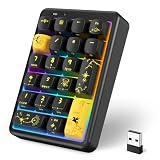
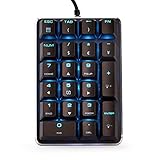
- Top Pick: Gurjot Portable Rechargeable USB Wired Mechanical Numeric Keypad, Tactile Number Pad with Arrow Keys & Macro Function, Black Number Pad for Gaming Laptop, 34‑Key Number Pad Keyboard for Data Entry
- Best Value: 8BitDo Retro 18 Mechanical Numpad, Supports Calculator Mode, Bluetooth/2.4G/Wired Numpad for Windows and Android – M Edition
- Premium Choice: MOTOSPEED Macro Mechanical Numeric Keypad USB Wired 21 Keys Mini Numpad Portable Keypad RGB Backlight Gaming Keypad Extended Layout for Cashier(Fully Programmable Keys)
Affiliate disclosure: As an Amazon Associate we earn from qualifying purchases. This post contains affiliate links — if you buy through them we may earn a small commission at no extra cost to you. This never affects our recommendations.
- Quick Comparison: Top 5 Standalone Gaming Numpads
- 1. Keychron Q0 Plus — The Premium All-Rounder
- 2. IQUNIX NumPad — The Design-Forward Statement Piece
- 3. Epomaker EP21 — The Best Value Hot-Swap Pick
- 4. Cidoo V21 — The Sleeper Pick for Macro Enthusiasts
- 5. Vortexgear ViBE — The Programmer’s Faithful Companion
- How to Choose the Best Standalone Gaming Numpad
- Final Verdict
- Related Articles
- Frequently Asked Questions
- Related Articles
As an Amazon Associate we earn from qualifying purchases at no extra cost to you.





You switched to a TKL or 60% keyboard to reclaim desk space and get a better mouse position. Smart move. But then tax season rolls around, your spreadsheet-heavy project kicks in, or you fire up a flight simulator demanding constant numpad input — and suddenly you’re hunting for a workaround. The answer is not to go back to a full-size board. The answer is a standalone gaming numpad.
Standalone numpads give you the best of both worlds: a compact, ergonomic main keyboard setup and an on-demand number pad you can position wherever it makes sense — left of your keyboard, right of your mouse, or tucked away entirely when you don’t need it. Modern standalone numpads have evolved far beyond simple number entry. Many now offer wireless connectivity, hot-swappable switches, per-key RGB, and full QMK/VIA programmability for macros, media controls, and layer switching. Whether you’re crunching numbers in Excel, managing item hotbars in an MMO like Final Fantasy XIV, running DCS World autopilot commands, or just want a macro pad that pulls double duty, a quality standalone numpad is a legitimate peripheral upgrade.
In this guide, we compared and ranked five of the best standalone gaming numpads available in 2026, covering everything from premium aluminum builds to budget-friendly hot-swap options. Here’s what you need to know before you buy.
In a hurry? See the top-rated Gaming Numpad Add-On deals available right now:
🛒 Check Gaming Numpad Add-On Prices on Amazon →🛒 Best Price Today on Amazon
Prime members get fast, free shipping on everything above, plus member-only deals. New members get a 30-day free trial — cancel anytime.
Start 30-Day Prime Free Trial →See Today’s Amazon DealsQuick Comparison: Top 5 Standalone Gaming Numpads
| Numpad | Keys | Switch Options | Connectivity | Programmable | Price (Approx.) |
|---|---|---|---|---|---|
| Keychron Q0 Plus | 21 | Gateron G Pro (hot-swap) | USB-C / 2.4GHz / BT | QMK/VIA | ~$95 |
| IQUNIX NumPad | 21 | TTC / Gateron (hot-swap) | USB-C / BT 5.0 | Limited | ~$75 |
| Epomaker EP21 | 21 | Multiple options (hot-swap) | USB-C / 2.4GHz / BT | VIA | ~$55 |
| Cidoo V21 | 21 | Gateron (hot-swap) | USB-C / 2.4GHz / BT | VIA | ~$50 |
| Vortexgear ViBE | 21 | Cherry MX (non-swap) | USB-C | Full programmable | ~$65 |
1. Keychron Q0 Plus — The Premium All-Rounder
If you want the best standalone numpad money can buy in 2026 without any meaningful compromise, the Keychron Q0 Plus is it. This is the wireless successor to the original Q0, and Keychron got virtually everything right on the upgrade.
The build quality is immediately apparent the moment you pick it up. The CNC-machined aluminum case is thick, dense, and satisfying in hand — this is not a lightweight plastic slab that slides around your desk. A silicone gasket layer underneath the PCB absorbs vibration and gives the typing feel a softer, more cushioned response that punch-typists will appreciate. The south-facing RGB shine-through keycaps look excellent in low light, and Keychron’s PBT doubleshot legends hold up far better than ABS alternatives.
Under the hood, the Q0 Plus runs full QMK and VIA firmware, meaning every single key is remappable, macro-programmable, and layer-assignable through an open-source interface. For MMO players who want to bind rotations, for accountants who want formula shortcuts, or for streamers mapping OBS scene switches, this level of programmability is invaluable. Wireless performance via the 2.4GHz USB dongle is rock solid with no perceptible latency. Bluetooth multi-device pairing (up to three devices) lets you switch between a work laptop and gaming PC without unplugging anything.
Pros: CNC aluminum case, QMK/VIA full programmability, three-mode wireless, gasket mount feel, excellent build longevity
Cons: Heaviest and most expensive on this list, no included wrist rest, stock keycap legends are basic
Best For: Enthusiasts who want a long-term peripheral investment, professionals using both work and gaming setups
2. IQUNIX NumPad — The Design-Forward Statement Piece
IQUNIX has built a devoted following among keyboard enthusiasts who care as much about aesthetics as they do about functionality, and the IQUNIX NumPad lives up to that reputation. It looks unlike anything else in this category — clean lines, premium anodized aluminum finish, and a design sensibility that belongs on a minimalist desk setup rather than buried next to a budget gaming rig.
The typing experience is a highlight. IQUNIX includes TTC or Gateron switch options depending on the variant, both of which deliver a smooth and consistent keystroke. The hot-swap PCB means you are not locked into those switches, and with 3-pin or 5-pin compatibility you have a wide range of aftermarket options to tune the feel exactly where you want it. Foam dampening inside the case keeps the sound profile tight and thocky rather than hollow and clacky.

Where IQUNIX pulls back slightly is on programmability and wireless performance. Bluetooth 5.0 is included, but there is no 2.4GHz dongle option, which matters if you want the lowest possible latency for gaming use. The companion software is functional but less powerful than QMK/VIA — remapping works, macro creation is available, but layer management is more limited. If your use case leans heavily on number entry and occasional macro use rather than deep firmware customization, this is not a dealbreaker. If you want to run eight VIA layers with tap-dance functions, look at the Keychron Q0 Plus instead.
Pros: Outstanding build aesthetics, premium anodized aluminum, hot-swap PCB, excellent stock switch options, compact footprint
Cons: No 2.4GHz wireless, limited programming depth versus QMK/VIA, software is Windows-only
Best For: Desk setup enthusiasts who prioritize aesthetics, writers and accountants needing clean number entry
Check Price on Amazon
3. Epomaker EP21 — The Best Value Hot-Swap Pick
Epomaker has been quietly delivering excellent value in the mechanical keyboard space, and the EP21 standalone numpad continues that trend. At roughly half the price of the Keychron Q0 Plus, the EP21 punches significantly above its weight class with a feature set that would have cost twice as much two years ago.
The headline feature is triple-mode wireless connectivity — USB-C wired, 2.4GHz wireless dongle, and Bluetooth 5.0 — delivered at a budget price point. The 2.4GHz mode gives you polling-rate performance suitable for gaming without the latency trade-off of Bluetooth. A 3000mAh battery comfortably handles weeks of regular Bluetooth use before a recharge is needed, which is genuinely impressive for a numpad this size.
Hot-swap support is full 5-pin compatible, meaning virtually any aftermarket switch works without soldering. Epomaker includes their own switches (options vary by configuration at time of purchase, typically Gateron or their house switches), which are perfectly decent out of the box. VIA programmability is supported, so full remapping and macro assignment is available through a browser-based interface. The gasket-mount construction and south-facing RGB are features you’d expect at a higher price, and the per-key lighting customization through VIA is a nice touch. The plastic case does flex slightly more than aluminum alternatives, and long-term durability under heavy use is the main trade-off at this price.
Pros: Triple-mode wireless including 2.4GHz, VIA programmability, 5-pin hot-swap, gasket mount, excellent price-to-feature ratio
Cons: Plastic case lacks premium feel, stock keycaps are average quality, RGB can bleed through legends on some color profiles
Best For: Budget-conscious buyers who want the full wireless feature set without spending premium prices
Check Price on Amazon
4. Cidoo V21 — The Sleeper Pick for Macro Enthusiasts
The Cidoo V21 is not as well-known as the other entries on this list, and that is arguably its biggest advantage — it delivers a compelling feature package without the brand premium markup, making it one of the most cost-effective standalone numpads in 2026.

Like the Epomaker EP21, the V21 offers triple-mode connectivity (USB-C, 2.4GHz, Bluetooth 5.0) and hot-swap support. The distinguishing factor is the rotary encoder built into the top-right corner of the board. This dial is fully programmable through VIA and serves as an exceptional volume control, scroll wheel, or timeline scrubber depending on your software context. For video editors, music producers, or anyone using a DAW alongside a compact keyboard, the encoder alone justifies the purchase. For gamers, binding the encoder to grenade throws, weapon wheel navigation, or zoom sensitivity adjustments adds a tactile dimension that flat keys cannot replicate.
The case is polycarbonate rather than aluminum, and the overall construction quality reflects the price — it is solid enough for daily desk use but will not win any premium feel contests. The stock Gateron switches are smooth and satisfying. VIA support works reliably, covering layer switching, macro recording, and encoder binding with minimal friction. Battery life on wireless is strong, and the 2.4GHz connection is stable enough for gaming without stuttering concerns.
Pros: Programmable rotary encoder, triple-mode wireless, VIA support, hot-swap PCB, excellent value
Cons: Polycarbonate case, less brand recognition means smaller community for troubleshooting, keycaps are basic
Best For: Content creators, DAW users, gamers who want rotary dial macro control on a budget
Check Price on Amazon
5. Vortexgear ViBE — The Programmer’s Faithful Companion
Vortexgear has been making keyboards since before most gaming peripheral brands existed, and the ViBE numpad carries that legacy of reliability into the standalone numpad category. It is the most traditional option on this list — wired USB-C only, non-hot-swap Cherry MX switches — but it compensates with Vortexgear’s battle-tested onboard programmable firmware that does not require any software to configure.
Every key on the ViBE is fully remappable using the onboard DIP switch and layer system. Three programmable layers give you enough flexibility to assign macros, shortcuts, and media controls directly on the hardware, with no driver installation or companion app required. This is a significant advantage in work environments where installing third-party software is restricted, or for users who prefer a purely hardware-driven configuration approach. Plug it into any computer and your mappings travel with the device, not a software profile on a single machine.
Cherry MX switch availability is broad — Red, Brown, Blue, and Silent Red options let you select a feel and sound profile appropriate for your environment. The aluminum top plate keeps the build rigid and professional-looking, and the absence of RGB means zero distractions for minimalist desk setups. The wired-only limitation is the clearest concession in 2026, where wireless has become table stakes for a premium numpad. If cable management is no concern, or if you specifically want to avoid wireless interference in a tournament or studio environment, that limitation becomes a non-issue.
Pros: Onboard programmability requires no software, Cherry MX switch options, aluminum top plate, extremely reliable firmware, works on any OS immediately
Cons: Wired only, no hot-swap, no RGB, higher price than wireless competitors for what you get
Best For: IT professionals, users in locked-down software environments, minimalists, Cherry MX loyalists

Check Price on Amazon
How to Choose the Best Standalone Gaming Numpad
Number of Keys and Layout
Most standalone numpads in 2026 follow the standard 21-key layout: the number grid, arithmetic operators, Enter, Backspace, Tab, and Num Lock. A small number of models expand to 22 or 24 keys by adding a top row of function keys or macro buttons. Unless you have a specific workflow that demands those extra keys, the standard 21-key layout covers virtually every use case and keeps the footprint compact. Verify that the numpad includes a dedicated 000 key if you do heavy accounting entry — some budget models omit it.
Wireless vs Wired for Flexible Placement
Wireless is the primary reason standalone numpads have become practical for desk setups in 2026. A wired numpad still needs to reach your USB port or a hub, which constrains placement. A wireless numpad can sit wherever your workflow demands — left of your main keyboard for left-hand macro access during gaming, right of your keyboard for standard number entry, or stored in a drawer and brought out only when needed. If you go wireless, prioritize 2.4GHz over Bluetooth-only for gaming use, as 2.4GHz polling rates are significantly faster and the connection is more interference-resistant.
Switch Compatibility and Hot-Swap
Hot-swap PCBs have gone from a premium feature to a near-standard expectation at mid-range prices. If a numpad at this price tier does not include hot-swap support, it needs to offer something exceptional to compensate — usually the Vortexgear ViBE’s onboard programmability justification. When evaluating hot-swap boards, check for 5-pin compatibility rather than 3-pin only, as 5-pin support opens the full aftermarket switch catalog including premium stabilized switches like Boba U4, Gateron Oil Kings, and Topre replacements.
Programmability for Macros
For gaming, the most important specification after wireless connectivity is programmability depth. A numpad with QMK/VIA support gives you essentially unlimited macro complexity — multi-key sequences, layer switching, tap-dance actions, leader key sequences, and mouse emulation. Software-driven alternatives like Epomaker’s and Cidoo’s VIA implementations cover 90% of what most users need. Onboard-only programming (Vortexgear ViBE) is sufficient for straightforward remapping. Evaluate your actual needs: if you want to script a 20-keystroke rotation macro triggered by a single key, you need QMK or VIA.
Matching Your Main Keyboard Aesthetic
This matters more than it sounds. A numpad you enjoy looking at stays on your desk. A numpad that clashes with your setup gets tucked in a drawer. Most standalone numpads are sold with black or white PBT keycaps in basic legends — neutral and inoffensive but not inspiring. If your main keyboard runs custom keycaps, check whether the numpad uses a standard layout that accepts aftermarket keycap sets. Most 21-key numpads are compatible with standard numpad keycap kits sold on Drop, KBDfans, and similar enthusiast retailers. Aluminum case finishes in space gray or silver integrate cleanly with most monitor and desk setups.
Final Verdict
For most gamers and professionals pairing a standalone numpad with a TKL or 60% keyboard, the Keychron Q0 Plus is the clear first recommendation. The combination of wireless reliability, QMK/VIA programmability, gasket-mount typing feel, and premium aluminum construction represents the ceiling of what this peripheral category offers. It costs more, but it is a peripheral you will not need to replace.
If the Keychron Q0 Plus price is a barrier, the Epomaker EP21 is the most complete package at a budget price — triple-mode wireless including 2.4GHz, VIA support, and hot-swap in a single product. It makes more compromises on build quality, but zero compromises on the features that matter most for functional use.
For content creators and gamers who want something genuinely different, the Cidoo V21 and its programmable rotary encoder carve out a unique niche that none of the competition addresses at the same price. The IQUNIX NumPad earns its place for desk setup aesthetes who refuse to compromise on visual design. And the Vortexgear ViBE remains the right answer for anyone in a wired-preferred or software-restricted environment who values pure reliability above all else.
Whatever your setup, there is a standalone numpad on this list that fits it. Stop fighting your compact keyboard. Get a numpad that works with it.
Related Articles
Looking for more on this topic? Browse the hand-picked guides below — each one applies the same scoring rubric used in this review.
Frequently Asked Questions
What is the best gaming keyboard numpad standalone in 2026?
The best gaming keyboard numpad standalone depends on your budget and how you plan to use it. The options compared above are our top-rated picks based on real customer ratings, build quality, and overall value — start with the highest-rated model that fits your budget.
How much should I expect to spend on a gaming keyboard numpad standalone?
Prices vary by brand and features. Budget options cover the essentials, while mid-range and premium models add durability, performance, and extra features. Compare the prices in the list above to find the best value for your needs.
What should I look for when buying a gaming keyboard numpad standalone?
Focus on what matters most for your use case — build quality, compatibility, performance, warranty, and verified customer reviews. Every pick above is selected to balance these factors.
Are budget gaming keyboard numpad standalone options worth it?
Yes. For most people a well-reviewed budget or mid-range gaming keyboard numpad standalone delivers excellent value. You only need to spend more if you specifically require premium materials or top-tier performance.
How did we choose these gaming keyboard numpad standalone picks?
We compare current Amazon ratings, review counts, key features, and price to surface the options with the best real-world value. The list is refreshed as ratings and availability change.









