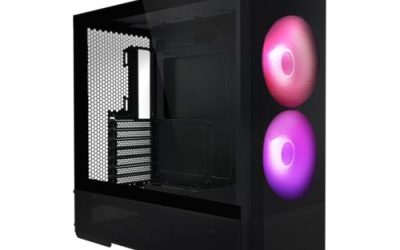
A dual-chamber mid-tower case splits a build into two compartments. The motherboard, graphics card, and cooling hardware live in the main chamber, while the power supply, drives, and most cabling hide in the second. The result is a cleaner interior and a clear view through the glass panel.
That layout suits showcase builds and high-airflow rigs, but not every dual-chamber case fits every build. Motherboard form factor, graphics card length, radiator support, front-panel connectors, and power supply length all matter, and the numbers on a product page are manufacturer figures worth checking against the spec sheet. This guide compares five dual-chamber mid-tower cases sold on Amazon US.
As an Amazon Associate we earn from qualifying purchases
Quick Answer
For most builds, the Lian Li O11 Dynamic EVO RGB is the safest pick: it supports E-ATX boards, fits long graphics cards, and leaves room for a large radiator. The HYTE Y70 suits display builds, with a riser cable for a vertical graphics card mount. The NZXT H6 Flow RGB is the compact choice for smaller desks, the NZXT H9 Flow (2025) the roomiest for big air-cooled builds, and the Corsair 6500D AIRFLOW the pick for an airflow-first build.
What to Check Before You Buy
Start with the motherboard. The cases here accept ATX boards, and several also accept E-ATX, but the fit is not identical. Check the board tray dimensions, and confirm that a wider board will not block cable routing holes or a side radiator mount.
Graphics card clearance comes next. The HYTE Y70 lists up to 422mm and the NZXT H9 Flow (2025) up to 435mm. Treat those as manufacturer maximums, and measure your card including any power connector past its end.
Cooling support decides how far the build can go. The Lian Li and NZXT H9 Flow list 420mm radiator support, while the HYTE Y70 and NZXT H6 Flow RGB list 360mm at the top. A thick radiator plus fans can eat into graphics card space, so confirm where your radiator fits.
Check the front-panel connectors against your motherboard headers: a Type-C port is only useful if your board provides the header. Power supply length also matters, since the rear chamber has a limit; the HYTE Y70 lists support for units up to 235mm. Warranty terms differ by maker.
Manufacturer specifications describe what a case is designed to hold, not measured performance. Airflow and temperatures depend on the fans and components inside. If you are still deciding whether the layout suits your build, our broader dual-chamber PC case guide explains its trade-offs.
The Five Cases at a Glance
| Case | Motherboard support | Radiator support | Fans included | Best for |
|---|---|---|---|---|
| Lian Li O11 Dynamic EVO RGB | Up to E-ATX | Up to 420mm | None listed | Most builds |
| HYTE Y70 | ATX, E-ATX | Up to 360mm top | None listed | Display builds |
| NZXT H6 Flow RGB | ATX | Up to 360mm | 3 x 120mm RGB | Compact desks |
| NZXT H9 Flow (2025) | ATX | Up to 420mm | 3 x 140mm, 1 x 120mm | Large air-cooled builds |
| Corsair 6500D AIRFLOW | ATX | Wide mounting options | None | Airflow-first builds |
1. Lian Li O11 Dynamic EVO RGB — Best Overall

The O11 Dynamic EVO RGB is the most flexible case in this guide. Lian Li lists it as a mid-tower dual-chamber chassis with tempered glass panels, support for motherboards up to E-ATX, and room for a radiator up to 420mm, covering large air-cooled builds, custom loops, and showpiece rigs with long graphics cards. It also supports an inverted layout. Check the spec sheet for exact clearances.
Key specs
- Form factor: Mid-tower, dual chamber
- Motherboard support: Up to E-ATX
- Radiator support: Up to 420mm
- Panels: Tempered glass
- Front I/O: USB Type-C port
- Model: O11DERGBW (white)
Who it is for
Builders who want one case for a wide range of parts, and anyone planning to change components later.
Who should skip it
If desk space is tight, measure first: this wide mid-tower needs more desk depth than a compact case. Builders who want fans included should look at the NZXT options instead.
2. HYTE Y70 — Best for a Display Build

The HYTE Y70 is built to be looked at: a dual-chamber ATX mid-tower with panoramic tempered glass, shipping with a PCIe 4.0 riser cable so the graphics card can mount vertically and face the glass. HYTE lists support for ten fans, graphics cards up to 422mm, and power supplies up to 235mm. The top mount accepts a radiator up to 360mm, and the side mount one up to 280mm. Storage mounts cover two 3.5-inch drives or four 2.5-inch drives.
Key specs
- Form factor: Mid-tower, dual chamber
- Motherboard support: ITX, Micro-ATX, ATX, E-ATX
- Radiator support: Up to 360mm top, up to 280mm side
- Fan capacity: Up to 10 fans
- Graphics card clearance: Up to 422mm
- Power supply length: Up to 235mm
- Included: PCIe 4.0 riser cable
Who it is for
Builders who want the finished PC on display, with a vertical graphics card and a panoramic glass view, and large builds, since the clearances cover long cards and full-size power supplies.
Who should skip it
The Y70 is a wide case, and the vertical mount adds complexity. If you prefer a simple assembly or a smaller footprint, the NZXT H6 Flow RGB is a better match.
3. NZXT H6 Flow RGB — Best Compact Dual-Chamber Case
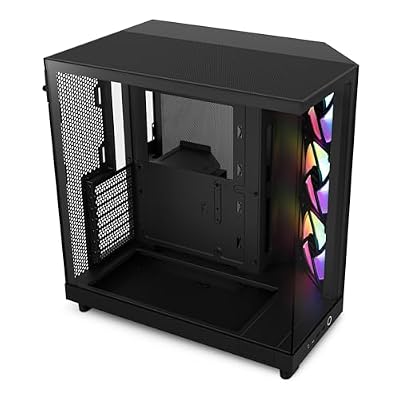
The NZXT H6 Flow RGB is the compact option in this guide: a compact dual-chamber ATX case with wraparound glass panels and three pre-installed 120mm RGB fans. The angled front panel directs cool air to the graphics card, and the dual-chamber layout keeps the power supply and cabling out of the airflow path. The case also includes a cable management system and a GPU anti-sag bracket. Its smaller footprint fits desks and shelves where a wide dual-chamber tower would not.
Key specs
- Form factor: Compact mid-tower, dual chamber
- Motherboard support: ATX
- Radiator support: Up to 360mm
- Fans included: 3 x 120mm RGB
- Panels: Panoramic tempered glass
- Front panel: Angled, airflow focused
- Model: CC-H61FB-R1 (black)
Who it is for
Builders with limited desk space who still want the dual-chamber look and a glass view of the build. The included RGB fans make it a good starting point for a first build.
Who should skip it
The compact size limits radiator and component options. Builders planning a large custom loop or an E-ATX motherboard should choose the Lian Li O11 Dynamic EVO RGB or the NZXT H9 Flow (2025).
4. NZXT H9 Flow (2025) — Best for Large Air-Cooled Builds

The NZXT H9 Flow (2025) is the largest case in this guide: a large dual-chamber ATX mid-tower with high-airflow mesh panels, room for ten fans, and support for radiators up to 420mm. NZXT lists graphics card clearance up to 435mm, which covers the longest graphics cards, and the case is ready for back-connect motherboards, where the connectors sit on the rear of the board.
Key specs
- Form factor: Large mid-tower, dual chamber
- Motherboard support: ATX, back-connect ready
- Radiator support: Up to 420mm
- Fan capacity: Up to 10 fans
- Fans included: 3 x 140mm, 1 x 120mm
- Graphics card clearance: Up to 435mm
- Front I/O: 2 x USB-A, 1 x USB-C, audio jack
- Model: CM-H92FW-01 (white)
Who it is for
Builders planning a large air-cooled rig with a long graphics card and a big radiator, and anyone who wants a clean build with minimal cabling.
Who should skip it
This large case needs a deep desk. Builders with limited space should consider the NZXT H6 Flow RGB, and anyone who wants a vertical graphics card mount should look at the HYTE Y70.
5. Corsair 6500D AIRFLOW — Best for Airflow-First Builds

The Corsair 6500D AIRFLOW is the airflow-focused case in this guide: a mid-tower ATX dual-chamber case with mesh panels, a tempered glass side panel, and wide cooling flexibility. It is compatible with reverse-connection motherboards, where the connectors sit on the back of the board. No fans are included, which is a deliberate trade-off: the case is a blank canvas for builders who want to choose their own cooling setup. The mesh front and side panels give intake air a direct path to the components. Check the Corsair spec sheet for exact radiator and fan mounting options.
Key specs
- Form factor: Mid-tower, dual chamber
- Motherboard support: ATX, reverse-connection compatible
- Panels: Tempered glass side, mesh front and side
- Fans included: None
- Model: CC-9011260-WW (white)
Who it is for
Builders who want maximum airflow and plan to pick their own fans, and reverse-connection motherboard builds.
Who should skip it
Because no fans are included, this case needs extra parts before it can run.
How the Five Compare
The Lian Li O11 Dynamic EVO RGB is the most versatile pick, with E-ATX support and 420mm radiator room. The HYTE Y70 is display-first, with a vertical graphics card mount and riser cable. The NZXT H6 Flow RGB is the compact, complete option, with three RGB fans included. The NZXT H9 Flow (2025) is the largest, with the most included fans and the longest graphics card clearance. The Corsair 6500D AIRFLOW is the most open-ended, with mesh panels and no included fans.
Frequently Asked Questions
What is a dual-chamber PC case?
A dual-chamber case divides the interior into two compartments: the motherboard, graphics card, and cooling hardware sit in the main chamber, while the power supply, drives, and most cables sit in a second chamber.
Does a dual-chamber case need more fans?
Not always. The NZXT H9 Flow (2025) ships with four fans and the NZXT H6 Flow RGB with three, while the Lian Li, HYTE, and Corsair cases ship without fans listed. Count the included fans against your cooling plan and add fans where mounts are empty.
Can a dual-chamber mid-tower fit an E-ATX motherboard?
Some can. The Lian Li O11 Dynamic EVO RGB and the HYTE Y70 list support for E-ATX boards, while the NZXT and Corsair cases list ATX support. Even where E-ATX is listed, check the board tray dimensions, because a wide board can cover mounting points.
Do dual-chamber cases run cooler than standard cases?
There is no single answer: temperatures depend on the fans installed, the components inside, and the room around the case. A dual-chamber layout helps by keeping cables out of the airflow path, but the fans, the radiator size, and the panels matter just as much. Compare published mounting options rather than assuming one layout runs cooler.
Final Verdict
For most builders, the Lian Li O11 Dynamic EVO RGB is the best dual-chamber mid-tower PC case. It supports E-ATX boards, fits long graphics cards, leaves room for a 420mm radiator, and works for air-cooled, liquid-cooled, and showpiece builds alike. The HYTE Y70 is the better choice if the finished PC is meant to be displayed. The NZXT H6 Flow RGB is the pick for smaller desks, the NZXT H9 Flow (2025) for the largest air-cooled builds, and the Corsair 6500D AIRFLOW for builders who want maximum airflow.
Whichever case you choose, measure your motherboard, graphics card, radiator, and power supply against the spec sheet first. Those four measurements decide whether the build fits.
Product and ASIN Reference
| Product | ASIN |
|---|---|
| Lian Li O11 Dynamic EVO RGB (White) | B0CQTFNPMH |
| HYTE Y70 (White) | B0CX58ZF9G |
| NZXT H6 Flow RGB (Black) | B0C89F1V5S |
| NZXT H9 Flow (2025) (White) | B0DQPRVD4C |
| Corsair 6500D AIRFLOW (White) | B0CQ5CHKRB |