

Yes — for most players, a 75 percent keyboard is good for gaming, and for some it is the smartest size on the desk. It keeps the keys games actually use, including a full function row and dedicated arrow keys, while dropping the number pad and the wide navigation cluster that push your mouse hand further out. What it does not do is make you faster by itself: gaming performance still comes from the switches, the firmware features and the connection, not from the percentage printed on the box. This guide breaks down exactly what the layout keeps and drops, who it suits, and where a tenkeyless (TKL) or full-size board is still the better call.
Disclosure: As an Amazon Associate we earn from qualifying purchases.
The short answer
Choose a 75% keyboard if you want one board for gaming and everyday use, you play on a small or crowded desk, or you use low mouse sensitivity and need sweep room. The layout keeps F1–F12, dedicated arrows and a slim column of navigation keys, so game binds, ability rows and everyday shortcuts all survive. Skip it if your workflow leans on a number pad, if you rely on a full, spaced-out navigation cluster for editing or spreadsheet work, or if you want a wide board with room for dedicated macro keys. In those cases a TKL or full-size model fits better.
What a 75% keyboard keeps — and what it drops
A 75% board is best understood as a compressed TKL. Compared with a full-size keyboard, it drops the number pad entirely. Compared with a TKL, it keeps the same core key set but squeezes it together: the function row sits directly above the number row with little or no gap, the arrow keys are tucked under the Enter and right Shift area, and the navigation cluster shrinks to a single column — typically Delete plus Page Up and Page Down, with Home, End or Insert varying by model.
What you keep:
- A dedicated function row. F1–F12 stay on their own keys, which matters for MMO and MOBA ability binds, strategy games, and sim titles that map systems to the F-keys.
- Dedicated arrow keys. No function-layer workaround is needed for menu navigation, racing games or older titles that expect real arrows.
- A slim navigation column. Delete is almost always a physical key; Page Up and Page Down usually are too, though the exact mix differs between models, so check the layout diagram of any board you shortlist.
What you give up:
- The number pad. Data entry, calculator work and some sim or strategy binds get slower. A separate pad is the usual fix.
- Breathing room between clusters. Keys sit tighter than on a TKL, and the compressed right-hand column causes occasional mis-presses while your fingers learn the board. An “exploded” 75% layout with small gaps between groups eases this; a fully packed one maximises the space saving.
- Some standalone keys. Print Screen, Scroll Lock and Pause usually move to the function layer, and the exact secondary legends vary by maker.
The payoff for those trade-offs is width. Most 75% boards measure roughly 32–33 cm across — the Razer board below is listed at 12.64 inches wide — against roughly 36 cm for a typical TKL and well over 40 cm for a full-size board. Those reclaimed centimetres go straight to your mouse side, which is the layout’s one genuine gaming advantage: low-sensitivity FPS players get wider, more comfortable sweeps, and every player gets a mouse position closer to the body’s centre line.
What actually decides gaming performance
Layout size does not change how fast a keypress registers. Three things do, and they are worth more than the percentage in a product name:
- Switch type. Traditional mechanical switches actuate at a fixed point. Hall effect (magnetic) switches measure key travel continuously, which enables adjustable actuation points and rapid trigger — the key resets the moment you start releasing it rather than at a fixed point, so repeated strafing inputs and counter-strafing in shooters can register faster. Only some 75% boards offer this; the Keychron below is one.
- Polling rate. This is how often the keyboard reports to the PC. Figures are maker-published: the wired Razer below specifies up to 8,000 Hz, while the Corsair below specifies 1,000 Hz. Higher is not automatically noticeable, but it is a real spec to compare.
- Connection. A wired link or a 2.4 GHz dongle is the safe choice for competitive play. Bluetooth is convenient for a second device and fine for casual gaming, but it is the mode to avoid for ranked matches.
In other words: a well-specced 75% board gives up nothing in-game to a TKL with the same switches and connection. The decision is about desk space and key access, not raw performance.
Who a 75% keyboard suits — and who it does not
It suits:
- FPS and tactical shooter players on low sensitivity, who trade the numpad for mouse room.
- MMO, MOBA and strategy players who still need a real F-row and arrows in a compact body.
- Anyone running one keyboard for gaming, work and study on a small desk, including laptop users docking at home.
- Players who travel or attend LANs and want a board that fits a backpack.
It does not suit:
- Spreadsheet-heavy users and anyone entering numbers all day — keep the full-size board or add a separate pad.
- Players whose games lean on large dedicated macro clusters or media sections.
- Anyone who already dislikes compact layouts; the tighter right-hand column is the first thing you will notice, and it is not for everyone.
Four 75% keyboards worth shortlisting
The four boards below show the range of what the layout offers, from a Hall effect rapid-trigger model to a mainstream wireless board that also pairs with consoles. If you want the wider field compared side by side before deciding, the best gaming keyboard 75 percent roundup covers more models in this class.
Keychron K2 HE — the rapid-trigger pick for competitive players
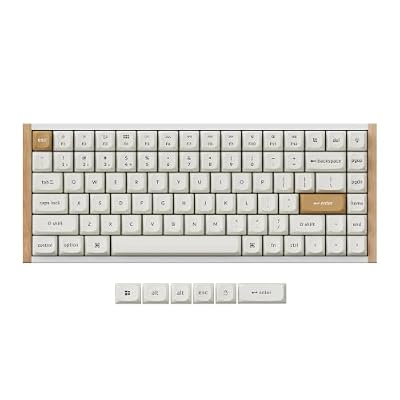
The K2 HE is the pick for FPS players who want the firmware features that actually affect inputs. Its Gateron double-rail magnetic switches are Hall effect units: Keychron publishes an adjustable actuation range of 0.2 to 3.8 mm in 0.1 mm steps, plus rapid trigger, so direction changes register as fast as your fingers reverse. It connects over 2.4 GHz, Bluetooth 5.2 or a USB-C cable, supports QMK, and works across Mac, Windows and Linux, which makes it an easy single board for a gaming PC plus a laptop. One limit to know: the hot-swap sockets accept Gateron double-rail magnetic switches only, not standard mechanical switches.
Specs
- Layout: 75%, function row, dedicated arrow keys
- Switches: Gateron double-rail magnetic (Hall effect), pre-lubed, hot-swappable (magnetic switches only)
- Actuation: adjustable 0.2–3.8 mm, rapid trigger supported
- Connectivity: 2.4 GHz wireless, Bluetooth 5.2, wired USB-C
- Platforms: Mac, Windows, Linux; QMK support
Razer BlackWidow V4 75% — the wired board for switch tinkerers
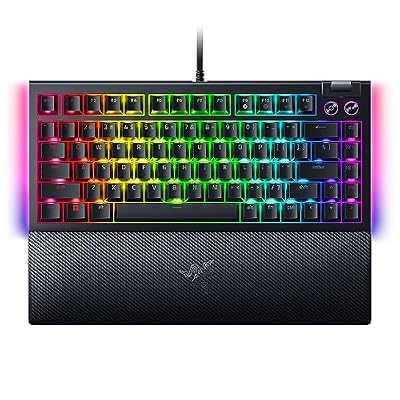
Razer’s entry is wired only, and that focus shows in the spec sheet: Razer specifies polling up to 8,000 Hz over its detachable USB-C cable. This listing ships with Razer Orange Tactile Gen-3 mechanical switches, and the socketed PCB accepts both 3-pin and 5-pin switches, so swapping in a different set later takes minutes and no soldering. The layout keeps Delete, Page Up, Page Down and Insert in the right-hand column, and the board adds a multi-function roller, media keys and a wrist rest in the box. The case pairs a 5052 aluminium-alloy top with an ABS bottom. This is the one for players who sit at one desk, prefer a cable, and like the option to change how their board feels.
Specs
- Layout: 75%, 12.64 × 6.12 × 1.52 in (listed)
- Switches: Razer Orange Tactile mechanical Gen-3, hot-swappable (3-pin and 5-pin)
- Polling: up to 8,000 Hz (Razer specification)
- Connectivity: wired USB-C (detachable cable)
- Extras: multi-function roller, media keys, wrist rest included
ASUS ROG Azoth — the premium wireless custom-style board

The Azoth is the enthusiast option: a gasket-style custom board from a mainstream gaming brand. This listing carries pre-lubed ROG NX Brown mechanical switches on hot-swap sockets, PBT keycaps, an OLED display with a control knob, and tri-mode connectivity — 2.4 GHz wireless, Bluetooth and wired USB — with support for both PC and Mac. It suits players who want one wireless board that feels like a hobbyist build and still covers gaming, work and a second machine over Bluetooth.
Specs
- Layout: 75%, function row, dedicated arrow keys
- Switches: ROG NX Brown mechanical, pre-lubed, hot-swappable
- Connectivity: 2.4 GHz wireless, Bluetooth, wired USB
- Extras: OLED display, control knob, PBT keycaps
- Platforms: PC and Mac
Corsair K65 Plus Wireless — the all-rounder for PC and console

Corsair’s board is the easiest recommendation for mixed setups. It runs pre-lubed MLX Red linear switches on hot-swap sockets, connects over 2.4 GHz Slipstream wireless, Bluetooth or USB, and Corsair publishes up to 266 hours of battery life with the LEDs off and a 1,000 Hz report rate. The Amazon listing names PC, Mac, PS5, PS4, Xbox and iPad as supported platforms, and there is a multi-function rotary dial for volume and shortcuts. Pick this one if the same desk hosts a gaming PC and a console, or if you simply want a quiet, soft-feeling wireless board for gaming and typing alike.
Specs
- Layout: 75%, 81 keys plus rotary dial
- Switches: Corsair MLX Red linear, pre-lubed, hot-swappable
- Connectivity: 2.4 GHz Slipstream wireless, Bluetooth, wired USB
- Battery: up to 266 hours with LEDs off (Corsair figure)
- Platforms: PC, Mac, PS5, PS4, Xbox, iPad (per listing)
Quick questions
Do you lose the F-keys on a 75% keyboard? No. A dedicated F1–F12 row is the defining feature that separates 75% from 60% and most 65% boards.
Is 75% big enough for MMOs? For most players, yes: the F-row, number row and a column of navigation keys cover typical ability layouts. If your binds depend on a numpad block, stay full-size.
Does a smaller keyboard reduce input lag? No. Latency comes from the switch technology, firmware and connection. A 75% board and a TKL with the same internals respond the same; the 75% simply leaves more room for the mouse.
Can you use one for work as well as gaming? Yes — that dual role is the layout’s main selling point, provided your work does not live in spreadsheets.
Verdict
Are 75 percent keyboards good for gaming? Yes — they keep every key most genres need, free up real mouse space, and lose nothing in responsiveness to larger boards with the same switches and connection. The players who should look elsewhere are numpad-dependent users and those who want a wide, spaced-out editing cluster. For everyone else, pick by switch first — Hall effect if you want rapid trigger, mechanical if you want swap-and-tinker freedom — and let the 75% layout handle the desk.









