

A compact ATX case solves a simple problem: a full-size ATX motherboard and a long graphics card, packed into a chassis that does not dominate the desk. The trick is that “compact” means something different for every brand. Some cases shrink the footprint by moving the power supply to the front, others by using a dual-chamber layout, and a few simply trim centimeters off a standard mid-tower. Before buying, check motherboard support, graphics card clearance, radiator support, and how much room is left for cables once everything is installed.
This guide compares five compact ATX cases currently listed on Amazon US. Each takes a standard ATX board but saves space differently, so the right pick depends on whether airflow, silence, a glass showcase look, or a simple build matters most.
As an Amazon Associate we earn from qualifying purchases.
Quick Answer
If you want the strongest all-round compact ATX case, the LIAN LI LANCOOL 207 leads with four pre-installed fans and a layout that pushes cool air straight onto the graphics card. Builders who want a panoramic glass showcase should look at the LIAN LI O11D MINI V2 Flow, while quiet-build fans will prefer the be quiet! Pure Base 501 LX. The NZXT H5 Flow 2024 is the straightforward airflow pick, and the CORSAIR 3000D Airflow is the classic mesh-front option with room for eight 120mm fans.
What Makes a Compact ATX Case Worth Buying
A case earns the “compact ATX” label when it fits a full ATX motherboard in a smaller box than a typical mid-tower, without compromises that hurt the build. Start with the motherboard tray: confirm the case lists ATX support, not just Micro-ATX or Mini-ITX. Some cases also support back-connect ATX boards, which route cables behind the tray for a cleaner look.
Check graphics card clearance next. Modern graphics cards are long and thick, so measure the card and compare it with the clearance the manufacturer lists. Radiator support matters just as much for liquid cooling: a 360mm radiator needs a matching mount, usually at the front or the top, and the mount must not clash with a long graphics card. Power supply length is easy to overlook in a compact chassis, so check the maximum PSU length as well.
Airflow in a small case depends on fan placement more than fan count: bottom intake fans that feed the graphics card directly, a mesh front panel, and a clear exhaust path. Manufacturer dimensions describe the outside of the box; usable space inside depends on the tray layout, cable channel depth, and drive cage placement. For a wider look at full-size towers, our guide to the best ATX PC cases covers larger options that trade desk space for extra clearance.
Comparison at a Glance
| Case | Board Support | Included Fans | Radiator Support | Standout Feature |
|---|---|---|---|---|
| LIAN LI LANCOOL 207 | ATX, Micro-ATX | 2x 140mm ARGB, 2x 120mm PWM | 360mm | Bottom fans feed the GPU directly |
| LIAN LI O11D MINI V2 Flow | ATX, Micro-ATX, Mini-ITX, back-connect ATX | 5x 120mm reverse-blade | 360mm | Panoramic glass, dual-chamber layout |
| be quiet! Pure Base 501 LX | ATX | 4x 140mm Light Wings LX ARGB | 360mm front, 240mm top | ARGB controller and PWM hub included |
| NZXT H5 Flow 2024 | ATX | 2x 120mm | 360mm front, 240mm top | Perforated front panel, clean cable routing |
| CORSAIR 3000D Airflow | ATX | 2x SP120 Elite | 360mm | Mesh front, up to 8x 120mm fan mounts |
1. LIAN LI LANCOOL 207
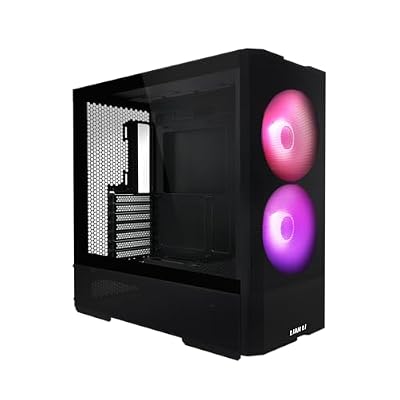
The LANCOOL 207 rethinks the compact interior. It mounts the power supply at the front, rotated 90 degrees, which frees space behind the motherboard tray for cables and shortens the chassis. Two 140mm ARGB fans sit at the front, and two 120mm PWM fans sit under the graphics card, pushing cool air straight onto it. A GPU anti-sag bracket is included, and the tempered glass side panel shows off the build.
Specs
- Motherboard support: ATX, Micro-ATX
- Dimensions: 456mm high, 455.6mm deep, 219mm wide
- Included fans: 2x 140mm ARGB front, 2x 120mm PWM bottom
- Radiator support: 360mm
- Graphics card clearance: up to 410mm
- Front I/O: USB Type-C port
- Side panel: Tempered glass
Who It Is For
This case suits builders who want strong airflow without buying extra fans. The bottom intake layout is a genuine advantage for graphics-card cooling, and the front-mounted PSU keeps cable runs short. It also works well for a first compact build.
Who Should Skip It
Skip it if you want a dual-chamber showcase layout instead of a traditional tower. The front PSU position means power cable routing differs from a standard case, so read the manual before the build.
2. LIAN LI O11D MINI V2 Flow

The O11D MINI V2 Flow is the showcase pick: a dual-chamber case with panoramic glass, a pillar-less corner, and five pre-installed 120mm reverse-blade fans, three at the bottom and two on the side. The bottom fan tray sits at a 10-degree angle, directing intake air toward the graphics card. It supports standard and back-connect ATX boards, and the I/O panel can move between the top and the bottom of the case.
Specs
- Motherboard support: ATX, Micro-ATX, Mini-ITX, back-connect ATX
- Volume: 45.38 liters
- Dimensions: 423.6mm deep, 273.3mm wide, 391.95mm high
- Included fans: 5x 120mm reverse-blade PWM
- Radiator support: 360mm
- Graphics card clearance: up to 400mm
- Expansion slots: 5
- Warranty: 2 years
Who It Is For
This case suits builders who want a glass showcase with serious airflow already installed. The five included fans mean no extra fan purchase is needed for a typical build, and the dual-chamber layout hides the power supply and cables behind the tray. Back-connect motherboard support is a bonus for a cable-free look.
Who Should Skip It
Skip it if your build needs more than five expansion slots. Boards that place the graphics card in the first slot under the CPU may need the included vertical GPU mount, so check your motherboard layout first.
3. be quiet! Pure Base 501 LX

The Pure Base 501 LX is the quiet-build option with lighting included. It ships with four pre-installed Light Wings LX PWM ARGB fans, an ARGB controller, and a PWM hub, so lighting and fan control are handled out of the box. The case keeps the traditional be quiet! layout with a tempered glass side panel and a focus on low noise.
Specs
- Motherboard support: ATX
- Model number: BGW78
- Included fans: 4x Light Wings LX PWM ARGB
- Extras: ARGB controller and PWM hub included
- Radiator support: 360mm front, 240mm top
- Side panel: Tempered glass
Who It Is For
This case suits builders who want a quiet machine that still looks good on a desk. The included controller and hub save the cost and wiring of separate fan control, and the four ARGB fans give the build a finished look without extra purchases.
Who Should Skip It
Skip it if you want a mesh-front airflow tower or a dual-chamber showcase case. The Pure Base 501 LX prioritizes a restrained look and quiet operation over maximum open airflow, so builders chasing the lowest component temperatures should compare it with the mesh-front picks here.
4. NZXT H5 Flow 2024
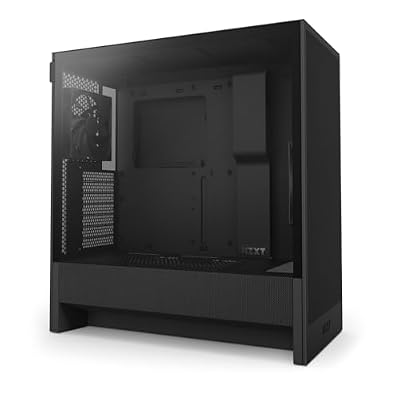
The NZXT H5 Flow 2024 is the straightforward airflow pick. A perforated front panel feeds cool air into the case, two 120mm fans come pre-installed, and the interior keeps NZXT’s cable management channels behind the tray. It supports a 360mm radiator at the front and a 240mm radiator at the top, which covers most liquid cooling setups.
Specs
- Motherboard support: ATX
- Included fans: 2x 120mm
- Radiator support: 360mm front, 240mm top
- Front panel: Perforated high-airflow design
- Side panel: Tempered glass
- Cable management: Built-in routing channels
Who It Is For
This case suits builders who want a simple, proven airflow layout without a complicated interior. The perforated front panel and clear cable channels make the build process easy, and the compact mid-tower size fits on most desks. It suits a first ATX build or a move into a smaller chassis.
Who Should Skip It
Skip it if you want several fans included, because only two come in the box. Builders who want a panoramic glass view or dual-chamber layout should look at the O11D MINI V2 Flow instead.
5. CORSAIR 3000D Airflow

The CORSAIR 3000D Airflow is the classic mesh-front option here. It ships with two SP120 Elite fans, supports up to eight 120mm fans in total, and takes graphics cards up to 360mm long with a four-slot layout. A 360mm radiator fits, and the tempered glass side panel keeps the build visible while the mesh front keeps air moving.
Specs
- Motherboard support: ATX
- Dimensions: 466mm high, 462mm deep, 230mm wide
- Included fans: 2x SP120 Elite
- Fan support: Up to 8x 120mm fans
- Radiator support: 360mm
- Graphics card clearance: Up to 360mm, four-slot support
- Front I/O: 2x USB 3.2 Type-A
- Warranty: 2 years
Who It Is For
This case suits builders who like a traditional mid-tower layout with a mesh front and plenty of fan mounts. The eight fan positions leave room to add cooling later, and the four-slot GPU support handles thick graphics cards. It suits an air-cooled build that may grow over time.
Who Should Skip It
Skip it if your graphics card is longer than 360mm, because the clearance limit is firm. It is also the least compact case here by footprint, so compare its dimensions with the LANCOOL 207 and the O11D MINI V2 Flow first.
How to Measure Before You Buy
Measure three things before ordering. First, the graphics card: measure its length and thickness, then compare both against the clearance the manufacturer lists, remembering that a radiator mounted at the front can eat into that clearance. Second, the CPU cooler: check the maximum cooler height against the cooler you own, and confirm that a top-mounted radiator will not clash with tall memory modules. Third, the desk space: measure the depth and width available, and leave room at the front and rear for cables and airflow. A case that fits the desk but blocks its own intake vents will run hotter than a slightly larger case with clear airflow.
Also confirm the power supply length the case accepts and count the drive mounts you need. Compact cases often carry fewer 3.5-inch bays, so builders with large local storage should check that detail early.
Frequently Asked Questions
Does a compact ATX case fit a full-size ATX motherboard?
Yes, provided the case lists ATX support. All five cases here accept a standard ATX board. Compact refers to the chassis footprint, not the motherboard size, so confirm the ATX listing on the product page before buying.
Can a compact ATX case cool a high-end graphics card?
It can, but fan placement matters more in a small case. Bottom intake fans, a mesh front panel, and a clear exhaust path all help. Check graphics card clearance and radiator support together, because a front radiator can reduce the space for a long card.
Is a dual-chamber case better than a traditional layout?
A dual-chamber layout hides the power supply and cables behind the motherboard tray, which improves the look and can improve airflow. A traditional layout is simpler to build in and usually offers more drive mounts. Neither is better in every build.
What radiator size should I plan for in a compact ATX case?
All five cases here support a 360mm radiator, usually at the front, with several also supporting a 240mm radiator at the top. Confirm the mount location and maximum radiator thickness, because a thick radiator plus fans can clash with memory modules or a long graphics card.
Final Verdict
The best compact PC case ATX for most builders is the LIAN LI LANCOOL 207, thanks to its four included fans, bottom GPU intake, and genuinely compact footprint. Builders who want a glass showcase should pick the LIAN LI O11D MINI V2 Flow, while the be quiet! Pure Base 501 LX suits a quiet build with lighting included. The NZXT H5 Flow 2024 covers straightforward airflow builds, and the CORSAIR 3000D Airflow remains the safe mesh-front choice with room to add fans later. Measure the graphics card, the cooler, and the desk space first, then pick the layout that matches the build.
Product and ASIN Reference
| Product | ASIN |
|---|---|
| LIAN LI LANCOOL 207 | B0DHXWYK4J |
| LIAN LI O11D MINI V2 Flow | B0FDX14YCT |
| be quiet! Pure Base 501 LX | B0DYLHRVKH |
| NZXT H5 Flow 2024 | B0D2MK6NML |
| CORSAIR 3000D Airflow | B0C2JL6PNC |









