Auracast is Bluetooth broadcast audio. It is a feature of Bluetooth LE Audio that lets one transmitter stream audio to an unlimited number of compatible receivers at the same time, with no pairing step. A TV in an airport, a sound system in a gym, or a phone on a run can broadcast a stream, and anyone nearby with Auracast-capable earbuds, headphones, or hearing aids can tune in, much like choosing a radio station.
Auracast is the consumer brand the Bluetooth Special Interest Group gave to broadcast audio in June 2022. It is an open standard built on the LE Audio specifications released in January 2022, which build on Bluetooth Core 5.2 and later. Auracast is not a product, a brand of earbuds, or a subscription service. It is a capability manufacturers can build into phones, earbuds, TVs, and transmitters, and it is still rolling out, so checking for it by name matters more than assuming a new device has it.
As an Amazon Associate, we earn from qualifying purchases.
Table of Contents
- Quick Answer
- What Auracast Is
- How Auracast Works
- Where You Can Use Auracast Today
- What You Need to Use Auracast
- JBL Tour Pro 3
- Samsung Galaxy Buds2 Pro
- Sony WF-1000XM5
- Sennheiser Momentum True Wireless 4
- How to Choose
- Who Should Skip
- Frequently Asked Questions
- Final Verdict
- Product and ASIN Reference
Quick Answer
Auracast is Bluetooth LE Audio broadcast audio: one source streams to unlimited receivers without pairing. You need a transmitter and a receiver that both list Auracast support, usually with Bluetooth 5.2 or later hardware and a firmware update. Venues, TV sharing, and hearing aids are the main uses, and the feature is still rolling out.
What Auracast Is
Classic Bluetooth audio is one-to-one: you pair your phone with your earbuds, and the two talk only to each other. Auracast breaks that pattern: a transmitter sends out an audio stream, and any compatible receiver in range can pick it up. The Bluetooth Special Interest Group defines Auracast as broadcast audio inside the Public Broadcast Profile specification.
Three roles make it work. The transmitter sends the audio: a smart TV, a venue sound system, a laptop, or a phone. The receiver plays it: earbuds, headphones, or LE Audio hearing aids. The assistant, usually a phone or an app, helps you find and select a broadcast. Auracast uses the LC3 codec, which beats the older SBC codec at half the data rate. Public broadcasts are open to anyone in range; private ones need an invitation.
How Auracast Works
Using Auracast is closer to tuning a radio than to pairing Bluetooth. A transmitter starts a broadcast and gives it a name. Your receiver, or the assistant app on your phone, scans for broadcasts nearby. You tap the stream you want. There is no pairing menu, no PIN, and no limit on receivers joining the same public broadcast.
The assistant role is the part most people will actually touch, because earbuds have no screen. Sennheiser’s Smart Control app can act as the Auracast assistant for its Momentum True Wireless 4 earbuds, so even an iPhone user can join an airport TV stream. LE Audio support and Auracast support are not the same thing: Auracast is an optional add-on to the LE Audio specification, so the only reliable check is the specification sheet, which must list Auracast by name.
Where You Can Use Auracast Today
The Bluetooth SIG frames Auracast around public venues first: theaters, cinemas, places of worship, transport hubs, gyms, museums, and arenas can broadcast audio that visitors pick up on their own earbuds or hearing aids. That matters most for assistive listening: a person with hearing loss can receive a venue’s audio directly in their hearing aids.
The everyday use is simpler and already works: two people can share what one phone is playing, each on their own earbuds, without a splitter cable. A gym can broadcast a muted TV’s audio to members’ earbuds. A family can connect several sets of earbuds to one TV, as Samsung did with the Buds2 Pro and its 2023 TVs. The rollout is early, so confirm that a venue actually broadcasts before buying gear for it.
What You Need to Use Auracast
You need three things. First, a transmitter: a phone, a TV, or a dedicated transmitter such as the JBL Tour Pro 3 charging case. Second, a receiver: earbuds, headphones, or hearing aids that list Auracast support. Third, an assistant, usually a phone or its companion app, to find the broadcast.
Firmware updates are the practical catch. The Sony WF-1000XM5 only gained Auracast in its firmware 6.0.0 update, and Sony warns you must delete the old pairing and pair again after installing it. The Sennheiser Momentum True Wireless 4 is firmware-update-only too. Phone support is uneven: Android is ahead, with recent Pixel, Samsung Galaxy, and OnePlus models supporting LE Audio and Auracast sharing, while Apple’s Bluetooth stack has not broadly supported Auracast.
JBL Tour Pro 3
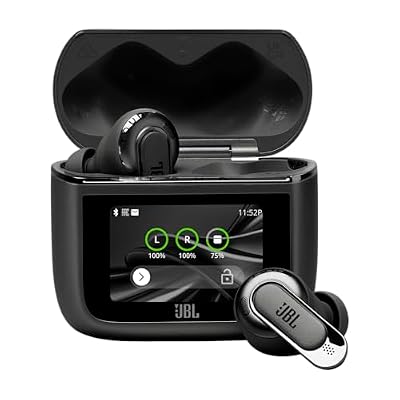
The JBL Tour Pro 3 is the only pick here that is a transmitter as well as a receiver. Its Smart Charging Case works as a transmitter dongle: connect it to any AUX or USB-C source, such as a TV or an in-flight entertainment system, and it streams the audio to the earbuds. An Auracast button on the case lets you share that audio with nearby Auracast devices. The earbuds run Bluetooth 5.3 with LE Audio, with Auracast via an over-the-air update, dual drivers, Spatial 360 sound, adaptive noise cancelling, and up to 44 hours of playback.
| Spec | Detail |
|---|---|
| Bluetooth | 5.3 with LE Audio |
| Auracast | Yes, via Smart Charging Case and OTA update |
| Drivers | Dual drivers per earbud |
| Noise cancelling | Adaptive noise cancelling |
| Playback | Up to 44 hours with case |
| Charging | Wireless charging, USB-C |
| ASIN | B0D3633DVB |
Samsung Galaxy Buds2 Pro

The Galaxy Buds2 Pro were the first major earbuds to get Auracast. Samsung’s August 2023 software update added Auracast to the Buds2 Pro and its 2023 Neo QLED 8K and MICRO LED TVs. With the update, a TV can broadcast to several sets at once. The earbuds also offer 360 Audio, active noise cancelling, Hi-Fi sound, and IPX7 water resistance. Auracast here is a receiver feature: the Buds tune in to broadcasts from a Samsung TV or another transmitter. The limitation is the ecosystem: the TV use case needs a compatible Samsung TV with its own update installed.
| Spec | Detail |
|---|---|
| Bluetooth | 5.3 with LE Audio |
| Auracast | Yes, receiver, via software update from September 2023 |
| Audio | 360 Audio, Hi-Fi sound |
| Noise cancelling | Active noise cancelling |
| Water resistance | IPX7 |
| ASIN | B0B2SH4CN6 |
Sony WF-1000XM5
The Sony WF-1000XM5 gained Auracast late. Firmware 6.0.0 added Audio Sharing with Fast Pair, powered by Auracast. With a compatible Android phone, you can pair two sets of headphones to one source, or set up a private broadcast others join by scanning a QR code. The earbuds are Sony’s flagship true wireless model, with LDAC, active noise cancelling, and up to 24 hours of battery life with the case. Two caveats: you must delete the old pairing and pair again after the update, and if your phone lacks LE Audio and Auracast, the earbuds cannot share audio on their own.
| Spec | Detail |
|---|---|
| Bluetooth | LE Audio with LC3 |
| Auracast | Yes, receiver and broadcast, via firmware 6.0.0 |
| Codecs | LDAC, SBC, AAC, LC3 |
| Noise cancelling | Active noise cancelling |
| Playback | Up to 24 hours with case |
| Water resistance | IPX4 |
| ASIN |
Sennheiser Momentum True Wireless 4

The Momentum True Wireless 4 is the pick for people who want the assistant role handled properly. Sennheiser’s Smart Control app (version 4.9.0 and later) enables Auracast assistant and transmitter modes, and the earbuds gain Auracast and LE Audio through a firmware update. The app works as the assistant even on an iPhone, so an owner can join an airport TV stream. The earbuds run Bluetooth 5.4 with SBC, AAC, aptX, aptX Adaptive and aptX Lossless, plus LC3, adaptive noise cancelling, and up to 30 hours of playtime.
| Spec | Detail |
|---|---|
| Bluetooth | 5.4 with LE Audio |
| Auracast | Yes, receiver, via firmware update; assistant via app |
| Codecs | SBC, AAC, aptX, aptX Adaptive, aptX Lossless, LC3 |
| Noise cancelling | Adaptive noise cancelling |
| Playback | Up to 30 hours with case |
| ASIN | B0CTHVX6DK |
How to Choose
Start with the role you need. If you want to create broadcasts, you need a transmitter, and only the JBL Tour Pro 3 charging case does that job. If you only want to receive broadcasts, any of the four works. Check the specification sheet for the word Auracast, and do not accept LE Audio as a substitute: Auracast is an optional feature on top of it. Match the pick to your phone: Samsung’s TV sharing works best inside Samsung’s ecosystem, Sony’s sharing needs a compatible Android phone, and Sennheiser’s app assistant is most forgiving for iPhone owners.
Who Should Skip
Skip Auracast gear if your phone is an iPhone and you do not want to rely on a companion app. Skip it if you expect nearby venues to broadcast already, since most have not installed transmitters yet. Skip the transmitter if you only listen alone at a desk. And skip any earbuds that list LE Audio but not Auracast if broadcast audio is the reason you are buying: without the Auracast name, the feature is not there.
Frequently Asked Questions
Does Auracast work with any Bluetooth earbuds?
No. Auracast needs Bluetooth LE Audio hardware, generally Bluetooth 5.2 or later, plus Auracast support itself, an optional part of the LE Audio specification. Older earbuds and LE Audio devices without it cannot tune in.
Do I need a special app to use Auracast?
Usually, yes, because earbuds have no screen. An assistant, usually a phone or its companion app, finds nearby broadcasts for you. The JBL Tour Pro 3 charging case has its own screen and button.
Is Auracast free to use?
Yes. Auracast is an open standard from the Bluetooth Special Interest Group, not a subscription. There is no fee to join a public broadcast, and no account is needed.
Does Auracast replace Bluetooth pairing?
For broadcasts, yes: you tune in to a public stream without pairing, the way you tune a radio. For ordinary listening, no: your phone and earbuds still connect by normal pairing.
Final Verdict
Auracast is a real and useful change to Bluetooth audio, but it is a feature to buy into deliberately, not one to assume. One transmitter can feed unlimited receivers with no pairing, and the same technology can also carry assistive listening in a theater. For most buyers, the JBL Tour Pro 3 is the most practical first Auracast product, because its case is a transmitter. The Galaxy Buds2 Pro fits Samsung’s TV ecosystem, and the Sennheiser Momentum True Wireless 4 has the friendliest assistant for iPhone owners. Confirm Auracast on the specification sheet, install the firmware update, and buy the earbuds for their sound first.