

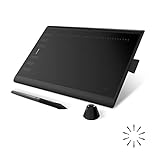
- Top Pick: HUION Inspiroy H1060P Graphics Drawing Tablet, 10 x 6.25 in, 12+16 Hot Keys | 8192 Pressure Levels, Battery-Free Stylus, Digital Art Tablet Works with Mac, Windows PC and Android
- Best Value: Frunsi RubensTab T11 Pro standalone Drawing Tablet | No Computer Needed,10.1 inch FHD Display,Octa-Core CPU,Pre-Installed Drawing Apps, Tutorials for Beginners, Artists, Students
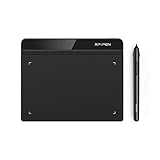
- Premium Choice: Drawing Tablet XPPen StarG640 Digital Graphic Tablet 6×4 Inch Art Tablet with Battery-Free Stylus Pen Tablet for Mac, Windows and Chromebook (Drawing/E-Learning/Remote-Working)
Setting a ceiling of under 100 dollars on a drawing tablet changes the question from which one is the most capable to which compromise you can live with. At this level you are choosing between three different kinds of device: a plain pen tablet that plugs into a computer and has no screen, a standalone slate with its own display, and tiny pads built for note-taking or rhythm games. Each has a distinct feel, and the wrong match leads to a drawer-bound purchase.
This 2026 comparison covers eight models, from a 4-inch pad up to 10-inch active areas, plus two standalone options with built-in displays. Two listings from the same search were dropped: a set of children’s LCD doodle boards, which are not graphics tablets, and a laminated pen display with a 15.6-inch screen that belongs to a different class of product. Everything below is drawn from the specs in the titles, so use it to narrow your list and then verify driver and operating system support for your own setup.
Quick Picks
As an Amazon Associate we earn from qualifying purchases at no extra cost to you.



| Product | Best for | Key spec from the title |
|---|---|---|
| HUION Inspiroy H1060P | Roomy desktop sketching | 10 x 6.25 in, 8192 levels, 28 hot keys |
| Frunsi RubensTab T11 Pro | Drawing without a computer | 10.1 inch FHD display, octa-core CPU |
| XPPen G640 | Small desks and e-learning | 6×4 inch, battery-free stylus |
| XOPPOX Graphics Drawing Tablet | Painting and online teaching | 10×6 inch, 8192 levels, 12 hot keys |
| Frunsi T8 Standalone | Portable beginner kit | 8 inch, standalone, octa-core CPU |
| UGEE M708 | High-pressure sensitivity | 10×6 inch, 16384 levels, 8 hot keys |
| HUION H420X | Rhythm games and signatures | 4.17×2.6 in, 8192 levels |
| GAOMON S620 | Light, portable sketching | 6.5×4 in, 4 hot keys, ultra-slim |
How to Choose
Pen Tablet or Standalone Slate
A pen tablet is a flat pad that connects to a computer and mirrors your pen movements on the monitor. You look at the screen, not your hand, and that takes a few days to master. A standalone tablet has its own display, so the learning curve is gentler, but the internal hardware limits what apps you can run. Pick a pen tablet if you have a PC or Mac and want to use full drawing software, and a standalone slate if you want to draw anywhere without a computer.
Active Area and Desk Space
Active area is the part of the pad that responds to the pen. Around 10×6 inches is the comfortable zone for most drawers, because your wrist moves naturally across it. A 6×4 inch pad fits a laptop bag and works well for signatures and light sketching, but wider strokes feel cramped. Anything near 4×2.6 inches is best for note-taking or games. Match the active area to your monitor: a large area on a small monitor can feel overly sensitive, while a very small pad on a large monitor makes lines jumpy.
Pressure Levels and Stylus Type
Pressure levels describe how many steps of line thickness a pen can register. 8192 is the common baseline at this level, and 16384 appears on a few models. Higher numbers help with smooth tapers, though real-world differences are subtle, so do not lean on the number alone. A battery-free stylus is easier to live with, because there is nothing to charge or replace. Look for a pen that does not need a battery and a spare set of nibs in the box.
Compatibility and Shortcut Keys
Check that the tablet lists your operating system. Mac, Windows, Linux, Android, and Chromebook support differ between models. Hot keys are useful if you assign undo, brush size, or eraser to them, but a pad with 12 or 16 keys can feel cluttered if you only need four. Ignore long marketing lists of included software unless they name the programs, and remember that a smaller pad with fewer keys can be cleaner for travel.
The 8 Best Options
HUION Inspiroy H1060P
A 10 x 6.25 inch graphics pad with 8192 pressure levels, a battery-free stylus, and 12+16 hot keys. The title lists support for Mac, Windows PC, and Android, which makes it flexible for a home studio or a student with several devices.
- Strength: large active area gives the wrist space to move.
- Strength: a generous hot key count lets you assign common shortcuts.
- Trade-off: the size and key count take desk space, and the pad is not made for backpack travel.
Skip it if you have a tiny desk or only need quick signatures. It suits a hobbyist who wants a roomy, desktop-style drawing surface for digital art.
Frunsi RubensTab T11 Pro
A standalone drawing tablet that needs no computer, with a 10.1 inch FHD display, an octa-core CPU, pre-installed drawing apps, and tutorials for beginners. It is aimed at artists and students who want to draw right away.
- Strength: built-in display means you can see your lines under the pen.
- Strength: tutorials and pre-installed apps ease the first sessions.
- Trade-off: a standalone device has its own limits on software, unlike a pad tied to a full computer.
Skip it if you already own a computer and want to use professional software. It suits beginners who dislike looking at one screen while drawing on another.
XPPen G640
A compact 6×4 inch pen tablet with a battery-free stylus, listed for Mac, Windows, and Chromebook. The title mentions drawing, e-learning, and remote working, which makes it a flexible small pad for school and office tasks.
- Strength: small footprint fits a crowded desk or a laptop bag.
- Strength: Chromebook support is a useful extra for students.
- Trade-off: a 6×4 inch area feels tight for large canvases.
Skip it if you plan long, detailed paintings. It suits annotating documents, signing forms, and teaching remotely, and it also works as an entry-level art pad for anyone who wants to learn the pen-and-monitor habit before committing to a larger surface.
XOPPOX Graphics Drawing Tablet
A 10×6 inch pen tablet with a battery-free stylus, 8192 pressure levels, and 12 hot keys. It lists PC, Mac, and Android compatibility and calls out painting, design, and online teaching.
- Strength: large active area at an entry-level spec set.
- Strength: PC, Mac, and Android support in one listing.
- Trade-off: the title says little about driver support or warranty, so confirm those details first.
Skip it if a well-known brand and a clear driver download page matter to you. It suits teachers and students who want a wide pad for lessons, whiteboard-style explanations, and casual sketches, with Android phones and tablets on the compatibility list as a bonus.
Frunsi T8 Standalone
An 8 inch standalone drawing tablet that needs no computer, with an octa-core CPU, pre-installed drawing apps, tutorials, and bonus items for beginners, artists, and students. It suits younger creators who want everything in one package.
- Strength: a bundle of apps, tutorials, and extras reduces setup friction.
- Strength: 8 inch display size is easier to carry than a 10-inch slate.
- Trade-off: small screens limit detailed work.
Skip it if you want a pad that runs full desktop software, or if you need a screen larger than 8 inches for detailed work. It suits first-time drawers who want a portable, ready-to-draw device they can hand to a student without installing anything.
UGEE M708
A 10×6 inch pen tablet with 8 hot keys and a passive stylus rated for 16384 pressure levels, marketed for digital drawing, sketching, and design. The passive stylus needs no battery.
- Strength: the 16384 level spec leads this list on paper.
- Strength: a large active area with a modest eight keys keeps the layout tidy.
- Trade-off: the title lists PC only, so check support for Mac or Android.
Skip it if you use a Chromebook or tablet. It suits PC-based artists who want sensitivity and a large work area, particularly people who like to vary line weight in inking and lettering.
HUION H420X
A tiny 4.17×2.6 inch tablet with 8192 pressure levels and a battery-free stylus, the smallest pad on this list, aimed at osu! gaming, design, drawing, teaching, and work on PC, Mac, Linux, and mobile devices.
- Strength: very small size travels easily and suits fast rhythm-game movements.
- Strength: broad compatibility covers Linux and mobile.
- Trade-off: the small area is unsuitable for illustration.
Skip it if you want to paint or draw large pieces, because the pad is built for small, quick movements. It suits osu! players, people who sign documents digitally, and anyone who wants a pocket-sized pad for quick notes and annotations on a laptop or phone.
GAOMON S620
A 6.5×4 inch ultra-slim pad with 8192 pressure levels, four hot keys, and a battery-free stylus, aimed at beginners, students, and creators in digital art, note-taking, and osu!
- Strength: slim, portable body fits a backpack.
- Strength: four hot keys keep the layout simple for beginners.
- Trade-off: the working area is modest for large illustrations.
Skip it if you want many shortcut keys or a larger canvas than 6.5×4 inches. It suits students who need a slim, portable pad for notes and light sketches, and beginners who prefer a simple layout with only four keys to learn.
Which One Fits Your Situation
Learning Digital Art on a Desktop PC
The HUION Inspiroy H1060P offers a roomy pad and many hot keys, while the UGEE M708 adds a high pressure level spec. Either gives a comfortable wrist space.
Drawing Without a Computer
The Frunsi RubensTab T11 Pro, with its 10.1 inch display, is the larger option and its tutorials suit total beginners. The Frunsi T8 trades screen size for portability, which helps if the tablet will travel in a school bag.
Teaching or Studying Online
The XPPen G640 and XOPPOX Graphics Drawing Tablet both mention e-learning and online teaching. The XPPen is smaller, and the XOPPOX is wider.
Games and Quick Notes
The HUION H420X and GAOMON S620 are small and portable, with osu! support noted in both titles. The H420X is the tiniest of the group, while the S620 gives a little more room for sketching.
Common Mistakes
- Buying a pad that is too small for your drawing style, then feeling cramped.
- Expecting a pen tablet to show your lines under the pen, as a display tablet would.
- Chasing the highest pressure level number while ignoring pen comfort and driver support.
- Overlooking operating system compatibility, especially for Chromebook, Linux, or Android.
- Assuming a standalone slate can run every program found on a computer.
Frequently Asked Questions
Can I draw directly on these tablets?
Pen tablets with no screen are used by looking at the monitor, not your hand. Only the standalone options have a built-in display you draw on directly.
Do I need a battery-powered pen?
No. Several models list battery-free styluses, which never need charging. That is a convenience at this level.
Which active area is right?
Around 10×6 inches is comfortable for most drawing. Smaller 6×4 inch pads suit travel and note-taking.
Will it work with a Chromebook or phone?
Some do. The XPPen G640 lists Chromebook support, and the HUION H420X lists mobile compatibility, while the HUION Inspiroy H1060P and XOPPOX name Android. Verify any model against your device before purchase, since driver support can differ.










