Our Short List of 3

- Best for: High-refresh console players who want the strongest USB capture ceiling.
- Capture up to 4K144 from the Amazon listing title
- HDMI 2.1 with VRR and HDR10
- USB 3.2 Gen 2 connection
- Listed for PS5, Xbox Series X|S, Nintendo Switch 2, PC, Mac, and iPad

- Best for: Creators who want real 4K60 capture from an external USB-C card.
- 4K60 capture from the Amazon listing title
- 1440p120 or 1080p240 passthrough and capture listed
- HDR10 and VRR support
- USB-C connection with near-zero latency stated

- Best for: Permanent desktop and dual-PC streaming builds.
- Internal PCIe capture card from the Amazon listing title
- 8K60 passthrough and 4K60 HDR10 capture
- HDMI 2.1 and VRR support listed
- Ultra-low latency stated in the listing
All 5 Picks at a Glance
| Product | Specs | Action |
|---|---|---|
| Elgato 4K X |
| Check price on Amazon |
| Elgato 4K S |
| Check price on Amazon |
| Elgato 4K Pro |
| Check price on Amazon |
 AVerMedia Live Gamer Ultra 2.1 |
| Check price on Amazon |
 AVerMedia Live Gamer Extreme 3 |
| Check price on Amazon |
Cyber Monday is a tempting moment to buy a capture card, yet the real decision is not which listing shouts loudest in a crowded sale. It is whether capture resolution, passthrough, and connection type match the console, display, and computer you already own. Choose wrongly and you either cap your gameplay, lose a feature your monitor supports, or pay for headroom you never use.
This roundup is for console streamers, dual-PC creators, and PC players who record high-refresh gameplay for channels, clips, and archives. Every model below was selected from its Amazon listing title and stated specifications, covering USB and PCIe designs, practical 1440p streaming, and full 4K capture for current consoles, so each recommendation maps to a distinct setup rather than repeating the same card.
Quick Picks
As an Amazon Associate we earn from qualifying purchases
| Product | Best for | Key spec from title |
|---|---|---|
| Elgato 4K X | High-refresh console capture | Capture up to 4K144, HDMI 2.1, USB 3.2 Gen 2 |
| Elgato 4K S | 4K60 capture over USB-C | 4K60, 1440p120, or 1080p240 passthrough and capture |
| Elgato 4K Pro | Internal dual-PC builds | 8K60 passthrough, 4K60 HDR10 capture, PCIe |
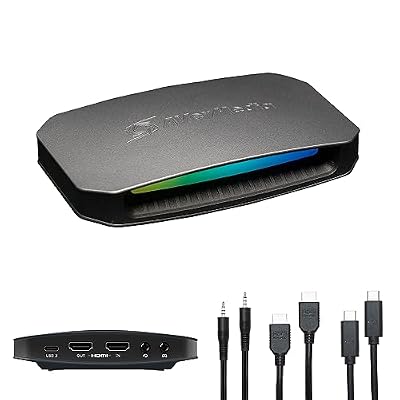
| AVerMedia Live Gamer Ultra 2.1 | HDMI 2.1 USB capture | 4K144 passthrough, HDR and VRR support |
| AVerMedia Live Gamer Extreme 3 | Plug-and-play 4K streaming | 1440p120 capture, 4K capture card for streaming |
How to Choose
Resolution and Frame-Rate Passthrough
Passthrough decides what you see on your gaming display while the card records something else, and confusing the two figures is the most common buying error. A card can pass 4K at a high refresh rate while capturing at a lower one, which is fine if your audience watches at 1080p. If you publish 4K video, capture resolution matters more. Match both numbers to your console output, monitor, and recording target before comparing anything else during the sale, because a headline figure alone never tells the whole story.
USB or PCIe Connection
External USB cards sit between console and display, travel easily between rooms, and suit laptops or compact desks. They depend on a fast, unshared USB port and the correct cable, so check the generation stated in the listing. Internal PCIe cards live inside a desktop, free up desk space, and can suit permanent dual-PC rigs, but they need a suitable slot and a Windows desktop. Neither format is automatically faster; the stated capture modes and your machine decide that, along with how permanently the streaming desk stays assembled.
Platform Compatibility
Start with the source, not the software logo. PlayStation, Xbox, and Switch models output different resolutions and refresh combinations, and features such as variable refresh rate or HDR may behave differently on PC and Mac. Confirm that your console, operating system, and display all appear in the listing details. Also check whether HDR capture is limited to one operating system, because a card that records HDR on Windows may only handle standard range on a Mac, which would change the footage you expected to publish.
Software and Encoding Demands
Most modern cards appear as a video source in OBS and similar applications, but capture is only half the workload. Your computer still handles compositing, encoding, and uploading unless a workflow shifts that burden elsewhere. A stronger graphics card helps with high-resolution encoding, while storage speed matters for long 4K recordings. Read the listed system requirements carefully, leave headroom above the minimum, and plan your recording format before the card arrives, not during your first live session, when changing encoders mid-stream can disrupt viewers and recordings alike.
The Best Cyber Monday Options
Elgato 4K X
- Best for: High-refresh console players who want the strongest USB capture ceiling.
- Capture up to 4K144 from the Amazon listing title
- HDMI 2.1 with VRR and HDR10
- USB 3.2 Gen 2 connection
- Listed for PS5, Xbox Series X|S, Nintendo Switch 2, PC, Mac, and iPad
High-refresh console players who want the strongest USB capture ceiling.
Full performance needs a USB 3.2 Gen 2 port; a slower port can reduce capture resolution.
The 4K X is aimed at players whose displays run well beyond standard 4K at sixty frames. Its Amazon title leads with capture up to 4K144, HDMI 2.1, VRR, and HDR10, making it the clearest fit here for PlayStation, Xbox, and Switch 2 owners chasing high-refresh passthrough. USB 3.2 Gen 2 connectivity keeps it external and portable, although that port requirement deserves attention on older laptops. For creators recording fast console gameplay without moving to an internal card, this is the most forward-looking USB option in the group.
Elgato 4K S
- Best for: Creators who want real 4K60 capture from an external USB-C card.
- 4K60 capture from the Amazon listing title
- 1440p120 or 1080p240 passthrough and capture listed
- HDR10 and VRR support
- USB-C connection with near-zero latency stated
Creators who want real 4K60 capture from an external USB-C card.
Check the exact mode you plan to use, since capture and passthrough combinations vary by resolution.
Elgato positions the 4K S as an external card for PS5, Xbox Series X|S, Switch 2, PC, Mac, and iPad, with 4K60 capture at its centre. The listing also highlights 1440p120 and 1080p240 modes, HDR10, VRR, USB-C, and near-zero latency, giving it flexibility across cinematic and competitive games. That spread makes it easier to justify than a card built around one mode. If you want genuine 4K recording without installing hardware inside a desktop, the 4K S is the balanced choice in this roundup.
Elgato 4K Pro
- Best for: Permanent desktop and dual-PC streaming builds.
- Internal PCIe capture card from the Amazon listing title
- 8K60 passthrough and 4K60 HDR10 capture
- HDMI 2.1 and VRR support listed
- Ultra-low latency stated in the listing
Permanent desktop and dual-PC streaming builds.
It needs a suitable free PCIe slot and a Windows desktop, so it does not suit laptops.
The 4K Pro takes the internal route, installing in a PCIe slot rather than sitting on the desk. Its listing promises 8K60 passthrough alongside 4K60 HDR10 capture, ultra-low latency, and support for single and dual-PC setups. That combination suits a fixed streaming room where a gaming machine feeds a separate recording computer. Because it is Windows PC hardware, laptop and Mac users should look at the USB models instead. For a permanent desktop build, however, the 4K Pro offers the cleanest high-end installation here.
AVerMedia Live Gamer Ultra 2.1
- Best for: Console creators who prefer AVerMedia hardware and need HDMI 2.1 features.
- Model GC553G2 Live Gamer Ultra 2.1 from the Amazon listing
- HDMI 2.1 capture card with VRR support
- HDR 4K capture listed
- Listed for Xbox Series X|S, PS5, Xbox One, PS4, and Nintendo Switch
Console creators who prefer AVerMedia hardware and need HDMI 2.1 features.
Confirm your display and console settings support the VRR and HDR modes you intend to record.
AVerMedia’s Live Gamer Ultra 2.1, model GC553G2, is another HDMI 2.1 design built around current consoles. Its listing emphasises VRR support and HDR 4K capture for Xbox Series X|S, PS5, earlier consoles, and Nintendo Switch, while the wider product details point to 4K144 passthrough. USB connectivity keeps installation simple for creators who move between a desk setup and another room. Compared with the Elgato USB cards, it gives AVerMedia users a direct route into high-refresh capture without changing their preferred software ecosystem.
AVerMedia Live Gamer Extreme 3
- Best for: Streamers who want 1440p120 capture and simple USB setup.
- Model GC551G2 Live Gamer Extreme 3 from the Amazon listing title
- 1440p120 video capture listed
- 4K capture card for streaming, per the listing title
- Listed for PS5, Xbox Series X|S, Nintendo Switch, and PC
Streamers who want 1440p120 capture and simple USB setup.
It is not the pick for creators who specifically need the highest 4K capture modes above.
The Live Gamer Extreme 3, model GC551G2, focuses on straightforward streaming rather than the highest capture ceiling. AVerMedia’s Amazon title highlights 1440p120 video capture and compatibility with PS5 and PS5 Pro, Xbox Series X|S, Nintendo Switch, and PC, plus Twitch, OBS, Windows, and Mac. That 1440p mode is a practical middle ground for creators whose monitors run above 1080p but whose published video does not need 4K files. As a plug-and-play USB device, it also suits a first dedicated capture setup.
Which One Fits Your Situation
You Play on a High-Refresh Console Display
Choose the Elgato 4K X or the AVerMedia Live Gamer Ultra 2.1 when passthrough is your priority. Both are HDMI 2.1 USB designs aimed at current consoles and high-refresh play. The Elgato title emphasises capture up to 4K144, while the AVerMedia card stresses HDR capture and VRR support. Either approach protects the experience on your gaming screen while still feeding a recording or stream to your computer.
You Want 4K Recordings Without Opening Your PC
The Elgato 4K S fits this situation most directly because it pairs 4K60 capture with an external USB-C connection. It works across the listed consoles and computers, including Mac and iPad, so a laptop-based creator can build around it. Its high-frame-rate alternatives at lower resolutions also help when a competitive game feels better at 1440p or 1080p than in a 4K mode.
You Run a Dedicated Dual-PC Streaming Desk
Pick the Elgato 4K Pro if your streaming computer is a desktop with a free PCIe slot. An internal card keeps cables and desk hardware tidier in a permanent installation, and its 4K60 HDR10 capture suits a separate recording machine. The 8K60 passthrough figure gives a high-refresh or high-resolution gaming PC room to pass its signal through while the second system handles the broadcast workload.
You Mainly Stream at 1440p or 1080p
The AVerMedia Live Gamer Extreme 3 is the sensible match when 1440p120 capture already exceeds what your channel publishes. It covers the major current consoles, works with OBS, and avoids forcing you into a desktop-only internal card. Creators publishing mainly at 1080p can use the extra capture headroom for cleaner downscaling, while keeping the setup external and easy to move between computers.
How to Shop Cyber Monday Deals
Cyber Monday rewards preparation more than speed. Before the event window tightens, write down the exact model name and code for the card you want, because similar names can hide different capture limits. Elgato alone sells several cards in this roundup whose titles look alike at a glance, yet their passthrough, capture modes, and connection types differ in ways that matter once the box is open.
Always check the current price on Amazon before buying, even if you saw a figure quoted earlier in the day. Prices move during the event, listings change, and a card can return to a different figure between your first look and checkout. Treat any price you remember as a starting point for comparison, never as a promise of what the checkout screen will show.
Compare the same model across the event window rather than comparing unrelated cards by headline numbers alone. Open the exact listing, confirm the model code and ASIN, and recheck the stated capture and passthrough modes before ordering. If the listing details do not match the card you researched, pause and find the correct model instead of assuming a naming variation is harmless.
Common Mistakes
- Confusing passthrough resolution with capture resolution, then discovering recordings are lower quality than expected.
- Buying a PCIe card for a laptop, or overlooking whether a desktop has a suitable free slot.
- Plugging a fast USB card into a slow port or using an unsuitable cable, limiting its stated modes.
- Ignoring operating system limits for HDR capture, especially when moving between Windows and Mac.
- Ordering a similarly named model without checking its model code, ASIN, and listed specifications.
Frequently Asked Questions
Do I need HDMI 2.1 in a capture card?
Only if your console and display use the higher refresh or resolution modes that HDMI 2.1 enables, and you want those modes preserved in passthrough. Players gaming at 1080p or standard 4K at sixty frames can use an HDMI 2.0 card happily. The deciding factor is your screen and source, not the newest label.
Can one capture card work with both console and PC sources?
Often, yes, provided the source outputs an unencrypted HDMI signal and the card lists that platform. The models above cover combinations of PlayStation, Xbox, Switch, and PC, but check the individual listing for your exact machine. A dual-PC setup also needs the gaming computer’s HDMI output routed into the card installed in, or attached to, the streaming computer.
Why does my USB capture card not reach its highest mode?
The port, cable, and selected software settings all have to support that mode. A card listed for a faster USB generation may reduce capture resolution on a slower connection, and capture applications can default to a safer setting. Use the cable supplied where possible, connect directly to a suitable port, and then select the intended resolution inside your recording software.
Should I choose 4K capture or higher frame rates?
Choose 4K capture for detailed single-player recordings and videos viewers will watch on large screens. Choose higher frame rates at 1440p or 1080p for fast competitive games where motion clarity matters more than pixel count. Many creators stream at the lower resolution and still benefit from high-refresh passthrough, so let your published format decide.