- Top Pick: PowerA Twin Charging Station for Dualsense Wireless Controllers, Dualsense Controller Charging, Charge, Sony PlayStation, PS5, Officially Licensed – PlayStation 5
- Best Value: PS 5 Controller Charger Station Compatible with PlayStation 5 Dual Controller, 9 Lightings PS 5 Accessories Charging Station, PS 5 Dock Stand with LED Indicator & On-Off Switch for PlayStation 5 Cases
- Premium Choice: OIVO PS5 Controller Charger with Fast Charging AC Adapter, PS5 Controller Charging Station Stand for PlayStation 5, Docking Station Replacement for PS 5 Accessories Kits
Nothing ends a ranked match like a DualSense that dies mid-round, and the stock USB cable tethers you to the console while you play. A dedicated charging station solves that by giving controllers a home: set one down, and the next session starts with a full battery instead of a hunt for a cable. The decision is less about brand than about how many controllers you juggle, whether you own the standard pad or the Edge, and how much shelf space you can spare.
Every pick below is built around PlayStation 5 DualSense controllers, so Xbox and Switch owners should look elsewhere. This roundup compares ten docks, from a single-slot officially licensed unit to dual-controller stands with lighting and one console cooling stand that adds charging on the side. The text sticks to what each listing states, which is a safer guide in 2026 than marketing adjectives.
Quick Picks
As an Amazon Associate we earn from qualifying purchases at no extra cost to you.




| Product | Best for | Key spec from the title |
|---|---|---|
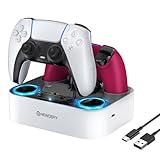
| PowerA Twin Charging Station | Licensed dual dock | Officially licensed, two DualSense |
| 9-Light LED Dual Charger | Lit-up desk setups | 9 lightings, dual dock stand |
| OIVO Fast-Charging Dock | Included power adapter | Fast charging AC adapter |
| NEWDERY Dual Dock | Edge owners | DualSense Edge compatible, cable |
| OIVO RGB Dock | Standard plus Edge pads | RGB, DualSense and Edge |
| 9-Color LED Charger Stand | Color-coded status | 9 color LED, fast charging dock |
| PowerA Solo Station | Single controller, white | Solo dock for DualSense |
| Drop-and-Charge Dual Dock | Compact shelves | Space-saving dual charging dock |
| PS5 Stand and Cooling Station | Console stand plus charging | Cooling stand, LED, charging |
| Dual Stand Charger Dock (M) | Simple two-pad charging | Dual stand charger dock |
How to Choose
Match the dock to your controller
The standard DualSense and the DualSense Edge have different shapes, so check the listing for the word Edge. Some titles name both; others name only the standard pad. If a dock does not mention Edge, assume the Edge may not seat properly in the cradle.
One slot or two
Solo docks suit a single player. Households with two pads, or anyone rotating a spare so one is always full, should pick a dual dock. Skip three-slot hype; two charging bays cover nearly every couch setup, and a spare battery routine matters more than extra bays.
Power source and speed
Docks that ship with their own AC adapter or a cable let you plug into a wall outlet or USB port. A listing that mentions fast charging suggests a stronger supply, though the title rarely gives amperage. Cheaper models may lean on a console USB port, which stops working when the console is fully off or unplugged, so look for a dock that names its own adapter.
Lights, stability, and footprint
RGB and LED strips look good but do not charge faster. Prioritize a weighted base and a snug cradle so a pad does not slip loose and miss the contacts. Measure the shelf: stand-style docks are taller than flat ones, and a console stand with a cooling fan needs room near vents.
The 10 Best Options
PowerA Twin Charging Station for DualSense
This is the officially licensed pick, and the Twin label means two slots. It suits buyers who prefer a recognizable accessory brand with Sony licensing noted right in the title. A pair of players sharing a console can park both controllers in one spot, and the dock keeps them upright and off the table. Because the title carries the licensing note, it also appeals to parents buying a gift who want a name they can verify.
- Strength: official licensing gives reassurance about fit with the DualSense.
- Strength: two charging bays handle a full co-op session.
- Trade-off: the title does not mention Edge support or lighting.
Skip it if you own an Edge controller or want a glowing dock.
9-Light LED Dual PS5 Charger Station
This unbranded dock adds nine lighting modes to a dual-slot stand, aimed at buyers who want their desk to glow while pads recharge. The title calls it a PS5 accessory for a dual controller setup. It fits players who care about aesthetics and want visible charging cues from across the room.
- Strength: nine lighting options let you match an existing RGB desk.
- Strength: dual slots cover two pads at once.
- Trade-off: no licensing is stated, and the name gives little detail about charging speed.
Skip it if you want a plain dock without lights or a named brand.
OIVO PS5 Controller Charger with Fast Charging AC Adapter
OIVO highlights an included AC adapter, which is the real draw here. Instead of borrowing a console port, the stand plugs into the wall. The title calls it a charging station stand for the PlayStation 5, so it suits a bedroom or living room where the console sits far from the couch, or a setup where the front USB ports are already taken by a headset and a drive.
- Strength: the bundled adapter means charging does not depend on the console being awake.
- Strength: fast charging is named in the listing title.
- Trade-off: a wall adapter needs an outlet near the dock.
Skip it if you want to power the dock from a nearby USB port only.
NEWDERY PS5 Controller Charger Station for DualSense Edge
NEWDERY names the DualSense Edge up front, making it a natural choice for anyone with the premium pad. The title lists a fast charging dock stand with a cable and a dual charging layout, so a standard controller and an Edge can sit side by side. Players who bought the Edge for its extra buttons and swappable parts often want a dock that treats it as a first-class citizen rather than an afterthought.
- Strength: Edge compatibility is stated outright.
- Strength: cable included, so setup needs no extra purchase.
- Trade-off: the title gives no detail on lighting or footprint.
Skip it if you only use standard controllers and want extras like LED strips.
OIVO PS5 Controller Charger Station with RGB
This second OIVO adds RGB lighting to a dock that lists both the standard DualSense and Edge controllers. It targets players with mixed pads who also want a lit stand. The holder-style layout keeps controllers upright and displayed rather than lying flat, which suits a shelf above a monitor or a streaming desk where the gear is part of the look.
- Strength: covers standard and Edge controllers in one dock.
- Strength: RGB adds visual flair to an enthusiast setup.
- Trade-off: lighting adds nothing to charging performance.
Skip it if you prefer a low-profile, no-glow dock for a bedroom.
PS5 Charger Station with 9 Color LED Light
Another unbranded dual dock for DualSense and Edge, with nine LED colors and a fast charging holder. The color changes help players glance at the stand to see charging status, a small convenience in a dim room. It is aimed at buyers comparing generic docks on lights and compatibility, and it sits in the same family of listings as the other nine-light dock, so read the two side by side before choosing.
- Strength: DualSense and Edge both appear in the title.
- Strength: nine LED colors give visible feedback.
- Trade-off: the brand is not named, so listing details are the only guide.
Skip it if you like clearly named, licensed accessories.
PowerA Solo Charging Station for DualSense, White
The Solo is the minimalist choice: one controller, one cradle, finished in white to match the console. It suits a single-player household or anyone who just wants one pad topped off between sessions without a bulky dock on the shelf. A second solo unit later is a simple way to add a second slot, and the matching white finish blends with the console instead of competing with it.
- Strength: white finish matches the PS5 look.
- Strength: small footprint with a licensed-brand name.
- Trade-off: only one controller can charge at a time.
Skip it if two players share the console or you own an Edge controller.
PS5 Controller Charger Station, Just Drop and Charge
The wording here promises simplicity: set the pad in the dock and it charges. The dual layout covers DualSense and Edge, and the title mentions a space-saving design. It suits a cramped media shelf, a dorm desk, or anyone who dislikes cable clutter. The Edge mention makes it more flexible than a licensed dock that only names the standard pad.
- Strength: two slots in a space-saving frame.
- Strength: Edge is listed alongside the standard pad.
- Trade-off: no lighting or power-adapter detail appears in the title.
Skip it if you want visual indicators or a stated adapter.
PS5 Stand and Cooling Station with LED Controller Charging
Unlike the rest, this is a console stand first and a charging dock second. The title lists compatibility with PS5, Slim, and Pro consoles, plus a cooling function, LED lighting, and controller charging. It suits buyers who want a single accessory for the console and the pads. It also makes sense for someone whose console runs warm in a closed cabinet and who wants airflow help plus a charging spot in one purchase.
- Strength: one product replaces a separate stand and charger.
- Strength: cooling and LED features are named.
- Trade-off: as a console stand, it is bulkier than a dedicated charging dock.
Skip it if you only want a controller dock for a desk.
PS5 Controller Charger Station Dual Stand Charger Dock (M)
A plain dual dock described as a stand-type charger for PlayStation 5 controllers. The (M) in the title hints at a model or size variant, so confirm the option you pick. It suits buyers who want two charging slots without lights or extras. It belongs on a shortlist mainly when the price tier matters more than features and the listing size option matches your controllers.
- Strength: dual slots at a simple, bare-bones design.
- Strength: stand layout keeps controllers upright.
- Trade-off: the title offers little on Edge support or charging speed.
Skip it if you need confirmed Edge compatibility.
Which One Fits Your Situation
You own a DualSense Edge
Start with the NEWDERY dock, since it names the Edge in its title. The OIVO RGB dock is the alternative if you want lighting, and the 9-Color LED stand is a third generic option that lists both pads.
You share a console with a partner
The PowerA Twin Charging Station gives two licensed slots in one spot, so neither of you hunts for a cable before game night.
You play alone and want a tidy shelf
The PowerA Solo in white keeps things minimal and leaves the shelf nearly as clear as before.
You want the console and the pads handled together
The Stand and Cooling Station combines both jobs, provided you have room for the larger frame.
Common Mistakes
- Assuming every PS5 dock fits the Edge controller.
- Paying extra for lighting and expecting faster charging.
- Relying on a console USB port that goes dead when the console is fully off.
- Ignoring the footprint of a stand-style dock on a narrow shelf.
- Buying a single-slot dock for a two-player household.
Related guides
- Aio Liquid Coolers For High Performance Gaming
- Wireless Gaming Headsets Under 100 For Pc
- Ssds For Large Video And Raw Photo Files
Frequently Asked Questions
Do these docks work with Xbox controllers?
No. Every product here is listed for PlayStation 5 DualSense controllers. Xbox and Switch pads use different shapes and charging contacts.
Are generic docks safe to use?
Licensed docks like the PowerA models carry official branding. Generic docks vary, so favor listings that name an adapter or cable and read the compatibility line carefully.
Does the dock replace a charging cable?
For daily use, yes. A cable is still handy for playing while the battery is empty.
Can I leave a controller on the dock overnight?
Docks are designed for resting controllers between sessions. Check the maker’s guidance in the listing for specifics.