

- Top Pick: Logitech K270 Full Size Wireless Keyboard for Windows – Black | Full-size keyboard with number pad, 8 multimedia keys, includes USB-A receiver, 2-year battery, compatible with PC, laptop
- Best Value: Logitech K250 Compact Wireless Bluetooth Keyboard with Number Pad, Graphite | Bluetooth only, no USB receiver, full number pad, deep-profile keys, responsive typing, spill-resistant, for Windows, MacOS
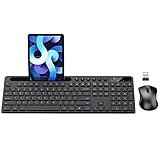
- Premium Choice: MARVO Wirelss Keyboard and Mouse Combo with Phone Holder, Full-Size, Black | 2.4G Ergonomic Wireless Computer Keyboard with 6 Multimedia, Phone Tablet Holder, Silent Mouse with 6 Button for Mac, Windows
A budget wireless keyboard has one job: remove a cable and stay out of the way. The decision behind this search is rarely about features. It is about how the keyboard connects, whether a mouse is bundled, and whether the layout matches how you actually type. A full-size board with a number pad suits spreadsheets and a fixed desk. A compact Bluetooth model suits a laptop that moves between rooms. A touchpad board suits a living-room PC.
This guide is for buyers who want something that works straight away without chasing features they will not use: students, home-office workers, parents setting up a family computer, and anyone connecting a PC to a television. All ten picks below are judged only on what their listings state, so every strength and trade-off traces back to a spec you can verify yourself before buying in 2026.
Quick Picks
As an Amazon Associate we earn from qualifying purchases at no extra cost to you.






| Product | Best for | Key spec from the title |
|---|---|---|
| Logitech K270 | Everyday desk typing | Full size, number pad, 8 multimedia keys, 2-year battery |
| Logitech K250 | Bluetooth laptop users | Compact, Bluetooth only, full number pad |
| MARVO combo | Phone and tablet users | Built-in phone and tablet holder, 6 multimedia keys |
| Silent ergonomic combo | Long typing sessions | Full size, silent, ergonomic, 2.4G |
| Logitech MK235 | Spill-prone desks | Spill-resistant keyboard plus M170 mouse |
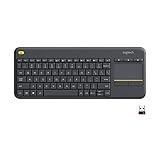
| Logitech K400 Plus | Living-room PCs | Built-in touchpad, HTPC media control |
| EDJO combo | Quiet shared spaces | Silent, 2.4GHz, Chromebook compatible |
| Kisnt KN85 | Mechanical fans | 75% layout, Bluetooth/2.4GHz/USB-C, hot-swappable |
| HP 230 | Quiet office use | Low-profile, quiet design, Windows and Mac OS |
| USB silent keyboard | Simple desktop swap | Full size, number pad, USB-A nano receiver |
How to Choose
Pick the connection first
A 2.4GHz model ships with a USB-A nano receiver and pairs without any settings, which suits desktops and older laptops. A Bluetooth-only model such as the K250 frees a port but needs a computer with Bluetooth built in or added. If your laptop has only USB-C ports, confirm you own an adapter before buying a receiver-based board. Tri-mode boards like the Kisnt KN85 cover both cases, which matters if you swap between a desktop and a tablet.
Decide on layout and size
Full size means a number pad, which matters for spreadsheets and accounting entry. A 75% layout drops the number pad and some navigation keys to save desk space. Measure the room beside your monitor: a full-size board plus a mouse needs a wide, clear surface, and a compact board leaves the mouse closer to your keyboard hand. Anything described as low-profile or deep-profile changes how tall the keys sit, so wrist comfort varies.
Bundle or standalone
Combos add a mouse to the same receiver or a second one, which reduces setup time and leaves fewer separate batteries to track. The trade-off is that bundled mice are basic. If you already own a mouse you like, a standalone keyboard avoids duplicates. Always check whether one receiver serves both devices, because two receivers mean two used ports.
Ignore marketing noise, watch for cut corners
Words like lag-free and long battery life appear on most listings and say little without a number. Look for a stated battery duration, spill resistance, and operating-system support instead. Budget boards usually cut backlighting, adjustable feet, and multi-device switching, so decide which of those you would miss. Check that the listing names your operating system, since several of these boards mention Windows only.
The 10 Best Options
Logitech K270
The K270 is the straightforward full-size choice for a desk that needs a number pad and little else. It ships with a USB-A receiver and lists a 2-year battery, so it suits a family computer that nobody wants to babysit. Its eight multimedia keys put volume and playback within reach of a single hand.
- Strength: full-size layout with number pad and 8 multimedia keys.
- Strength: a 2-year battery listing means few replacements.
- Trade-off: the title names Windows only, so Mac owners should look elsewhere.
Skip it if your computer has no spare USB-A port or you want Bluetooth pairing.
Logitech K250
The K250 serves anyone who wants a number pad without giving up a USB port. It connects over Bluetooth only and lists no receiver in the box, which makes it a tidy partner for a laptop dock or a tablet stand where ports are already crowded.
- Strength: compact body with a full number pad and spill-resistant construction.
- Strength: listed for Windows and MacOS, so one board follows you between computers.
- Trade-off: Bluetooth only, so a desktop without Bluetooth cannot use it.
Skip it if your PC lacks Bluetooth or you prefer plug-in-and-go pairing.
MARVO Keyboard and Mouse Combo
This set is for people who keep a phone or tablet propped beside the screen while typing, such as support staff following a chat window. A holder for both devices is part of the keyboard, which is unusual in this tier, and the kit adds a silent six-button mouse over the 2.4G link.
- Strength: phone and tablet holder with 6 multimedia keys.
- Strength: ergonomic, full-size 2.4G keyboard with a 6-button silent mouse.
- Trade-off: the title does not state battery duration, so keep spare batteries on hand.
Skip it if you want a slim, travel-ready board; the holder suggests extra bulk.
Silent Ergonomic Wireless Combo
Aimed at buyers who type for hours and want the clatter reduced. The listing pairs a silent full-size ergonomic keyboard with an optical mouse over 2.4G and claims long battery life, a decent match for a home office where a spouse is on calls nearby.
- Strength: described as silent and ergonomic, with long battery life stated.
- Strength: listed for Mac, laptop, PC, and Windows.
- Trade-off: an unbranded listing, so there is less brand support to lean on.
Skip it if you want a recognizable brand name or a mechanical feel.
Logitech MK235
The MK235 is the pick for a messy work surface where drinks sit near the keys. It is a full-size, spill-resistant keyboard bundled with a compact ambidextrous M170 mouse, so left-handed and right-handed users share the same kit. Because the keyboard and mouse use one receiver, a single USB-A port covers the whole setup, which helps on thin laptops with few ports.
- Strength: spill-resistant keyboard with a full-size layout.
- Strength: both devices connect through one included USB-A receiver.
- Trade-off: the listing names Windows and Chrome, with no mention of Mac.
Skip it if you already own a favorite mouse or run macOS.
Logitech K400 Plus
This one belongs on a couch, not a desk. A built-in touchpad replaces the mouse for a PC connected to a television, and the listing highlights easy media control for an HTPC. It also names Android, Chrome OS, and tablets, so it can serve a second screen around the house.
- Strength: touchpad plus easy media control for HTPC use.
- Strength: compatible with Windows, Android, Chrome OS, laptops, and tablets.
- Trade-off: a compact layout without a number pad makes data work awkward.
Skip it if you mainly type documents at a desk with a separate mouse.
EDJO Silent Keyboard and Mouse Combo
A combo for shared rooms where noise matters, such as a dorm or an open-plan office. The set uses a 2.4GHz cordless USB link and a full-size layout, and Chromebook support is spelled out, which is not universal in this class.
- Strength: silent, full-size keyboard and mouse together.
- Strength: listed for Chromebook as well as Windows, computer, laptop, and PC.
- Trade-off: the title gives no battery numbers, only a long battery life claim.
Skip it if you need Bluetooth, since the title mentions only a USB 2.4GHz connection.
Kisnt KN85
The odd one out, and a good fit for typists who want a mechanical board without a wire. It offers three connection modes in a 75% layout, plus custom RGB backlighting and a retro beige finish for a desk that doubles as a hobby space.
- Strength: Bluetooth, 2.4GHz, and USB-C connection options.
- Strength: hot-swappable linear switches, so switches can be changed later.
- Trade-off: a 75% layout has no number pad.
Skip it if you want a silent office board or a strict budget tier; mechanical models usually sit higher.
HP 230 Wireless Keyboard
A low-profile, quiet design from a familiar brand, intended for offices where a conservative keyboard is expected. Shortcut keys and a number pad sit on a slim body, and the listing names both Windows and Mac OS, which makes it easy to hand over in a mixed household.
- Strength: Windows and Mac OS support with shortcut keys and a number pad.
- Strength: low-profile, quiet design with long battery life listed.
- Trade-off: no mouse is included.
Skip it if you need a bundled mouse or a Bluetooth-first board.
USB Silent Wireless Keyboard
The simplest option here: a full-size keyboard with a number pad and a USB-A nano receiver, meant to replace a worn-out desktop board without a learning curve. The title stresses quiet 2.4G operation, which is a sensible fit for a spare-room computer, a classroom cart, or a small business counter where several people share one machine and nobody wants to learn new software.
- Strength: quiet 2.4G typing with a full number pad.
- Strength: listed for Windows PC, desktop, notebook, and Chromebook.
- Trade-off: the title says nothing about Mac support or spill resistance.
Skip it if you want a recognizable brand or Bluetooth.
Which One Fits Your Situation
A shared apartment with thin walls
The HP 230 or the EDJO combo keep noise down. The HP suits those who already have a mouse; the EDJO adds one, so a roommate can plug it in and start working.
A laptop on a standing desk
The Logitech K250 pairs over Bluetooth and keeps your port count free, with a number pad for numbers work and a compact footprint for a narrow shelf.
A PC wired to the living-room television
The Logitech K400 Plus is built for it, with its touchpad and media controls removing the need for a separate mouse on a couch cushion.
Typists who miss mechanical switches
The Kisnt KN85 is the only mechanical board here, with swappable switches and three connection modes for moving between a laptop and a desktop.
Common Mistakes
- Buying a Bluetooth-only keyboard for a desktop that has no Bluetooth adapter.
- Assuming a combo works on any operating system when the title names only Windows or Chrome.
- Ignoring layout and discovering a 75% board has no number pad.
- Forgetting that receiver-based boards use up a USB-A port, and that combos may use two.
- Trusting words like lag-free or long battery life when no number is stated.
Frequently Asked Questions
Is a wireless keyboard slower than a wired one?
For ordinary typing the difference is not something most people can feel. Receiver-based 2.4GHz links are designed for low delay, and Bluetooth is fine for office work.
Do I need a number pad?
If you enter figures regularly, yes. If you mostly write emails and browse, a compact layout saves desk space and shortens the reach to your mouse.
Can one keyboard work with several computers?
Bluetooth models can be paired with different devices one at a time, and the Kisnt KN85 lists multiple connection modes. Receiver-based boards stay tied to the computer holding the receiver.
What do I do with the receiver when I travel?
Leave it plugged into the laptop port, or store it in the compartment if the board has one. Losing it renders a receiver-only keyboard unusable.
















