

‘AX’ is shorthand for WiFi 6, the 802.11ax wireless standard, and it is the feature that matters most for a modern home network. WiFi 6 was designed for the reality of today’s homes: dozens of connected devices fighting for airtime, from phones and laptops to consoles, smart speakers, cameras and TVs. Through technologies like OFDMA and improved MU-MIMO it handles that crowd far more efficiently than the older WiFi 5 (AC) standard, which translates into lower latency for gaming and steadier speeds when everyone is online at once. This guide rounds up the best AX routers in 2026 — true WiFi 6 standalone routers and mesh systems — for gaming and busy households.
- Best AX Routers at a Glance
- 1. TP-Link Archer AX21 V5 AX1800 WiFi 6 Router (Dual Band, Gigabit)
- 2. TP-Link Deco X55 AX3000 WiFi 6 Mesh System (covers up to 2,500 sq.ft)
- 3. ASUS RT-AX3000 Ultra-Fast Dual Band Gigabit WiFi 6 Router
- 4. TP-Link Archer AX10 AX1500 WiFi 6 Router (4 Gigabit LAN, 802.11ax)
- 5. TP-Link Deco S4 Mesh AC1900 WiFi System (up to 5,500 sq.ft) — WiFi 5 / AC
- 6. ASUS RT-AC86U AC2900 WiFi Gaming Router (Dual Band, Gigabit) — WiFi 5 / AC
- How to Choose an AX Router
- Frequently Asked Questions
- Related Guides
- Related Articles
An important honesty note up front, because two popular models in this price range are frequently mislabelled: the TP-Link Deco S4 (AC1900) and the ASUS RT-AC86U (AC2900) are WiFi 5 / 802.11ac devices, not WiFi 6 / AX. We have included both because they are strong, widely bought routers, but if your specific goal is genuine AX, the four WiFi 6 picks here are the ones to shortlist. Prices span roughly $52 to around $128, covering budget AX1800 routers, an affordable AX3000 mesh kit, and a higher-end dual-band WiFi 6 unit. Below is an at-a-glance comparison of all six, then a closer look at each and a buyer’s guide to picking the right one.
As an Amazon Associate we earn from qualifying purchases at no extra cost to you.








🛒 Best Price Today on Amazon
Prime members get fast, free shipping on everything above, plus member-only deals. New members get a 30-day free trial — cancel anytime.
Best AX Routers at a Glance
| Router | Best For | Standout Spec | Approx Price |
|---|---|---|---|
| TP-Link Deco S4 (AC1900) | Whole-home mesh coverage (WiFi 5) | AC1900, up to 5,500 sq.ft mesh | around $96 |
| TP-Link Archer AX21 (AX1800) | Best-value WiFi 6 router | AX1800, dual-band 802.11ax | around $52 |
| TP-Link Deco X55 (AX3000) | WiFi 6 whole-home mesh | AX3000 mesh, ~2,500 sq.ft | around $70 |
| TP-Link Archer AX10 (AX1500) | Entry WiFi 6 upgrade | AX1500, 4 Gigabit LAN | around $60 |
| ASUS RT-AX3000 WiFi 6 | Higher-end AX router | AX3000, dual-band 802.11ax | around $128 |
| ASUS RT-AC86U (AC2900) | Gaming features (WiFi 5) | AC2900, AiProtection, QoS | around $113 |
1. TP-Link Archer AX21 V5 AX1800 WiFi 6 Router (Dual Band, Gigabit)
The TP-Link Archer AX21 is the best-value true AX router on this list and the easiest place to start if you simply want WiFi 6 without overspending. It is a dual-band AX1800 router built on the 802.11ax standard, with Gigabit Ethernet ports, OneMesh support to extend coverage later, and TP-Link’s mature, beginner-friendly Tether app. At around $52 it is one of the cheapest ways to get genuine WiFi 6.
For most homes this is the sweet spot. The AX1800 rating is plenty for typical broadband plans, WiFi 6 efficiency keeps a houseful of phones, consoles and smart devices responsive at once, and OFDMA helps reduce the latency spikes that hurt online gaming when the network is busy. It is not a flagship, but as an affordable, dependable AX router that covers an apartment or small-to-medium home well, the Archer AX21 is the obvious entry point and a long-standing favorite.
Pros: Genuine WiFi 6 (AX1800), excellent value, easy Tether setup, OneMesh expandable.
Cons: Dual-band AX1800 is entry-level; single home unit, not mesh out of the box.
2. TP-Link Deco X55 AX3000 WiFi 6 Mesh System (covers up to 2,500 sq.ft)

TP-Link Deco X55 AX3000 WiFi 6 Mesh System, Deco X55(1-Pack) | Covers up to 2500 Sq.Ft., Replaces Wireless Router and Extender, 3 Gigabit Ports, Supports Ethernet Backhaul




As an Amazon Associate we earn from qualifying purchases. Product prices and availability are accurate as of the date/time indicated.
The TP-Link Deco X55 is the WiFi 6 mesh pick, and the right answer when a single router cannot blanket your home. It is an AX3000 mesh system built on 802.11ax, designed to cover up to around 2,500 sq.ft with seamless roaming, so your devices hand off between nodes without dropping the connection. At around $70 it brings genuine AX performance to whole-home coverage at a sensible price.
This is the system to choose for a multi-room or multi-floor home where dead spots are the real problem. Unlike the older AC1900 Deco S4, the X55 is a true WiFi 6 kit, so it pairs broad coverage with the efficiency that keeps many devices responsive at once — ideal when gaming upstairs while the rest of the household streams downstairs. Setup runs through the same friendly Deco app, and you can add nodes later. For AX coverage across a whole house, the X55 is the standout value.
Pros: True AX3000 WiFi 6 mesh, seamless whole-home roaming, easy Deco app, expandable.
Cons: Per-node speed is shared; large homes may need extra units.
3. ASUS RT-AX3000 Ultra-Fast Dual Band Gigabit WiFi 6 Router
![ASUS AC1900 Wireless Dual Band (5GHz + 2.4GHz) Gigabit Wi-Fi Router [RT-AC68U] Ultra-Fast 802.11ac 1900 Mbps Speed, 5X Gigabit LAN Ports, Broadcam TurboQAM Wi-Fi Acceleration, AiProtection Security](https://m.media-amazon.com/images/I/41AQkd3zfKL._SL400_.jpg)
ASUS AC1900 Wireless Dual Band (5GHz + 2.4GHz) Gigabit Wi-Fi Router [RT-AC68U] Ultra-Fast 802.11ac 1900 Mbps Speed, 5X Gigabit LAN Ports, Broadcam TurboQAM Wi-Fi Acceleration, AiProtection Security


As an Amazon Associate we earn from qualifying purchases. Product prices and availability are accurate as of the date/time indicated.
The ASUS RT-AX3000 is the higher-end standalone AX pick for users who want more headroom and ASUS’s deeper feature set. It is a dual-band AX3000 WiFi 6 router with Gigabit ports, AiMesh support to build a mesh from compatible ASUS units, and the AiProtection security suite plus adaptive QoS for prioritising traffic. At around $128 it is the premium router here and the most capable single unit.
This is the router for the enthusiast or gamer who wants strong WiFi 6 performance in one box with room to grow. The AX3000 rating and 802.11ax efficiency keep a busy network smooth, adaptive QoS lets you prioritise game or stream traffic over background downloads, and AiProtection adds network-level security. If you outgrow it, AiMesh lets you add ASUS nodes for whole-home coverage. For a feature-rich, higher-performance AX router, the RT-AX3000 is the pick.
Pros: Strong AX3000 WiFi 6, AiMesh-ready, adaptive QoS, AiProtection security suite.
Cons: Highest single-router price here; setup is more involved than basics.
4. TP-Link Archer AX10 AX1500 WiFi 6 Router (4 Gigabit LAN, 802.11ax)
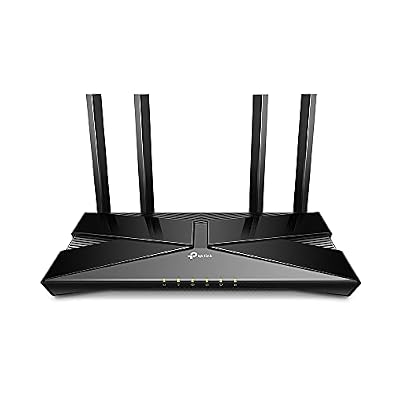
TP-Link Smart WiFi 6 Dual Band Router 4 Gigabit LAN Ports | 802.11AX Router, Beamforming, OFDMA, MU-MIMO, Parental Controls, Dual-Core 900MHz Processor, Works with Alexa (Archer AX10)


As an Amazon Associate we earn from qualifying purchases. Product prices and availability are accurate as of the date/time indicated.
The TP-Link Archer AX10 is the entry WiFi 6 upgrade pick — the cheapest route onto the AX standard for someone replacing an aging WiFi 5 box. It is a dual-band AX1500 802.11ax router with four Gigabit LAN ports and TP-Link’s straightforward setup. At around $60 it delivers the core benefits of WiFi 6 without any frills.
This is the router for a smaller home or apartment where the priority is stepping up to WiFi 6 efficiency on a tight budget. The AX1500 rating suits common broadband speeds, the four Gigabit LAN ports handle wired devices like a console or desktop, and 802.11ax keeps everyday multi-device use smoother than an old AC router would. It is the most modest AX unit here, but as a clean, affordable WiFi 6 starting point it does exactly what it should.
Pros: Affordable genuine WiFi 6 (AX1500), four Gigabit LAN ports, simple setup.
Cons: Entry-level throughput; best for smaller spaces and lighter loads.
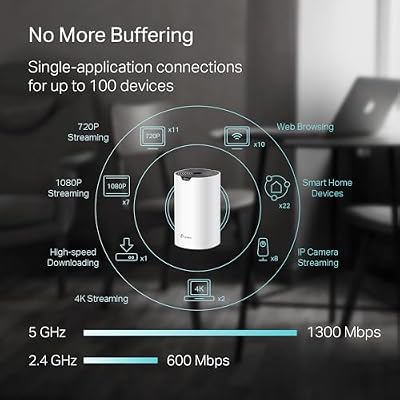
5. TP-Link Deco S4 Mesh AC1900 WiFi System (up to 5,500 sq.ft) — WiFi 5 / AC

TP-Link Deco S4 Mesh AC1900 WiFi System, Deco S4(3-Pack) | Up to 5,500 Sq.ft. Coverage, Replaces WiFi Router and Extender, Gigabit Ports, Works with Alexa



As an Amazon Associate we earn from qualifying purchases. Product prices and availability are accurate as of the date/time indicated.
A clear honesty flag first: the TP-Link Deco S4 is an AC1900 system, which means it runs the older WiFi 5 (802.11ac) standard, not WiFi 6 / AX. We have included it because it is a hugely popular, well-reviewed mesh kit, but if true AX is your requirement, choose the Deco X55 above instead. The S4’s headline strength is reach: it is rated to cover up to around 5,500 sq.ft with seamless mesh roaming. At around $96 it is an affordable way to eliminate dead spots in a large home.
Where the S4 makes sense is sheer coverage on a budget when WiFi 6 is not essential. For a large house full of devices that mostly stream and browse rather than chase the lowest possible gaming latency, AC1900 mesh is still perfectly capable, and the wide footprint and easy Deco app make it a no-drama whole-home solution. Just go in knowing it is WiFi 5, not the AX standard the rest of this list focuses on.
Pros: Very wide mesh coverage (up to 5,500 sq.ft), affordable, easy Deco app.
Cons: WiFi 5 / AC1900, NOT WiFi 6 / AX; lacks the efficiency of true AX kits.
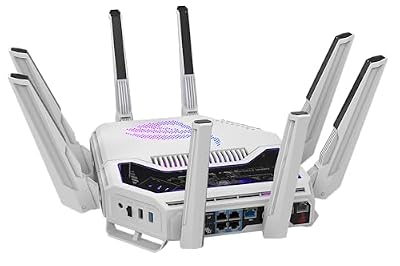
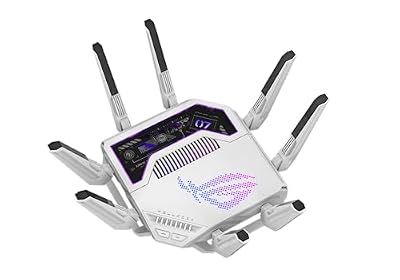
6. ASUS RT-AC86U AC2900 WiFi Gaming Router (Dual Band, Gigabit) — WiFi 5 / AC

ASUS GT-BE19000AI Tri-Band WiFi 7 AI Gaming Router - 10G, Game Boost | Coverage up to 3,500 Sq. Ft., 10G Port x2, 2.5G Port x4. Game Boost for Low Latency Gaming & Streaming. VPN support








As an Amazon Associate we earn from qualifying purchases. Product prices and availability are accurate as of the date/time indicated.
Another honesty flag: the ASUS RT-AC86U is an AC2900 router, so like the Deco S4 it is a WiFi 5 (802.11ac) device rather than WiFi 6 / AX. It earns a place here because it is a beloved gaming-focused router with a deep feature set — AiProtection security, adaptive QoS, and gaming traffic prioritisation — and a reputation for stability. At around $113 it remains a capable unit, but it is not AX.
This is the router for a gamer who values ASUS’s mature gaming and security features and does not specifically need WiFi 6. The AC2900 dual-band design still delivers strong throughput, adaptive QoS lets you prioritise game traffic, and AiProtection adds network-level defence. If you want those same ASUS features on the current AX standard, step up to the RT-AX3000 above. As a proven WiFi 5 gaming router, the RT-AC86U is solid — just not part of the AX club.
Pros: Strong gaming features, adaptive QoS, AiProtection, proven reliability.
Cons: WiFi 5 / AC2900, NOT WiFi 6 / AX; pricey for an older-standard router.
How to Choose an AX Router
The first thing to get right is the standard itself, because the label can mislead. ‘AX’ means WiFi 6 (802.11ax); ‘AC’ means the older WiFi 5 (802.11ac). On this list the Archer AX21, Deco X55, Archer AX10 and ASUS RT-AX3000 are genuine AX, while the Deco S4 (AC1900) and RT-AC86U (AC2900) are WiFi 5. If your goal is specifically AX — for its efficiency with many devices and lower latency under load — confirm the model name carries an ‘AX’ rating before you buy, and treat the AC models as capable but older alternatives.
Next, decide between a single router and a mesh system based on your home’s size and layout. A standalone router like the Archer AX21, Archer AX10 or RT-AX3000 is ideal for an apartment or a small-to-medium home where one unit can reach every room. A mesh system like the Deco X55 (or the AC1900 Deco S4) uses multiple nodes to blanket a larger or multi-floor house with seamless roaming. Match the coverage approach to where your dead spots actually are rather than buying more hardware than you need.
Then look at the speed rating and bands in the context of your internet plan. The AX number — AX1500, AX1800, AX3000 — is a combined theoretical figure across bands, and for most households an AX1800 unit comfortably exceeds the speeds a typical broadband connection delivers. Buying a higher AX3000 rating buys headroom for very fast plans, many simultaneous devices, or future-proofing, but it is not essential for everyone. Be honest about your actual line speed and device count before paying for the top tier.
Finally, weigh the extras: gaming features, security and ease of use. Adaptive QoS, as on the ASUS units, lets you prioritise game or stream traffic so a background download does not spike your ping, while suites like AiProtection add network-level security. TP-Link’s Tether and Deco apps, by contrast, are famously simple for newcomers. Decide whether you value advanced control or set-and-forget simplicity, set your budget, confirm you are getting true AX if that matters, and pick the router on this list that fits your home.
Frequently Asked Questions
What does ‘AX’ mean on a router, and is it the same as WiFi 6?
Yes — ‘AX’ is shorthand for 802.11ax, which is WiFi 6. It is the current mainstream wireless standard and improves on WiFi 5 (802.11ac, often labelled ‘AC’) mainly in efficiency: it handles many connected devices at once far better, which lowers latency and steadies speeds in busy homes. On this list the Archer AX21, Deco X55, Archer AX10 and ASUS RT-AX3000 are true AX, while the Deco S4 and RT-AC86U are WiFi 5 / AC.
Are the Deco S4 and RT-AC86U actually AX routers?
No, and this is worth flagging clearly. The TP-Link Deco S4 is an AC1900 system and the ASUS RT-AC86U is an AC2900 router — both run the older WiFi 5 (802.11ac) standard, not WiFi 6 / AX. They are still good, popular routers, but if genuine AX is your requirement, choose the Deco X55, Archer AX21, Archer AX10 or ASUS RT-AX3000 instead.
Do I need a mesh system or a single AX router?
It depends on your home. A single router like the Archer AX21 or RT-AX3000 is ideal for apartments and small-to-medium homes where one unit reaches every room. A mesh system like the Deco X55 uses multiple nodes for seamless coverage across a larger or multi-floor house. Choose based on where your dead spots are rather than simply buying the most hardware.
Does WiFi 6 (AX) actually help with online gaming?
Indirectly but meaningfully. WiFi 6’s main benefit is efficiency under load — technologies like OFDMA let the router serve many devices more smoothly, which reduces the latency spikes that occur when the network is busy. That keeps your ping steadier while others stream or download. Pairing an AX router with adaptive QoS, as on the ASUS models, lets you prioritise game traffic further for the most consistent connection.
Related Guides
- Best Gaming Routers
- Best Mesh WiFi Systems
- Best WiFi 6 Routers
- Best Network Switches
- Best Powerline Adapters
- Best Gaming PCs
Affiliate Disclosure: As an Amazon Associate, we earn from qualifying purchases. If you click a link and make a purchase, we may earn a small commission at no extra cost to you. Prices and availability are accurate as of publication and may change.










