As an Amazon Associate we earn from qualifying purchases
A compact desk changes what a good keyboard needs to do. If your monitor, mousepad, and mouse already fill most of the surface, a full-size board can crowd your aim. That is why the best 60 gaming keyboards for compact setups keep the main letter, number, and modifier keys, remove the separate function row, navigation cluster, arrow keys, and number pad, and move those inputs to a secondary layer.
This guide compares five 60 percent models still sold on Amazon US. They differ in switch technology, connectivity, keycaps, and supported platforms, so the right choice depends on how you play, travel, and type.
Our guide to the best gaming keyboard 60 percent explains how the layout works in more detail.
What a 60 Percent Layout Actually Removes
A typical 60 percent keyboard has around 61 keys. You keep the alphanumeric block, the top number row, and the main modifiers such as Shift, Control, Alt, Enter, and Backspace. What disappears as dedicated keys is just as important:
- The F1 to F12 function row
- Dedicated arrow keys
- The navigation cluster, including Home, End, Page Up, and Page Down
- The number pad on the right side
Those functions do not vanish. Manufacturers print secondary legends on the keycaps and assign the missing inputs to a Function layer: holding Fn and pressing another key produces an arrow, a function key, or a media command. The learning curve is real for the first few days, but many players then prefer the extra mouse room, particularly for low-sensitivity aiming with wide mouse sweeps.
A 60 percent board is also noticeably narrower than a tenkeyless or full-size model, so it fits smaller desks, dorm setups, and travel bags more easily. The trade-off is productivity: spreadsheets and data entry are slower without a number pad. For a gaming-first desk, that is usually an acceptable exchange.
How to Compare These Keyboards
Use these points for every model below.
Switch type: Optical switches use light to register a press, magnetic switches can support adjustable actuation and rapid reset features on supported models, and mechanical switches offer familiar tactile or linear options.
Connectivity: Wired USB-C models avoid charging and suit a fixed desk. Wireless models add cable-free positioning, but you need to manage battery life and a receiver or Bluetooth pairing.
Platforms: Most of these boards target Windows PC first. Console support varies by model and game, so check the listing for your exact platform.
Keycaps and build: Double-shot PBT keycaps resist shine and keep legends legible. Aluminum frames add rigidity, which matters if the keyboard travels in a bag.
The Picks at a Glance
| Product | Switch type listed | Connectivity listed | Key highlight |
|---|---|---|---|
| Razer Huntsman Mini | Clicky optical, Purple Switch | Wired, detachable USB-C | Doubleshot PBT keycaps |
| SteelSeries Apex Pro Mini Wireless | OmniPoint 2.0 Adjustable HyperMagnetic | 2.4GHz wireless, Bluetooth 5.0, wired | Adjustable actuation and Rapid Trigger |
| HyperX Alloy Origins 60 | Linear HyperX Red mechanical | Wired USB-C | Double-shot PBT keycaps and RGB backlighting |
| Logitech G PRO X 60 Lightspeed | GX Optical Tactile | LIGHTSPEED wireless | Designed for Windows PC, LIGHTSYNC RGB |
| Corsair K65 RGB MINI | Cherry MX Brown mechanical | Wired, detachable USB Type-C | Per-key RGB backlighting |
1. Razer Huntsman Mini
ASIN: B089QP4QNB
Amazon US: https://www.amazon.com/dp/B089QP4QNB
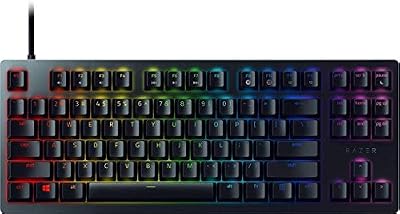
The Razer Huntsman Mini listing describes a compact 60 percent gaming keyboard with clicky optical switches in the Purple Switch version, doubleshot PBT keycaps, and a detachable USB-C cable, in a QWERTY US layout in black.
Because it is wired only, this suits a fixed compact desk. The detachable cable helps with packing and avoids charging a battery. The clicky variant suits players who want audible confirmation with each press, though that sound is worth considering if you share a room or use voice chat.
Best for: PC players with a permanent small desk who prefer a wired connection and a clicky optical switch feel.
2. SteelSeries Apex Pro Mini Wireless
ASIN: B0B16JFF54
Amazon US: https://www.amazon.com/dp/B0B16JFF54
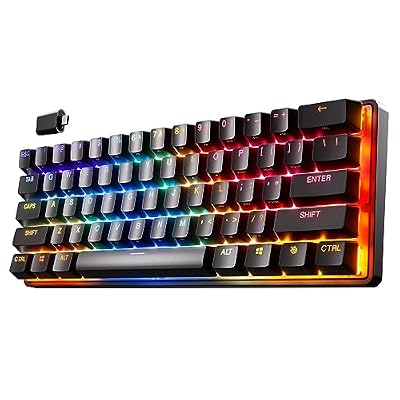
The SteelSeries Apex Pro Mini Wireless is listed as a 60 percent design with 61 keys, OmniPoint 2.0 Adjustable HyperMagnetic switches, Rapid Trigger, double-shot PBT keycaps, and an aircraft-grade aluminum frame. Its product information lists wired and wireless connectivity, Quantum 2.0 Wireless with a 2.4GHz connection and Bluetooth 5.0, RGB backlighting, and compatibility with PC and gaming console devices.
This is the most adjustable option in this group. The listing explains that actuation can be tuned between a light and a deeper press, so movement keys can be set differently from less urgent keys. Wireless flexibility also makes it easy to reposition for work, play, or travel. The trade-off is complexity: more settings mean more setup time in software.
Best for: Competitive PC players in compact setups who want adjustable actuation, Rapid Trigger, and the choice of wireless or wired use.
3. HyperX Alloy Origins 60

ASIN: B08XBQ79MN
Amazon US: https://www.amazon.com/dp/B08XBQ79MN
The HyperX Alloy Origins 60 is listed as a mechanical gaming keyboard with an ultra-compact 60 percent form factor, double-shot PBT keycaps, RGB LED backlighting, compatibility with HyperX NGENUITY software, and a linear HyperX Red switch in the black version referenced here.
A linear switch travels smoothly without a tactile bump, which many action players prefer for repeated movement inputs. The wired design keeps the setup simple, focusing on the core layout rather than wireless modes or adjustable actuation. Product imagery has highlighted compatibility icons for PC and recent PlayStation and Xbox consoles, but console support depends on the console and game, so confirm your title first.
Best for: Players who want a simple wired 60 percent board with linear mechanical switches and PBT keycaps, without extra wireless hardware to manage.
4. Logitech G PRO X 60 Lightspeed

ASIN: B0BRSSGBCN
Amazon US: https://www.amazon.com/dp/B0BRSSGBCN
The Logitech G PRO X 60 Lightspeed listing describes an ultra-compact 60 percent mechanical keyboard for Windows PC, with LIGHTSYNC RGB, dual-shot PBT keycaps, and GX Optical Tactile switches in the black version referenced here.
Its clearest distinction is LIGHTSPEED wireless connectivity, paired with a design presented for competitive play. A tactile optical switch gives a noticeable bump while using optical registration. Removing the cable can make a compact surface feel larger and makes it easier to slide the board aside for work. As with any wireless board, plan for charging.
Best for: Windows PC players who want a cable-free compact desk and a tactile optical switch, especially for a setup that is moved or tidied often.
5. Corsair K65 RGB MINI

ASIN: B0CLGWXRW9
Amazon US: https://www.amazon.com/dp/B0CLGWXRW9
The Corsair K65 RGB MINI is listed as a 60 percent mechanical gaming keyboard with Cherry MX Brown mechanical keyswitches, customizable per-key RGB backlighting, a detachable USB Type-C cable, and a QWERTY NA layout in black.
Cherry MX Brown is a tactile option between a purely linear press and a strongly clicky one, making this model relevant for people who game and type on the same board. The wired connection and detachable cable suit a fixed desk or travel kit. Per-key RGB helps if you highlight movement or ability keys by color in a dim room.
Best for: Players who share one compact keyboard between gaming and typing and prefer a tactile Cherry MX Brown feel with per-key RGB control.
Who Each Keyboard Suits
Choose the Razer Huntsman Mini if you want wired simplicity and a distinctly clicky optical press, and your setup stays in one place.
Choose the SteelSeries Apex Pro Mini Wireless if adjustable actuation and wireless flexibility matter most.
Choose the HyperX Alloy Origins 60 if you prefer a linear mechanical switch and a focused wired board for a small gaming desk.
Choose the Logitech G PRO X 60 Lightspeed if a wireless Windows PC setup is the priority.
Choose the Corsair K65 RGB MINI if you type as much as you play.
Buying Checks Before You Order
First, confirm the exact variant on the Amazon listing. Several families are sold with different switches and colors, and each ASIN above refers to the specific version named here. Linear, tactile, and clicky versions feel noticeably different.
Second, check your platform. A board that works on Windows PC will not automatically work in every console game, and Mac support for gaming software can be more limited.
Third, think about the missing keys. If your work needs a number pad or dedicated arrows, a 60 percent board may slow you down outside games. Some owners add a separate number pad only for work, keeping the desk clear the rest of the time.
Finally, measure your desk, leaving room for the mouse travel your games require. The point of this layout is the balance between the board, mouse space, and a comfortable shoulder position.