As an Amazon Associate we earn from qualifying purchases
Wi-Fi 6 (802.11ax) is the sweet spot for a home network upgrade right now. In this price segment you get the features that actually change day-to-day performance — OFDMA for busy households, MU-MIMO for serving several devices at once, 160 MHz channels on the 5 GHz band, and WPA3 security — without paying early-adopter money for a newer standard your phones and laptops may not even support yet. The four routers below cover the realistic spread of this segment: a mainstream AX3000 all-rounder, a gaming-leaning AX5400 model, a faster AX4200 option from NETGEAR, and an enthusiast AX6000 router with multi-gig ports and open firmware.
Every speed figure in this guide is the manufacturer’s own rating. Wi-Fi speed classes such as AX3000 are theoretical maximum link rates summed across bands; no home will see that number as a single real-world throughput result, and your internet plan, walls, and client devices matter far more than the badge on the box.
How to Choose a Wi-Fi 6 Router in This Segment
Speed class. AX3000 (2,402 Mbps on 5 GHz plus 574 Mbps on 2.4 GHz, as manufacturers rate it) is enough for gigabit-or-slower internet plans and typical family use. AX4200 and AX5400 classes add 5 GHz capacity and usually a stronger processor, which helps when several people stream and game at the same time. AX6000 adds more streams again, mainly useful in device-dense homes.
OFDMA and MU-MIMO. These are the core Wi-Fi 6 upgrades. OFDMA lets one transmission serve multiple devices at once, which cuts waiting time in busy homes, and MU-MIMO moves data to several clients simultaneously instead of strictly one after another. Every router here supports both, per its manufacturer.
Ports. Most routers in this segment are gigabit-only: one WAN port and four LAN ports. That is fine for internet plans up to a gigabit. If your plan is faster than gigabit, or you run a NAS or a wired gaming PC you want on a faster local link, look for a 2.5G port — only one router in this roundup offers two of them.
Mesh compatibility. A standalone router is the right buy for most apartments and smaller houses. If you already know one unit will not reach every room, check the maker’s mesh system before buying: TP-Link uses EasyMesh, ASUS uses AiMesh, and NETGEAR and GL.iNet take different approaches again. Mesh ecosystems are not interchangeable between brands.
Security. WPA3 support is standard on all four routers here. Beyond that, the bundled security software differs a lot — some brands include their network protection at no extra subscription, while others tie advanced features to a paid plan, so check what is actually included before you count it as a benefit.
For a wider look at current models across every standard and segment, see our guide to the best Wi-Fi router options for 2026, then come back here for the focused Wi-Fi 6 shortlist.
The Routers at a Glance
| Router | Speed class (maker rating) | Bands | Wired ports | Mesh system | Standout feature |
|---|---|---|---|---|---|
| TP-Link Archer AX55 | AX3000 | Dual-band | 1x gigabit WAN, 4x gigabit LAN, USB 3.0 | EasyMesh | Balanced feature set, HomeShield |
| ASUS RT-AX82U | AX5400 | Dual-band | 1x gigabit WAN, 4x gigabit LAN, USB 3.0 | AiMesh | Dedicated gaming port, AiProtection Pro |
| NETGEAR Nighthawk RAX43 | AX4200 | Dual-band | 1x gigabit WAN, 4x gigabit LAN, USB 3.0 | Not a mesh system | 5-stream design, NETGEAR Armor option |
| GL.iNet GL-MT6000 (Flint 2) | AX6000 | Dual-band | 2x 2.5G, 4x gigabit LAN, USB 3.0 | GL.iNet mesh | OpenWrt firmware, dual multi-gig ports |
1. TP-Link Archer AX55 — The Mainstream All-Rounder
ASIN: B09G5W9R6R — View on Amazon
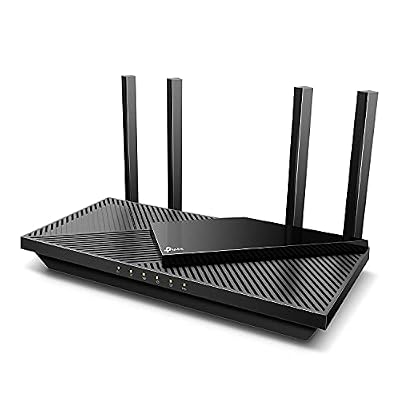
TP-Link rates the Archer AX55 at AX3000: up to 2,402 Mbps on the 5 GHz band with 160 MHz channels, and 574 Mbps on 2.4 GHz. It supports OFDMA and MU-MIMO, carries four external antennas with beamforming, and TP-Link lists it as EasyMesh compatible, so it can join a compatible EasyMesh network later instead of being replaced outright.
Wired connections are all gigabit — one WAN and four LAN — plus a USB 3.0 port for sharing storage across the network. Security is handled by TP-Link HomeShield, and the router supports WPA3 along with VPN server and client functions, per TP-Link’s specifications.
Choose the AX55 if you want the straightforward upgrade: a modern Wi-Fi 6 router for a gigabit-or-slower connection, a family-sized device count, and no interest in multi-gig wired networking. It is the least specialised router here, and for most homes that is exactly the point.
2. ASUS RT-AX82U — The Gaming-Leaning AX5400 Pick

ASIN: B08BJJ3RGW — View on Amazon
ASUS rates the RT-AX82U at AX5400 — 574 Mbps on 2.4 GHz and 4,804 Mbps on 5 GHz — driven by a 1.5 GHz tri-core processor. It is built around gaming households: ASUS includes a dedicated gaming LAN port that prioritises the device plugged into it, a Mobile Game Mode in the ASUS Router app, and Adaptive QoS for prioritising traffic by activity.
The RT-AX82U is AiMesh compatible, so it can become one node of an ASUS mesh network rather than a dead end. Security comes from AiProtection Pro powered by Trend Micro, which ASUS includes with the router, alongside Instant Guard VPN and WPA3 support. Ports are gigabit (one WAN, four LAN) plus USB 3.0, and the design adds configurable Aura RGB lighting, which is purely cosmetic but tells you exactly who ASUS built it for.
Choose the RT-AX82U if gaming traffic is the priority in your home and you want the prioritisation features and mesh upgrade path inside the ASUS ecosystem.
3. NETGEAR Nighthawk RAX43 — Extra 5 GHz Capacity

ASIN: B08JY6RMG9 — View on Amazon
The Nighthawk RAX43 is a 5-stream Wi-Fi 6 router that NETGEAR rates at AX4200: 574 Mbps on 2.4 GHz and 3,603 Mbps on 5 GHz. NETGEAR markets it for coverage of up to 2,500 square feet and around 25 devices — treat those as manufacturer figures for an unobstructed layout rather than a promise for a house full of brick walls, but they signal the class of home it is aimed at.
It runs on a 1.5 GHz quad-core processor per NETGEAR, supports OFDMA, MU-MIMO and beamforming, and offers the usual gigabit layout of one WAN and four LAN ports plus a USB 3.0 port for shared storage. WPA3 is supported, and NETGEAR Armor security is available on this model as NETGEAR’s subscription-based protection layer — the router works fully without it, but the advanced security suite is not a free inclusion, so factor that into the comparison.
Choose the RAX43 if you want more 5 GHz headroom than an AX3000 model offers and prefer NETGEAR’s app and interface, and you do not need mesh expansion or multi-gig ports.
4. GL.iNet GL-MT6000 (Flint 2) — The Enthusiast Pick With 2.5G Ports

ASIN: B0CP7S3117 — View on Amazon
The Flint 2 is the outlier here, in a good way. GL.iNet rates it at AX6000 with 8-stream Wi-Fi 6 — 1,148 Mbps on 2.4 GHz and 4,804 Mbps on 5 GHz — and backs it with hardware the others do not match: two 2.5G Ethernet ports (configurable for WAN use) plus four gigabit LAN ports, a quad-core MediaTek processor, 1 GB of DDR4 memory and 8 GB of eMMC storage, per GL.iNet’s published specifications.
It ships with OpenWrt pre-installed behind GL.iNet’s own interface, which opens up serious customisation: WireGuard and OpenVPN clients and servers, network-wide ad blocking, and detailed firewall control. GL.iNet publishes WireGuard performance figures for the router that no stock firmware on the other three can approach for whole-network VPN use. WPA3 and OFDMA/MU-MIMO are all present, as expected at this level.
Choose the Flint 2 if you have (or plan to get) a faster-than-gigabit internet connection, run a home server or NAS that benefits from a 2.5G link, or simply want a router you can configure far beyond a consumer app. If you will never open the advanced settings, its advantages are wasted and the AX55 above is the calmer buy.
Who Should Choose What
- Most households upgrading from an older router: the TP-Link Archer AX55. It covers the Wi-Fi 6 essentials, mesh expansion and security without paying for capacity you will not use.
- Gaming-first homes: the ASUS RT-AX82U, for the prioritised gaming port, Adaptive QoS and the AiMesh path.
- Bigger homes that want one strong unit, not a mesh kit: the NETGEAR Nighthawk RAX43, with its higher 5 GHz capacity — keeping in mind its maker coverage figures assume friendly layouts.
- Power users and multi-gig internet plans: the GL.iNet Flint 2, the only router here with 2.5G ports and open firmware.
One honest limit applies to all four: no router fixes a slow internet plan or a house layout that blocks 5 GHz signals. If your problem is a dead zone two floors away rather than an ageing router, a mesh system — not a stronger single box — is the correct purchase.
FAQ
Is Wi-Fi 6 still worth buying now that newer standards exist?
Yes, for most homes. Wi-Fi 6 clients are everywhere, the routers are mature and well supported, and the real-world bottlenecks for most households are the internet plan and indoor range, not the Wi-Fi generation badge.
What does the AX number actually mean?
It is the sum of the manufacturer’s theoretical maximum link rates across all bands — AX3000 means roughly 2,402 Mbps on 5 GHz plus 574 Mbps on 2.4 GHz. It is a capacity class, not a speed any single device will achieve.
Do I need a 2.5G port on my router?
Only if your internet plan is faster than gigabit, or you move large files between wired devices such as a NAS and a PC. For gigabit-or-slower plans with mostly wireless clients, gigabit ports are not a bottleneck.
Will a Wi-Fi 6 router work with my older devices?
Yes. Wi-Fi 6 routers are backward compatible with Wi-Fi 5 and earlier clients; older devices simply connect at their own maximum standard and do not gain the Wi-Fi 6 efficiency features.
Can I mix brands in a mesh network?
Generally no. EasyMesh is a cross-brand standard on paper, but in practice mesh features work most reliably within one maker’s ecosystem — AiMesh with ASUS, EasyMesh with TP-Link — so pick the ecosystem before you buy the first unit.