

- Top Pick: Samsung 32" Odyssey (G55C) Series QHD 1000R Curved Gaming Monitor,
- Best Value: Sceptre New 22-Inch Gaming Monitor, FHD 1080p, Up to 144Hz, HDMI, DisplayPort, Built-in Speakers, Machine Black (E225W-FW144 Series, 2026)
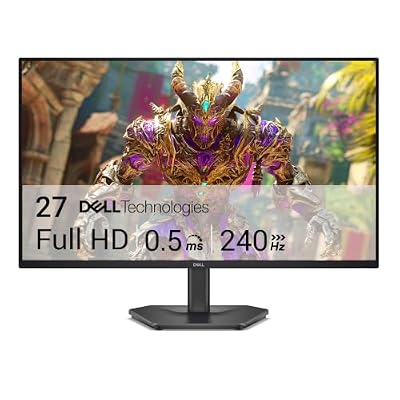
- Premium Choice: Dell 27 240Hz Gaming Monitor – SE2726HG – 27-inch FHD (1920×1080) Display, in-Plane Switching (IPS) Technology, AMD FreeSync Premium, TÜV 3-Star, 2X HDMI, DisplayPort 1.4, Tilt
244Hz sits in an odd spot. It’s not a round number like 240Hz, and it’s not a huge jump over it either. Most of the time you’ll see 244Hz on monitors that are really 240Hz panels with a bit of headroom baked in by the manufacturer, often paired with overclockable modes that push past the rated spec. The practical question isn’t “why 244 instead of 240” — it’s whether you need anything past 165Hz at all, and what you’re giving up to get there.
As an Amazon Associate we earn from qualifying purchases at no extra cost to you.




Who actually benefits from 244Hz
If you play competitive shooters — Valorant, CS2, Overwatch 2 — at a level where you’re consistently hitting triple-digit frame rates, the jump from 144Hz to 244Hz is noticeable in a way that matters: less smearing on fast horizontal flicks, tighter perceived input lag, and a smoother feel tracking moving targets. If you’re playing single-player games, slower strategy titles, or anything where your GPU struggles to break 100fps anyway, 244Hz is wasted. A 165Hz panel will look identical in those cases because you’re not feeding it enough frames to tell the difference.
The GPU requirement is the real gatekeeper here. To actually see 244 unique frames a second you need a card that can sustain that output at your settings, which usually means turning down resolution or detail in anything graphically demanding. People buying these monitors for a mid-range GPU and 4K settings are buying a number they’ll never use.
Panel type matters more than the Hz number
At 244Hz you’ll mostly see three panel types, and they behave differently enough that panel type should be your first filter, not refresh rate.
| Panel | Response time feel | Color/contrast | Typical trade-off |
|---|---|---|---|
| TN | Fastest, least smearing | Washed out, poor viewing angles | Cheap but looks dated for anything non-competitive |
| IPS | Good, slight overshoot/glow possible | Best color accuracy, wide angles | Can show IPS glow in dark scenes |
| VA | Slower, more smearing in dark transitions | Best contrast, deep blacks | Dark trail/smearing undercuts the high refresh rate |
TN at 244Hz used to be the default for esports monitors because it was cheap and fast, but most buyers today are better served by a fast IPS panel. The color and viewing angle difference is big enough that you notice it every time you use the monitor, not just in competitive matches. VA panels are the one to be careful with at this refresh rate — the contrast is great, but the slower pixel response can introduce visible smearing during dark, fast-moving scenes, which partly defeats the purpose of buying a 244Hz panel in the first place.
Resolution: 1080p vs 1440p at 244Hz
Most 244Hz monitors are 1080p, and that’s not an accident. Driving 1440p at sustained 240+ fps requires significantly more GPU horsepower, so manufacturers have mostly kept 244Hz panels at 1080p where mid-range GPUs can actually hit the frame rate. If you’re on an RTX 4070-class card or better and want 1440p at high refresh, you’ll find more options at 165Hz-180Hz than at 244Hz specifically — the panel supply skews that way. If you already have a strong GPU and want both resolution and frame rate, it’s worth browsing 1440p 240Hz gaming monitors rather than insisting on the 244 number specifically — the extra 4Hz isn’t the differentiator, the panel and resolution are.
Response time and overshoot: the spec that lies
Marketing response time numbers (1ms, 0.5ms) are measured under ideal, often unrealistic conditions and don’t tell you much on their own. What matters more in practice is overshoot — when a panel’s overdrive circuitry overcorrects and creates a bright or dark halo around fast-moving edges. A monitor with a technically fast response time but aggressive overdrive can look worse in motion than a slightly slower panel tuned conservatively. This is hard to know from a spec sheet, which is why checking independent reviews with motion photography (not just marketing claims) is worth the extra ten minutes before buying.
Budget vs premium 244Hz
Budget 244Hz monitors (roughly $150-$250) are usually 1080p TN or entry IPS, often missing proper HDR, with mediocre stands and limited port selection. For pure competitive play on a modest GPU, that’s genuinely fine — you’re not losing much by skipping the premium tier. Spending more buys you better color calibration, usable HDR, better build quality, and sometimes additional features like a built-in frame rate counter or crosshair overlay. The jump from $200 to $400 is rarely about the refresh rate at all; it’s everything else around it.
| Tier | Price range | What you get | What you don’t |
|---|---|---|---|
| Budget | $150-$250 | 1080p, TN/basic IPS, 244Hz | HDR, color accuracy, build quality |
| Mid | $250-$400 | Fast IPS, better stand, decent HDR400 | Premium contrast, extras like KVM |
| Premium | $400+ | Factory calibration, higher-end HDR, extras | Little — mostly diminishing returns |
If you’re shopping right now and don’t want to overthink panel chemistry, searching 244Hz gaming monitors and filtering by panel type in the results will get you further than chasing a specific model name, since availability shifts constantly. For most people, though, the honest advice is to check whether you can actually hit 200+ fps in your main games before paying for the Hz at all — if you can’t, a well-reviewed 165Hz IPS panel will cost less and look just as good doing everything except the one thing you won’t use anyway.















