

- Top Pick: HP 17 Inch Touchscreen Laptop – AMD Ryzen 5 7430U 32GB RAM 1TB SSD W11 Pro | 17.3" HD+ Anti-Glare Display, Wi-Fi 6, Bluetooth 5.4, Fast Charge, AI Copilot – Laptop Windows 11 Pro for Business & Student
- Best Value: HP 17 Inch Touchscreen Laptop – AMD Ryzen 5 7430U 16GB RAM 1TB SSD W11 Pro | 17.3" HD+ Anti-Glare Display, Wi-Fi 6, Bluetooth 5.4, Fast Charge, AI Copilot – Laptop Windows 11 Pro for Business & Student
- Premium Choice: HP 17 Inch Laptop Touchscreen Computer, 17.3 HD+ IPS Touch Screen Business Laptop AI PC, 15th Gen Intel Core Ultra 7(12-Core)+NPU, 32GB DDR5|2TB SSD|Windows 11 Pro, 10-Key|Backlit Keyboard|Fingerprint
A 17-inch touch screen laptop is a specific compromise. You give up the grab-and-go convenience of a 14-inch machine, and in return you get a wide canvas for spreadsheets, side-by-side documents, video calls with a shared deck, and direct finger input when a mouse feels slow. If that is the trade you want to make in 2026, the real questions are narrower than “which laptop is good.” Is the processor family right for your software? Is the memory enough for a dozen browser tabs plus Office? And does the 17.3-inch panel resolution match how much you plan to see at once?
This guide is written for people who live in documents and dashboards: office managers, students who work at a desk, small business owners, and anyone who wants a large touch display without moving to a gaming chassis. Every model below is a 17-inch-class HP listing with a touch panel, so the differences come down to processor, memory, storage layout, keyboard extras, and what is bundled in the box. Everything here is based on the listed specs, so use it as a shortlist and confirm details on the product page before you buy.
Quick Picks
As an Amazon Associate we earn from qualifying purchases at no extra cost to you.


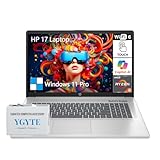


| Product | Best for | Key spec from the title |
|---|---|---|
| HP 17 Ryzen 5 7430U, 32GB | Heavy multitasking | 32GB RAM, 1TB SSD, Wi-Fi 6, Bluetooth 5.4 |
| HP 17 Ryzen 5 7430U, 16GB | Everyday work and school | 16GB RAM, 1TB SSD, Windows 11 Pro |
| HP 17 Core Ultra 7, 32GB DDR5 | Newest-generation business use | 15th Gen Core Ultra 7 with NPU, 2TB SSD |
| HP 17.3 Ryzen 5 6-Core, 1TB | Ports and a numpad | 16GB RAM, USB-C, HDMI, numpad |
| HP 17.3 Core Ultra 7, docking set | Extra storage on day one | 512GB SSD plus 512GB external storage |
| HP 17 Core 5 120U | Light office duty | 16GB RAM, 512GB SSD, backlit keyboard |
| HP 17 Business Ryzen 5, FHD | Sharper text | 17.3-inch FHD display, long battery life listed |
How to Choose
Seven listings can look nearly identical at a glance. These are the checks that actually separate them.
Screen resolution and panel type
Several of these laptops use an HD+ panel, which is a lower pixel count than full HD. On a 17.3-inch screen that means text and icons look larger and slightly softer, which some buyers like and others find coarse. One listing names an FHD display, which packs in noticeably more pixels and fits more of a spreadsheet on screen. Anti-glare and IPS wording in a title are worth noting because a touch screen can pick up fingerprints and reflections. If you will read small type for hours, favor the FHD option; if the laptop mostly handles email and video calls, HD+ is workable.
Processor family and memory
The titles split between AMD Ryzen 5 chips, an Intel Core 5 120U, and Intel Core Ultra 7 chips with an NPU for on-device AI features. For plain office work, any of them clears the bar. Memory matters more: treat 16GB as the practical floor for Windows 11 with many browser tabs open, and step up to 32GB only if you run large spreadsheets, virtual machines, or editing tools. Be careful with comparison claims inside titles, such as a Ryzen 5 described as outperforming a named Intel chip. Those are seller statements, not spec-sheet facts.
Storage layout
Look at the exact wording. A listing that says 1TB SSD offers one drive. One that says 512GB SSD plus 512GB external storage is giving you a smaller internal drive and an add-on, which is less convenient for a laptop you carry between rooms. The 512GB SSD models are fine if you store files in the cloud, while 1TB or 2TB suits local photo and video libraries. Budget models tend to cut corners here, so read the storage line before the processor line.
Keyboard, ports, and security extras
At this size, a numeric keypad is a real advantage for accounting and data entry, and several listings mention it. A backlit keyboard helps in dim rooms, and a fingerprint reader speeds up Windows sign-in. For connectivity, look for USB-C and HDMI if you plan to drive an external monitor, plus Wi-Fi 6 and Bluetooth 5.4 for current wireless gear. Ignore marketing phrases such as large screen or AI PC unless a concrete feature, like an NPU, backs them up.
The 7 Best Options
HP 17 Ryzen 5 7430U, 32GB RAM
This is the configuration for people who keep an unreasonable number of windows open. The title lists an AMD Ryzen 5 7430U, 32GB of RAM, a 1TB SSD, a 17.3-inch HD+ anti-glare touch display, Wi-Fi 6, Bluetooth 5.4, fast charge, and Windows 11 Pro. It suits a bookkeeper, analyst, or student who runs many applications together and wants Pro-level Windows features for business use.
- Strength: the 32GB memory figure is the highest among the Ryzen models here, which leaves room as software grows.
- Strength: Windows 11 Pro and Bluetooth 5.4 are both named in the title.
- Trade-off: the HD+ panel is less sharp than the FHD model in this list.
Skip it if your work is mostly browsing and email; the 16GB sibling covers that without memory you will not use.
HP 17 Ryzen 5 7430U, 16GB RAM
Same platform, half the memory. The listing shows the Ryzen 5 7430U with 16GB of RAM, a 1TB SSD, the same 17.3-inch HD+ anti-glare touch screen, Wi-Fi 6, Bluetooth 5.4, and Windows 11 Pro. For a student or home office user, this is the sensible middle of the group: enough memory for modern Windows, plenty of storage, and the same wireless generation as its bigger sibling.
- Strength: 1TB of storage is generous for a mid-range configuration.
- Strength: the Pro edition of Windows 11 is listed.
- Trade-off: 16GB cannot be treated as future-proof if your workload grows.
Skip it if you already know you will run virtual machines or large datasets; begin at 32GB instead.
HP 17 Core Ultra 7, 32GB DDR5, 2TB
The most heavily equipped listing in the set. The title names a 15th Gen Intel Core Ultra 7 with 12 cores and an NPU, 32GB of DDR5 memory, a 2TB SSD, a 17.3-inch HD+ IPS touch screen, Windows 11 Pro, a 10-key section, a backlit keyboard, and a fingerprint reader. It is aimed at buyers who want one large machine to last years and who value the security and typing extras.
- Strength: 2TB of storage and DDR5 memory are the top figures in this roundup.
- Strength: backlit keyboard, numeric keypad, and fingerprint sign-in are all listed.
- Trade-off: this is the premium tier, and the HD+ panel does not match the rest of the spec sheet.
Skip it if you only need a light office laptop; the extra capacity will sit idle.
HP 17.3 Ryzen 5 6-Core, 16GB, 1TB
A practical pick for people who plug in peripherals. The listing names a 6-core AMD Ryzen 5, 16GB of RAM, a 1TB SSD, a 17.3-inch HD+ touch display, Windows 11 Pro, a numpad, USB-C, and HDMI. The title also claims the processor outperforms an Intel i7-1255U, which is a seller comparison worth verifying rather than assuming.
- Strength: USB-C and HDMI are called out, which makes a second monitor easy.
- Strength: the numpad and 1TB drive suit data-heavy desk work.
- Trade-off: the HD+ screen is the same modest resolution as most of the group.
Skip it if you want a fingerprint reader or backlit keyboard; neither is mentioned in the title.
HP 17.3 Core Ultra 7, 16GB, Docking Set
This one is built around a bundle. The title lists an Intel Core Ultra 7 processor, 16GB of RAM, and 1TB of storage split as a 512GB SSD plus a 512GB external docking set, along with Windows 11 Pro, a fingerprint reader, a backlit keyboard, and bundled earphones in Moonlight Blue. It appeals to someone who wants storage expansion and accessories in a single order.
- Strength: fingerprint reader and backlit keyboard are both named.
- Strength: the extra 512GB external storage gives room for backups.
- Trade-off: the internal drive is only 512GB, so the second half of the storage lives outside the laptop.
Skip it if you want all your capacity inside the chassis, or if you would rather not manage a separate dock.
HP 17 Core 5 120U, 16GB, 512GB
The simplest configuration in the group. The title shows an Intel Core 5 120U, 16GB of RAM, a 512GB SSD, a backlit keyboard, a large 17-inch touch screen, and Windows 11 with Office 365 for the web. Because the listing says Windows 11 without the Pro label, expect the standard edition. It fits a household that needs a big screen for homework, streaming, and web-based documents.
- Strength: 16GB of memory and a backlit keyboard at the entry end of the range.
- Strength: the web-based Office note suits browser-first workflows.
- Trade-off: 512GB of storage fills quickly with photos and downloads.
Skip it if you need business-grade Windows features or a numpad; neither is named in the title.
HP 17 Business Ryzen 5, 17.3-inch FHD
The only listing that names an FHD panel, which makes it the best candidate for text-heavy work. The title lists the latest AMD Ryzen 5 as described by the seller, 16GB of RAM, a 512GB SSD, a numeric keypad, long battery life, and Windows 11 with Office 365 for the web. It targets spreadsheet users who want sharper type and a number pad.
- Strength: FHD resolution gives more screen real estate than HD+.
- Strength: numeric keypad is named, along with a long battery life claim.
- Trade-off: only 512GB of storage, and the exact Ryzen 5 model is not specified.
Skip it if you need to confirm a precise processor number before buying; the title is vague on that point.
Which One Fits Your Situation
You manage spreadsheets all day
Choose the HP 17 Business Ryzen 5 with the FHD display. Sharper text and a numeric keypad matter more than extra processor headroom when your day is rows and columns.
You run many apps at once
The HP 17 Ryzen 5 7430U with 32GB is the clear fit. If you also want the largest drive and a fingerprint reader, the Core Ultra 7 model with 2TB is the step up.
You connect to monitors and peripherals
The HP 17.3 Ryzen 5 6-Core lists both USB-C and HDMI plus a numpad, so a desk setup comes together without adapters hunting.
You want a simple family laptop
The HP 17 Core 5 120U covers streaming, homework, and web documents with 16GB of memory and a backlit keyboard, and it keeps the configuration uncomplicated.
Common Mistakes
- Assuming every 17-inch panel is sharp. HD+ is a lower resolution than FHD, and the difference shows in small text.
- Treating bundled extras as core features. Earphones and decals do not make a laptop better; storage, memory, and keyboard layout do.
- Skipping the storage wording. An internal SSD and an external add-on are not the same thing.
- Buying 32GB of memory for light use, or 16GB for heavy use. Match memory to your actual workload.
- Ignoring the Windows edition. Pro and standard differ in business features such as device management.
Frequently Asked Questions
Is a 17-inch touch screen laptop too heavy to carry?
It is a bigger machine than a 14-inch model, so it suits a desk or occasional trips better than daily commuting. Check the listed weight and decide whether it will live in a bag or on a table.
Do I need a Core Ultra processor?
Not for ordinary office work. The NPU in Core Ultra chips targets on-device AI features, and the Ryzen 5 and Core 5 models handle documents, video calls, and streaming without them.
Is 16GB of RAM enough?
For most office, school, and home use, yes. Move to 32GB when you work with large files, run several heavy programs together, or want the machine to stay useful for longer.
What does HD+ mean on a 17.3-inch screen?
It describes a resolution below full HD, so images are less detailed than on an FHD panel. It is acceptable for general use, but text-focused buyers should prefer FHD.









