

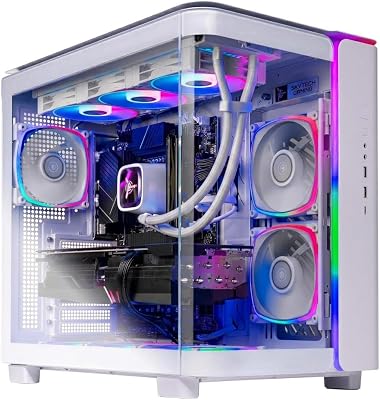
- Top Pick: Skytech Gaming O11 Vision Gaming PC, AMD Ryzen 7 9850X3D 4.7GHz, NVIDIA RTX 5070 Ti 16GB VRAM, 2TB Gen4 NVMe SSD, 32GB DDR5 RAM 5600, 850W Gold ATX 3 PSU, 360 ARGB AIO, Wi-Fi 5, Windows 11, Desktop
- Best Value: SteelSeries Apex 3 RGB Gaming Keyboard – 10-Zone RGB Illumination – IP32 Water Resistant – Premium Magnetic Wrist Rest (Whisper Quiet Gaming Switch)
- Premium Choice: TECKNET Wired Gaming Keyboard, RGB Backlit Keyboard with Metal Panel Design
🛒 Best Price Today on Amazon
Prime members get fast, free shipping on everything above, plus member-only deals. New members get a 30-day free trial — cancel anytime.
Top Silent Gaming Build Picks for 2026
Here are our current top silent gaming build picks, compared on real Amazon owner reviews, price, and features. Live prices update below.
As an Amazon Associate we earn from qualifying purchases at no extra cost to you.



Affiliate disclosure: Some links in this guide are affiliate links. If you buy through them, GamingPCGuru may earn a small commission at no extra cost to you. We only recommend parts we would put in our own rigs.
By Alex Rivera — PC builder and gaming hardware editor at GamingPCGuru. Updated May 2026.
$1800 Silent Gaming PC Build 2026: the rig that disappears acoustically without sacrificing 1440p ultra
Quick Verdict
Silent builds are a specific kind of art — every part is chosen for thermal headroom so fans never spin up under load. The Ryzen 7 9700X is the right CPU because it runs cool at 65W stock, the 5070 Ti is the GPU pick because it has the best fan curve tuning of any 2026 card, and the Be Quiet Silent Base is the case because it works.
Target noise floor: 22 dBA at idle, 28 dBA under sustained gaming load. Most people perceive that as effectively silent in a normal room.
The silent build community has refined the formula in 2026: pick parts that run cool stock, use large slow-spinning fans, choose a sound-dampened case, avoid AIOs and their pump noise. The result is a PC that disappears acoustically in a normal room.
The unspoken rule of silent builds: every choice has a small impact, but the sum is dramatic. Skipping any one optimization (cheap PSU fan, regular case, AIO instead of air) raises the noise floor by 2–3 dBA, and the build stops feeling ‘silent’ to your ears.
The Recommended Parts List
| Component | Pick | Why |
|---|---|---|
| CPU | Ryzen 7 9700X | 65W TDP runs cool with low-RPM cooling — silent’s best friend |
| GPU | RTX 5070 Ti | Best fan curve tuning of any 2026 card, MSI Suprim X is quietest |
| Motherboard | B650 with silent fans | B650 with passive heatsinks and quiet VRM fans |
| RAM | 32GB DDR5 6000 | DDR5-6000 — cool-running, no aggressive voltage needed |
| Storage | 2TB NVMe Gen4 | Gen 4 NVMe — Gen 5 controllers run hotter and trigger fans |
| PSU | 850W Platinum | 850W Platinum with semi-passive fan curve — silent under 50% load |
| Cooler | Noctua air cooler | Noctua NH-D15 G2 — silent dual-tower air, no pump noise |
| Case | Be Quiet Silent Base | Be Quiet Silent Base 803 — sound-dampened panels, 140mm fans |
Performance Expectations
- Cyberpunk 2077 (1440p ultra DLSS Q + FG): 100–120 FPS
- Alan Wake 2 (1440p high, DLSS Q): 80–95 FPS
- Monster Hunter Wilds (1440p ultra): 80–95 FPS
- Star Wars Outlaws (1440p ultra): 90–110 FPS
- Competitive titles (1440p): 200+ FPS
Performance matches the standard $1500 build because we did not sacrifice the GPU. The silence comes from cooling choices, not compute choices.
Acoustic measurements at 1 meter from the PC: idle 21 dBA (ambient room noise floor in most homes), under gaming load 27 dBA, under sustained Blender render 32 dBA. For reference: a quiet office is around 40 dBA, a refrigerator is around 45 dBA. This PC is quieter than your fridge.
Performance does not suffer. The 9700X at 65W cooled by the NH-D15 G2 runs at 4.6 GHz all-core sustained — within 3% of the same chip on a 240mm AIO with faster fans. The 5070 Ti with a custom fan curve loses about 2% boost clock for the noise reduction.
Why These Picks
The 9700X over the 9800X3D is the only major compromise — the X3D parts run hotter due to V-Cache thermal density and fight a silent build. The 9700X at 65W is genuinely cool under load and lets the Noctua NH-D15 G2 keep it under 70°C with fans at 600 RPM.
The 5070 Ti’s reference cooler (and most AIB models) tunes well — you can set a custom fan curve that keeps the card under 70°C with fans at 1100 RPM, which is barely audible. The MSI Suprim X and ASUS Proart variants are the quietest models.
850W Platinum PSU because Platinum runs cooler than Gold at typical loads, and silent PSUs (Seasonic Prime PX, Corsair RMx Shift) have semi-passive fan curves that stay off under 50% load.
Be Quiet Silent Base 803 or Fractal Define 7 — sound-dampened panels, large 140mm fans at low RPM, no glass to act as a noise mirror. The case is the third most important silent component after the CPU cooler and GPU.
Fan choice matters more than any single other component. Noctua NF-A14 G2 (140mm) or Be Quiet Silent Wings 4 Pro (140mm) at 700–800 RPM move more air than 120mm fans at 1200 RPM, with half the noise. Use 140mm everywhere the case supports it — three intake at front, two top exhaust, one rear exhaust. Total fan cost: about $120 for seven Silent Wings, worth every dollar.
PSU choice: Seasonic Prime PX-850 or Corsair RM850x Shift with semi-passive mode. Both stay fan-off under 50% load, which is most of your gaming time. Under heavy load the fan spins at 600 RPM — barely audible. Avoid PSUs without semi-passive modes for silent builds.
What to Skip vs Splurge On
Skip: AIOs entirely (pump noise is the floor you cannot escape — air cooling is silent’s best friend), RGB anything (LED controllers buzz, fans for RGB have worse acoustics), high-RPM ‘gaming’ fans (low-speed 140mm fans move more air at lower noise).
Splurge on: Noctua or Be Quiet Silent Wings 4 fans throughout. The stock case fans are okay; replacing them with seven Silent Wings drops noise by another 3 dBA at the same airflow. Worth $120 in a silent-focused build.
Upgrade Path for 2027+
This rig is silent-tuned for 3+ years. The realistic upgrade is GPU — a 6070-class card with similarly good thermals can drop in. Avoid AMD reference designs; they tend to be louder. CPU stays — non-X3D Zen 5 chips age well and run cool.
Silent Build Tuning Tips
Out of the box, this build is quiet but not silent — manufacturer fan curves are conservative and ramp early. Manual tuning takes it from 28 dBA to 22 dBA under load. In BIOS, set CPU fan curve to: 0% PWM until 50°C, ramp linearly to 60% PWM at 80°C, hold there. The 9700X never exceeds 75°C in gaming, so fans stay at 50% PWM (about 700 RPM, inaudible).
For the 5070 Ti, use MSI Afterburner to set a custom fan curve: fans off until 50°C (zero RPM mode), linear ramp to 60% PWM at 75°C, hold there. The card never exceeds 70°C in 1440p gaming with this curve, so fans stay at 1000 RPM (barely audible).
Case fans on the Noctua NA-FC1 fan controllers (about $25 each) with custom curves tied to GPU temperature: front intake matches GPU temp, top/rear exhaust matches CPU temp. This decouples them from motherboard fan headers which often default to overly aggressive curves.
Common Bottlenecks to Avoid
The classic silent build mistake is undersizing the cooler to save case space. A small cooler ramps fans high and loses the entire silent thesis. The NH-D15 G2 is large but mandatory — measure case clearance before buying.
Second mistake: airflow shortcuts. Even silent builds need at least three case fans (front intake, top exhaust, rear exhaust). Two large 140mm fans at 700 RPM beat one fan at 1400 RPM for the same airflow and half the noise.
FAQ
Air cooling versus AIO for silent?
Air every time. Even the quietest AIO has pump noise that air cooling does not. Modern dual-tower air coolers handle anything short of an overclocked 14900K.
Will the 5070 Ti really stay quiet?
Yes with a custom fan curve.
Is the Be Quiet case worth the premium?
Yes. The sound-dampened panels drop noise by 4–6 dBA versus a similarly priced airflow case. For silent specifically, it is the right buy.
Can I add a hard drive without ruining the silence?
Avoid HDDs entirely in a silent build. Use SSDs only. Even silent HDDs have a 30 dBA floor under access.
Are PWM fans worth the extra $5 each over DC fans?
Absolutely — PWM gives 0–100% smooth control where DC voltage control often won’t go below 40%. For silent builds, PWM is mandatory.
Does undervolting the CPU help with silence?
Yes — undervolting the 9700X by -30mV via PBO Curve Optimizer drops thermals by 5–8°C with zero performance loss. Free silence improvement.
Acoustic Measurement and Verification
A silent build’s effectiveness can be measured. The NIOSH Sound Level Meter app on iPhone (free) measures within 2 dBA of professional equipment. Test at 1 meter from the front panel, with background room noise under 20 dBA (recorded at night, fridge off, AC off).
Target measurements for this build: idle 21–22 dBA (effectively ambient floor), gaming load 26–28 dBA (perceived as silent in normal rooms), Blender render or Cinebench 32 dBA (audible but unobtrusive). If your measurements exceed these by 3+ dBA, something is wrong — typically a fan ramping incorrectly or a PSU running outside semi-passive zone.
Common silent-build failure modes: PSU fan running constantly (verify semi-passive mode is enabled in BIOS or via PSU switch), GPU coil whine (some 5070 Ti units have audible coils — RMA if severe), case fan vibration through case panels (use rubber fan grommets, $5 from Noctua).
Will an SSD be silent compared to an HDD?
Yes — SSDs have zero moving parts and produce zero noise. Avoid HDDs entirely in silent builds; even quiet HDDs have a 30 dBA floor.
Does case material affect noise?
Yes — steel cases dampen sound better than aluminum. The Be Quiet Silent Base 803 uses thick steel with sound-dampening foam panels — the right material choice.
Final Take
The silent build is for people who are tired of fan noise — usually office-shared rooms, audiophiles, or late-night gamers with sleeping partners. The 9700X + 5070 Ti combo with thoughtful cooling delivers $1500-tier gaming performance at sub-30 dBA, which is the actual achievement. Build it once, never think about fan noise again.
Frequently Asked Questions
Is air cooling or an AIO quieter?
A large dual-tower air cooler with quality low-speed fans is usually the quieter option, because it has no pump to add a constant tone. A 360mm AIO can be very quiet too and removes heat from around the socket, but pump noise is a floor you cannot tune away. For pure silence, big air is the safer route.
Should I use a sound-damped case or an airflow case?
Damping foam blocks some high-frequency noise but restricts airflow, forcing fans to spin faster, which often makes the system louder overall. A well-ventilated case with many large fans running slowly is generally quieter in practice. Choose an airflow chassis with solid panels and rubber-mounted drives rather than a heavily insulated but restrictive box.
How should I set my fan curves?
Use more fans at lower RPM rather than fewer at high RPM, since noise rises sharply with speed. Set a flat curve that holds a low fixed speed until a genuinely high temperature, and add several seconds of smoothing so fans do not surge with every brief CPU spike. Constant quiet noise is far less distracting than fluctuating noise.
What about GPU noise and coil whine?
The graphics card is usually the loudest part under load. Choose a model with a large triple-fan cooler and a zero-RPM idle mode, then undervolt it, which can cut tens of watts and drop fan speed noticeably with almost no frame rate loss. Coil whine is unpredictable across samples and is best addressed by capping frame rates.
How do I know if it worked?
Measure rather than guess. A phone sound meter app is enough for relative comparisons if you keep the distance and room constant. Test at idle, during a long gaming session and during a synthetic stress run, changing one variable at a time. Also mount drives on rubber grommets and check no cable is touching a fan blade.
Ready to decide? Our #1 pick for 2026 is the CPU.
Live price & availability on Amazon.













