

- Top Pick: 8BitDo Arcade Stick
- Runner-up: MAYFLASH F500 Elite Arcade Stick
- Also consider: 8BitDo Ultimate 2 Bluetooth Controller
Shoot ’em ups ask more of a platform than almost any other genre. A dropped frame or a mushy D-pad that would go unnoticed in a slower game becomes a lost life when the screen is full of bullets and your ship’s hitbox is a few pixels wide. The good news for Linux players is that the genre’s PC catalogue is old enough, and light enough on system demands, that most of it runs well here — some of it natively, and much of the rest through Proton with top-tier community ratings.
This guide sorts the Linux shmup shelf by how each game actually runs: native builds first, then the Proton titles whose status is documented on ProtonDB or through Valve’s own Steam Deck ratings, with an honest note on the names that still need tinkering. It also covers the tate display question that every vertical-scroller fan eventually faces, and the controllers and sticks that suit the genre.
As an Amazon Associate, we earn from qualifying purchases.
Quick answer
Yes — the genre is in good shape on Linux. Steredenn: Binary Stars and Sky Force Reloaded ship native Linux builds, while Cave’s Mushihimesama and Treasure’s Ikaruga carry Platinum ratings on ProtonDB and DoDonPachi Resurrection is Steam Deck Verified. Only some big names, such as Raiden V at Silver, still need tinkering, so check each title before buying.
Native Linux builds: no translation layer at all
The simplest route to a shmup on Linux is a game that ships a Linux build, and the genre has a respectable set of them.
Steredenn: Binary Stars is a horizontal scroller with roguelike structure — randomised waves, weapon drops and boss fights that change from run to run. Its Steam page lists a dedicated SteamOS and Linux system-requirements section, so it installs and runs as a native application with no compatibility layer involved. It is a good first purchase for Linux players because the native build removes Proton from the equation, and its short-run format suits quick sessions.
Sky Force Reloaded takes the opposite design route: a polished, deliberately old-school vertical scroller with a campaign, upgradeable planes and medal targets per stage. Its Steam page likewise lists SteamOS and Linux requirements, confirming a native build, and Valve rates it Steam Deck Verified. Of the two, Sky Force Reloaded is the gentler on-ramp — its difficulty curve is built for players new to the genre — while Steredenn is the harder, replayable score-chaser.
Beyond these two, the native shelf rewards browsing: many smaller indie shmups on Steam and itch.io ship Linux builds, and the Steam store’s platform icons are the reliable way to confirm a given title before buying. What the native shelf lacks is the genre’s biggest Japanese arcade names — and those live in the Proton section.
Bullet hell through Proton: the Cave and Treasure shelf
The centre of the modern shmup canon is Cave’s bullet-hell catalogue, published on Steam by Degica, and none of it has a native Linux build. Through Proton, though, the flagship titles are about as safe as Windows-only games get.
Mushihimesama, Cave’s insect-themed vertical scroller, holds a Platinum rating on ProtonDB — the site’s top tier, meaning community reports describe it running perfectly out of the box — across dozens of reports, and Valve rates it Playable on Steam Deck. Reports note that the arcade version’s deliberate slowdown is faithfully reproduced, which matters: in Cave games, slowdown is part of the design, not a performance fault. Its Novice and Arrange modes also make it the friendliest entry point into bullet hell.
DoDonPachi Resurrection, the fifth DonPachi game, is Windows-only on its Steam page, but Valve rates it Steam Deck Verified, the strongest of Valve’s own Deck ratings, and its eight game modes include novice variants alongside the full arcade rules. Treat the Deck Verified badge as the sourcing: it is Valve’s testing label, and it makes Resurrection a low-risk purchase for Linux players even without a native build.
Ikaruga, Treasure’s polarity-switching classic, also holds a Platinum rating on ProtonDB and a Steam Deck Verified badge. One honest caveat from the community reports: a minority of players on AMD graphics hardware describe slowdown in the final stages and document a workaround that switches Proton to its older Direct3D rendering path. Most reports describe it running perfectly, but AMD users should know the reports exist.
Then there is the cautionary tale. Raiden V: Director’s Cut sits at a Silver rating on ProtonDB and is rated Unsupported for Steam Deck, with reports describing Media Foundation tinkering and custom Proton builds. It is playable for tinkerers, but it is not a buy-and-play title on Linux, and it shows why checking each game individually beats assuming the whole genre works.
The tate question: playing vertical games on horizontal screens
Most of the genre’s classics were designed for vertically oriented arcade monitors — tate, from the Japanese word for vertical. On a standard horizontal display, a vertical shmup runs pillarboxed, with bars on either side and a playfield much smaller than the screen. Every Linux shmup setup has to answer this somehow.
The first answer is software. Several of the Steam ports, including Ikaruga and Cave’s releases, offer in-game screen-rotation options that turn the playfield sideways to fill a rotated monitor. The second answer is hardware: a monitor whose stand pivots into portrait orientation, which the buying section below includes for exactly this reason. Rotating the desktop is a display-settings change in any mainstream Linux desktop environment, and Steam Deck players should know the handheld’s screen is fixed in landscape — on Deck, tate games play pillarboxed unless you dock to a rotating display.
Tate is worth the effort for score players because a full-height playfield makes dense patterns easier to read. Casual players can stay pillarboxed and lose nothing but screen area.
Bullet hell versus classic: two sub-styles, two skill sets
Newcomers often bounce off the genre because they buy the wrong sub-style. Bullet hell, the Cave tradition, fills the screen with patterned shots but gives your ship a tiny hitbox — often a single visible point — so the real skill is threading gaps and learning patterns, and games like Mushihimesama add grazing and chaining systems that reward flying close to bullets. Classic shmups in the Raiden lineage use a full-size hitbox, sparser but faster shots, and checkpoint-style memorisation: survival depends on routing a stage in advance rather than improvising through curtains of fire.
Linux players can sample both cheaply in effort terms: Sky Force Reloaded and Steredenn lean classic and modern-hybrid respectively, while Mushihimesama’s Novice mode is the genre’s best-designed bridge into bullet hell. Pick the sub-style that matches the challenge you want before building a library around either.
Gear that suits the genre
8BitDo Arcade Stick

A ball-top lever is the traditional shmup control, and this stick’s universal mounting plate accepts Sanwa levers if you want to upgrade the feel later. It connects three ways, so it moves between a Linux desktop and other machines easily.
Specs:
- Connections: Bluetooth, 2.4 GHz receiver, wired USB-C
- Lever: ball-top stick, universal mounting plate for Sanwa parts
- Software: 8BitDo Ultimate Software button mapping
- Layout: eight action buttons, dynamic mode layout
MAYFLASH F500 Elite Arcade Stick

The F500 Elite is the step-up pick for players who want genuine arcade parts from the box: Mayflash fits Sanwa Denshi lever and buttons as standard. It is wired only, which suits a fixed desk setup.
Specs:
- Parts: Sanwa Denshi lever and pushbuttons, maker-fitted
- Connection: wired USB
- Layout: eight-button arcade layout
- Build: metal top panel, wide body for lap or desk play
8BitDo Ultimate 2 Bluetooth Controller

For pad players, the Ultimate 2 Bluetooth offers precise sticks for fine ship movement and two back buttons that map well to shot and bomb. Its dock keeps it charged between sessions.
Specs:
- Connections: Bluetooth, 2.4 GHz, wired USB-C
- Sticks: anti-drift TMR sticks, maker-described
- Extras: charging dock, two remappable back buttons
- Software: 8BitDo Ultimate Software profiles
8BitDo M30 Bluetooth Gamepad
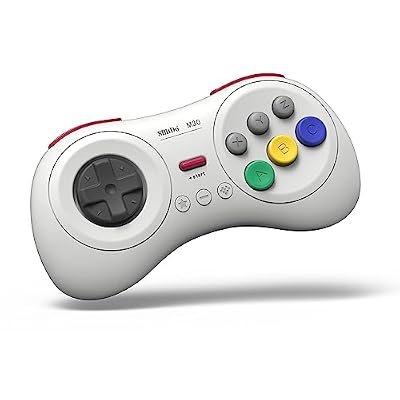
The M30 recreates the six-button Sega layout that many shmup ports assume, with a rolling D-pad suited to diagonal weaving. It is the budget-friendly pad pick for retro-leaning players.
Specs:
- Layout: six face buttons, Sega-style D-pad
- Connections: Bluetooth, wired USB-C
- Compatibility: Switch, Windows, Android per maker listing
- Form: compact retro shell
LG UltraGear 27GR83Q-B Gaming Monitor

The tate enabler: this 27-inch QHD monitor’s stand pivots into portrait, so vertical scrollers can use the full panel. Its maker-stated 240 Hz refresh also serves fast horizontal titles on the same desk.
Specs:
- Panel: 27-inch Nano IPS, 2560 by 1440
- Refresh rate: 240 Hz, maker-stated
- Stand: height, tilt and pivot adjustment
- Inputs: HDMI and DisplayPort
How to choose
Start with how a game runs, not how famous it is. Native builds like Steredenn and Sky Force Reloaded carry no compatibility risk at all. For Windows-only titles, treat ProtonDB’s tiers as your buying filter: Platinum means community reports describe a perfect out-of-box experience, while Silver, as with Raiden V, means setting aside time for tinkering. Valve’s Steam Deck ratings are a second, independent signal — a Deck Verified badge on a Windows-only game like DoDonPachi Resurrection is meaningful evidence for desktop Linux too.
Then choose your sub-style. If dense patterns and tiny hitboxes sound appealing, begin with Mushihimesama’s Novice mode. If you prefer routing and memorisation, start with Sky Force Reloaded. Finally, match the controller to the games: a lever for arcade authenticity, a six-button pad for Sega-era ports, and a pivoting monitor only if tate play genuinely interests you.
Who should skip this
Skip this shelf if you need every purchase to work with zero research: the genre’s biggest names are Windows-only, and even Platinum-rated Proton titles are community-reported rather than publisher-guaranteed on Linux. Skip the arcade sticks if you play mostly on a handheld — they solve a desk problem. And skip tate hardware entirely if you play casually in short sessions; pillarboxed play on a normal monitor is perfectly serviceable, and the rotating stand only pays off for committed score-chasers.
FAQ
Do I need Steam Deck Verified for a game to work on desktop Linux?
No. Deck Verified is Valve’s handheld rating and a useful signal, but desktop Linux runs the same Proton layer. Mushihimesama, for example, is rated Playable on Deck yet holds a Platinum rating on ProtonDB from desktop and Deck reports combined.
Are Cave’s other Steam releases safe buys on Linux?
Check each one individually. The pattern in this guide — Platinum for Mushihimesama, Deck Verified for DoDonPachi Resurrection, Silver for Raiden V from a different publisher — shows that status varies title by title even within one developer’s catalogue. ProtonDB takes a minute to check and prevents most bad purchases.
Can I play tate mode on a Steam Deck without extra hardware?
Only pillarboxed. The Deck’s screen does not rotate, so a vertical game displays with side bars in handheld mode. True tate on Deck means docking to a monitor that pivots, or accepting the smaller playfield.
Is an arcade stick actually better than a pad for shmups?
It is different, not automatically better. A lever gives precise, repeatable directional taps and suits players raised on cabinets; a good D-pad is faster to learn and works everywhere. Many top score players use each. Buy the stick for the feel, not for a promised skill jump.
Final verdict
Linux is a genuinely good home for shmups in 2026. The native shelf covers both a modern roguelike take in Steredenn and a polished classic campaign in Sky Force Reloaded, while Proton carries the genre’s crown jewels — Mushihimesama and Ikaruga at Platinum, DoDonPachi Resurrection with Valve’s own Verified badge. The discipline the platform asks in return is small: verify each Windows-only title’s documented status before buying, respect the Silver-rated exceptions, and let your preferred sub-style, not nostalgia alone, decide where your money goes.










