KeyWe is the co-op postal game about Jeff and Debra, two flightless kiwi birds who run a rural mailroom by bouncing across keyboards, stamping letters and sorting parcels against the clock. It plays solo, in local co-op, or online with a second bird. The question here is narrower: does a native Linux build exist, and if not, what carries the game on a Linux machine?


Every layer of Steam’s record points the same way: the store flags Windows alone, the Linux requirements tab is a hollow shell, the one content depot rides in a Windows-only package, and both add-ons repeat the same paperwork. The working route is Proton, and two records — ProtonDB’s pool and Valve’s Deck testing — describe how it performs.
As an Amazon Associate, we earn from qualifying purchases.
Quick answer
No. KeyWe has no native Linux build. Steam’s record flags Windows only, its Linux requirements tab is an empty shell, and the single content depot sits in a Windows-only package. The route in is Proton: ProtonDB rates the game Platinum across its report pool, and Valve grades it Playable on Steam Deck.
The store record: Windows only, and the Linux tab is a shell
Steam’s platform line for KeyWe reads windows true, mac false, linux false. The game was released on 31 August 2021 by developer Stonewheat & Sons, with Fireshine Games as publisher, and nothing since has revised that line.
The requirements fields tell the same story. The Windows minimum is genuinely written out: a 64-bit copy of Windows 7, an Intel i3-2100 or AMD A8-5600k processor, 4 GB of RAM, a GeForce GTX 630 or Radeon HD 6570 class card, DirectX 11, and 4 GB of storage. Its recommended tier is little more than a heading carrying the 64-bit note. The Linux field, by contrast, is an empty shell — Minimum and Recommended headings printed over lists with nothing in them — and the Mac field wears the identical shell. A shell is a tab kept for a platform the record does not serve, not a specification.
Two absences round out the record: no DRM notice on the store data, and no external-account notice either — nothing asks a player to sign into a second service first.
One depot, one package, no second copy
Flags can be mis-set, so the delivery layer is where this verdict gets checked. SteamDB lists exactly one content depot, depot 1242981, named KeyWe Content, at 2.31 GiB — no operating-system split, no separate Linux or Mac depot, just the single shared file the Windows build uses.
The package layer closes the question. The one store package, sub 623246, grants the game app alone, and Steam’s own package record reads windows true, mac false, linux false. A normal purchase can therefore only install the Windows build; no second copy waits in an unmentioned package. The record is still maintained, too: the public branch serves build 21489958 (March 2026), its Windows-only shape unchanged.
The add-on sweep: the family agrees with the game
Many games in this cluster are betrayed by their own families — a soundtrack or artbook app flags a Linux build the game never shipped. KeyWe’s family, read app by app for exactly that, is the anti-trap: the full DLC array is exactly two apps, and both agree with the base game.
The 100th Grand Ol’ Telepost Tournament (app 1873760, February 2022) flags windows true, mac false, linux false, carries the same empty-shell Linux field, and copies its Windows minimum from the base game word for word. The Early Bird Pack (app 1728650, released alongside the game) repeats the same three answers. No soundtrack app and no artbook exists in this family, so the classic false-flag surface is absent: nothing in the record claims Linux.
Anti-cheat, from three directions
Because KeyWe has online co-op, its anti-cheat position matters, so it was checked from the three usual directions and kept separate. Steam’s record names no anti-cheat. SteamDB’s detected-technology list is engine plumbing only: the Unity Engine, the Mono SDK, and the Photon SDK — Photon is the networking middleware behind the online play, not an anti-cheat system. The Are We Anti-Cheat Yet dataset, all 1,167 games on its master branch, carries no entry for KeyWe by name or by app id. Three sources, three blanks: nothing gates a Linux player out of the online mailroom, and the store’s category list — Online Co-op, Cross-Platform Multiplayer, Remote Play Together — is reported exactly as written, with no claims added about servers or player counts.
Steam Deck: Playable, with two footnotes
Valve’s own compatibility endpoint answered directly for this game, and it grades KeyWe Playable on Steam Deck, with SteamOS separately rated Compatible. The passing items: all functionality is accessible with the default controller configuration, the game shows Steam Deck controller icons, interface text is legible, and the default graphics configuration performs well. The configuration’s recommended runtime is proton-stable — the badge certifies the Windows build under Proton, not a native port.
Two footnotes hold the grade at Playable rather than Verified. Entering some text requires manually invoking the on-screen keyboard. Valve’s sheet also notes that external Bluetooth or USB controllers are not supported on Deck for local multiplayer — a real caveat for a co-op game; the gear section is framed with it in mind.
One more date matters. Valve’s test ran on 12 November 2022 against build 8246099; the public branch now serves build 21489958, so the paperwork predates the current build by years of updates. The grade stands as Valve’s last word, but the sheet belongs on the factual list of Deck paperwork whose tested build no longer matches the build players download.
ProtonDB: Platinum across a small pool
ProtonDB’s summary for KeyWe reads Platinum at every level it publishes: headline, best-reported and trending tiers all Platinum, across 17 reports, with confidence rated good. That pool is small next to the hundreds of filings some games here carry, but unanimous — the reports describe the Windows build under Proton without platform-level blockers, matching the Deck sheet’s picture.
One check could not be completed this session: the game’s ProtonDB page itself timed out when fetched, so whether its classification heading claims native support is unverified, and nothing here rests on it. The summary figures stand alone, describing Proton performance only — never evidence of a native build.
GOG: no edition to fall back on
The DRM-free route offers no alternative here. GOG’s search returns no KeyWe product, its catalogue query surfaces only an unrelated title, and the game’s natural GOG address resolves to the general catalogue rather than a product page — no product record exists to verify. No GOG edition exists, so the Steam copy is the only PC edition.
Gear that fits the record
The record’s shape decides the gear: the Deck whose Playable badge was earned under Proton, pads for desktop co-op, a mouse for desk sessions, and storage.
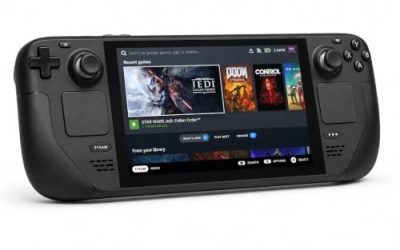
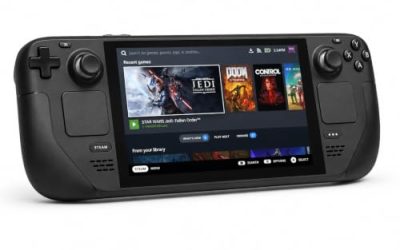
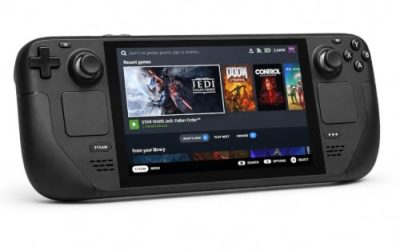
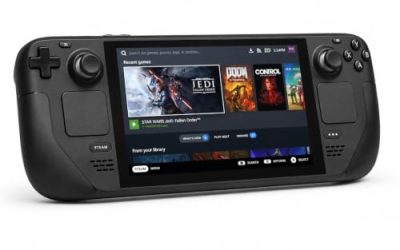
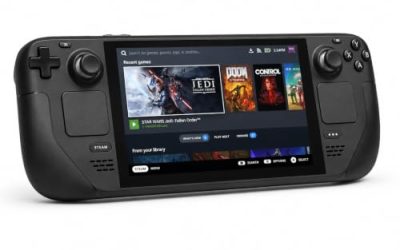
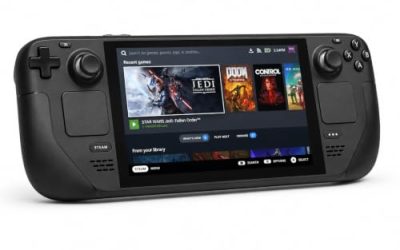
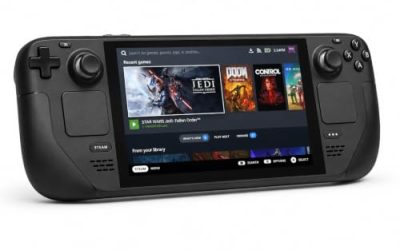
Valve Steam Deck OLED 512GB
The handheld Valve graded Playable for this game. Its badge was earned by the Windows build under proton-stable, and the game’s modest requirements sit far below this APU.
Specs
- Display: 7.4-inch HDR OLED, 1280 by 800, up to 90 Hz
- Processor: AMD Zen 2 and RDNA 2 custom APU
- Memory: 16 GB LPDDR5
- Storage: 512 GB NVMe, plus a microSD slot
- Wireless: Wi-Fi 6E and Bluetooth
- Channel note: Valve sells the Deck mainly through its own store, so Amazon listings are third-party sellers
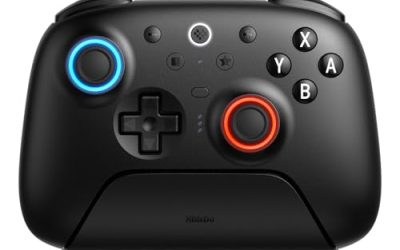
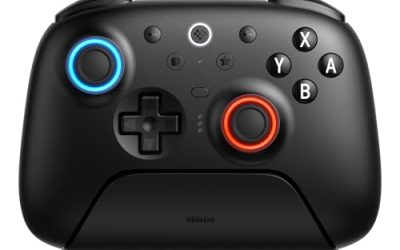
8BitDo Ultimate 2 Bluetooth Controller
The desktop co-op pick. KeyWe lists full controller support, and a second bird needs a second pad; this one covers that seat with modern sticks, triggers and back buttons. Valve warns that external pads do not join local multiplayer on the Deck itself — this pick is for the PC side.
Specs
- Connectivity: Bluetooth wireless and USB-C wired
- Joysticks: TMR electromagnetic, anti-drift design
- Triggers: Hall effect, with mode switching
- Extras: two remappable back buttons, motion control
- In the box: charging dock included
Xbox Wireless Controller, Carbon Black

The safest second pad: Steam Input support is universal, the glyphs match what most games display, and it pairs over Bluetooth or its own wireless standard. On a Linux desktop, it is the pad least likely to need configuration.
- Connectivity: Xbox Wireless and Bluetooth
- Port: USB-C for wired play
- Controls: hybrid D-pad, dedicated Share button
- Power: AA batteries or optional rechargeable pack
Logitech G502 HERO

Solo shifts involve menu clicking, and at a desk a precise wired mouse makes those screens faster to work through. Eleven programmable buttons cover the confirm, cancel and camera inputs a long session repeats.
Specs
- HERO optical sensor, up to 25,600 DPI
- 11 programmable buttons
- Adjustable weight system
- Wired USB connection
- On-board memory profiles
Samsung T9 Portable SSD 2TB

For moving a Linux game library between machines, or keeping an offline backup of installers, a fast USB-C drive is the simple answer. The headline figure needs a Gen 2×2 host port; on a lesser port the drive runs at that ceiling instead.
Specs
- Capacity: 2 TB portable SSD
- Interface: USB 3.2 Gen 2×2, USB-C connector
- Maker-rated speeds: up to 2,000 MB per second read, 1,950 MB per second write
- Features: Dynamic Thermal Guard, maker-rated drop resistance
How to choose
Choose the Steam copy, because it is the only PC edition on sale and the build both compatibility records describe. On a Linux desktop or laptop, install it under Proton and leave the compatibility tool at its default; a unanimous Platinum pool, even a small one, says the build behaves. On Steam Deck, expect the Playable experience Valve describes: full functionality and legible text, with the on-screen keyboard summoned by hand when a text field appears. For co-op, plan the second controller around where you play — a pad pair is at home on the desktop, while Valve’s sheet warns that external pads do not join local multiplayer on the Deck itself, so online co-op or Remote Play Together is the smoother two-bird route there.
Who should skip
Skip KeyWe on Linux if a native build is a condition of purchase: there is none, and nothing in the record hints at one. Skip it if your plan was a GOG copy, because no GOG edition exists. Skip the Deck version if your co-op depends on a second external controller paired to the handheld, since Valve’s sheet rules that out for local multiplayer. And skip it if a Platinum rating only persuades you at scale — this pool is 17 reports, unanimous but small.
FAQ
Is KeyWe native on Linux?
No. Steam flags Windows only, the Linux requirements field is an empty shell, the single content depot sits in a Windows-only store package, and both add-on apps repeat the same paperwork. Linux play happens through Proton.
How well does KeyWe run under Proton?
ProtonDB’s summary rates it Platinum as headline, best-reported and trending tier across 17 reports, with confidence rated good. Valve’s separate Deck testing also passes the Windows build on performance and legibility under proton-stable. No report in the pool describes a platform-level blocker.
Is KeyWe Steam Deck Verified?
It is graded Playable, one step below Verified. Functionality, glyphs, legibility and performance all pass; the deductions are the manual on-screen keyboard for text entry and the note that external controllers are not supported on Deck for local multiplayer. Valve’s test also predates the current build.
Can I buy KeyWe on GOG instead?
No. GOG’s searches return no product for the game and its natural GOG address resolves to the general catalogue. The Steam copy is the only PC edition.
Final verdict
KeyWe on Linux is a Proton story told unusually cleanly. The native question is closed at every layer — flag, field, depot, package and a two-app family that agrees with its own game — and what remains is a compatibility record in good health: a unanimous Platinum summary, a Playable Deck grade whose footnotes concern keyboards and couch controllers rather than crashes, and no anti-cheat entry to trip over. Buy the Steam copy, run it under Proton, and keep the second controller on the desktop side of the room.
Product and ASIN Reference
| Product | ASIN |
|---|---|
| Valve Steam Deck OLED 512GB | B0CQ3RWQQZ |
| 8BitDo Ultimate 2 Bluetooth Controller | B0F194QFT2 |
| Xbox Wireless Controller, Carbon Black | B08DF248LD |
| Logitech G502 HERO | B07GBZ4Q68 |
| Samsung T9 Portable SSD 2TB | B0CHFS9K14 |