

- Top Pick: Backbone One Mobile Gaming Controller (USB-C)
- Runner-up: Razer Kishi Ultra
- Also consider: Xbox Wireless Controller (Carbon Black)
For most of the App Store’s life, emulation on iPhone meant jailbreaks, expiring sideloading certificates, or nothing at all. That changed in April 2024, when Apple revised its App Review Guidelines to admit retro game console emulator apps worldwide. Within weeks, Delta, RetroArch and PPSSPP sat in the store next to every other app — no workarounds, no expiry timers.
As an Amazon Associate, we earn from qualifying purchases.
What you get is genuinely good, but it is not PC or Android emulation. iOS forbids one technique the heaviest emulators depend on, and that rule shapes the whole catalogue: which apps exist, which systems run well, and which will never appear. This guide covers the apps worth installing, the ceiling they share, how to move your own dumps onto the device, and the controllers that make it feel like a console.
This article contains affiliate links, and we may earn a commission when you buy through them at no extra cost to you.
Quick Answer
Emulation on iPhone and iPad is legal and straightforward since Apple’s April 2024 rule change: install Delta for Nintendo systems up to DS, RetroArch for the widest core library, or PPSSPP for PSP. App Store apps cannot use JIT compilation, so GameCube, PS2 and Switch emulation stay out of reach, while 8-bit through PSP systems run well. You supply games dumped from your own cartridges and discs.
The Rule Change That Opened the Door
In April 2024 Apple updated App Review Guideline 4.7, the section covering mini apps, streaming games and emulators. The revised text states that retro game console emulator apps can offer to download games — with the crucial condition that the developer is responsible for everything the software offers and must hold the rights or licences for it. In practice, that condition is why no legitimate emulator ships with games inside: the apps arrived empty, and the games are yours to supply from your own collection.
The change was global, not limited to the European Union’s alternative marketplaces, and it landed alongside Delta’s release. Riley Testut had spent years distributing Delta through AltStore precisely because the store would not take it; the April revision turned that workaround into a normal listing. RetroArch and PPSSPP followed within weeks.
The Three Apps Worth Installing
Delta: the Nintendo specialist
Delta covers NES, Super NES, Nintendo 64, Game Boy, Game Boy Color, Game Boy Advance, Nintendo DS and Sega Genesis inside one polished app by Riley Testut. It is the easiest starting point on iOS: save states, fast-forward, cheat codes, customisable controller skins, and Delta Sync, which backs up games, saves and states to Google Drive or Dropbox so iPhone and iPad stay in step. DS games get sensible layouts, and AirPlay can send the top screen to a TV. For Nintendo’s handheld and 16-bit history, Delta is the default answer.
RetroArch: the everything frontend
RetroArch’s App Store build is the same frontend PC players know, loading libretro cores for dozens of systems: Delta’s Nintendo range, plus PlayStation, Sega’s Saturn-era hardware, PC Engine and arcade cores. It brings shaders, run-ahead latency options, per-core settings and netplay, at the cost of the densest menus in the business. Some desktop cores are absent, and the JIT restriction below caps the heavy ones, but for breadth in one install nothing else on iOS comes close.
PPSSPP: the PSP in your pocket
PPSSPP’s App Store build plays PlayStation Portable games dumped from your own UMDs or converted from your own digital purchases. PSP games upscale cleanly to iPhone and iPad resolutions, and the app supports save states, texture filtering and external controllers. The PSP’s hardware is modest next to modern phone chips, so most of the library runs at full speed without the dynamic recompilation tricks iOS restricts — exactly why PPSSPP thrives here while heavier systems stall.
The JIT Ceiling, Explained Plainly
JIT — just-in-time compilation — is how demanding emulators turn console code into native phone code on the fly instead of interpreting it instruction by instruction, which is far slower. Apple’s rules do not permit App Store apps to use JIT, and that restriction draws the platform’s ceiling.
Everything from the 8-bit era through the Nintendo 64, DS and PSP runs acceptably without JIT on current Apple chips, because those systems are light enough for interpreter cores. GameCube and Wii emulation leans on JIT heavily, which is why Dolphin has no App Store build: its developers state that without JIT the performance is not acceptable. PlayStation 2 and Switch emulation sit in the same blocked category. Inside the store, the rule is simple — if a system needs JIT to run well, it is not here.
Getting Your Own Games onto the Device
Every app in this guide starts empty. The games come from cartridges and discs you own, dumped with the usual PC-side tools, and iOS gives you three clean routes in. The Files app is the hub: copy dumps into the app’s folder under On My iPhone, and all three apps can browse to them. iCloud Drive works the same way over the air. A cable or USB-C drive transfer suits big libraries, and on iPad a drive can stay attached as working storage.
A few habits keep this painless. Keep one folder per system so scanners and library views stay tidy. Keep BIOS files from your own consoles in the folder each app documents — Delta needs none for most systems, while some RetroArch cores expect specific files. And back the library up: Delta Sync covers saves and states, but the dumps are your archive to protect.
Controllers: Skins, MFi and Bluetooth
Delta’s controller skins are the best touch controls on iOS — resizable, system-themed layouts that make Game Boy and DS games honestly playable on glass. Anything stick-heavy deserves real buttons. Xbox Wireless and DualSense controllers pair natively over Bluetooth, MFi-certified pads work across the store’s games, and 8BitDo’s pads bring the retro shapes. Telescopic grips that clamp around the phone turn it into a handheld outright, with USB-C models connecting without pairing or battery anxiety.
On iPad, a separate pad on a stand beats a clamp, and RetroArch’s per-core mapping pays off for arcade layouts. Either way, map a menu hotkey before you need it — save states and fast-forward live behind those combos.
What the Rules Do Not Allow
Three limits follow from how the store works. First, no emulator may bundle games or BIOS files it does not have rights to, so any app promising a built-in library is breaking the rules and your trust. Second, there are no in-app game downloads from legitimate apps — the download clause covers developers who own the content, not emulators pointing at other companies’ libraries. Third, the JIT ban is not a setting you can toggle. Work within those lines and the setup is durable: store apps update normally and are not revoked.
Hardware That Makes It Feel Right
Backbone One Mobile Gaming Controller (USB-C)
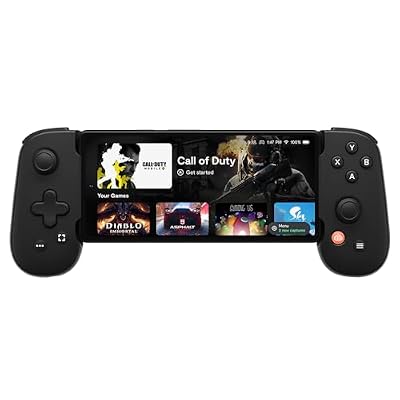
The Backbone One clamps around a USB-C iPhone and connects through the port itself, so there is no pairing step and no battery to charge. For Delta and PPSSPP sessions it is the closest thing to a dedicated handheld.
Specs:
- Connection: USB-C plug, passthrough charging port
- Compatibility: iPhone 15 series and later USB-C models, plus Android
- Item model number: 83401122863
- Weight: 4.9 ounces
- Extras: 3.5 mm headphone jack
Razer Kishi Ultra

Razer’s flagship grip stretches wider than most, making it the rare telescopic controller that also fits an iPad mini. Full-size sticks and Hall Effect triggers suit longer RetroArch sessions, and a USB-C cable mode lets the same pad serve a full-size iPad or PC.
Specs:
- Connection: USB-C plug; wired USB-C mode for PC and iPad
- Compatibility: iPhone 15 and 16 series, iPad mini 6 and A17 Pro, Android
- Controls: mecha-tactile 8-way D-pad, Hall Effect triggers, programmable buttons
- Item model number: RZ06-05070100-R3U1
8BitDo Pro 2 Bluetooth Controller (Hall Effect)
For iPad play, or anyone who prefers a separate pad, the Pro 2 is the emulation-friendly default: a proper D-pad for 8-bit and 16-bit systems, Hall Effect sticks that will not drift, and profiles that follow you between devices.
Specs:
- Connection: Bluetooth and USB-C wired
- Sticks: Hall Effect, with two remappable back buttons
- Compatibility: iPhone, iPad, macOS, Windows, Switch, Android
- Battery: rechargeable, USB-C charging
Xbox Wireless Controller (Carbon Black)

The safest Bluetooth pairing on iOS is Microsoft’s own pad. It connects natively, both Delta and RetroArch recognise it without fuss, and its D-pad handles N64 and arcade libraries better than most phone-first accessories.
Specs:
- Connection: Bluetooth and USB-C wired
- Compatibility: iPhone, iPad, Xbox consoles, Windows, Android
- Model: QAT-00001, Carbon Black
- Features: hybrid D-pad, Share button, textured grips
- Power: AA batteries or optional rechargeable pack
SanDisk 256GB Ultra Dual Drive USB Type-C
A dual-connector flash drive is the simplest bridge between the PC where your dumps live and the device that plays them: USB-C on one end, USB-A on the other, and room for a whole handheld library.
Specs:
- Capacity: 256 GB (model SDDDC2-256G-G46)
- Connectors: USB Type-C and USB Type-A on a swivel design
- Interface: USB 3.1, read speeds up to 150 MB/s as SanDisk states
- Use in the Files app as external storage on USB-C models
How to Choose
Start with the systems you actually own games for. A Nintendo-focused collection points to Delta alone; a mixed library wants RetroArch beside it; PSP owners add PPSSPP and stop there. Then pick controls by device: a telescopic grip for phone-first play, a full Bluetooth pad for iPad and TV output. Finally, plan storage — a small library lives happily in iCloud Drive, while a large one deserves the cable-and-drive routine and a PC backup.
Who Should Skip
Skip this platform if your target systems are GameCube, Wii, PlayStation 2 or Switch — the JIT restriction keeps them off the store, and a PC, Steam Deck or Android device serves them better. Skip it if you are unwilling to dump your own games, because no legitimate app will supply them. And skip the grips if your phone is a Lightning model: USB-C accessories will not connect, so a Bluetooth pad is the workable route.
FAQ
Is emulation on iPhone legal?
Yes. Emulator apps are lawful software, Apple explicitly admits retro console emulators under Guideline 4.7, and playing games you dumped from your own cartridges and discs is the accepted personal-use route. Downloading other people’s copies is the part that crosses the line.
Why is there no Dolphin or PS2 emulator in the App Store?
Both rely on just-in-time compilation for playable speed, and App Store rules prohibit JIT in distributed apps. Without it, their developers judge performance unacceptable, so no official builds exist. The systems that run well on iOS are the ones light enough not to need it.
Does Delta work on iPad as well as iPhone?
Yes — Delta is a universal app, and the iPad’s screen suits DS dual-screen layouts and play with an external controller. Delta Sync keeps games, saves and states consistent between devices via Google Drive or Dropbox.
What is the difference between Delta and RetroArch?
Delta is a focused Nintendo app with a friendly interface and per-system polish. RetroArch is a frontend covering far more systems through swappable cores, with deeper settings — shaders, latency controls, per-core options — and a steeper learning curve. Many players keep both installed.
Final Verdict
Emulation on iPhone and iPad went from a sideloading hobby to a three-download setup in a single guideline revision. Delta, RetroArch and PPSSPP cover the 8-bit era through the PSP with real polish, and the JIT ceiling is a clear, knowable limit rather than a hidden flaw. Bring your own dumps, add a controller that fits how you play, and the phone in your pocket becomes a serious retro handheld.










