As an Amazon Associate we earn from qualifying purchases
A built-in laptop camera gets the job done, but it rarely does it well. Most sit at an unflattering angle, struggle in anything less than perfect light, and pair a mediocre sensor with a microphone that makes you sound like you are calling from another room. A dedicated webcam fixes all three problems in one plug-and-play step, which is why it remains the single most effective upgrade for anyone who spends their day on video calls.
This guide covers three webcams that are all currently sold on Amazon US, spanning the three resolution classes that matter for remote work: a proven 1080p model, a sharper 2K option, and a full 4K camera for people who present, record, or simply want the cleanest possible image. Every specification below comes from the manufacturer’s published data, and each pick includes autofocus, a built-in microphone, and a privacy shutter, because those are the features that make the biggest day-to-day difference at a home desk.
What to Look for in a Work-from-Home Webcam
Resolution and frame rate. Full HD 1080p is the practical standard for Zoom, Teams, and Google Meet, and it looks noticeably sharper than the 720p cameras built into many laptops. A 2K sensor adds extra detail that survives digital cropping, while 4K gives you headroom to zoom in without softening the picture. Frame rate matters less for meetings: 30 fps is fine for calls, and higher rates only become relevant if you also record or stream.
Autofocus. A fixed-focus lens is tuned for one distance and blurs when you lean in or hold something up to the camera. Autofocus keeps you sharp as you move, which matters more than raw resolution for looking professional on a call.
Field of view. A narrower view around 65 to 78 degrees frames your head and shoulders and keeps a messy room out of shot. Wider angles up to 90 or 95 degrees suit shared desks and whiteboard sessions but show more of the background.
Microphone. Built-in stereo microphones with noise reduction are a big step up from a laptop’s mic array. If audio is your top priority, pairing any of these cameras with one of the best headsets for working from home gives you the strongest combination of clear picture and clear voice.
Privacy and mounting. A physical privacy shutter means the lens is covered when you say it is, with no software involved. Look for a universal monitor clip and a tripod thread so the camera works on a laptop screen, an external monitor, or a small desk tripod.
1. Logitech C920s HD Pro: The Reliable 1080p Standard

The C920s has been a default recommendation for remote workers for years, and the published specification sheet explains why: it covers every work-from-home essential without pushing into premium territory. Logitech lists Full HD 1080p video at 30 frames per second, autofocus, and automatic HD light correction that adjusts exposure when your room is dim or backlit.
The 78-degree field of view is well judged for a single-person desk setup, framing head and shoulders with a little context. Dual stereo microphones are built in, and the attachable privacy shutter snaps over the lens when the working day ends. It connects over USB-A and works with Windows, macOS, and ChromeOS machines, plus the major calling platforms.
Specs (manufacturer-published):
- Resolution/frame rate: 1080p Full HD at 30 fps (720p at 30 fps also supported)
- Field of view: 78 degrees
- Focus type: Autofocus
- Microphone: Built-in dual stereo microphones
- Privacy: Attachable privacy shutter included
- Connection: USB-A, plug and play
- Mounting: Universal clip for laptops and monitors, tripod thread
- Compatibility: Windows, macOS, ChromeOS; works with Zoom, Teams, Google Meet, Skype
Choose the C920s if you want a dependable 1080p upgrade that simply works on any machine, and your calls rarely demand more than clean, well-lit Full HD.
2. Anker PowerConf C200: The Sharper 2K Middle Ground

Anker’s PowerConf C200 steps up to a 2K sensor, recording at 2560 x 1440 at 30 fps according to Anker’s published specifications. That extra resolution is genuinely useful at a home desk: it keeps your face detailed even when a meeting app crops or digitally zooms the feed, and it gives recorded updates and demos a crisper finish than 1080p.
The field of view is adjustable between 65, 78, and 95 degrees through Anker’s software, so one camera can cover both a tight head-and-shoulders frame and a wider shot that includes a desk or whiteboard. Autofocus works from 15 cm to 3 m per the manual, dual microphones use AI noise cancellation to reduce background sound, and a built-in privacy cover slides over the lens — no separate cap to lose. The camera connects over USB-C, with a USB-C to USB-A cable included for older ports.
Specs (manufacturer-published):
- Resolution/frame rate: 2K (2560 x 1440) at 30 fps; 1080p and 720p at 30 fps also supported
- Field of view: Adjustable 65, 78, or 95 degrees
- Focus type: Autofocus, 15 cm to 3 m focus distance
- Sensor: 5 MP CMOS, 1/2.7 inch
- Microphone: Dual microphones with AI noise cancellation
- Privacy: Built-in privacy cover
- Connection: USB-C (USB-C to USB-A cable included)
- Mounting: Adjustable clip/stand, tripod thread
Choose the C200 if you want visibly sharper video than 1080p, flexible framing, and a built-in privacy cover in a compact body that suits a laptop-first setup.
3. Logitech Brio 4K: The Premium Pick for Presenters
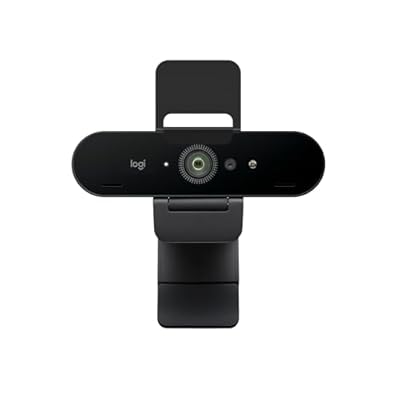
The Brio 4K is the option for people whose camera is on all day and whose image quality is part of the job: client presentations, recorded training, webinars, and content that gets reused. Logitech’s published specifications list 4K Ultra HD at 30 fps, 1080p at up to 60 fps, and 720p at up to 90 fps from a 13 MP sensor behind a glass lens.
The diagonal field of view adjusts between 90, 78, and 65 degrees, and 5x digital zoom lets you tighten the frame without losing much clarity thanks to the 4K sensor. RightLight 3 with HDR handles the mixed lighting that defeats lesser cameras, and an infrared sensor adds Windows Hello facial-recognition sign-in. Two omnidirectional microphones with noise cancellation are built in, an attachable privacy shutter is included, and the camera connects over USB with a detachable universal clip and tripod thread for flexible mounting.
Specs (manufacturer-published):
- Resolution/frame rate: 4K Ultra HD at 30 fps; 1080p at up to 60 fps; 720p at up to 90 fps
- Field of view: 90 degrees diagonal, adjustable to 78 or 65 degrees
- Focus type: Autofocus
- Sensor: 13 MP, glass lens, 5x digital zoom
- Microphone: Dual omnidirectional microphones with noise cancellation
- Privacy: Attachable privacy shutter included
- Connection: USB (USB-A to USB-C cable), plug and play
- Mounting: Detachable universal clip, tripod thread
- Extra features: RightLight 3 with HDR, Windows Hello support
Choose the Brio 4K if you present or record regularly, work in difficult lighting, or want one camera that will stay ahead of your setup for years.
Which One Fits Your Desk?
For most remote workers, the decision comes down to how much your image matters beyond everyday meetings. The Logitech C920s delivers clean 1080p, autofocus, and a privacy shutter in a package that works everywhere, and it remains the sensible default. The Anker PowerConf C200 adds 2K detail, an adjustable field of view, and AI noise-cancelling microphones, making it the strongest all-round step up for laptop-based workers. The Logitech Brio 4K is the premium tier: 4K resolution, HDR light correction, and higher frame rates for anyone who presents, teaches, or records on camera.
Whichever class you pick, set the camera at eye level, put your main light source in front of you rather than behind you, and close the privacy shutter when the day is done. Those habits, plus any of the three cameras above, will put you ahead of almost everyone else on the call.