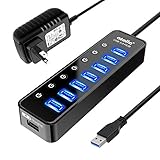
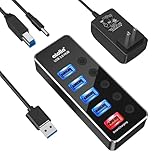
- Top Pick: Powered USB Hub 3.0, Atolla 8-Port USB 3.0 Data Hub Splitter with One Smart Charging Port and Individual On/Off Switches and 5V/4A Power Adapter USB Extension for MacBook, Mac Pro/Mini and More
- Best Value: TP-Link Powered USB Hub – 7 USB 3.0 Data Ports & 2 Smart Charging USB Ports | Compatible with Windows, Mac, Chrome & Linux OS, with Power On/Off Button, 12V/4A Power Adapter (UH720)
- Premium Choice: SABRENT 4-Port Powered USB 3.0 Hub, LED Power Switches (HB-UMP3) | Individual LED-lit power switches; includes 5V/2.5A power adapter; for PC & Mac
Look at the back of a gaming tower and you can see the problem: a keyboard, a mouse, a headset dongle, a controller receiver, a webcam, a capture card and a flash drive all competing for the same handful of ports. Add a phone cable and a VR headset and the motherboard runs out of headroom. A powered USB hub spreads that load across extra ports fed by its own adapter, so peripherals are not pulling everything from the PC.
This guide is for desktop gamers and streamers who want more ports at the desk, ideally with a switch for each one so a misbehaving device can be cut off without unplugging it. Every pick is judged only on what its listing title states: port count, USB 3.0 data speed, charging ports, power adapter wattage and switches. As of 2026 the useful distinction is how many ports you need, whether you want Type-C, and how much power the adapter supplies for that many devices.
Quick Picks
As an Amazon Associate we earn from qualifying purchases at no extra cost to you.




| Product | Best for | Key spec from the title |
|---|---|---|
| Atolla 8-Port | Big peripheral desks | 8 ports, 5V/4A, individual switches |
| TP-Link 7+2 | Data plus charging | 7 data ports, 2 charging ports |
| SABRENT 4-Port HB-UMP3 | Small desks | 4 ports, LED switches, 5V/2.5A |
| ONFINIO 10-Port | Many devices, simple setup | 10 ports, 12V/2A, switches |
| SABRENT 10-Port 60W | Heavy loads | 10 ports, 60W 12V/5A adapter |
| Atolla Aluminum 5-Port | Metal body, compact | 5 ports, 5V/3A, aluminum |
| Wenter 5-Port | Type-C charging | 4 data ports, 1 Type-C charging |
| UGREEN 7-in-1 | USB-A and USB-C mix | 5 USB-A, 2 USB-C, 5Gbps |
| Wenter 11-Port | Maximum port count | 10 data ports, 1 charging port |
| Atolla 4-Port | Basic and compact | 4 ports, 5Gbps, 65cm cable |
How to Choose
Port Count and Spare Capacity
Count what you plug in daily, then add two. A four-port hub fills quickly once you add a webcam and a capture card. Ten or eleven ports are reasonable for streaming rigs, but remember that all of those devices share one upstream cable to the PC, so a crowded hub is a poor home for a fast external drive.
Power Adapter Wattage
A hub that lists 5V/2.5A shares a small amount of power across its ports, while one that lists 12V/5A at 60W has far more headroom. Phones, external drives and some headsets pull noticeable current. Treat a small adapter on a large hub as a warning sign, especially if you plan to charge devices from it.
Data Speed and Connector Mix
USB 3.0 runs at 5Gbps, which is plenty for keyboards, mice, controllers and most drives. If you also have USB-C devices, choose a hub with at least one Type-C port rather than relying on adapters. A port labeled for charging is not the same as a data port, so read the title closely.
Switches, Cable Length and Where Budget Models Cut Corners
Individual on/off switches let you cut one device without touching others. Check the cable length from hub to PC, since a short lead may not reach a tower under the desk. Budget hubs often use light plastic and thin cords, so look for a metal body, a stated adapter wattage and a cable you can route cleanly.
The 10 Best Options
Atolla 8-Port Powered USB 3.0 Hub
A roomy eight-port hub with one smart charging port, individual switches and a 5V/4A adapter, aimed at a desk with a lot of wired peripherals. The adapter wattage is generous for the port count and sits near the top of the mid-sized hubs here.
- Eight ports with individual on/off switches.
- A 5V/4A adapter is stated, which gives respectable power headroom.
- Trade-off: only one smart charging port is listed, so phones queue up for it.
Skip it if you want several charging ports or a hub that also carries Type-C devices.
TP-Link Powered USB Hub, 7 Data and 2 Charging Ports
A brand-name hub offering seven USB 3.0 data ports and two smart charging ports, with a power on/off button and broad operating system support. It reads like a dependable all-rounder for a mixed desk.
- Seven data ports plus two charging ports serve phones and peripherals together.
- Windows, Mac, Chrome and Linux compatibility is listed.
- Trade-off: the title does not state the power adapter wattage.
Skip it if you need to compare adapter wattage figures before buying, or want per-port switches. The listing is confident about its port count but quiet about power, so it needs a little more checking.
SABRENT 4-Port Powered USB 3.0 Hub (HB-UMP3)
A compact four-port hub with individual LED-lit power switches and a 5V/2.5A adapter. It works best where you need a few reliable extra ports and a clear view of which one is switched on.
- LED switches show at a glance which port is active.
- A named 5V/2.5A adapter is included in the listing.
- Trade-off: only four ports, so it fills fast once a webcam and capture card arrive.
Skip it if you have more than four daily peripherals or want a charging port.
ONFINIO 10-Port Powered USB Hub 3.0
A ten-port hub with individual switches and a 12V/2A adapter, for desks that need many ports without a premium build. It is the plain, high-count option in the mid-range.
- Ten ports with individual on/off switches.
- A 12V/2A adapter is listed in the title.
- Trade-off: 24W of listed power is modest when spread across ten ports.
Skip it if you plan to charge many devices at once, where a stronger adapter would help. Phones, tablets and external drives will tell you quickly if the supply is stretched.
SABRENT 10-Port 60W Powered USB 3.0 Hub (HB-BU10)
The power-heavy option, with a 60W 12V/5A adapter plus switches and LEDs on ten ports. It is the natural choice for a streaming desk that runs lights, mics and drives from one hub.
- A 60W adapter is the highest wattage in this group.
- Individual switches with LED indicators.
- Trade-off: a large adapter adds bulk behind the desk.
Skip it if you only need a few extra ports and want a tidy, compact cable run. The size of the adapter that comes with the hub also asks for a spare outlet and some room on the power strip.
Atolla Aluminum 5-Port USB 3.0 Hub
A five-port hub with four data ports, one smart charging port and a 5V/3A adapter in an aluminum body. It suits a tidy desk where a metal finish matches the rest of the setup.
- Aluminum construction is stated in the title.
- A 5V/3A adapter backs the five ports.
- Trade-off: only four data ports, with one reserved for charging.
Skip it if you need more data ports, or want the per-port switches the larger Atolla models list. Anyone who rotates peripherals often will appreciate those switches more than the metal finish.
Wenter 5-Port Powered USB 3.0 Hub
Four faster data ports plus one Type-C charging port, each with an individual LED switch. It targets desks that need to top up a modern phone while four peripherals stay connected.
- A Type-C charging port is included alongside four data ports.
- Individual LED on/off switches are listed.
- Trade-off: the Type-C port is described for charging, not as a data port.
Skip it if you want a Type-C data connection for a drive or a headset. Buyers with a newer phone or tablet may prefer a hub whose Type-C ports are described as data ports.
UGREEN 7-in-1 Powered USB 3.0 Hub
Seven ports made up of five USB-A and two USB-C, with 5Gbps data, a 24W DC power input and a 3.3ft cable. It is the clearest answer for anyone with a mix of old and new connectors.
- Five USB-A and two USB-C ports cover both generations.
- A 3.3ft cable reaches a tower under the desk more easily.
- Trade-off: the title mentions no individual switches.
Skip it if you want to cut power to one device at a time. That matters most with RGB accessories or a flaky receiver that sometimes needs a power cycle to reconnect.
Wenter 11-Port USB Splitter Hub
The highest port count here, with ten data ports and one smart charging port, all with individual LED switches. It suits a cluttered battlestation with every peripheral wired in.
- Eleven ports in total.
- Individual LED on/off switches on every port.
- Trade-off: the title does not give an adapter wattage.
Skip it if a named power adapter wattage matters, or if a smaller hub would do the job. Eleven ports is a lot of devices on one upstream cable, so heavy data users should split the load across two hubs.
Atolla 4-Port Powered USB Hub 3.0
Four ports with a charging port, individual switches, 5Gbps data and a 65cm cable. It is a compact, no-nonsense choice for a laptop or small desktop setup.
- A 65cm cable gives some flexibility in placement.
- 5Gbps data speed is stated.
- Trade-off: only four ports in total.
Skip it if you have many devices to connect or need a long cable. A 65cm lead will stretch only so far from a tower sitting on the floor.
Which One Fits Your Situation
Streaming Rig With Lights, Mic and Drives
The SABRENT 10-Port 60W has the largest adapter and ten ports, so it handles a desk full of powered gear better than the others. Pair it with a surge-protected strip and every light, mic and drive gets one tidy power source.
Mixed USB-A and USB-C Gear
The UGREEN 7-in-1 mixes five USB-A with two USB-C, which avoids a pile of small adapters. It also fits a laptop-and-desktop household where the same hub moves between machines.
Small Desk or Laptop Dock Spot
The SABRENT 4-Port or the Atolla 4-Port keeps the footprint small and the cable simple.
Metal Finish and Phone Charging
The Atolla Aluminum 5-Port suits a clean metal look, while the TP-Link adds two charging ports for phones.
Common Mistakes
- Buying too few ports, then adding a second hub within a month.
- Ignoring the adapter wattage on a large hub.
- Expecting Type-C data from a port described only for charging.
- Choosing a short cable that cannot reach a tower under the desk, then stretching it until the connector loosens.
- Plugging a fast external drive into a crowded hub shared with other devices.
Related guides
- Aio Liquid Coolers For High Performance Gaming
- Wireless Gaming Headsets Under 100 For Pc
- Ssds For Large Video And Raw Photo Files
Frequently Asked Questions
Do I need a powered hub?
If you connect many devices, charge phones, or use power-hungry gear, yes. An unpowered hub relies on the PC port, which has limited headroom.
Is USB 3.0 fast enough for gaming peripherals?
Yes. Keyboards, mice and headsets use a tiny fraction of the 5Gbps available. Fast drives are the only devices that notice the shared bandwidth, so give them a port on a lightly loaded hub or on the PC itself.
Do individual switches matter?
They help when a device misbehaves or when you want to cut power to RGB gear without unplugging it. They are a convenience, not a necessity, but the larger hubs in this guide are far easier to live with when each port has its own button.
Can I charge my phone from the hub?
Use the ports described as charging ports, which are designed for it. Regular data ports are meant for peripherals, and a phone left on one may charge slowly or not at all.