

Most TV backlight kits look the same in a thumbnail: a strip of LEDs glowing behind a black screen. The difference shows up in how the lights know what to do. Some follow the picture through a small camera, some follow the beat of your music, and some just hold a color you pick in an app. Which one you want depends on whether you are lighting a gaming desk, a living room movie wall or a bedroom TV.
Three checks narrow the field fast: the TV size range printed on the listing, the strip length, and the sync method. Get the size wrong and the strip either runs short or hangs loose behind the frame. This guide covers eight kits, from small USB-powered strips for 32 to 43 inch sets up to longer kits for TVs as large as 75 inches.
Quick Picks
| Product | Best for | Key spec from the title |
|---|---|---|
| Govee TV LED Backlight (RGBIC) | Smart-home setups | 55-65 inch TVs, 99+ scene modes, Bluetooth and Wi-Fi app |
| Govee TV Backlight 3 Lite | Picture-matching colors | 11.8ft, 55-65 inch, camera with fish-eye correction |
| KANTUTOE LED Lights for TV | Wide TV size range | 16.4ft, 45-75 inch, app and button control |
| Nexillumi LED Lights for TV | Large screens | 16.4 ft, 55-75 inch, app and remote |
| MATICOD TV Led Backlight | Bedroom and small TVs | 9.84ft, USB, 32-43 inch |
| KSIPZE LED Lights for TV | Mid to large TVs with button backup | 16.5ft, 45-75 inch, app and button control |
| Daymeet LED Lights for TV | Small TVs and monitors | 9.8FT, 32-43 inch, USB, Bluetooth app |
| Upgraded TV LED Backlight with Sensor | Gaming and home theater sync | 55-65 inch, smart camera screen sync |
How to Choose
TV size range and strip length
Every listing names a TV size range, such as 55-65 inch or 32-43 inch, and a strip length in feet. Measure the back of your TV’s perimeter, or at least the visible top and sides, and compare it with that length. A strip that is too short leaves a dark gap, while one that is too long needs folding or trimming only if the listing says it can be cut. Check the size range first, then confirm the length.
Sync method: camera, music or manual
Camera sync uses a small lens to read colors from the screen and match the strip to the picture, which is the closest thing to a TV-style ambient effect. Music sync reacts to sound through a microphone, which is fun for parties but does not track the video. App or button control only changes color manually. Read the title for “camera”, “sensor” or “screen sync” if you want picture matching.
Control and connectivity
Look for Bluetooth, Wi-Fi, a remote, a physical button, or all of them. Bluetooth works at short range from a phone, while Wi-Fi opens up scene sharing and voice assistants when the listing names them. A physical button or remote is a handy fallback for guests. Where the title is cut off, check the full spec sheet on the listing for supported assistants.
Power, mounting and safety
Many strips run from a TV’s USB port, which means they switch on and off with the screen, but check that the listing says so for your model. Look at what the strip uses to stick: adhesive backing needs a clean, dry surface. Route cables away from heat and sharp edges, and follow the manufacturer’s installation and safety instructions.
The 8 Best Options
Govee TV LED Backlight (RGBIC)
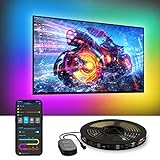
This Govee kit targets 55 to 65 inch TVs and leans on app features: RGBIC color zones, 99+ scene modes, music sync, and Bluetooth and Wi-Fi control. It is aimed at someone who wants a configurable smart-home accent and is comfortable using an app.
- Strength: 99+ scene modes with Bluetooth and Wi-Fi control.
- Strength: RGBIC zones for multi-color effects.
- Limit: the title shows music sync, not camera sync, so it will not match the picture.
Skip it if you want colors that follow the screen content, since a camera-based kit does that job better.
Govee TV Backlight 3 Lite
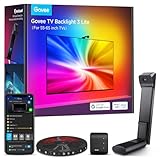
The 3 Lite is a camera-based kit for 55 to 65 inch TVs, with an 11.8ft strip and a camera that includes fish-eye correction for the screen sync. The RGBICW label suggests a white channel in addition to color.
- Strength: camera screen sync with fish-eye correction.
- Strength: RGBICW lighting with an 11.8ft strip.
- Limit: the size range stops at 65 inch.
Skip it if your TV is larger than 65 inches.
KANTUTOE LED Lights for TV

KANTUTOE offers a 16.4ft strip designed for 45 to 75 inch TVs, with RGB color, music sync, and both app and button control. The broad size range suits households that might upgrade their TV later.
- Strength: wide 45-75 inch range.
- Strength: app control plus a physical button.
- Limit: the title lists music sync only, with no camera.
Skip it if you want picture-matched lighting.
Nexillumi LED Lights for TV

Nexillumi is a 16.4 ft RGB strip for 55 to 75 inch TVs with app and remote control and music sync. The remote gives an easy way to change colors without picking up a phone, which helps in a shared living room.
- Strength: remote plus app control.
- Strength: 16.4 ft length for large screens.
- Limit: the 55-inch minimum rules out smaller TVs.
Skip it if your TV is under 55 inches.
MATICOD TV Led Backlight
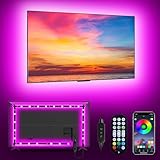
MATICOD is a 9.84ft USB-powered RGB strip for 32 to 43 inch screens, with app and remote control and music sync. It is a modest accent for a bedroom TV or a dorm.
- Strength: USB power and a short strip for small TVs.
- Strength: app and remote control.
- Limit: it will not wrap a TV larger than 43 inches.
Skip it if you own a mid-size or large TV.
KSIPZE LED Lights for TV

KSIPZE is a 16.5ft RGB kit for 45 to 75 inch TVs with music sync and both smart app and button control. Its specs closely match KANTUTOE’s, so the choice usually comes down to what is in the box.
- Strength: 45-75 inch compatibility with a 16.5ft strip.
- Strength: app and button control.
- Limit: music sync only, no camera in the title.
Skip it if you want screen-synced colors.
Daymeet LED Lights for TV

Daymeet is a 9.8FT USB strip for 32 to 43 inch TVs with color changing, music sync and Bluetooth app control. It suits a small TV, a desk screen or a monitor setup.
- Strength: USB power with Bluetooth app control.
- Strength: compact length for small screens.
- Limit: size range tops out at 43 inch.
Skip it if your screen is larger than 43 inches.
Upgraded TV LED Backlight with Sensor

This kit for 55 to 65 inch TVs adds a sensor and a smart camera that syncs the strip to the screen, with RGB ambient lighting pitched at gaming and home theater. It is the second camera-based option here.
- Strength: smart camera sync to the screen.
- Strength: RGB ambient lighting for gaming and movies.
- Limit: the title is cut off, so check the full spec sheet on the listing for strip length and control options.
Skip it if you need a known strip length before buying.
Which One Fits Your Situation
A gaming desk or console setup
Camera sync is the feature to chase. The Govee TV Backlight 3 Lite and the Upgraded TV LED Backlight with Sensor both match colors to the screen for 55-65 inch sets. If your PC feeds a TV or a large monitor, soft light behind the screen also reduces the harsh contrast between a bright display and a dark wall, which makes late sessions feel calmer.
A big living-room TV
For 70 or 75 inch sets, look at the Nexillumi, KANTUTOE or KSIPZE, whose ranges reach 75 inches. All three use roughly 16 feet of strip, which gives room to wrap the full perimeter. Pick the Nexillumi if you like a remote on the coffee table, or the KANTUTOE or KSIPZE if a button on the strip matters more.
A small bedroom or dorm TV
The MATICOD and Daymeet are built for 32-43 inch screens and run from USB. Either works for a TV on a dresser or a large monitor on a desk, and both keep the cable run short, which keeps the setup tidy in a small room.
A smart-home fan
The Govee TV LED Backlight with its scenes and Wi-Fi control is the closest fit, and its title mentions voice assistant compatibility, so check the listing for which one.
Common Mistakes
- Ordering by budget tier instead of the stated TV size range.
- Expecting music sync to follow the video on screen.
- Sticking the strip to a dusty or damp surface.
- Forgetting the TV needs a free USB port or a separate adapter.
- Covering the camera lens or mounting it off-center.
Frequently Asked Questions
Do these strips damage a TV?
They are designed to stick behind the frame, but adhesive can mark some surfaces. Clean the area first, press the strip on firmly and follow the manufacturer’s installation and safety instructions. Remove it slowly when you move the TV.
Can I cut the strip?
Only if the listing says so. Otherwise fold the excess neatly behind the TV instead of cutting, because a cut in the wrong place can stop the strip from working.
Is camera sync worth it?
It is the only method that follows the picture, so it suits gaming and movies. If you mostly want a pleasant glow or party effects, music sync or a fixed color is enough.
Do I need Wi-Fi?
No. Bluetooth or a remote works for color control, and Wi-Fi mainly adds voice and scene features. Check the full spec sheet on the listing for supported assistants.










