

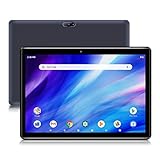
- Top Pick: Tablet,10.1" Android 16 Tablet Octa-core 36GB+128GB Dual Camera | 1280×800 IPS HD Touchscreen 6000mAh Battery Wi-Fi 6,BT 5.4 GMS 36GB(6+30) RAM 128GB ROM Support 1TB Expansion 5MP+8MP cameras
- Best Value: COOPERS Tablet 10 inch, Android 15 Tablet, 32GB ROM 1TB Expand Computer Tablets, Quad Core Processor 6000mAh Battery, 1280×800 IPS Touch Screen, 2+8MP Dual HD Camera, Bluetooth WiFi Tablets PC
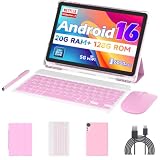
- Premium Choice: Android 16 Tablet 10 inch Tablets, 20GB RAM 128GB ROM 2TB Expandable, 2.0GHz Quad-core Processor, 2 in 1 Tablet with Keyboard Case Stylus Mouse, 5G WiFi6, BT 5.0, 6000mAh, Widevine L1, GMS, Pink
Programming on a tablet is a different job from programming on a laptop. Android tablets do not run full desktop IDEs, so the realistic uses are writing and reading code in browser-based editors, connecting to a remote machine over SSH, running terminal apps, studying documentation, and working through lessons away from the desk. A tablet for that work should be judged on screen sharpness, memory, keyboard support, and ports, not on gaming speed or camera counts.
This guide is for students, hobbyists, and working developers who want a secondary device for study and remote sessions in 2026. It compares eight Android tablets using only the facts in their listings. Two other listings, a toddler tablet and a pen display that needs a computer to work, were dropped because they do not fit the job. None of the models below replaces a laptop, so confirm that your tools run in a browser or over a remote connection before you buy.
Quick Picks
As an Amazon Associate we earn from qualifying purchases at no extra cost to you.





| Product | Best for | Key spec from the title |
|---|---|---|
| 10.1 Inch Android 16 Tablet (36GB RAM listing) | Big memory totals on paper | Octa-core, 36GB (6+30) RAM, 128GB ROM |
| COOPERS 10 Inch Tablet | Basic note-taking and reading | Android 15, 32GB ROM, 1TB expansion |
| 10 Inch 2 in 1 Tablet with Keyboard Case | Typing code on the go | 20GB RAM, keyboard case, stylus, mouse |
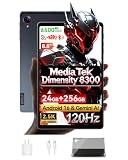
| BNCF 8.8 Inch Tablet | Sharpest screen and quickest chip | Dimensity 8300, 2560×1600, 120Hz |
| COTGOD 10.1 Inch Tablet | Mid-range all-rounder | 26GB RAM, 128GB ROM, Wi-Fi 6 |
| Blackview 9 Inch Rugged Tablet | Field work and site visits | IP68/IP69K, MIL-STD-810H, OTG |
| PRITOM 10 Inch Tablet | Simple reading screen | 64GB, GMS certified, low bloatware |
| ZZB 10 Inch Tablet | Light use at the lowest tier | 2GB RAM, 32GB ROM, quad-core |
How to Choose
Plan how you will actually code
Decide first whether you will write code locally, in a browser, or on a remote server. Browser editors and SSH sessions run happily on modest hardware, while local terminal tools and emulators want more memory. If your workflow needs a full desktop environment, a laptop is the better purchase and the tablet is a companion. Be honest about this choice, because it decides how much hardware you need. A student working through online lessons needs far less than a developer who keeps a terminal, documentation, and a browser open together.
Memory, storage, and display
Aim for at least 8GB of physical memory and 128GB of storage if you want several browser tabs and a terminal open at once. Watch for listings that add borrowed storage to inflate RAM totals, such as 6GB physical plus 30GB extended. Resolution matters because code is text: 1280×800 is readable at ten inches, while a 2560×1600 panel makes small fonts crisper. A 120Hz refresh makes scrolling through long files smoother.
Keyboard, mouse, and port support
Typing code on glass is tiring. Look for a keyboard case in the bundle, Bluetooth for a separate keyboard, or OTG support on the USB-C port for wired accessories. A mouse and stylus are bonuses for navigation and diagrams. Ignore camera megapixels and speaker claims, which do nothing for a developer, and prefer a tablet that pairs reliably with your keyboard.
Battery, certification, and software
Capacities near 6000mAh are common at ten inches, and an eight-hour claim is fine for study sessions. Google certification, shown as GMS, matters because it gives access to the Play Store for terminal apps and editors. Where budget models cut corners is in processor speed, storage, and software updates, so lean toward Android 15 or 16 and avoid single-digit RAM totals. Also check whether the tablet allows installing apps from the Play Store at all, since an uncertified device can block the editors and terminals you want.
The 8 Best Options
10.1 Inch Android 16 Tablet (36GB RAM Listing)
This unbranded Android 16 tablet has an octa-core chip and a headline of 36GB memory made of 6GB physical plus 30GB extended, with 128GB storage and 1TB expansion. A 1280×800 IPS screen, Wi-Fi 6, Bluetooth 5.4, and a 6000mAh battery are listed.
- Title is open about the 6GB physical memory split
- Wi-Fi 6 and Bluetooth 5.4 help with remote sessions and keyboards
- Trade-off: only 6GB is physical RAM, so heavy multitasking will feel limited
Skip it if you plan to run several local tools at once. It suits reading, light editing, and remote shells better than anything that needs a lot of working memory, and the 1280×800 screen is readable but not sharp.
COOPERS 10 Inch Tablet
An Android 15 tablet with a quad-core processor, 32GB ROM, 1TB expansion, and a 6000mAh battery. The screen is a 1280×800 IPS panel, and cameras are listed at 2MP and 8MP, which is more than a note-taker needs.
- Large expansion limit for notes and documentation
- Reasonable 6000mAh battery capacity
- Trade-off: 32GB of built-in storage fills quickly
Skip it if you want a smooth multitasking experience for development work. Because the title does not state a RAM figure, treat it as a reading and note-taking slate rather than a coding machine, and keep expectations modest for anything beyond a browser and a notes app.
10 Inch 2 in 1 Tablet with Keyboard Case
This pink Android 16 package bundles a keyboard case, stylus, and mouse with a 2.0GHz quad-core processor, 20GB RAM total, 128GB ROM, and 2TB expansion. Widevine L1, GMS, 5G WiFi 6, Bluetooth 5.0, and a 6000mAh battery are named in the title.
- Keyboard case and mouse included for typing code
- 2TB expansion limit for projects and references
- Trade-off: a quad-core processor limits heavier tools
Skip it if you already own a favorite Bluetooth keyboard. The bundle is aimed at buyers who want a laptop-like setup without separate purchases, but keyboard cases in this group vary, so judge the typing feel before relying on it.
BNCF 8.8 Inch Tablet
The most powerful-looking listing here: a MediaTek Dimensity 8300 octa-core chip, 24GB RAM, 256GB ROM, a 2.5K 2560×1600 display at 120Hz, a 13MP camera, 4G LTE plus Wi-Fi 6E, a 6300mAh battery, and a protective case. Gemini AI is also mentioned.
- Sharp 2560×1600 120Hz screen for reading code
- 4G LTE for SSH sessions away from Wi-Fi
- Trade-off: the 8.8-inch size is small for long coding sessions
Skip it if you want a larger canvas for side-by-side windows. It belongs in the premium tier of this group, and the compact body trades screen area for portability and a sharper picture per inch.
COTGOD 10.1 Inch Tablet
An Android 16 tablet with an octa-core processor, 26GB RAM total, 128GB ROM, and 2TB expansion. The title lists a 1280×800 IPS screen, an eight-hour battery, GPS, Wi-Fi 6, Bluetooth 5.4, and dual cameras, a sensible mid-range mix.
- 128GB storage and 2TB expansion
- Wi-Fi 6 and Bluetooth 5.4 for keyboards
- Trade-off: a standard 1280×800 screen is less crisp for small text
Skip it if you want the highest-resolution display. As a mid-range tablet it balances storage, wireless standards, and memory, but the screen is the compromise for people who read a lot of small code text.
Blackview 9 Inch Rugged Tablet
A rugged Android 15 tablet with IP68 and IP69K protection, MIL-STD-810H shock resistance, 18GB RAM total, 128GB storage, and a 180Hz display. OTG, NFC, Face ID, glove mode, and 18W charging are named, along with 16MP and 13MP cameras.
- Built for dust, water, and drops on job sites
- OTG support for wired keyboards and drives
- Trade-off: rugged bodies are thicker and heavier
Skip it if you work only at a desk and do not need the armor. For most students the extra bulk is a poor trade, but for field engineers who plug in a serial adapter or keyboard it makes sense.
PRITOM 10 Inch Tablet
A 64GB Android tablet with an HD IPS screen, a 6000mAh battery, dual cameras, and GMS certification. The title also mentions a stable system and low bloatware, which keeps the storage free for a few apps and notes.
- GMS certified for Play Store access
- Low bloatware keeps storage free
- Trade-off: no RAM or processor details are given
Skip it if you need confirmed memory figures before you commit. It is a plain, uncluttered slate, which suits a reader or note-taker more than someone running several windows at once.
ZZB 10 Inch Tablet
The lowest-spec entry: 2GB RAM, 32GB ROM, 1TB expansion, a quad-core processor, a 6000mAh battery, and a 10.1-inch IPS HD touch screen with an 8MP camera. It sits at the budget end of the group.
- Basic reading and note-taking at a low tier
- Expandable storage for documentation
- Trade-off: 2GB RAM makes it unsuitable for multitasking
Skip it if you plan to run a terminal app and a browser together. It works as a basic reading device at the lowest tier, but anything beyond one app at a time will push it past its limits.
Which One Fits Your Situation
Student learning the basics
The 2 in 1 keyboard case tablet gives typing and mouse support in one box, which is helpful for homework. PRITOM is a simple option if you mostly read tutorials and watch lectures.
Developer working on remote servers
The BNCF adds 4G LTE and a sharp screen, which suits SSH sessions on the move. Pair it with a compact Bluetooth keyboard for the best experience, and keep the connection details of your server handy. The COTGOD is a larger-screen alternative with GPS and Wi-Fi 6 if you prefer ten inches.
Field technician or site engineer
The Blackview rugged tablet fits job sites, with OTG for wired accessories and protection against dust and water.
Occasional use for notes
The COOPERS or ZZB handles notes, documentation, and reading, though neither is built for multitasking. If you can stretch to the mid-range, the COTGOD offers noticeably more memory and storage for similar screen size.
Common Mistakes
- Expecting a desktop IDE to run on an Android tablet.
- Counting extended memory as real RAM when comparing models.
- Skipping a keyboard and then struggling to type for more than a few minutes.
- Choosing a low-resolution panel and squinting at small fonts all day.
- Ignoring the Android version and its update outlook.
Frequently Asked Questions
Can you program on an Android tablet?
Yes, through browser-based editors, SSH clients, and terminal apps. Full desktop IDEs generally do not run, so choose based on a cloud or remote workflow.
How much RAM is enough?
Look for at least 8GB of physical memory if you want a browser and a terminal side by side. Extended memory totals are less meaningful than physical RAM.
Is a keyboard necessary?
For anything beyond short edits, yes. A bundled keyboard case or Bluetooth support makes longer sessions much more comfortable.
Is a laptop better for programming?
For full IDEs, local builds, and containers, a laptop is the stronger tool. A tablet works best as a lightweight second device for reading, remote work, and quick edits. Many developers pair one with a cloud workspace so the heavy lifting happens on a server while the tablet handles input and display.










