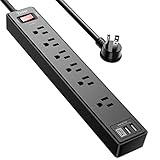
- Top Pick: Anker Power Strip with 2100J Surge Protector, Outlet Extender, 20W, 12 AC | 5ft Extension Cord with Multiple Outlets, 1 USB C, 2 USB A, Home Office, Dorm Room Essentials, TUV Listed
- Best Value: Yintar 6Ft Surge Protector Power Strip with 6 Outlets & 3 USB Ports, Black | 6 Feet Flat Plug Extension Cord with Multiple Outlets for Home, Office, Dorm Essentials, 1680 Joules, ETL Listed
- Premium Choice: ALESTOR 6 Ft Surge Protector Power Strip with 12 Outlets and 4 USB Ports | 2700 Joules, 6 Feet Heavy Duty Extension Cord with Multiple Outlets for Home, Office, Dorm Room, ETL Listed, Black
A gaming PC is rarely a single plug. The tower, one or two monitors, speakers, a router, a console and a charging dock can all land on the same wall socket, and the strip that joins them decides how much a power spike can reach. Surge protectors are sold with big joule numbers and many outlets, but those headlines hide the practical questions: do the outlets leave room for bulky adapters, is the cord long enough to reach the desk, and does a recognized safety listing appear in the description?
This guide is for desk-bound players who want a protected strip under or behind the desk, and for anyone retiring a bare extension cord. The ten options below are judged on their listings: joule figure, outlet count, cord length, USB ports and listing marks such as ETL, UL or TUV. Joules measure how much surge energy a unit can absorb over its life, so a higher number generally means more headroom. Start with how many devices you really plug in during 2026, then pick the size.
Quick Picks
As an Amazon Associate we earn from qualifying purchases at no extra cost to you.




| Product | Best for | Key spec from the title |
|---|---|---|
| Anker 2100J 12-Outlet Strip | Desk with USB-C charging | 2100J, 12 AC, 20W USB-C, 5ft |
| Yintar 6-Outlet Strip | Smaller setups | 6 outlets, 3 USB, 1680 Joules, 6ft |
| ALESTOR 12-Outlet Strip | High-capacity PC desks | 12 outlets, 2700 Joules, 6ft |
| 2-Pack 6-Outlet 900J Strip | Two rooms, light loads | 900 Joules, 15A breaker, wall mount |
| Teiobar 12-Outlet Strip | Big setups with USB | 12 AC, 4 USB, 2700 Joules |
| Anker 2000J 8-Outlet Strip | Medium desks | 2000J, 8 AC, 20W, TUV Listed |
| Addtam Ultra Thin Flat Strip | Tight gaps behind furniture | 12 outlets, 1050J, wall mount |
| Belkin 12-Outlet Strip | Long reach to the wall | 3,780 Joules, 8ft cord, UL-listed |
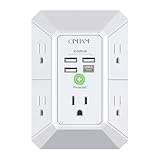
| QINLIANF 5-Outlet Wall Tap | Wall-socket expansion | 1680 Joules, 4 USB, 3-sided |
| POWSAV 18-Outlet Strip | Every device in one place | 18 outlets, 2100 Joules, 6ft |
How to Choose
Joules, and what they tell you
The listings here run from 900 joules up to 3,780 joules. A figure around 2000 or more is a comfortable target for a PC, monitors and accessories, while 900 to 1050 suits lighter loads like a laptop and a lamp. Joules describe absorbed energy, not guaranteed protection, and the number shrinks with repeated surges. Treat it as a headroom guide and replace old strips after a known storm or outage event.
Safety listing and breaker
Look for an ETL, UL or TUV listing in the title, as several here have. A listing means the product was evaluated against a safety standard. A built-in circuit breaker, named in one title at 15A, adds overload protection. Skip any listing that shows big numbers and no listing mark.
Outlet layout, cord length and plug shape
Count the outlets and add a margin for power bricks. A flat plug, named in several titles, sits close to the wall and helps when furniture is pushed back. A 5ft cord suits a desk near the wall, while 6ft and 8ft cords reach farther. Wall-mounted extenders skip the cord entirely but add weight to the socket.
USB ports and what to ignore
USB ports are handy for phones and controllers, but they share the strip’s limited capacity. A listed 20W USB-C figure suggests moderate fast charging. Ignore claims of protecting every device forever. Budget models cut corners on spacing, so check whether the outlets can host wide adapters.
Think about the whole power chain, not just the strip. The strip should go directly into a wall socket, with the PC, monitors and router plugged into it, so that a spike has one protected path. Keep the strip off the carpet where heat and dust build up, and leave the switch or breaker, if there is one, within reach. If your area has frequent outages, a surge protector alone will not keep a game session alive, because it only limits spikes. Many players pair a strip with a separate battery backup for the tower and keep the strip for peripherals.
It also helps to write down the total power draw of what you plan to plug in. Gaming towers, large monitors and speaker systems can add up, and a strip is limited by its own breaker and cord, not only by its outlet count. A heavy-duty cord and a breaker in the listing are signs the maker planned for sustained loads rather than just a pile of small chargers.
The 10 Best Options
Anker 2100J 12-Outlet Strip
The Anker lists 2100J, 12 AC outlets, a 5ft cord, one USB-C with 20W and two USB-A ports, and a TUV listing. It targets desks where phones, controllers and a headset all need charging nearby. It is the best match for people who value a recognizable brand.
- Strength: TUV listing is stated.
- Strength: USB-C with 20W plus two USB-A ports.
- Trade-off: a 5ft cord may not reach from a far corner.
Skip it if you need an extra-long cord.
Yintar 6-Outlet Strip
Yintar lists six outlets, three USB ports, a 6ft flat plug cord, 1680 Joules and an ETL listing. The size is moderate, which suits a small setup with a PC, a monitor and a few accessories. The flat plug is a practical detail for a desk that sits close to the wall, and the three USB ports cover a phone, a controller and a headset dock without extra chargers.
- Strength: ETL listing and a 6ft cord.
- Strength: 1680 Joules for a six-outlet unit.
- Trade-off: only six outlets, which can fill quickly.
Skip it if you have a dual-monitor setup with many bricks.
ALESTOR 12-Outlet Strip
ALESTOR lists 12 outlets, four USB ports, 2700 Joules and a 6ft heavy-duty cord with ETL listing. The higher joule number is the main point, along with the roomy outlet count. It makes sense for a desk that carries a tower, two monitors, speakers and a console, where the extra outlets mean nothing has to share a wall adapter.
- Strength: 2700 Joules is among the higher figures here.
- Strength: 12 outlets and 4 USB ports.
- Trade-off: bulky, so it needs floor or under-desk space.
Skip it if you want a compact strip.
2-Pack 6-Outlet 900J Strip
This set provides two 6-outlet strips with four USB ports each, 5ft braided cords, a flat plug, 900 Joules, a 15A circuit breaker and wall-mount capability. It suits buyers who need two lighter-duty strips for different spots, such as a laptop corner and a media shelf, rather than one strip for a power-hungry tower. Treat it as a secondary-room choice and keep the higher joule models for the main rig.
- Strength: two strips in one pack.
- Strength: 15A circuit breaker is named.
- Trade-off: 900 Joules is the lowest figure here.
Skip it if your main gaming PC needs the highest headroom.
Teiobar 12-Outlet Strip
Teiobar lists 12 AC outlets, four USB ports, a 6ft cord, 2700 Joules and ETL listing, framed for home, office and dorm use. It overlaps closely with the ALESTOR in specs.
- Strength: 2700 Joules with an ETL listing.
- Strength: 12 outlets and four USB ports.
- Trade-off: the near-identical spec sheet to ALESTOR leaves little to separate them.
Skip it if you want a smaller footprint.
Anker 2000J 8-Outlet Strip
This Anker lists 2000J, eight AC outlets, an extension cord, one USB-C with 20W, two USB-A ports and a TUV listing. It is a middle-sized option with the same charging mix as the larger Anker.
- Strength: TUV listing and 2000J figure.
- Strength: 20W USB-C plus two USB-A ports.
- Trade-off: eight outlets may be tight for large setups.
Skip it if you need 12 or more outlets.
Addtam Ultra Thin Flat Strip
The Addtam strip is ultra thin with 12 outlets across three sides, a 5ft cord, a 1050J figure and a wall-mount design. The flat shape helps behind a desk or bed where space is tight.
- Strength: slim body fits narrow gaps.
- Strength: wall-mount design.
- Trade-off: 1050J is modest for a heavy gaming desk.
Skip it if you want the highest joule figure.
Belkin 12-Outlet Strip
Belkin lists 12 AC outlets, an 8ft flat plug cord, UL listing and 3,780 Joules, the highest figure here. The long cord suits setups where the wall socket sits far from the desk.
- Strength: highest joule figure of the ten.
- Strength: 8ft cord and UL listing.
- Trade-off: no USB ports in the title.
Skip it if you want built-in USB charging.
QINLIANF 5-Outlet Wall Tap
This is a wall-plug extender with five outlets, four USB ports, 1680 Joules and a three-sided design, spaced for bulky plugs. It has no cord, so it suits a socket close to the desk.
- Strength: compact and cord-free.
- Strength: 1680 Joules with four USB ports.
- Trade-off: only five outlets, and it hangs from the wall.
Skip it if your PC and accessories need many outlets.
POWSAV 18-Outlet Strip
POWSAV lists 18 widely spaced outlets, four USB ports, a 6ft flat plug cord, 2100 Joules and ETL listing. The count is the highest here, and spacing helps with bulky adapters. It fits a streaming desk or a shared workbench where a capture box, lights, a mixer and the PC all need a socket, and where the strip can live on the floor out of sight.
- Strength: 18 outlets for large setups.
- Strength: 2100 Joules with ETL listing.
- Trade-off: very large, so it needs space.
Skip it if you only have a few devices.
Which One Fits Your Situation
A dual-monitor tower desk
The ALESTOR 12-Outlet Strip or Teiobar 12-Outlet Strip gives 2700 Joules and enough outlets for the PC, two monitors and speakers.
A far wall socket
The Belkin 12-Outlet Strip’s 8ft cord and high joule figure suit a desk that sits far from the outlet.
A phone and controller charging desk
The Anker 2100J 12-Outlet Strip combines USB-C and USB-A with the TUV listing.
A cramped corner
The Addtam Ultra Thin Flat Strip or QINLIANF 5-Outlet Wall Tap avoids bulky cords.
Common Mistakes
- Chaining one power strip into another, which defeats the safety design.
- Choosing by outlet count and ignoring the joule figure and listing mark.
- Keeping an old strip after a serious surge event.
- Blocking outlets with wide adapters because the layout is too tight.
- Assuming USB ports can fast charge several devices at once.
Related guides
- Aio Liquid Coolers For High Performance Gaming
- Wireless Gaming Headsets Under 100 For Pc
- Ssds For Large Video And Raw Photo Files
Frequently Asked Questions
How many joules does a gaming PC need?
A figure around 2000 or higher is a sensible target for a desk with a PC and monitors. Higher numbers add headroom.
Is a surge protector the same as a UPS?
No. A surge protector limits spikes, while a UPS also provides battery power during an outage.
Do surge protectors wear out?
Yes. Each surge reduces capacity, so replace the strip after a major event or many years of service.
Are flat plugs better?
They sit closer to the wall, which helps when furniture is tight. They do not change the protection level.