

4K gaming is brutal on storage. Modern titles ship as 100GB-plus installs, ultra-high-resolution textures stream constantly as you move through a level, and technologies like DirectStorage are built to pull that data straight off a fast SSD into the GPU. That means the two things that matter most for a 4K rig are capacity — enough room to keep several huge games installed at once — and an interface fast enough to keep load screens short and texture streaming smooth. A slow or cramped drive becomes the bottleneck long before your graphics card does.
- Best SSDs for 4K Gaming at a Glance
- 1. SAMSUNG 970 EVO Plus SSD 2TB NVMe M.2 Internal Solid State Drive
- 2. Samsung Electronics 870 EVO 2TB 2.5 Inch SATA III Internal SSD
- 3. SANDISK 2TB SSD Plus 2.5″ SATA SSD, Internal SSD up to 545 MB/s
- 4. Kingston 960GB A400 SATA3 2.5″ Internal SSD SA400S37/960G
- 5. SANDISK 4TB Extreme Portable SSD, Up to 1050MB/s, USB-C, USB 3.2
- 6. Samsung T7 Portable SSD, 2TB External Solid State Drive, Up to 1050MB/s
- How to Choose an SSD for 4K Gaming
- Frequently Asked Questions
- Related Guides
- Related Articles
This guide rounds up the best SSDs for 4K gaming in 2026 across the options real builders actually choose: a fast NVMe boot-and-game drive, spacious SATA internals for a deep game library, and big portable SSDs for carrying installs between machines. We lead with the NVMe pick because for 4K it is the interface that unlocks the quickest loads and DirectStorage support, then cover capacity-first SATA and portable choices. Prices run from around $180 to around $657. Below is an at-a-glance comparison of all six, then a closer look at each drive and a buyer’s guide focused on capacity, interface and load performance for a 4K setup.
As an Amazon Associate we earn from qualifying purchases.





🛒 Best Price Today on Amazon
Prime members get fast, free shipping on everything above, plus member-only deals. New members get a 30-day free trial — cancel anytime.
Best SSDs for 4K Gaming at a Glance
| SSD | Best For | Standout Spec | Approx Price |
|---|---|---|---|
| Samsung 970 EVO Plus 2TB NVMe M.2 | Fast 4K loads + DirectStorage | 2TB NVMe M.2, V-NAND | around $365 |
| Samsung 870 EVO 2TB SATA | Large 4K game library | 2TB SATA III, fast loads | around $657 |
| SanDisk 2TB SSD Plus 2.5″ SATA | Budget 2TB game storage | 2TB SATA, up to 545MB/s | around $399 |
| Kingston A400 960GB SATA 2.5″ | Affordable starter drive | 960GB SATA, HDD replacement | around $180 |
| SanDisk 4TB Extreme Portable SSD | Huge external install vault | 4TB portable, up to 1050MB/s | around $450 |
| Samsung T7 Portable SSD 2TB | Portable 4K library on the go | 2TB USB-C, up to 1050MB/s | around $389 |
1. SAMSUNG 970 EVO Plus SSD 2TB NVMe M.2 Internal Solid State Drive

SAMSUNG (MZ-V7E500BW) 970 EVO SSD 500GB - M.2 NVMe Interface Internal Solid State Drive with V-NAND Technology, Black/Red


As an Amazon Associate we earn from qualifying purchases. Product prices and availability are accurate as of the date/time indicated.
The Samsung 970 EVO Plus 2TB is the pick to lead a 4K gaming build. It is an NVMe M.2 drive built on Samsung’s V-NAND, and that PCIe interface is exactly what 4K gaming wants: far higher sequential throughput than any SATA drive, which translates into shorter load screens and the kind of fast data delivery DirectStorage was designed around. At around $365 for 2TB it is a strong balance of speed and room for a high-resolution rig.
This is the drive to install your operating system and your most-played 4K titles on. The NVMe interface keeps level loads brisk and texture streaming fluid as you move through detailed worlds, while 2TB is enough to keep a handful of large modern games resident without constant uninstalling. The compact M.2 form factor drops straight onto a motherboard slot with no cables, and Samsung’s reputation for reliability and its Magician software round out a drive that has earned its place as a default 4K gaming SSD.
Pros: NVMe M.2 speed for quick 4K loads, DirectStorage-friendly, 2TB capacity, trusted V-NAND.
Cons: Pricier per gigabyte than SATA; needs an M.2 NVMe slot.
2. Samsung Electronics 870 EVO 2TB 2.5 Inch SATA III Internal SSD

Samsung SSD 870 EVO SATA III 2.5” 2TB, Read Speeds Up to 560MB/s


As an Amazon Associate we earn from qualifying purchases. Product prices and availability are accurate as of the date/time indicated.
The Samsung 870 EVO 2TB is the large-library SATA pick. It will not match an NVMe drive on raw throughput — SATA III caps sequential speeds well below PCIe — but the 870 EVO is one of the fastest and most consistent SATA drives made, and 2TB of dependable storage is exactly what a deep 4K game collection needs. At around $657 it is the premium option here, reflecting its capacity and Samsung’s quality.
This is the drive to choose as a secondary ‘games library’ alongside an NVMe boot drive, or for a build whose motherboard lacks a free M.2 slot. Loads from a quality SATA SSD are still dramatically faster than any hard drive, so big 4K installs open quickly, and the 870 EVO’s mature controller and V-NAND keep performance steady as the drive fills. For roomy, reliable storage of large-resolution games where outright NVMe speed is not the priority, it is a proven choice.
Pros: Large 2TB capacity, fast and consistent SATA performance, excellent reliability.
Cons: SATA III is slower than NVMe; highest price on this list.
3. SANDISK 2TB SSD Plus 2.5″ SATA SSD, Internal SSD up to 545 MB/s
The SanDisk 2TB SSD Plus is the budget-capacity SATA pick for a 4K library. It is a 2.5-inch SATA drive rated up to 545MB/s — typical of the SATA III ceiling — offering a full 2TB of game storage at around $399, less than the premium 870 EVO. For builders who want maximum room for big 4K installs without paying flagship money, it is an appealing value play.
This is the drive to fill with your large game library when budget matters and the boot/most-played duties already sit on a faster NVMe drive. SanDisk’s SSD Plus delivers the usual SATA SSD benefits — far quicker loads than a hard drive, silent operation and no moving parts — across a generous 2TB. It is not the fastest or most premium drive here, but as affordable bulk storage for space-hungry 4K titles, it does the job and frees your NVMe slot for the games you play most.
Pros: Generous 2TB capacity, value pricing, standard SATA SSD load speeds, silent.
Cons: Entry-level SATA performance; not for boot/most-played 4K titles.
4. Kingston 960GB A400 SATA3 2.5″ Internal SSD SA400S37/960G
The Kingston A400 960GB is the affordable starter pick. It is a SATA 2.5-inch drive marketed as a straightforward hard-drive replacement, and at around $180 for nearly a terabyte it is the cheapest entry point here. It will not deliver NVMe speeds, but moving a system off a mechanical drive to an A400 transforms responsiveness, and it is a sensible way to add solid-state storage on a tight budget.
For 4K gaming specifically, treat the A400 as supporting storage rather than your main game drive — 960GB fills fast with a couple of modern installs, and SATA speeds trail NVMe for the heaviest texture streaming. Where it shines is as an inexpensive boot drive for a budget build, a holding drive for less demanding titles, or a first SSD upgrade for someone still on a hard disk. As a low-cost foundation that makes a whole PC feel quicker, the A400 is a long-standing value favorite.
Pros: Very affordable, easy HDD replacement, big responsiveness jump over a hard drive.
Cons: Entry SATA performance and 960GB fill quickly for 4K installs.
5. SANDISK 4TB Extreme Portable SSD, Up to 1050MB/s, USB-C, USB 3.2
The SanDisk 4TB Extreme Portable is the huge external vault pick. It is a rugged USB-C portable SSD rated up to 1050MB/s over USB 3.2, and its headline is sheer capacity: 4TB is enough to store a large slice of a 4K game library externally. Be clear about what it is, though — this is a fast external drive you connect by cable, not an internal NVMe drive, so it is best for storing and carrying installs rather than as your primary play drive. At around $450 it offers a lot of portable space.
This is the drive for the 4K gamer who is running out of internal room and wants somewhere to park big installs, back up save data, or move a library between a desktop and a laptop. Many games run acceptably from a fast USB SSD like this, and its 1050MB/s rating and rugged, pocketable build make it a flexible companion. For demanding 4K titles where every millisecond of streaming counts, keep them on internal NVMe and use the Extreme as an expansive, portable overflow vault.
Pros: Massive 4TB capacity, fast USB-C portable speeds, rugged and pocketable.
Cons: External USB drive, not internal NVMe; slower than M.2 for streaming.
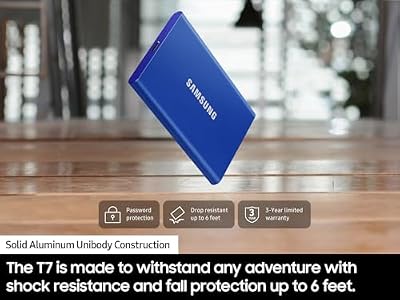
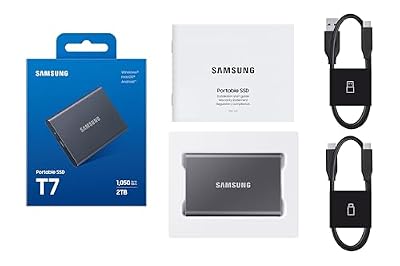
6. Samsung T7 Portable SSD, 2TB External Solid State Drive, Up to 1050MB/s

Samsung T7 Portable SSD 2TB Titan Gray, USB 3.2 Gen 2, Up to 1,050MB/s



As an Amazon Associate we earn from qualifying purchases. Product prices and availability are accurate as of the date/time indicated.
Rounding out the list is the Samsung T7 2TB, the take-it-anywhere portable pick. It is a sleek USB-C external SSD rated up to 1050MB/s, pairing 2TB of capacity with a slim metal shell that slips into a pocket. As with the SanDisk Extreme, it is an external drive rather than an internal NVMe one, so frame it as portable storage for your 4K library rather than your main streaming drive. At around $389 it is a polished, well-rounded option.
This is the drive for the gamer with more than one machine — a desktop and a gaming laptop, say — who wants to carry installs, screenshots and captures between them. The T7’s compact build and fast USB-C interface make moving large 4K games quick and painless, and Samsung’s hardware encryption adds security for the data you carry. For high-fidelity titles you load constantly, internal NVMe is still the place; for a fast, portable 4K library you can take anywhere, the T7 is an excellent companion drive.
Pros: Slim and portable, fast USB-C speeds, 2TB capacity, hardware encryption.
Cons: External USB drive, not internal NVMe; best as a portable companion.
How to Choose an SSD for 4K Gaming
For 4K gaming, start with the interface, because it sets the ceiling on load and streaming speed. NVMe drives like the Samsung 970 EVO Plus connect over PCIe and deliver far higher sequential throughput than SATA, which is what keeps load screens short and lets technologies such as DirectStorage feed high-resolution assets to the GPU quickly. If you want the snappiest 4K experience for your most-played games, an NVMe M.2 drive should be your boot and primary game drive.
Capacity is the second pillar, and 4K makes it pressing. Modern titles routinely exceed 100GB, and ultra-resolution texture packs push installs larger still, so a drive that is too small forces constant uninstalling. A 2TB drive — whether the NVMe 970 EVO Plus or a SATA 870 EVO or SSD Plus — keeps several big games resident at once, which is why we lean toward 2TB for a 4K rig. Smaller drives like the 960GB A400 are better as boot or supporting storage than as your main library.
Think in terms of a tiered setup rather than a single drive. A fast NVMe drive handles the operating system and the games you load most, a roomy SATA drive like the SSD Plus or 870 EVO acts as a larger, cheaper-per-gigabyte library, and a portable SSD such as the T7 or SanDisk Extreme stores overflow installs or moves a library between machines. Matching each drive to a role gets you both speed where it counts and capacity where you need it.
Finally, be honest about internal versus external, and check fit. The portable drives here connect by USB-C and are excellent for storage and transport, but they are not a substitute for internal NVMe when it comes to the lowest-latency streaming in demanding 4K titles. Confirm your motherboard has a free M.2 slot for an NVMe drive, or a SATA port and bay for a 2.5-inch one, set your capacity based on how many big games you keep installed, and pick the combination on this list that fits your 4K build.
Frequently Asked Questions
What kind of SSD is best for 4K gaming?
For your boot and most-played games, an NVMe M.2 drive like the Samsung 970 EVO Plus is best — its PCIe interface delivers far faster loads and the data throughput technologies like DirectStorage rely on for high-resolution streaming. Pair it with a roomy SATA drive such as the 870 EVO for your wider library, since 4K installs are large and capacity matters as much as speed.
How much SSD storage do I need for 4K games?
More than you might think. Modern 4K titles often exceed 100GB each, and high-resolution texture packs add more, so a 2TB drive is a sensible target for a 4K rig — it keeps several big games installed at once. Drives like the 2TB 970 EVO Plus, 870 EVO and SanDisk SSD Plus suit that role; a 960GB drive like the A400 is better as boot or supporting storage.
Can I run 4K games from a portable USB SSD?
Often, yes — fast portable drives like the Samsung T7 and SanDisk 4TB Extreme are rated up to about 1050MB/s and many games run acceptably from them. They are external USB drives rather than internal NVMe, though, so for the most demanding 4K titles where streaming latency counts, keep those on an internal M.2 drive and use a portable SSD as an expansive overflow and transport vault.
Does DirectStorage need a specific SSD?
DirectStorage is designed to pull game data straight off a fast NVMe SSD to the GPU, so an NVMe drive like the 970 EVO Plus is the right foundation to benefit from it. A SATA SSD still loads far faster than a hard drive, but it cannot match NVMe throughput, so install the games you want to stream fastest on your NVMe drive to get the most from DirectStorage-enabled titles.
Related Guides
- Best NVMe SSDs
- Best Gaming PCs
- Best 4K Monitors
- Best GPUs for 4K Gaming
- Best Portable SSDs
- Best Gaming Monitors
Affiliate Disclosure: As an Amazon Associate, we earn from qualifying purchases. If you click a link and make a purchase, we may earn a small commission at no extra cost to you. Prices and availability are accurate as of publication and may change.
Ready to decide? Our #1 pick for 2026 is the Samsung 970 EVO Plus 2TB NVMe M.2.
Live price & availability on Amazon.


