

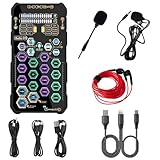
- Top Pick: Small Handheld Sound Card Set for Podacsting, Broadcasting, Living, Singing, Recording, Gaming with Families, Friends, Gift,YouTube, TikTok
- Best Value: Creative Sound Blaster Audigy Fx Pro Hi-Res PCIe Sound Card | Hi-Res, PCIe Sound Card, Hi-Res Audio, Surround Sound, Clean Audio, PC Upgrade
- Premium Choice: Cubilux 7.1 USB Surround Sound Card- 48KHz-384KHz Sample Rate for Headphones, Full Aluminum Alloy USB A External Sound Card for Laptop PC-Supports Line-in & Stereo Mic in
Motherboard audio has improved, yet plenty of gamers still reach for a separate sound card when headphones sound thin, a front jack hums, or a laptop offers no proper microphone input. With a limit of under 100 dollars, the field splits into two camps: PCIe cards that slot into a desktop and tiny USB dongles that work with almost anything. Knowing which camp suits your machine is the whole decision.
This guide covers seven listings, from a basic USB adapter to Creative PCIe gaming cards with a dedicated headphone amplifier, plus one portable device built for streaming. It is written for desktop owners upgrading in 2026, laptop users who want a cleaner headset connection, and streamers who need a microphone and voice effects in one box. Several items do different jobs, so the Quick Picks table matters.
Quick Picks
As an Amazon Associate we earn from qualifying purchases at no extra cost to you.


| Product | Best for | Key spec from the title |
|---|---|---|
| Creative Sound Blaster Audigy Fx Pro | Simple desktop upgrade | Hi-Res PCIe, surround sound |
| Cubilux 7.1 USB | Laptops and desktops | 7.1 surround, 48KHz to 384KHz |
| VENTION USB Sound Card | Plug-and-play headset use | Volume control, USB to 3.5mm |
| Creative Sound Blaster AE-X | Hi-Res desktop audio | PCIe, 32-bit/384kHz |
| Creative Sound BlasterX AE-5 Plus | Gaming with RGB | SABRE32-class, up to 122dB SNR |
| AE-5 Plus Pure Edition | Premium internal audio | SABRE32 Ultra-Class, RGB LED strips |
| ehaon Portable Sound Card | Streaming and karaoke | Handheld, voice changer |
How to Choose
Internal PCIe or External USB
A PCIe card needs a free slot and works only in a desktop. A USB card plugs into any port on a laptop or desktop and keeps the signal chain away from the electrical noise inside the case. A card that lives outside the chassis also moves with you, so a single adapter can serve a desk, a living-room console setup and a travel bag. If you own a small-form-factor PC or a laptop, USB is the only realistic option. If you own a tower with a spare slot, PCIe gives you a headphone amplifier and software control. Measure the gap between your graphics card and the next free slot, since a thick cooler can block the one you wanted.
Sample Rate and Bit Depth
The listings quote figures such as 32-bit/384kHz and a 48KHz to 384KHz range. Higher numbers matter mainly for music files that use them; for games and voice chat, 48kHz is already the working standard, and most headsets cannot reveal the difference between the top rates. Do not pay attention to a number alone. Check whether the card states a signal-to-noise ratio, such as the 122dB figure on the AE-5 Plus models, because that tells you how quiet the output stage is. A card with no stated figure leaves you guessing, and entry-level adapters rarely publish one.
Headphone Amplifier and Inputs
Headphones that are hard to drive benefit from a dedicated amplifier, which the AE-5 Plus listings call a Xamp discrete headphone bi-amp. A simple dongle suits easy-to-drive headsets. Also count your inputs: Cubilux lists line-in and a stereo mic input, which matters if you plug in a separate microphone. Basic adapters usually offer a single combined jack, which is fine for a headset but awkward for a standalone microphone. If your headset has separate plugs for audio and mic, make sure the card has matching sockets or you will need a splitter.
What to Ignore and Where Corners Get Cut
Ignore surround marketing unless you own headphones that benefit from it, since virtual surround is software processing. Budget cards cut corners on input choices, driver support and shielding. Be careful with devices described for karaoke, podcasting or voice changing: they handle live voice work and may not replace a desktop audio card. Confirm each listing fits within the cap before ordering, and check the driver and software support for your operating system.
One caution before the reviews: the group mixes three device types, so compare like with like. Internal Creative cards are best judged against one another, the two USB adapters against each other, and the handheld streaming device on its own terms.
The 7 Best Options
Creative Sound Blaster Audigy Fx Pro
A Hi-Res PCIe card promising surround sound and clean audio as a straightforward PC upgrade. It suits desktop owners with onboard audio they find lacking and who want a simple, familiar upgrade path rather than a feature-packed gaming model.
- PCIe form fits a standard desktop slot.
- Hi-Res audio with surround sound listed.
- Trade-off: it is internal only, so laptops cannot use it.
Skip it if you own a laptop or a PC without a free slot, or if you want a dedicated headphone amplifier, which the AE-5 Plus listings name and this one does not.
Cubilux 7.1 USB Surround Sound Card
This full aluminum alloy external card lists 7.1 surround and a 48KHz to 384KHz sample rate range for headphones. It adds line-in and a stereo mic input, which makes it suited to buyers who need an input for a microphone or a console capture feed. The all-metal body is a plus for desks where cables get tugged, and the external design keeps setup quick on a second machine.
- Works with laptops and desktops through USB A.
- Line-in plus stereo mic input.
- Trade-off: no headphone amplifier is described.
Skip it if you use hard-to-drive headphones or want software-heavy gaming tuning.
VENTION USB Sound Card
A small external stereo adapter with volume control and a 3.5mm jack, listed for Windows, Mac, PC, laptop, desktop, headset and Switch. It suits buyers who want to plug in and listen, especially anyone with a laptop whose headphone jack has gone noisy or stopped working.
- Volume control built in.
- Broad device compatibility in the title.
- Trade-off: stereo only, with no surround or gaming features.
Skip it if you want surround, a microphone input or a dedicated amplifier.
Creative Sound Blaster AE-X
A Hi-Res PCIe card quoting 32-bit/384kHz, with desktop app support for adjusting settings. It targets desktop builders who want a step above basic cards and plan to tune equalizer and surround settings in the companion application.
- 32-bit/384kHz capability listed.
- Desktop app support for tuning.
- Trade-off: a PCIe slot is required.
Skip it if your PC has no free slot or you need a portable solution.
Creative Sound BlasterX AE-5 Plus
A SABRE32-class PCIe gaming card and DAC with Dolby Digital and DTS, a Xamp discrete headphone bi-amp, up to 122dB SNR and an RGB lighting system. It is for gamers who care about headphone performance and want Dolby and DTS processing alongside lighting that matches the rest of the build.
- Headphone bi-amp and a high signal-to-noise figure.
- Dolby Digital and DTS support.
- Trade-off: it sits at the top of this list in features, so confirm it fits the cap.
Skip it if you need a laptop-compatible device or a plain, dark interior.
Creative Sound BlasterX AE-5 Plus Pure Edition
This version steps up to SABRE32 Ultra-Class conversion with a similar Xamp bi-amp, 122dB SNR and RGB LED strips. It is for builders who want a showpiece card in a windowed case and a step up in the converter class named on the box.
- Ultra-Class SABRE32 designation.
- RGB LED strips for case lighting.
- Trade-off: the feature set may exceed what basic headsets can use.
Skip it if your case has no window or your headset is basic, since the extra features would go unused.
ehaon Portable Sound Card
A small handheld device aimed at podcasting, live streaming, karaoke and gaming, with a voice changer and listed support for Android, iOS and Windows. It is a streaming accessory more than a desktop audio upgrade, and it makes sense for creators who move between a phone and a PC.
- Voice changer and HD sound for live use.
- Works across phones and Windows.
- Trade-off: it does not replace an internal desktop card.
Skip it if you only want better game audio on a PC; an internal card or a USB adapter fits that job better.
Which One Fits Your Situation
You Have a Desktop With a Free Slot
The Creative Sound Blaster Audigy Fx Pro and the AE-X are the simple PCIe choices. Move up to an AE-5 Plus model if your headphones need the dedicated amplifier, and consider the plain Pure Edition only if the case window and lighting matter.
You Game on a Laptop
The Cubilux 7.1 USB card adds surround and a mic input, while the VENTION adapter keeps things simple with volume control, which suits a headset-only setup and works with Windows, Mac and Switch according to its title.
You Stream or Make Content
The ehaon Portable Sound Card handles voice effects and live-stream use, and the Cubilux adds a microphone input for a separate mic. Pick one based on whether you stream from a phone or from a PC.
You Build a Showpiece PC
The AE-5 Plus Pure Edition adds RGB LED strips and a higher-class DAC, which suits a windowed case.
If you are unsure where to start, begin with how you connect your audio today. A desktop with a stereo headset and a free slot has the widest set of choices, while a laptop user can ignore half the table. Picking the connection type first removes most of the confusion, and the remaining choice is how much headphone amplification and lighting you want on top of that.
Common Mistakes
- Buying a PCIe card for a laptop or compact PC with no slot.
- Chasing sample rate numbers instead of checking inputs and headphone drive.
- Ignoring that some listings are accessories for voice work, not PC audio cards.
- Expecting virtual surround to replace a good stereo headset.
- Forgetting to disable the motherboard audio output in the system settings after installing a new card, which can leave sound routed to the wrong device.
Related guides
- Battery Operated Smoke And Carbon Monoxide Detectors
- Combination Smoke And Carbon Monoxide Detectors
- Aio Liquid Coolers For High Performance Gaming
Frequently Asked Questions
Do I need a sound card for gaming?
Not always, and many players never need one. Motherboard audio works for many players, but a separate card can improve headphone drive, add inputs and reduce interference. If your current audio sounds fine, the gain may be small.
Is a USB sound card good enough?
For stereo headsets and voice chat, yes. It also works on laptops, where internal cards cannot be used. Models that list line-in and a mic input also let you connect a separate microphone.
What does SNR mean?
Signal-to-noise ratio compares the audio signal with background noise, and a higher figure such as 122dB means a quieter output stage on paper. Treat it as one clue, not a guarantee of how the card sounds with your headphones, because the headset and the recording source matter just as much.
Will a PCIe card work on any desktop?
It needs a free PCIe slot and room in the case, and a small-form-factor board may not offer one at all. Check the slot layout and any graphics card overhang first, and keep the card away from hot components where possible.







