- Top Pick: Creative Sound Blaster Audigy Fx Pro Hi-Res PCIe Sound Card | Hi-Res, PCIe Sound Card, Hi-Res Audio, Surround Sound, Clean Audio, PC Upgrade
- Best Value: Creative Sound Blaster AE-X Hi-Res PCIe Sound Card for PC | Hi-Res, PCIe Sound Card, 32-bit/384kHz, Hi-Res Audio, PC Audio, Desktop App Support
- Premium Choice: Creative Sound Blaster AE-7 Hi-Res PCIe Gaming Sound Card and ACM | Hi-res, PCIe DAC, Headphone Amp, Xamp, Audio Control Module, Hi-Res Audio, Sound Card
The word “audiophile” changes what you should look for in a sound card. Gaming-oriented marketing leans on surround modes and RGB, but a listener who cares about fidelity wants a cleaner signal path: a respected DAC chip, a headphone amplifier that can drive demanding cans, a high noise-floor spec, and digital outputs that let you hand the signal to an outboard DAC. This list for 2026 filters for those traits, using only what each product title states.
It is written for desktop owners who already own decent headphones or studio monitors and suspect the motherboard audio is holding them back. If you only need a mic jack added to a laptop, a basic adapter is enough, and a different guide covers that. Here the question is how much analog quality a dedicated card or external unit can add, and which compromises come with each design.
Quick Picks
As an Amazon Associate we earn from qualifying purchases at no extra cost to you.




| Product | Best for | Key spec from the title |
|---|---|---|
| Sound Blaster Audigy Fx Pro | Simple Hi-Res upgrade | PCIe, Hi-Res Audio |
| Sound Blaster AE-X | Hi-Res card with app control | 32-bit/384kHz |
| Sound Blaster AE-7 | Headphone amp plus control module | PCIe DAC, Xamp, ACM |
| SoundBlasterX AE-5 Plus | Dolby/DTS plus strong output | Up to 122dB SNR |
| Sound Blaster Z SE | High-impedance headphones | 600 ohm amp, 116 dB SNR |
| SoundBlasterX AE-5 Plus Pure Edition | Top Creative spec with lighting | SABRE32 Ultra-Class |
| Cubilux 7.1 USB | External option, no slot needed | 48kHz-384kHz sample rate |
| LICAEVEY PCIe | Digital output hookups | ES9018K2M DAC, dual DACs |
How to Choose
Read the DAC and amplifier lines first
A card that names its DAC family, such as SABRE32-class or ES9018K2M, is telling you where the conversion happens. Next look for a dedicated headphone stage. Titles that mention a discrete bi-amp or a 600 ohm amp are advertising more drive for hard-to-power headphones. If your headphones are low impedance, that headroom matters less, and a mid-range card with a modest amp will serve you just as well. Planar and studio headphones are the usual reason to want the extra drive.
Treat SNR figures as a comparison tool
Signal-to-noise numbers such as 116 dB or 122 dB describe a ceiling on the noise floor under ideal conditions. Differences of a few dB are hard to hear in a living room. Use them to separate cards in the same family, and ignore them as a reason to jump between brands, since manufacturers measure differently. A card that lists no figure at all is not necessarily worse, but you lose the ability to compare it on paper.
Sample rate and bit depth are the floor, not the goal
Seeing 24-bit/192kHz or 32-bit/384kHz means the card can handle high-resolution files. Most streaming and CD-quality music never reaches those rates, so a 32-bit label alone will not make music sound better. Confirm your player or ASIO driver path can pass the format through untouched, and remember that a Windows sound setting set to a lower rate can quietly undo the benefit. Check the output format in the sound control panel after installing any card.
Slot, shielding, and where the card lives
PCIe cards sit next to a hot graphics card inside a noisy electrical environment, so look for designs with a shielded audio section. An external USB unit sidesteps the case entirely, which is why some listeners prefer it. Budget models usually cut the headphone amplifier and the shielding first, so check the title for those words before buying. Also ignore surround-sound extras if you only listen to stereo music, because they take up spec-sheet space without improving fidelity.
The 8 Best Options
Creative Sound Blaster Audigy Fx Pro
The title lists Hi-Res audio, surround sound, and clean audio on a PCIe card, framed as a PC upgrade. It is the plain entry into dedicated audio in this roundup, aimed at listeners moving off motherboard sound who want an easy install. It makes the most sense for someone with solid but not extreme headphones who wants cleaner output without chasing specifications.
- Strength: Hi-Res support on a PCIe card is a clear step up from onboard audio.
- Strength: the title keeps the pitch simple, which suits first-time card buyers.
- Trade-off: the title states no DAC chip, SNR figure, or headphone amp, so audiophile claims cannot be confirmed from it.
Skip it if you own high-impedance headphones or want to verify the amplifier stage.
Creative Sound Blaster AE-X
The AE-X title cites 32-bit/384kHz, Hi-Res audio, and desktop app support. That app mention suggests software control over the card’s behavior, handy for people who like tuning output from the desktop. It suits a listener who wants the high-resolution label and software control without moving into the most expensive tier.
- Strength: 32-bit/384kHz is the same top-end format stated on the more expensive Creative cards here.
- Strength: desktop app support means adjustments are possible without opening the case again.
- Trade-off: no SNR or headphone amplifier detail appears in the title.
Skip it if you want a documented high-power amp, because other cards here state theirs.
Creative Sound Blaster AE-7
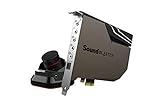
The AE-7 pairs a PCIe DAC with a headphone amp, Xamp, and an Audio Control Module. The module is the interesting part for desk users, because it puts volume and switching within reach instead of behind the tower. It is the natural pick for someone who swaps between headphones and speakers during a session.
- Strength: the Audio Control Module adds a physical control surface.
- Strength: a named headphone amp and Xamp point to a purpose-built output stage.
- Trade-off: the title gives no SNR or sample-rate figure to compare against rivals.
Skip it if your desk has no room for another control, or if you prefer an all-internal setup.
Creative SoundBlasterX AE-5 Plus
This one is labeled SABRE32-class, 32-bit/384kHz, with a DAC, Dolby Digital and DTS, a Xamp discrete headphone bi-amp, up to 122dB SNR, and an RGB lighting system. It is the most feature-dense title among the standard-edition cards, and a sensible target for buyers who want one card covering music, movies, and games.
- Strength: the discrete headphone bi-amp is spelled out, which matters for demanding headphones.
- Strength: 122dB SNR is the highest figure stated in this list.
- Trade-off: RGB lighting adds nothing to sound and may be pointless in a case without a window.
Skip it if you want a dark, understated build.
Creative Sound Blaster Z SE
The Z SE title lists a PCI-e card with 24-bit/192kHz, 116 dB SNR, ASIO, a 600 ohm headphone amp, mic EQ, discrete 5.1, virtual 7.1, and Dolby Digital Live support. The 600 ohm amp is the headline for owners of studio-style headphones, and the ASIO mention matters to anyone who records or mixes.
- Strength: ASIO is called out, which is useful when you want a low-latency driver path for music software.
- Strength: the mic EQ and surround options make it flexible if you also chat or game.
- Trade-off: 24-bit/192kHz and 116 dB trail the higher figures on the AE-5 family.
Skip it if maximum resolution and noise figures are your priority.
Creative SoundBlasterX AE-5 Plus Pure Edition
The Pure Edition repeats the AE-5 Plus core, now with SABRE32 Ultra-Class, 32-bit/384kHz, Dolby Digital and DTS, a Xamp bi-amp, 122dB SNR, and RGB LED strips. The wording suggests a refined variant, though the title does not explain what changed. It appeals to buyers who want the highest-numbered Creative listing.
- Strength: the Ultra-Class DAC label and 122dB SNR match the strongest numbers listed here.
- Strength: LED strips can add lighting to a windowed case.
- Trade-off: the title reads almost like the standard AE-5 Plus, so the difference needs verifying on the product page.
Skip it if you already own the standard edition.
Cubilux 7.1 USB Surround Sound Card
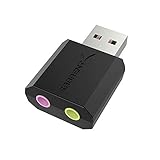
This is a full aluminum alloy external USB-A unit for laptops and PCs, with a 48KHz-384KHz sample rate, line-in, and a stereo mic input. It is the answer when there is no free PCIe slot or the card would sit too near a graphics card. It also fits small-form-factor owners who cannot add internal cards.
- Strength: an external design moves the converter out of the case.
- Strength: a 384KHz ceiling and line-in suit a laptop-plus-speakers desk.
- Trade-off: no DAC chip or headphone amp is named in the title.
Skip it if you need a high-power headphone stage.
LICAEVEY PCIe Sound Card
The title promises professional HiFi audio with dual DACs and headphone drivers, a CM108AH master controller, an ES9018K2M DAC, and optical and coaxial digital outputs. The digital outputs are its distinct angle, sending signal to an outboard DAC or receiver, which appeals to people building a separate hi-fi chain around the computer.
- Strength: named chips let you research the converter before buying.
- Strength: both optical and coaxial outputs are listed.
- Trade-off: the brand is unfamiliar, so driver support and software polish should be checked first.
Skip it if you want a well-known brand with an established control app.
Which One Fits Your Situation
You own studio-style headphones
Start with the Sound Blaster Z SE, since its title states a 600 ohm headphone amp. If you want the higher stated noise figure and a discrete bi-amp, step to the AE-5 Plus. Either choice gives high-impedance cans room to breathe.
You want a desk control and a clean build
The AE-7 with its Audio Control Module fits listeners who adjust volume often. Pair it with a dark case to keep lighting low-key, and keep the module near your keyboard for quick volume changes.
You have no free slot or a crowded case
Go external with the Cubilux USB unit. It also moves between a desktop and a laptop in seconds, which suits someone who works at two desks.
You plan to feed an outboard DAC or receiver
The LICAEVEY card is the one here that lists optical and coaxial outputs, so it suits that routing. Check that your receiver or DAC accepts the connector type before ordering.
Common Mistakes
- Chasing 384kHz labels when your music library is mostly CD-quality files.
- Ignoring headphone impedance and buying an amp stage you do not need, or skipping one you do.
- Choosing a card for its RGB lighting on a build with no side window.
- Installing a PCIe card directly against a hot graphics card without checking slot spacing.
- Skipping a driver and software check for lesser-known brands on your version of Windows.
Related guides
- Aio Liquid Coolers For High Performance Gaming
- How To Lower Input Delay In Competitive Shooters
- Wireless Gaming Headsets Under 100 For Pc
Frequently Asked Questions
Is a dedicated sound card still worth it today?
For listeners with demanding headphones or analog hookups, yes. For casual listening through speakers or earbuds, modern onboard audio is often adequate, and a card will add little. Spend the effort on better headphones or speakers first, then revisit the card if the output stage becomes the limit.
Does a higher SNR always sound better?
Not by itself. Differences of a few dB are small compared with headphone quality and room noise. Use SNR to compare similar cards.
PCIe card or USB unit?
PCIe fits fixed desktops and often carries bigger amps. USB suits laptops, crowded cases, and anyone who wants to avoid electrical noise inside the tower.
Do I need Dolby or DTS support for music?
No. Those features target games and movies. For music, focus on the DAC, amp, and output connections.