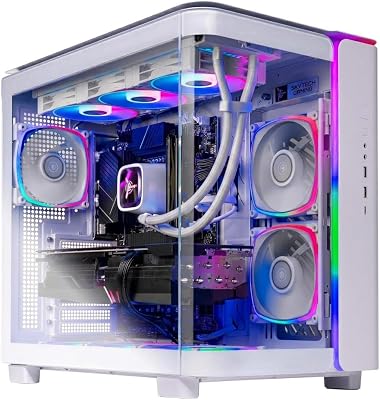
- Top Pick: Skytech Gaming King 95 Gaming PC, Ryzen 7 9800X3D, RTX 5070 Ti
- Best Value: STORMCRAFT Phantom RTX 5080 Gaming PC Ryzen 7 9800X3D 32GB DDR5 2TB SSD
- Best value:: Skytech Gaming King 95 Desktop PC, Ryzen 7 9800X3D 4.7 GHz (5.2 GHz), NVIDIA RTX 5070 Ti 16GB, 1TB Gen4 NVMe SSD, 32GB DDR5 RAM 5600 RGB, 850W Gold ATX 3 PSU, 360mm ARGB AIO, Wi-Fi, Win 11
Affiliate disclosure: As an Amazon Associate we earn from qualifying purchases. This post contains affiliate links — we may earn a small commission at no extra cost to you. This never affects our picks.
- Verdict at a glance
- Top 6 Ryzen 7 9800X3D Gaming Pc Picks Compared
- How We Compared These Ryzen 7 9800X3D Gaming Pc
- Our Top 3 Picks Explained
- More Ryzen 7 9800X3D and 9850X3D Prebuilts Worth Considering
- What Separates a Great Ryzen 7 9800X3D Gaming Pc From a Mediocre One
- Before You Hit “Buy”: A Quick Checklist
- Build vs Buy: Where the Money Goes
- What to Check Before Buying a 9800X3D Prebuilt
- Common Mistakes to Avoid
- What the Specs Really Mean
- Related Guides
- Frequently Asked Questions
- Final Take
- Related Guides
- Related Articles
Quick answer: Short on time? Skytech Gaming King 95 (Ryzen 7 9800X3D, RTX 5070 Ti) is the Ryzen 7 9800X3D gaming PC we’d hand most people in 2026, balancing price, performance and features better than the rest. The full ranked list and buying advice are below.
As an Amazon Associate we earn from qualifying purchases at no extra cost to you.


Buying the right ryzen 7 9800x3d gaming pc can be surprisingly tricky — the market is crowded, prices swing widely, and marketing copy rarely tells you what daily ownership is actually like. That’s why this guide focuses on what decides long-term satisfaction: GPU tier, power supply, memory configuration and warranty, all distilled into the picks below so you can decide in minutes instead of hours.
Verdict at a glance
The short answer: a Ryzen 7 9800X3D prebuilt is the right buy if you want the fastest gaming CPU class without building it yourself; just make sure the graphics card, PSU and memory match. AMD’s newer Ryzen 7 9850X3D (same eight cores and 96MB L3 cache, boost raised from 5.2GHz to 5.6GHz) now appears in many of the same chassis for a small step up in tier.
- Best overall: Skytech Gaming King 95 (Ryzen 7 9800X3D, RTX 5070 Ti, 850W Gold) for high-refresh 1440p.
- Best value: Skytech Gaming O11 Vision (Ryzen 7 9800X3D, RX 9070 XT) or ASUS ROG GM700 (RX 9070 XT, 850W Gold).
- Best 9850X3D upgrade: Skytech Ryzen 7 9850X3D with RTX 5070 Ti and an 850W Gold PSU.
- Best premium: Skytech Gaming Azure 3 (RTX 5080) for entry 4K, or Skytech Ryzen 7 9800X3D with RTX 5090 for 4K at maximum settings.
- Best warranty: STORMCRAFT Valkyrie RTX 5080 (2-year parts, 3-year labor).




🛒 Best Price Today on Amazon
Prime members get fast, free shipping on everything above, plus member-only deals. New members get a 30-day free trial — cancel anytime.
Top 6 Ryzen 7 9800X3D Gaming Pc Picks Compared
| Rank | Product | Price tier | GPU | Buy |
|---|---|---|---|---|
| 1 | Skytech Gaming Azure 3 Desktop PC, Ryzen 7 9800X3D 4.7 GHz (5.2 GHz), NVIDIA RTX 5080 16GB | Premium | RTX 5080 | View on Amazon |
| 2 | Skytech Gaming O11 Vision Desktop PC, Ryzen 7 9800X3D 4.7 GHz (5.2 GHz), AMD RX 9070XT 16G | Mid-range | RX 9070 XT | View on Amazon |
| 3 | Skytech Gaming King 95 Desktop PC, Ryzen 7 9800X3D 4.7 GHz (5.2 GHz), NVIDIA RTX 5070 Ti 1 | Mid-range | RTX 5070 Ti | View on Amazon |
| 4 | Cooler Master NR2 Pro Gaming PC – AMD RYZEN 7 9800X3D, NVIDIA GeForce RTX 5070 Ti 16GB, 32 | Mid-range to premium | RTX 5070 Ti | View on Amazon |
| 5 | Skytech Gaming Azure 3 Desktop PC, Ryzen 7 9800X3D 4.7 GHz (5.2 GHz), NVIDIA RTX 5080 16GB | Premium | RTX 5080 | View on Amazon |
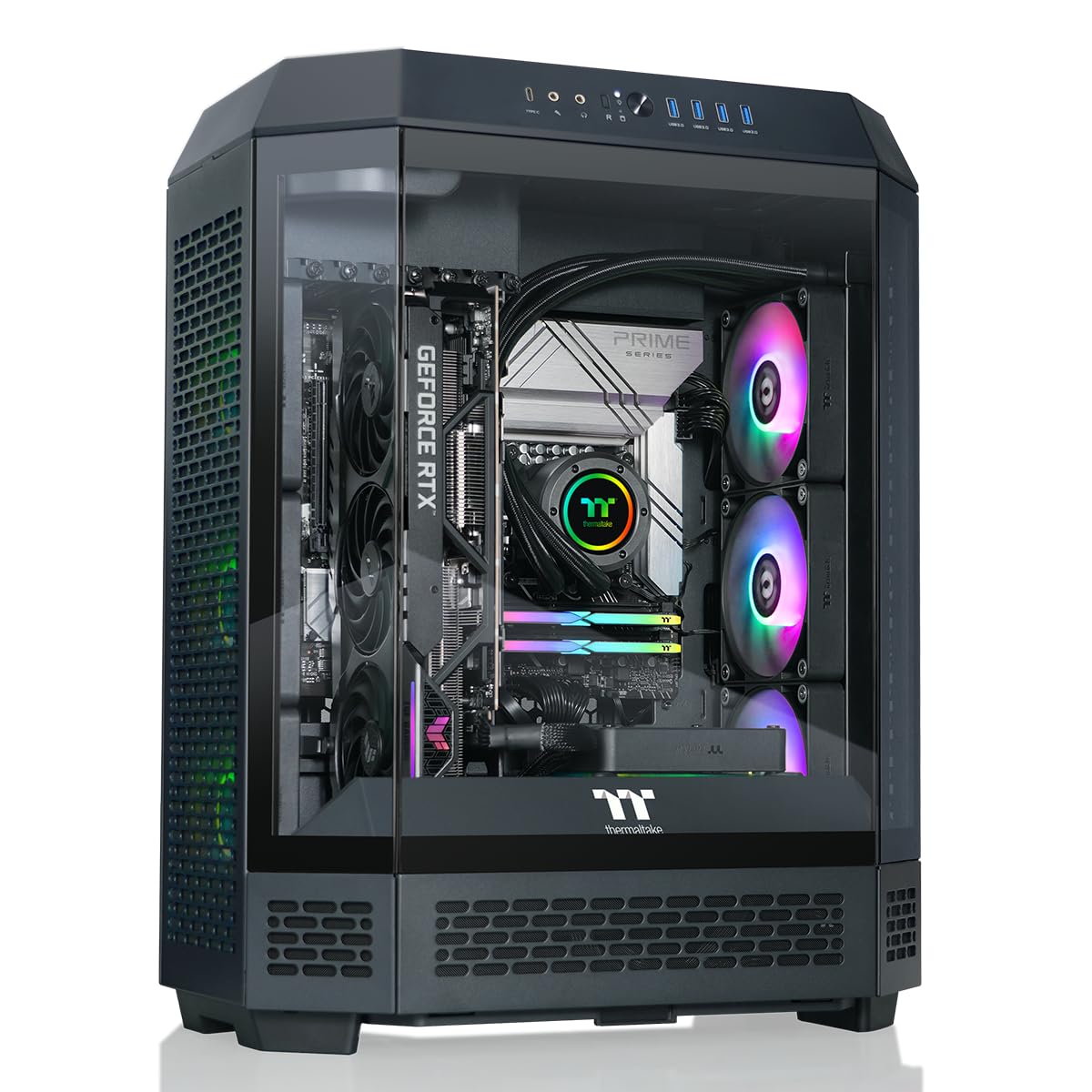
| 6 | Thermaltake Reactor 9880 Gaming Desktop (AMD Ryzen™ 7 9800X3D, ToughRam 32GB DDR5 6400MT/s | Premium | RTX 5080 | View on Amazon |
How We Compared These Ryzen 7 9800X3D Gaming Pc
We built this shortlist from current Ryzen 7 9800X3D gaming PC listings, then compared GPU tier, power supply quality, memory configuration, cooling and warranty terms using manufacturer specifications; we did not bench-test these systems ourselves. The picks reflect that comparison, not paid placement — we earn a commission only if you buy, never for a higher rank.
Our Top 3 Picks Explained
Premium Pick: Skytech Gaming Azure 3 (Ryzen 7 9800X3D, RTX 5080)
Sitting in the premium tier, the Azure 3 pairs the Ryzen 7 9800X3D with an RTX 5080, 32GB of DDR5-6000, a 2TB NVMe SSD, a 360mm AIO and an 850W Gold ATX 3 power supply. It is the pick for 1440p at very high refresh rates and entry-level 4K, where the RTX 5080 adds real headroom over the RTX 5070 Ti. Check the current price on Amazon.
Best Value: Skytech Gaming O11 Vision (Ryzen 7 9800X3D, RX 9070 XT)
In the mid-range tier, the O11 Vision pairs the Ryzen 7 9800X3D with an RX 9070 XT 16GB, 32GB of DDR5-6000, a 2TB Gen4 SSD, a 360mm AIO and an 850W Gold ATX 3 power supply. It is the value route to high-refresh 1440p, trading some ray-tracing performance for a lower tier than the RTX 5080 systems. Check the current price on Amazon.
Best Overall: Skytech Gaming King 95 (Ryzen 7 9800X3D, RTX 5070 Ti)
The King 95 pairs the Ryzen 7 9800X3D with an RTX 5070 Ti 16GB, 32GB of DDR5-5600, a 1TB Gen4 SSD, a 360mm AIO and an 850W Gold ATX 3 power supply. The RTX 5070 Ti is the best-balanced GPU for an X3D CPU at 1440p, which makes this mid-range system the one we would hand most buyers. Check the current price on Amazon.
More Ryzen 7 9800X3D and 9850X3D Prebuilts Worth Considering
The ranked list above leans heavily on Skytech systems. These five additional prebuilts widen the choice across brands, GPU tiers and warranty terms, and include the newer Ryzen 7 9850X3D.
Skytech Gaming PC, Ryzen 7 9850X3D, RTX 5070 Ti, 32GB RAM, 1TB SSD

This is the 9850X3D version of the system class that already tops many 9800X3D lists, and it is the pick for buyers who want the newest X3D chip at a mid-range-to-premium tier. The RTX 5070 Ti is the best-balanced GPU for an X3D CPU at 1440p: fast enough that the processor matters, without the cost of an RTX 5080.
Key specs from Skytech’s listings for its 9850X3D and RTX 5070 Ti builds: Ryzen 7 9850X3D (8 cores, 16 threads, up to 5.6GHz, 96MB L3, 120W TDP), RTX 5070 Ti 16GB GDDR7, 32GB DDR5, a 1TB Gen4 NVMe SSD on this configuration, an 850W Gold ATX 3.0 power supply, a 360mm AIO cooler, Wi-Fi and Windows 11. Skytech’s standard warranty covers one year of parts, labor and shipping, plus lifetime technical support.
Strengths: the 850W Gold supply comfortably covers the roughly 300W RTX 5070 Ti and the 9850X3D, and leaves room for a later RTX 5080. The 360mm AIO is more cooling than the chip needs, which keeps fan noise low.
Drawbacks: 1TB of storage fills quickly with modern games, so plan for a second SSD. Over the 9800X3D, the 9850X3D’s real-world gaming gain is modest, and the one-year warranty is shorter than STORMCRAFT’s below.
Compared with the Skytech King 95 (9800X3D, RTX 5070 Ti) in our ranked list, this system swaps in the faster CPU; pick whichever is the lower tier on the day you buy.
Skytech Gaming PC, Ryzen 7 9800X3D, RTX 5090, 32GB RAM, 2TB SSD

This is the premium pick for 4K gaming at maximum settings with path tracing, or for gamers who also render and run local AI models. The RTX 5090 is the only card where the 9800X3D’s gaming advantage is visible even at 4K in CPU-heavy titles.
Key specs from Skytech: Ryzen 7 9800X3D, RTX 5090 32GB GDDR7, 32GB DDR5, a 2TB NVMe SSD, a 360mm AIO, Wi-Fi and Windows 11. Skytech’s RTX 5090 builds ship with either a 1000W or a 1200W Gold ATX 3.0 power supply depending on the chassis, so check the listing for the exact unit before buying.
Strengths: the fastest consumer GPU paired with the fastest gaming CPU class, a native 12V-2×6 power path from an ATX 3.0 supply, and a 2TB SSD. NVIDIA recommends 1000W system power for the RTX 5090, which these configurations meet.
Drawbacks: the very top of the premium tier, 32GB of memory is the minimum we would accept at this level, and Skytech does not always publish the PSU brand. The one-year warranty is short for a system at this tier; consider Skytech’s paid extension.
It sits above every system in our ranked list. If you do not game at 4K or create, the RTX 5080 Azure 3 or our best-overall King 95 is far better value.
Lenovo Legion Tower 5 (2026), Ryzen 7 9800X3D, RTX 5070 Ti
Lenovo’s Legion Tower 5 is the pick for buyers who prefer a large mainstream brand with a clean, understated 30-litre case. This 2026 configuration pairs the 9800X3D with an RTX 5070 Ti, 32GB of memory and a 1TB SSD.
Key specs from Lenovo’s listing: Ryzen 7 9800X3D, RTX 5070 Ti 16GB GDDR7, 32GB DDR5, a 1TB SSD, Wi-Fi 6E and Bluetooth 5.3. Lenovo’s comparable RTX 5070 Ti Legion Tower 5 configurations ship with an 850W power supply and an air cooler, and the standard warranty is one year mail-in; confirm the exact PSU on Lenovo’s spec sheet for your part number.
Strengths: Lenovo’s support network and frequent discounts make it competitive, and the Legion case has good airflow for a mainstream design. It is a sensible choice for families or first-time PC buyers who want a recognised brand.
Drawbacks: Lenovo uses some proprietary parts, which can complicate upgrades, and owners have questioned the PSU quality on earlier Legion towers because the brand and certification are not always listed. Memory speed is often lower than on enthusiast prebuilts.
Against the Cooler Master NR2 Pro in our ranked list, the Legion Tower 5 is larger and easier to service, while the NR2 Pro wins on compactness and a named SFX Gold PSU.
ASUS ROG GM700 (2025), Ryzen 7 9800X3D, RX 9070 XT

The ROG GM700 is the best AMD-GPU alternative from a major brand. It pairs the 9800X3D with ASUS’s own Prime RX 9070 XT, making it an all-AMD system that is strong at 1440p and capable at 4K with FSR 4.
Key specs from ASUS and Micro Center: Ryzen 7 9800X3D, Radeon RX 9070 XT Prime OC 16GB GDDR6, 32GB DDR5-5600 in two modules (dual channel, two free slots, 64GB maximum), a 2TB PCIe 4.0 NVMe SSD on the GM700TZ-MS777, an ASUS B650M-A AX6 II motherboard, an 850W 80 Plus Gold power supply, a 240mm AIO cooler, 2.5GbE and Wi-Fi 6.
Strengths: every component is a known, named part, which is rare in prebuilts. The free memory slots and PCIe 5.0 x16 slot leave a clear upgrade path, and the 850W Gold PSU covers the RX 9070 XT’s 304W board power comfortably.
Drawbacks: the B650 board and DDR5-5600 memory are a step below enthusiast builds, Wi-Fi 6 rather than Wi-Fi 7, and rear USB is modest. Ray tracing trails the NVIDIA-based systems.
Compared with the Skytech O11 Vision (RX 9070 XT) in our ranked list, the GM700 offers a fully documented parts list and ASUS support, while the Skytech has a showier case and a larger 360mm AIO.
STORMCRAFT Valkyrie RTX 5080, Ryzen 7 9800X3D, 32GB DDR5, 2TB SSD

STORMCRAFT’s Valkyrie is the pick for buyers who care most about warranty coverage. The standard terms include two years of parts and three years of labor plus lifetime technical support, which is double the parts coverage of most prebuilts in this guide.
Key specs from STORMCRAFT’s listings: Ryzen 7 9800X3D, RTX 5080 16GB GDDR7, 32GB DDR5, a 2TB SSD, and an 850W 80 Plus Gold fully modular ATX 3 power supply on non-RTX 5090 Valkyrie models. STORMCRAFT says the systems are built and tested in California.
Strengths: the RTX 5080 handles 1440p at very high refresh rates and 4K with DLSS 4, the fully modular 850W Gold PSU meets NVIDIA’s RTX 5080 requirement, and the longer warranty reduces long-term risk.
Drawbacks: STORMCRAFT is a newer brand than Skytech or ASUS with less owner history, and the PSU brand is not published. 850W is the minimum for an RTX 5080, so there is little headroom for an RTX 5090 later.
Against the STORMCRAFT Phantom and Skytech Azure 3 in our list, the Valkyrie offers the same GPU class with the longest warranty of any RTX 5080 system here.
Ryzen 7 9800X3D / 9850X3D Prebuilt Spec Table
| System | CPU | GPU | RAM | PSU | Warranty | Tier |
|---|---|---|---|---|---|---|
| Skytech Azure 3 (premium pick) | Ryzen 7 9800X3D | RTX 5080 16GB | 32GB DDR5-6000 | 850W Gold ATX 3 | 1yr parts/labor | Premium |
| Skytech O11 Vision | Ryzen 7 9800X3D | RX 9070 XT 16GB | 32GB DDR5-6000 | 850W Gold ATX 3 | 1yr parts/labor | Mid-range |
| Skytech King 95 (best overall) | Ryzen 7 9800X3D | RTX 5070 Ti 16GB | 32GB DDR5-5600 | 850W Gold ATX 3 | 1yr parts/labor | Mid-range |
| Cooler Master NR2 Pro | Ryzen 7 9800X3D | RTX 5070 Ti 16GB | 32GB DDR5-6000 | V850 SFX Gold | See listing | Mid-range to premium |
| Skytech 9850X3D + RTX 5070 Ti | Ryzen 7 9850X3D | RTX 5070 Ti 16GB | 32GB DDR5 | 850W Gold ATX 3 | 1yr parts/labor | Mid-range to premium |
| Skytech 9800X3D + RTX 5090 | Ryzen 7 9800X3D | RTX 5090 32GB | 32GB DDR5 | 1000W or 1200W Gold | 1yr parts/labor | Premium |
| Lenovo Legion Tower 5 (2026) | Ryzen 7 9800X3D | RTX 5070 Ti 16GB | 32GB DDR5 | 850W on comparable configs | 1yr mail-in | Mid-range |
| ASUS ROG GM700 | Ryzen 7 9800X3D | RX 9070 XT 16GB | 32GB DDR5-5600 (2x16GB) | 850W 80 Plus Gold | See listing | Mid-range |
| STORMCRAFT Valkyrie | Ryzen 7 9800X3D | RTX 5080 16GB | 32GB DDR5 | 850W Gold, fully modular | 2yr parts / 3yr labor | Premium |
| Thermaltake Reactor 9880 | Ryzen 7 9800X3D | RTX 5080 16GB | 32GB DDR5-6400 | See listing | See listing | Premium |
What Separates a Great Ryzen 7 9800X3D Gaming Pc From a Mediocre One
When comparing Ryzen 7 9800X3D gaming PC options, four factors do most of the work in predicting whether you’ll be happy a year later:
- Reliability over time — warranty length and a named, quality power supply are your best proxies for long-term durability.
- Right-sized features — paying for capability you’ll never touch is the most common buyer regret.
- Everyday usability — setup friction and daily ergonomics matter more than headline specs.
- Honest value — the sweet spot is where price, build, and features intersect, not the lowest sticker.
Before You Hit “Buy”: A Quick Checklist
- Pin down your budget ceiling so you don’t overspend on extras.
- List the one or two features you truly need and ignore the rest.
- Read the most recent owner reviews for real durability signals.
- Verify it fits your space, size, and current gear.
- Compare live prices on the picks above — they move often.
- Confirm the return policy in case it isn’t the right fit.
Build vs Buy: Where the Money Goes
A prebuilt is not automatically more expensive than building the same PC yourself; system builders buy parts in bulk and often bundle a Windows licence. This approximate share-of-cost breakdown for a typical Ryzen 7 9800X3D and RTX 5070 Ti gaming PC, based on October 2026 component pricing, shows where your budget goes either way. Percentages are rounded and will shift with GPU and memory pricing.
| Component | Approximate share of total build cost | Where prebuilts commonly save |
|---|---|---|
| Graphics card (RTX 5070 Ti) | 35-40% | Rarely; GPUs are priced close to retail |
| CPU (Ryzen 7 9800X3D) | 15-20% | Occasionally via bundle pricing |
| Memory (32GB DDR5) | 8-12% | Often; cheaper, slower kits |
| Motherboard | 7-10% | Often; entry B650/B850 boards |
| Storage (1-2TB NVMe) | 5-8% | Sometimes; unbranded or DRAM-less SSDs |
| Power supply | 4-6% | Often; unnamed brands |
| Case, cooler and fans | 8-10% | Sometimes |
| Windows licence | 4-6% | Usually included |
Memory has taken a larger share of build budgets through 2026 as DRAM prices climbed, which is one reason prebuilts with 32GB included have become more competitive with DIY builds. Building yourself still wins on component choice and warranty per part; buying wins on time, a single support contact and an included OS.
What to Check Before Buying a 9800X3D Prebuilt
- PSU brand, wattage and rating: look for a named 850W Gold ATX 3.0 or 3.1 unit for an RTX 5070 Ti or RTX 5080, and 1000W or more for an RTX 5090. “850W” with no brand or certification is a warning sign.
- Memory channels: make sure 32GB is installed as two modules (2x16GB) for dual-channel operation. A single 32GB stick costs real performance. DDR5-6000 is the sweet spot for Ryzen 9000.
- Motherboard chipset and BIOS: B650, B850 or X870 boards all work, but a 9850X3D needs a recent BIOS. Ask the seller or check the build date.
- Cooling: the 9800X3D is rated at 120W; a quality dual-tower air cooler or a 240mm-360mm AIO is plenty. Check that the case has at least three intake fans.
- Storage type: confirm the SSD is NVMe Gen4 and at least 1TB, with a free M.2 slot for expansion.
- Warranty terms: parts and labor length, who pays shipping, and whether opening the case voids coverage. Coverage in this guide ranges from one year to two years of parts and three years of labor.
- GPU model: some prebuilts list only “RTX 5070 Ti”; a named partner card tells you more about cooling and noise.
Common Mistakes to Avoid
Three mistakes sink most ryzen 7 9800x3d gaming pc purchases: buying more than you need, under-buying to save a few dollars on something you’ll replace, and overlooking warranty and returns. Match the pick to your actual use and the rest takes care of itself.
What the Specs Really Mean
Don’t let a wall of specs overwhelm you. For ryzen 7 9800x3d gaming pc, the figures that matter map directly to your use case; when two picks look close on paper, warranty terms and power supply quality are the better tiebreakers.
Frequently Asked Questions
How did you rank these ryzen 7 9800x3d gaming pc options?
By comparing GPU tier, power supply quality, memory configuration, cooling, warranty terms and price-to-feature value using manufacturer specifications. We update picks as prices and stock change.
Is it better to buy a ryzen 7 9800x3d gaming pc online?
Online listings give you the most current pricing, stock status and owner reviews to compare before you buy.
What should I avoid when buying a ryzen 7 9800x3d gaming pc?
Avoid paying for features you won’t use, trusting marketing over real reviews, and skipping the fit/compatibility check. The table above keeps you focused on what matters.
What is the best ryzen 7 9800x3d gaming pc overall?
For most buyers in 2026, the Skytech Gaming King 95 (Ryzen 7 9800X3D, RTX 5070 Ti) offers the strongest balance of price, performance and features; step up to the Azure 3 with an RTX 5080 for entry 4K.
Should I buy a Ryzen 7 9850X3D prebuilt instead of a 9800X3D?
Only if it is close in tier. The 9850X3D has the same cores and 96MB of L3 cache with a higher 5.6GHz boost, so gaming gains are modest. A better GPU in a 9800X3D system usually delivers more frame rate for the same budget.
What GPU should I pair with a Ryzen 7 9800X3D?
An RTX 5070 Ti or RX 9070 XT for 1440p high refresh, an RTX 5080 for 1440p at very high refresh or entry 4K, and an RTX 5090 for 4K at maximum settings. Pairing it with an RTX 5060-class card wastes much of the CPU’s advantage.
Is 850W enough for a 9800X3D prebuilt?
Yes for an RTX 5070 Ti, RX 9070 XT or RTX 5080, provided it is a quality Gold-rated ATX 3.x unit. RTX 5090 systems need 1000W or more.
Final Take
If you want the safest all-round choice, start with the Skytech Gaming King 95 (Ryzen 7 9800X3D, RTX 5070 Ti). Otherwise, match one of the ranked picks above to your budget and priorities, double-check current pricing and reviews, and you’ll sidestep the common buying mistakes.