

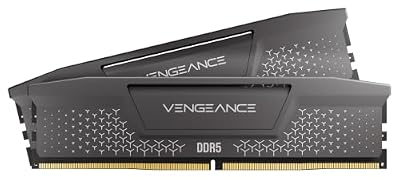
- Top Pick: CORSAIR Vengeance LPX DDR4 RAM 32GB (2x16GB) Up to 3200MHz CL16-20-20-38 1.35V Intel XMP AMD EXPO Computer Memory – Black (CMK32GX4M2E3200C16)
- Best Value: CORSAIR Vengeance RS DDR5 32GB (2 x 16GB) Up to 6000MHz AMD Intel RAM
- Premium Choice: Corsair Vengeance RGB RS DDR5 16GB (2 x 8GB) Up to 6000MHz AMD Intel RAM
For programming, the single most important thing your RAM does is hold everything you have open at once without forcing the system to swap to disk. Modern development means an IDE, a language server indexing your project, a stack of browser tabs, a database, a Docker daemon, and often one or more virtual machines — all resident in memory simultaneously. Run out of headroom and your machine starts paging, builds crawl, and the editor stutters. That is why developers prioritise capacity first: enough RAM to run your whole toolchain comfortably is worth far more than a few hundred extra megahertz. This guide rounds up the best RAM for programming in 2026, with capacity as the headline criterion across desktop and laptop builds.
- Best RAM for Programming at a Glance
- 1. Crucial 32GB DDR4 RAM Kit (2x16GB) 3200MHz (PC4-25600) CL22 Laptop Memory SODIMM
- 2. CORSAIR Vengeance LPX DDR4 RAM 32GB (2x16GB) Up to 3200MHz CL16 1.35V
- 3. Corsair Vengeance RGB Pro 32GB (2x16GB) DDR4 3200 (PC4-25600) C16 Desktop Memory
- 4. Corsair Vengeance LPX DDR4 RAM 16GB (2x8GB) 3200MHz CL16-18-18-36 1.35V
- 5. CORSAIR VENGEANCE LPX DDR4 RAM 16GB (2x8GB) 3000MHz CL15-17-17-35 1.35V
- 6. Timetec 8GB DDR3L / DDR3 1600MHz (DDR3L-1600) PC3L-12800 SODIMM Memory
- How to Choose RAM for Programming
- Frequently Asked Questions
- Related Guides
- Related Articles
Our picks were chosen on what genuinely matters for a developer workstation: total capacity for VMs, containers and a sprawling IDE-plus-browser workload, dual-channel configuration for bandwidth, reliability, and value. We have avoided quoting invented benchmark numbers — instead we explain where each kit fits and who it is for, with prices from around $23 up to around $245. The list deliberately leads with high-capacity 32GB options for serious multitasking and virtualization, includes a 32GB laptop SODIMM kit for developers on the move, and finishes with sensible 16GB and legacy upgrades. Below is an at-a-glance comparison of all six, then a closer look at each and a buyer’s guide built around capacity, channels and platform fit.
As an Amazon Associate we earn from qualifying purchases at no extra cost to you.


🛒 Best Price Today on Amazon
Prime members get fast, free shipping on everything above, plus member-only deals. New members get a 30-day free trial — cancel anytime.
Best RAM for Programming at a Glance
| Memory Kit | Best For | Standout Spec | Approx Price |
|---|---|---|---|
| Crucial 32GB DDR4 3200 SODIMM (Laptop) | Dev laptops + VMs on the go | 2x16GB SODIMM, auto-downclocks | around $245 |
| Corsair Vengeance LPX 32GB 3200 CL16 | Desktop dev workstation 32GB | 2x16GB, low-profile, CL16 | around $223 |
| Corsair Vengeance RGB Pro 32GB 3200 C16 | 32GB with build aesthetics | 2x16GB, C16, RGB | around $230 |
| Corsair Vengeance LPX 16GB 3200 CL16 | Solid 16GB starting point | 2x8GB, CL16, dual-channel | around $119 |
| Corsair Vengeance LPX 16GB 3000 CL15 | Tight-timing 16GB value | 2x8GB, CL15, low-profile | around $89 |
| Timetec 8GB DDR3L 1600MHz | Reviving an older dev box | 8GB SODIMM, DDR3L low voltage | around $23 |
1. Crucial 32GB DDR4 RAM Kit (2x16GB) 3200MHz (PC4-25600) CL22 Laptop Memory SODIMM

As an Amazon Associate we earn from qualifying purchases. Product prices and availability are accurate as of the date/time indicated.
The Crucial 32GB DDR4-3200 SODIMM kit leads this list because the developer who needs the most help is usually the one coding on a laptop. It is a 2x16GB SODIMM kit rated at 3200MHz (PC4-25600) with CL22 timing that auto-downclocks to match older notebooks, taking a memory-starved 8GB or 16GB laptop straight to a comfortable 32GB. At around $245 it is the most expensive pick here, and for a portable dev machine the capacity upgrade is worth every cent.
This is the pick if you write code on a laptop and routinely feel the squeeze — spinning up a database, a Docker stack, the language server and a dozen tabs until the fans roar and builds stall. Thirty-two gigabytes gives you the headroom to run a local VM or several containers alongside your IDE without paging to the SSD. Crucial’s modules are known for broad compatibility, and the matched 2x16GB pair enables dual-channel bandwidth in a notebook’s two SODIMM slots. Check your laptop accepts SODIMM DDR4 and 32GB before buying — this is the standout for mobile development.
Pros: Big 32GB capacity for laptop dev, dual-channel SODIMM pair, auto-downclocks for compatibility.
Cons: Laptop SODIMM only, not for desktops; highest price here; CL22 is a relaxed timing.
2. CORSAIR Vengeance LPX DDR4 RAM 32GB (2x16GB) Up to 3200MHz CL16 1.35V
CORSAIR Vengeance LPX DDR4 RAM 32GB (2x16GB) Up to 3200MHz CL16-20-20-38 1.35V Intel XMP AMD EXPO Computer Memory – Black (CMK32GX4M2E3200C16)


As an Amazon Associate we earn from qualifying purchases. Product prices and availability are accurate as of the date/time indicated.
The Corsair Vengeance LPX 32GB kit is the desktop workhorse for programming. It delivers 32GB across two 16GB modules at up to 3200MHz with a CL16 timing, all in Corsair’s famously low-profile LPX heat spreaders that clear tall CPU coolers and tight cases. At around $223 it is a proven, no-nonsense kit and the default 32GB recommendation for a developer’s desktop tower.
This is the kit for the developer building or upgrading a desktop who wants ample memory for serious multitasking and virtualization. Thirty-two gigabytes comfortably runs a heavyweight IDE, a Docker daemon with several containers, a local database, and a generous browser session at the same time, and leaves room for a full virtual machine when you need to test against another OS. The CL16 latency keeps it responsive, the dual-channel pair feeds the CPU efficiently, and the slim LPX design fits where bulkier modules will not. For a dependable, capacity-first desktop dev kit, the Vengeance LPX is an easy recommendation.
Pros: Generous 32GB for VMs and containers, low-profile LPX clearance, dual-channel CL16.
Cons: DDR4 desktop DIMMs only; no RGB if you want a flashy build.
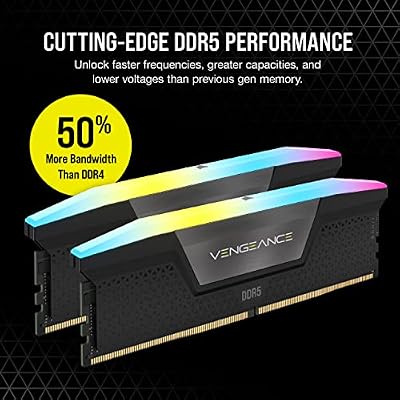
3. Corsair Vengeance RGB Pro 32GB (2x16GB) DDR4 3200 (PC4-25600) C16 Desktop Memory

CORSAIR Vengeance RGB DDR5 RAM 32GB (2x16GB) Up to 6000MHz CL30-36-36-76 1.40V AMD EXPO Intel XMP Desktop Computer Memory - Gray (CMH32GX5M2B6000Z30K)


As an Amazon Associate we earn from qualifying purchases. Product prices and availability are accurate as of the date/time indicated.
The Corsair Vengeance RGB Pro 32GB kit offers the same developer-friendly capacity as the LPX with one addition: per-module RGB lighting. It pairs 32GB across two 16GB DIMMs at 3200MHz with a C16 timing and ties its lighting into Corsair’s iCUE software for coordinated effects. It sits around the same price as the LPX kit, so the choice between them comes down to whether you want your memory to show.
This is the kit for the developer who spends long hours at the machine and wants a build that looks as good as it performs. The 32GB capacity is the real story for programming — enough to keep your IDE, containers, database and tabs resident without swapping — and the C16 timing at 3200MHz keeps everything snappy. The RGB is the bonus: if your workstation doubles as a gaming rig or simply sits on a desk you look at all day, the lighting adds personality without compromising the capacity that makes it a strong dev kit.
Pros: Full 32GB for heavy multitasking, C16 at 3200MHz, attractive iCUE RGB lighting.
Cons: Taller modules can clash with large coolers; RGB is unnecessary for pure work.
4. Corsair Vengeance LPX DDR4 RAM 16GB (2x8GB) 3200MHz CL16-18-18-36 1.35V

CORSAIR Vengeance DDR5 32GB (2 x 16GB) Up to 6000MHz AMD Intel RAM | Desktop Gaming Memory, AMD EXPO & Intel XMP 3.0 Compatible, CL30, Grey, CMK32GX5M2B6000Z30


As an Amazon Associate we earn from qualifying purchases. Product prices and availability are accurate as of the date/time indicated.
The Corsair Vengeance LPX 16GB kit is the sensible 16GB starting point for lighter development. It pairs a 3200MHz data rate with a tight CL16 timing across two 8GB modules in a low-profile LPX package. At around $119 it is the value entry to this list and the right call for developers whose workloads do not yet demand 32GB.
This is the kit for web and app development that stays within a reasonable footprint — an IDE, a moderate set of browser tabs, a local server and the occasional container, rather than multiple heavy VMs at once. Sixteen gigabytes handles that comfortably for many developers, the CL16 timing at 3200MHz keeps the editor and toolchain responsive, and the dual-channel pair delivers the bandwidth modern CPUs expect. If you know your work fits in 16GB and you would rather not overspend, this LPX kit is a dependable, low-profile choice — and you can always add a second matched kit later if your needs grow.
Pros: Responsive CL16 at 3200MHz, dual-channel 16GB, low-profile LPX, good value entry point.
Cons: 16GB is tight once you run several VMs or many containers at once.
5. CORSAIR VENGEANCE LPX DDR4 RAM 16GB (2x8GB) 3000MHz CL15-17-17-35 1.35V

CORSAIR Vengeance RGB DDR5 RAM 32GB (2x16GB) 6400MHz CL36-48-48-104 1.35V AMD EXPO Intel XMP 3.0 Desktop Computer Memory – Gray (CMH32GX5M2B6400Z36)


As an Amazon Associate we earn from qualifying purchases. Product prices and availability are accurate as of the date/time indicated.
The Corsair Vengeance LPX 16GB 3000MHz kit is the tight-timing value pick. It runs slightly lower in frequency at 3000MHz but tightens the primary timing to CL15, again across two 8GB low-profile modules. At around $89 it is the cheapest DDR4 desktop kit on the list and a smart way to get responsive 16GB memory on a budget.
This is the kit for the budget-conscious developer who wants snappy 16GB memory and is happy to trade a little frequency for a tighter CL15 latency and a lower price. For everyday coding — editor, server, a handful of containers and the usual browser load — the difference between 3000 and 3200MHz is marginal, while the CL15 timing keeps responses quick and the LPX profile keeps clearance easy. As an affordable entry into a dual-channel DDR4 dev build, it is a sensible, well-priced option that leaves money in the budget for a faster SSD or CPU.
Pros: Tight CL15 timing, low-profile LPX, dual-channel 16GB, lowest-cost DDR4 kit here.
Cons: 3000MHz is slightly slower than 3200 kits; 16GB limits heavy virtualization.
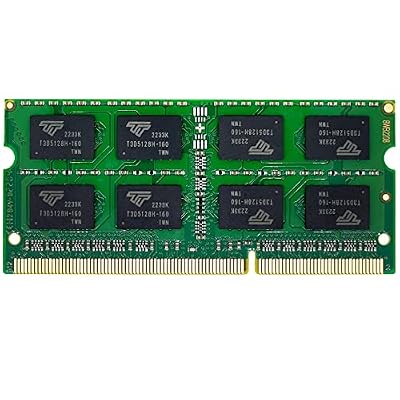
6. Timetec 8GB DDR3L / DDR3 1600MHz (DDR3L-1600) PC3L-12800 SODIMM Memory

Timetec 8GB DDR3L / DDR3 1600MHz (DDR3L-1600) PC3L-12800 / PC3-12800(PC3L-12800S) Non-ECC Unbuffered 1.35V/1.5V CL11 2Rx8 Dual Rank 204 Pin SODIMM Laptop Notebook PC Computer Memory RAM Module Upgrade


As an Amazon Associate we earn from qualifying purchases. Product prices and availability are accurate as of the date/time indicated.
Rounding out the list is the Timetec 8GB DDR3L module, the pick for reviving an older development machine. It is a single 8GB SODIMM running at 1600MHz on the DDR3L (low-voltage) standard, designed to upgrade laptops and small-form systems from the DDR3 era. At around $23 it is by far the cheapest option here and a cost-effective way to keep a legacy dev box usable.
This is the module to choose if you are coding on older hardware that still uses DDR3 rather than building something new — there is no point buying DDR4 for a board that cannot accept it. Adding 8GB, or filling a second slot to reach 16GB, is a big step up for an aging machine and can be the difference between a usable secondary dev box and one that swaps constantly. The low-voltage DDR3L design runs cool and efficiently, and Timetec offers solid value. For breathing new life into legacy development hardware, this module does exactly what it should.
Pros: Very affordable DDR3L SODIMM, low-voltage and cool-running, revives older dev machines.
Cons: DDR3 only; single 8GB module; not compatible with modern DDR4/DDR5 platforms.
How to Choose RAM for Programming
For programming, choose capacity before anything else. The job of your memory is to hold your entire active toolchain at once — IDE, language server, compiler caches, a database, a Docker daemon and its containers, and a wall of browser tabs — without forcing the operating system to swap to disk. The moment you run out of RAM, paging begins and everything slows down. For modern development that runs VMs or multiple containers, 32GB kits like the Corsair Vengeance LPX, RGB Pro or the Crucial SODIMM are the sweet spot; 16GB kits suit lighter web and app work but fill up fast under virtualization.
Match the memory to your machine and remember the desktop-versus-laptop divide. Desktop towers take full-size DIMMs, which is what the Vengeance LPX and RGB Pro kits are. Laptops and many mini PCs take smaller SODIMM modules — the Crucial 32GB kit and the Timetec module are SODIMMs, and they will not fit a desktop board, just as desktop DIMMs will not fit a laptop. Confirm the form factor, then confirm the standard: DDR4 for most modern-ish machines, DDR3L only for older systems like the one the Timetec module targets.
Buy memory as a matched dual-channel kit wherever you can. Two modules running in dual channel deliver markedly more bandwidth than a single stick of the same total capacity, and matched kits are factory-tested to run together at their rated speed and timing — which matters when a compiler is hammering memory. Most kits here are 2x configurations for exactly that reason; even on a laptop, filling both SODIMM slots with a matched pair like the Crucial kit is the right move over a single large module.
Frequency and CAS latency matter, but less than capacity for development work. A 3200MHz CL16 kit is a fine, balanced target, and the difference between that and a 3000MHz CL15 kit is marginal for compiling and editing — so do not overpay for headline speed at the expense of the gigabytes you actually need. Remember that XMP-rated kits often run slower until you enable the profile in the BIOS. Set your capacity based on whether you virtualize, match the form factor and standard to your machine, buy a matched dual-channel kit, and pick the option here that fits how you build software.
Frequently Asked Questions
How much RAM do I need for programming in 2026?
For lighter web and app development — an IDE, a local server, a few containers and the usual browser tabs — 16GB such as the Corsair Vengeance LPX 16GB kits is workable. If you run virtual machines, multiple Docker containers, or memory-hungry tools alongside everything else, 32GB like the Vengeance LPX 32GB, RGB Pro or the Crucial SODIMM kit is the comfortable sweet spot and leaves real headroom before the system starts swapping.
Does RAM speed matter for compiling and development?
It helps, but capacity matters far more. Having enough memory to avoid swapping to disk is what keeps builds and your IDE fast; once you have that, the gap between a 3000MHz CL15 kit and a 3200MHz CL16 kit is marginal for most coding and compiling. Prioritise the gigabytes you need for your workload first, then treat a sensible 3200MHz CL16 speed as a good, balanced target.
Can I use these desktop kits in a laptop?
No — desktop and laptop memory use different physical modules. Laptops and many mini PCs take smaller SODIMM modules, which is what the Crucial 32GB kit and the Timetec module are. The Corsair Vengeance LPX and RGB Pro kits are full-size desktop DIMMs and will not fit a laptop. Always check whether your machine needs SODIMM or full-size DIMM, plus the DDR generation, before you buy.
Is 32GB overkill for a development machine?
Not if you virtualize. If you run VMs, several containers at once, or large data and analytics tools alongside your editor and browser, 32GB stops the system swapping and keeps everything responsive — which is why the 32GB kits lead this list. For purely lightweight coding you can start at 16GB and add a second matched kit later, but for serious multitasking 32GB is a sound, future-friendly investment.
Related Guides
- Best RAM for Gaming
- Best DDR4 RAM Kits
- Best NVMe SSDs for Fast Builds
- Best CPUs for Programming
- Best Gaming and Workstation PCs
- Best Budget PC Setup
Affiliate Disclosure: As an Amazon Associate, we earn from qualifying purchases. If you click a link and make a purchase, we may earn a small commission at no extra cost to you. Prices and availability are accurate as of publication and may change.










