

CAD software runs on keyboard input. Coordinate entry, command aliases, snap and view shortcuts, and the constant precision typing of dimensions all live on the keyboard, which is why the right board can speed up a drafter as much as a faster GPU. Two things matter most for CAD: a full-size layout with a dedicated number pad for rapid numeric entry, and — ideally — programmable or macro keys you can bind to your most-used commands in AutoCAD, SolidWorks, Fusion 360 or Revit. This guide rounds up the best keyboards for CAD in 2026 across wired, wireless and mechanical options.
- Best Keyboards for CAD at a Glance
- 1. Logitech K270 Wireless Keyboard, Full-Size with Number Pad
- 2. Logitech MK345 Wireless Keyboard and Mouse Combo with Palm Rest
- 3. Redragon S101-3 PRO Gaming Keyboard and Mouse with Programmable Keys
- 4. Gaming Keyboard and Mouse Combo, K1 RGB 104-Key Backlit Keyboard
- 5. Redragon K552 Mechanical Gaming Keyboard, 87-Key Compact TKL
- 6. MageGee Portable 60% Mechanical Keyboard, MK-Box LED Backlit Compact
- How to Choose a Keyboard for CAD Work
- Frequently Asked Questions
- Related Guides
- Related Articles
Our picks were chosen on what genuinely helps a CAD workflow: a full numeric keypad, key feel and accuracy for long typing-and-command sessions, programmable or macro keys where available, and connection and value. We have included a spread from an around-$25 reliable wireless board to a feature-rich macro-capable mechanical option, with one honest note where a pick is a compact 60% board without a numpad. Prices run from around $25 to around $40. Below is an at-a-glance comparison of all six, then a closer look at each and a buyer’s guide built around layout, numpad and macro keys — the things that actually matter for CAD.
As an Amazon Associate we earn from qualifying purchases at no extra cost to you.




🛒 Best Price Today on Amazon
Prime members get fast, free shipping on everything above, plus member-only deals. New members get a 30-day free trial — cancel anytime.
Best Keyboards for CAD at a Glance
| Keyboard | Best For | Standout Spec | Approx Price |
|---|---|---|---|
| Logitech K270 Wireless Full-Size | Reliable full-size wireless | Full numpad, 2.4GHz wireless | around $25 |
| Logitech MK345 Wireless Combo w/ Palm Rest | All-day comfort + numpad | Palm rest, full-size, mouse incl. | around $38 |
| Redragon S101-3 PRO Keyboard & Mouse | Programmable macro keys | Programmable keys, full-size | around $40 |
| K1 RGB 104-Key Keyboard & Mouse Combo | Backlit full-size value | 104 keys, RGB, numpad | around $27 |
| Redragon K552 Mechanical (87-Key TKL) | Mechanical typing feel | Mechanical switches, compact TKL | around $37 |
| MageGee MK-Box 60% Mechanical (no numpad) | Compact desks (off-spec) | 60% layout, mechanical | around $27 |
1. Logitech K270 Wireless Keyboard, Full-Size with Number Pad

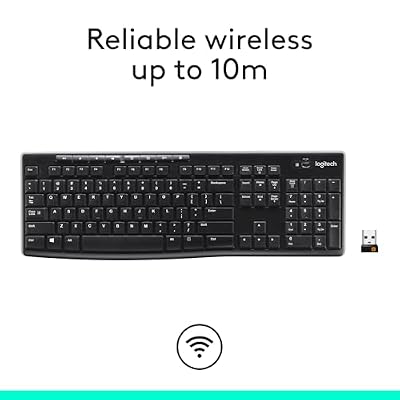
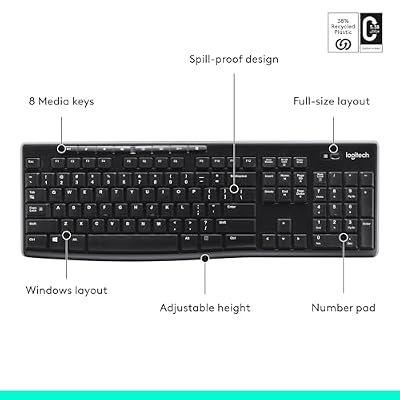
Logitech K270 Full Size Wireless Keyboard for Windows - Black | Full-size keyboard with number pad, 8 multimedia keys, includes USB-A receiver, 2-year battery, compatible with PC, laptop






As an Amazon Associate we earn from qualifying purchases. Product prices and availability are accurate as of the date/time indicated.
The Logitech K270 is our top CAD pick for one decisive reason: it nails the fundamentals every drafter needs. It is a reliable full-size wireless keyboard with a dedicated number pad, comfortable low-profile keys, and Logitech’s rock-solid 2.4GHz Unifying receiver. At around $25 it is the no-nonsense starting point for a CAD station, and the full numpad alone makes it more useful for coordinate entry than many pricier boards.
For CAD specifically, the number pad is the headline. Entering coordinates, dimensions and values all day is dramatically faster with a dedicated numeric keypad than reaching for the number row, and the K270 gives you that in a clean, full-size layout. The quiet, comfortable keys suit the long typing-and-command sessions CAD involves, the wireless connection keeps your desk tidy around a tablet and second monitor, and Logitech’s reliability means it simply works. For most drafters, it is the sensible default keyboard.
Pros: Full numpad for fast coordinate entry, reliable Logitech wireless, comfortable quiet keys, great value.
Cons: Membrane (not mechanical) feel; no programmable macro keys.
2. Logitech MK345 Wireless Keyboard and Mouse Combo with Palm Rest

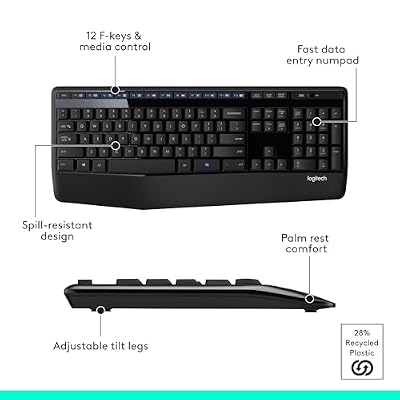
Logitech MK345 Full Size Wireless Keyboard and Mouse Combo - Black | Full size keyboard with integrated palm rest, compact right handed mouse, connect via single included USB-A Nano Receiver




As an Amazon Associate we earn from qualifying purchases. Product prices and availability are accurate as of the date/time indicated.
The Logitech MK345 combo is the all-day comfort pick for CAD. It is a full-size wireless keyboard with a dedicated number pad and an integrated palm rest, bundled with a comfortable wireless mouse, all running on Logitech’s dependable 2.4GHz receiver. At around $38 it is a complete, comfortable desk setup for a drafter in one box.
What sets it apart for CAD is the palm rest. Long modeling sessions mean hours of typing commands and entering values, and the built-in wrist support helps keep your hands in a neutral, fatigue-resistant position through the workday. The full number pad keeps numeric entry fast, the spill-resistant full-size layout suits a working studio, and the included mouse gives you a coordinated wireless pair without a second purchase. For drafters who prioritise hand comfort over a full shift, the MK345 is an easy, well-judged recommendation.
Pros: Integrated palm rest for all-day comfort, full numpad, reliable wireless, mouse included.
Cons: Membrane keys; no dedicated programmable macro buttons.
3. Redragon S101-3 PRO Gaming Keyboard and Mouse with Programmable Keys

Redragon S101-3 PRO Gaming Keyboard and Mouse, RGB Backlit Programmable Keyboard Mouse with Software, Independent Macro Record Keys, Value Combo Set, New Update Version


As an Amazon Associate we earn from qualifying purchases. Product prices and availability are accurate as of the date/time indicated.
The Redragon S101-3 PRO is the pick for CAD users who want programmable macro keys. It is a full-size keyboard with a number pad, RGB backlighting and programmable keys you can bind to custom commands and macros, bundled with a gaming mouse. At around $40 it brings genuine customization to a CAD station without a premium price.
For CAD, the programmable keys are the real draw. Binding your most-used AutoCAD aliases, SolidWorks features or Revit commands to dedicated keys — or recording multi-step macros — can meaningfully cut the clicks and keystrokes out of a repetitive modeling workflow. The full numpad keeps coordinate and dimension entry fast, the backlighting helps in a dim studio, and the included mouse rounds out the setup. If you want to tailor your keyboard to your CAD software rather than adapt to it, the S101-3 PRO is the standout value pick.
Pros: Programmable macro keys for CAD shortcuts, full numpad, RGB backlight, mouse included.
Cons: Marketed for gaming; macro software is basic compared with high-end boards.
4. Gaming Keyboard and Mouse Combo, K1 RGB 104-Key Backlit Keyboard

Gaming Keyboard and Mouse Combo, K1 RGB LED Backlit Keyboard with 104 Key for PC/Laptop(White)


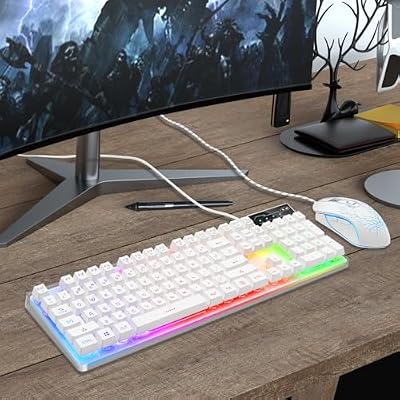
As an Amazon Associate we earn from qualifying purchases. Product prices and availability are accurate as of the date/time indicated.
The K1 RGB combo is the backlit full-size value pick. It is a 104-key full-size keyboard — number pad included — with RGB LED backlighting, paired with a matching mouse, for around $27. For a CAD desk that wants a complete, illuminated full-size setup on a budget, it covers the bases at a low price.
For CAD work, the full 104-key layout is what counts: you get the dedicated number pad for rapid numeric entry and the full function-key row for software shortcuts, which is everything a drafter strictly needs from the layout. The RGB backlighting helps you find keys in a dimly lit studio during late sessions, the included mouse gives you a coordinated pair, and the price leaves budget for a better chair or monitor. It lacks dedicated macro keys, but as an affordable, fully featured full-size board for CAD, it does the job.
Pros: Full 104-key layout with numpad, RGB backlight for dim studios, mouse included, low price.
Cons: No dedicated programmable macro keys; build quality is budget-tier.
5. Redragon K552 Mechanical Gaming Keyboard, 87-Key Compact TKL
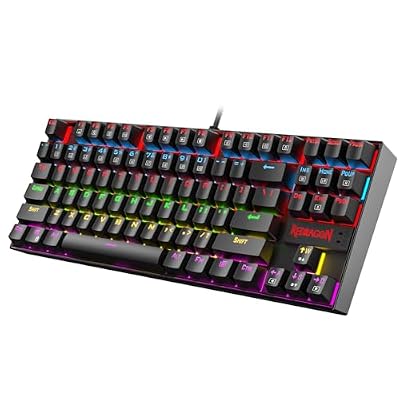
Redragon K552 Mechanical Keyboard, LED Gaming Keyboard with Red Switches | 87-Key TKL Compact, Anti-Ghosting, Metal Frame for PC Gaming & Typing, Beginner-Friendly, Redragon Classic Gaming Keyboard


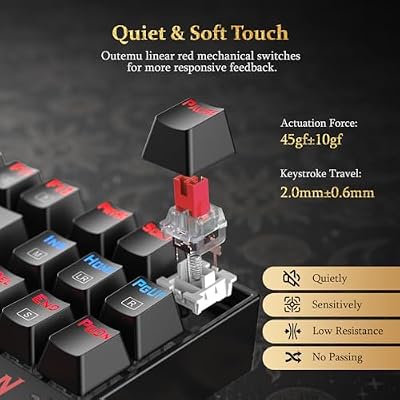


As an Amazon Associate we earn from qualifying purchases. Product prices and availability are accurate as of the date/time indicated.
The Redragon K552 is the mechanical-feel pick for CAD typists. It is a compact tenkeyless (87-key) mechanical keyboard with tactile switches and LED backlighting, built on a sturdy metal-plate frame. At around $37 it delivers a satisfying, precise typing experience that membrane boards cannot match.
An honest layout note first: the K552 is a tenkeyless board, so it omits the dedicated number pad — a trade-off for CAD users who rely on heavy numeric entry. Where it shines is feel. The tactile mechanical switches give crisp, accurate keystrokes that many drafters prefer for command typing and reduce mis-hits during precise input, and the solid build survives years of daily use. If you value mechanical typing quality and either enter numbers via the top row or pair it with a separate numpad, the K552 is a durable, responsive choice. If a numpad is non-negotiable, choose a full-size pick instead.
Pros: Crisp tactile mechanical switches, durable metal-plate build, accurate keystrokes, LED backlit.
Cons: Tenkeyless layout omits the dedicated number pad many CAD users rely on.
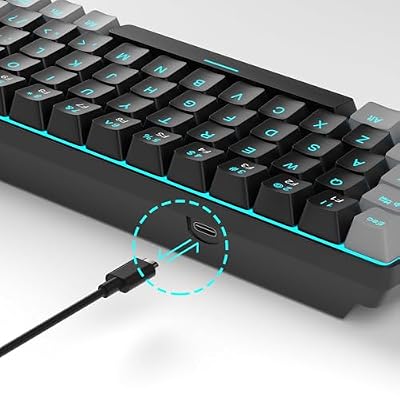
6. MageGee Portable 60% Mechanical Keyboard, MK-Box LED Backlit Compact

MageGee Portable 60% Mechanical Gaming Keyboard, MK-Box LED Backlit Compact 68 Keys Mini Wired Office Keyboard with Red Switch for Windows Laptop PC Mac - Black/Grey


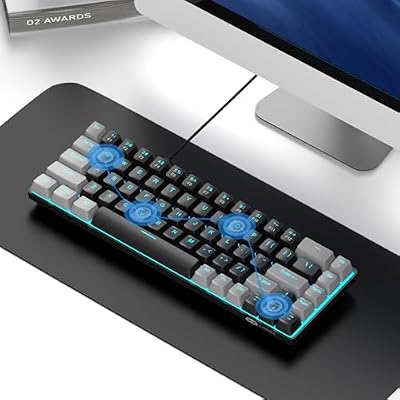

As an Amazon Associate we earn from qualifying purchases. Product prices and availability are accurate as of the date/time indicated.
An honest placement: the MageGee MK-Box is a compact 60% mechanical keyboard, which means it drops both the number pad and the function-key row to save desk space. It is a well-made little board with mechanical switches and LED backlighting for around $27 — but it is the least conventional CAD choice here, and we say so plainly.
For CAD, the missing numpad and function row are real limitations, since coordinate entry and shortcut keys are central to the workflow; on a 60% board they move to layered key combinations, which slows numeric-heavy drafting. So why include it? Because some users run CAD on a cramped desk, a secondary laptop setup, or a multi-monitor rig where space is at a premium and they pair the keyboard with a separate numpad. In that narrow case, the MK-Box’s tidy footprint and pleasant mechanical feel are an asset. For mainstream CAD with heavy numeric entry, though, a full-size board serves you far better.
Pros: Compact mechanical board, tidy footprint for cramped desks, pleasant switches, low price.
Cons: 60% layout drops the numpad and function row — poorly suited to numeric-heavy CAD on its own.
How to Choose a Keyboard for CAD Work
Choosing a keyboard for CAD begins with the number pad, full stop. CAD work is saturated with numeric input — coordinates, dimensions, angles, values — and a dedicated numeric keypad makes entering all of it dramatically faster and more accurate than reaching for the number row. That is why the full-size boards here, the K270, MK345, S101-3 PRO and K1, lead this guide, and why tenkeyless or 60% boards like the K552 and MK-Box come with an explicit caveat. If you do serious drafting, treat a numpad as essential.
Programmable and macro keys are the next consideration, and they are where a keyboard can genuinely accelerate your workflow. Binding frequently used commands — AutoCAD aliases, SolidWorks features, Revit tools — to dedicated keys, or recording multi-step macros, cuts repetitive keystrokes out of a long modeling session. The Redragon S101-3 PRO is the pick here for that capability. If your CAD software has a handful of commands you trigger hundreds of times a day, programmable keys pay for themselves quickly in saved time and reduced strain.
Key feel and comfort decide how the keyboard holds up across an eight-hour drafting day. Mechanical switches, as on the K552 and MK-Box, give crisp, accurate, tactile keystrokes that many CAD typists prefer for precise command entry and that last for years of heavy use. Membrane boards like the K270 and MK345 are quieter and softer, and the MK345’s integrated palm rest adds real wrist support for long sessions. Decide whether you value mechanical precision or cushioned, quiet comfort — both are valid for CAD.
Finally, weigh connection, layout honesty and budget together. Wireless boards like the K270 and MK345 keep a busy CAD desk tidy around tablets and multiple monitors, while wired boards never need charging. Be realistic about layout: a 60% board such as the MK-Box looks tidy but hampers numeric-heavy CAD unless you add a separate numpad. Set your priority — numpad first, then macros, then feel and connection — and pick the keyboard on this list that matches how you actually draft. The best CAD keyboard disappears under your hands and lets the commands flow.
Frequently Asked Questions
Do I really need a number pad for CAD work?
For serious CAD work, yes. Drafting and modeling involve constant numeric entry — coordinates, dimensions, angles and values — and a dedicated number pad makes all of it far faster and more accurate than using the number row. The full-size boards here, like the Logitech K270 and MK345, include one. Tenkeyless or 60% keyboards omit the numpad, so pair them with a separate numeric keypad if you choose that route.
Are programmable macro keys worth it for CAD?
If you trigger the same commands constantly, very much so. Binding AutoCAD aliases, SolidWorks features or Revit tools to dedicated keys, or recording multi-step macros, removes repetitive keystrokes from your workflow and speeds up modeling. The Redragon S101-3 PRO on this list offers programmable keys for exactly this. For drafters with a handful of high-frequency commands, the time saved adds up fast.
Is a mechanical keyboard better for CAD than a membrane one?
It is a matter of feel rather than a strict rule. Mechanical boards like the Redragon K552 give crisp, tactile, accurate keystrokes many CAD typists prefer for precise command entry, and they are highly durable. Membrane boards such as the Logitech K270 and MK345 are quieter and softer, and the MK345 adds a palm rest. Both work well for CAD — choose the typing experience you find most comfortable over long sessions.
Can I use a compact 60% keyboard for CAD?
You can, but with a real caveat. A 60% board like the MageGee MK-Box drops the number pad and function row, moving them to layered key combinations that slow numeric-heavy drafting. It suits cramped desks or secondary setups, ideally paired with a separate numpad. For mainstream CAD with heavy coordinate and dimension entry, a full-size keyboard is the far better fit.
Related Guides
- Best Mechanical Keyboards
- Best Wireless Keyboards
- Best Chairs for CAD
- Best Gaming and Productivity Mouse
- Best Monitors for Content Creation
- Best Gaming and Workstation PCs
Affiliate Disclosure: As an Amazon Associate, we earn from qualifying purchases. If you click a link and make a purchase, we may earn a small commission at no extra cost to you. Prices and availability are accurate as of publication and may change.










