

- Top Pick: Skytech Gaming Azure 3 Gaming PC, Ryzen 7 9850X3D, RX 9070 XT
- Best Value: The Horizon Autherium Dragon RGB I9 RTX Gaming PC || 64GB RAM || 5TB Storage || Core I9 Upto 5.4Ghz || RTX 5070 OC || Windows 11 PRO || 360MM AIO || 2.4GB/s WiFi, VR, Gaming Ready Desktop Computer
- Premium Choice: iBUYPOWER Element SE Gaming PC Desktop Computer AMD Ryzen 5 5500 CPU, AMD Radeon RX 6500XT 4GB, 16GB DDR4 Non-RGB 3200MHz RAM, 512GB NVMe SSD, Windows 11 Home, Gamer Keyboard and Mouse – ESA5R65XT04
A quiet gaming PC is one you forget is even running. The whir of fans ramping up under load can pull you out of a game or grate during late-night sessions, and the cause is almost always heat: hot components force their fans to spin fast and loud. The route to quiet is therefore cool and efficient — components that generate less heat, paired with cooling that can keep them in check without screaming. This guide rounds up the best quiet gaming PCs in 2026, prebuilts chosen for the low-noise operation that comes from efficient CPUs, capable cooling, and acoustically sensible chassis design.
- Best Quiet Gaming PCs at a Glance
- 1. Skytech Gaming O11 Vision, AMD Ryzen 7 7700X, NVIDIA RTX 5070
- 2. Skytech Gaming Archangel 5, AMD Ryzen 7 7700X, NVIDIA RTX 5070
- 3. Skytech Gaming Archangel, Intel i5 14400F, NVIDIA RTX 5060, 1TB
- 4. Skytech Gaming Azure 3, AMD Ryzen 7 5700, NVIDIA RTX 5060, 1TB
- 5. Skytech Gaming O11 Vision, AMD Ryzen 7 7800X3D, NVIDIA RTX 5060
- 6. Skytech Gaming King 95, Ryzen 7 7800X3D up to 5GHz, AMD RX 9070XT
- How to Choose a Quiet Gaming PC
- Frequently Asked Questions
- Related Guides
- Related Articles
Our picks were chosen on what genuinely keeps a system quiet: thermally efficient processors that run cool, GPU and CPU cooling with enough headroom to spin fans slowly, sensible chassis acoustics, and value. We have included a spread — from a around $1,199.99 RTX 5060 build up to a around $2,099.99 RX 9070XT machine — because the quietest PC is the one whose cooling comfortably outpaces the heat its parts produce. Whether you want an affordable, calm everyday build or a powerful rig that stays composed under pressure, there is a fit here. Below you will find an at-a-glance comparison, then a closer look at each system and a buyer’s guide covering what really matters for quiet operation.
As an Amazon Associate we earn from qualifying purchases at no extra cost to you.







🛒 Best Price Today on Amazon
Prime members get fast, free shipping on everything above, plus member-only deals. New members get a 30-day free trial — cancel anytime.
Best Quiet Gaming PCs at a Glance
| Gaming PC | Best For | Standout Spec | Approx Price |
|---|---|---|---|
| Skytech O11 Vision (Ryzen 7 7700X / RTX 5070) | Calm high-performance build | Efficient 7700X, roomy O11 case | around $1,999.99 |
| Skytech Archangel 5 (Ryzen 7 7700X / RTX 5070) | Quiet mid-range value | Cool-running 7700X, RTX 5070 | around $1,899.99 |
| Skytech Archangel (i5 14400F / RTX 5060) | Affordable low-noise entry | Efficient i5 14400F, RTX 5060 | around $1,199.99 |
| Skytech Azure 3 (Ryzen 7 5700 / RTX 5060) | Quiet everyday gaming | Cool Ryzen 7 5700, RTX 5060 | around $1,299.99 |
| Skytech O11 Vision (Ryzen 7 7800X3D / RTX 5060) | Quiet gaming-first CPU | Efficient 7800X3D, roomy case | around $1,899.99 |
| Skytech King 95 (Ryzen 7 7800X3D / RX 9070XT) | Powerful yet composed | 7800X3D, RX 9070XT | around $2,099.99 |
1. Skytech Gaming O11 Vision, AMD Ryzen 7 7700X, NVIDIA RTX 5070
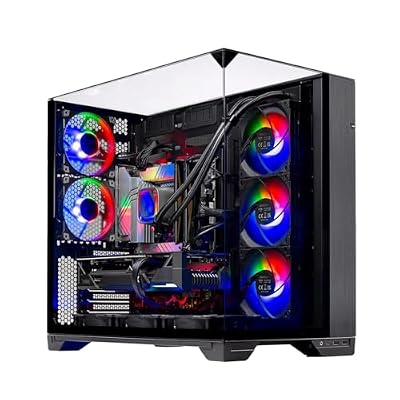
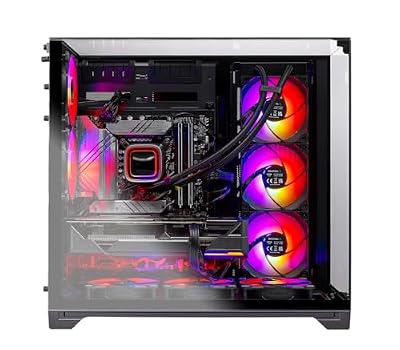
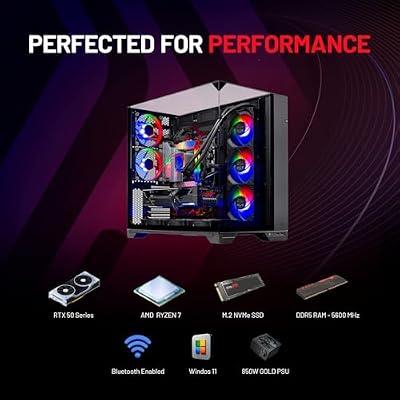
Skytech Gaming O11 Vision Gaming PC, AMD Ryzen 7 7700X 4.5GHz, NVIDIA RTX 5070 12GB, X670 Board, 1TB Gen4 NVMe SSD, 32GB DDR5 RAM 5600, 850W Gold ATX 3 PSU, 360 ARGB AIO, Wi-Fi, Win 11, Desktop







As an Amazon Associate we earn from qualifying purchases. Product prices and availability are accurate as of the date/time indicated.
The Skytech O11 Vision leads this quiet roundup because it combines an efficient, cool-running CPU with one of the roomiest chassis designs around. The AMD Ryzen 7 7700X produces relatively little heat for its performance, and the spacious dual-chamber O11-style case gives the cooling fans plenty of room to move air slowly and quietly rather than ramping up. Paired with an RTX 5070, at around $1,999.99 it is a strong performer that stays composed.
This is the system to choose if you want serious 1440p gaming without the fan roar. Because the 7700X runs cool, its cooler and the case fans rarely need to spin hard, and the open O11 layout lets heat dissipate gently instead of building up and triggering loud fan spikes. The RTX 5070 delivers high-refresh performance with thermal headroom to keep its own fans calm. For a high-performance build that prioritises low noise, the O11 Vision is the standout pick.
Pros: Cool-running Ryzen 7 7700X, roomy quiet-friendly O11 case, RTX 5070, composed under load.
Cons: Open glass design needs occasional dusting; premium of the value tier.
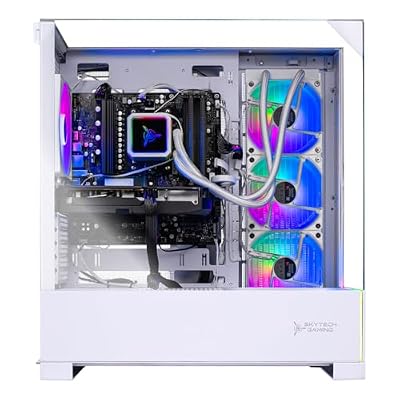
2. Skytech Gaming Archangel 5, AMD Ryzen 7 7700X, NVIDIA RTX 5070

Skytech Gaming Archangel 5 Gaming PC, AMD Ryzen 7 7700X 4.5GHz, NVIDIA RTX 5070 12GB, 1TB Gen4 NVMe SSD, 32GB DDR5 RAM 6000, 750W Gold PSU, 360 ARGB AIO, Wi-Fi, Win 11, Desktop


As an Amazon Associate we earn from qualifying purchases. Product prices and availability are accurate as of the date/time indicated.
The Skytech Archangel 5 in its Ryzen form is the quiet mid-range value pick. It pairs the thermally efficient Ryzen 7 7700X with an NVIDIA RTX 5070 in a well-ventilated Archangel chassis, and the combination of a cool CPU and adequate airflow means the fans can run at low, quiet speeds during typical gaming. At around $1,899.99 it delivers strong performance and calm operation for a sensible price.
This is the system for the buyer who wants near-silent everyday gaming without stretching to a flagship. The Ryzen 7 7700X’s efficiency keeps heat — and therefore fan noise — low, the RTX 5070 handles modern titles at high settings with cooling headroom, and the Archangel case moves enough air that nothing has to work loudly. For a quiet, capable mid-range gaming PC that does not draw attention to itself, the Ryzen Archangel 5 is the value sweet spot here.
Pros: Efficient cool Ryzen 7 7700X, RTX 5070, ventilated chassis, low fan noise in typical play.
Cons: Air-cooled CPU; under heavy sustained load fans will still be audible.
3. Skytech Gaming Archangel, Intel i5 14400F, NVIDIA RTX 5060, 1TB

Skytech Gaming PC Desktop, Intel i5 14400F, RTX 5060, 16GB RAM, 1TB SSD


As an Amazon Associate we earn from qualifying purchases. Product prices and availability are accurate as of the date/time indicated.
The Skytech Archangel with the Intel i5 14400F is the affordable low-noise entry pick. The six-core i5 14400F is a relatively cool, efficient processor that does not generate much heat, so paired with an RTX 5060 and a 1TB SSD in the ventilated Archangel case, the system runs calmly during everyday gaming. At around $1,199.99 it is the most affordable way onto this quiet list.
This is the system to choose for a budget build that stays quiet and unobtrusive. The efficient i5 14400F keeps thermals modest, which means the cooler and case fans rarely need to ramp up, and the RTX 5060 handles popular titles at high settings without running hot. The Archangel chassis provides enough airflow that the fans can stay slow and quiet. For an affordable gaming PC that you will barely hear during a session, the i5 Archangel is a smart, low-noise entry point.
Pros: Cool efficient i5 14400F, RTX 5060, 1TB SSD, calm low-noise everyday operation.
Cons: Entry-tier GPU; demanding 1440p titles will push the hardware harder.
4. Skytech Gaming Azure 3, AMD Ryzen 7 5700, NVIDIA RTX 5060, 1TB

Skytech Gaming Azure 3 Gaming PC, AMD Ryzen 7 5700 3.7GHz, NVIDIA RTX 5060, 1TB NVMe SSD, 32GB DDR4 RAM 3200, 650W Gold PSU, Wi-Fi, Win 11, Desktop


As an Amazon Associate we earn from qualifying purchases. Product prices and availability are accurate as of the date/time indicated.
The Skytech Azure 3 with the Ryzen 7 5700 is the quiet everyday gaming pick. The eight-core Ryzen 7 5700 is an efficient, cool-running CPU, and paired with an RTX 5060 and a 1TB SSD in the Azure chassis it makes for a calm, capable 1080p and entry-1440p machine. At around $1,299.99 it is an affordable, low-noise all-rounder.
This is the system for the buyer who wants smooth, quiet gaming for popular titles without a hot, noisy box. The Ryzen 7 5700’s efficiency keeps heat low so the fans can spin gently, the RTX 5060 delivers strong 1080p performance with thermal room to spare, and the Azure case provides steady airflow that keeps everything composed. For an affordable, near-silent everyday gaming PC that handles the games most people actually play, the Ryzen 7 5700 Azure 3 is a sensible, quiet choice.
Pros: Efficient eight-core Ryzen 7 5700, RTX 5060, 1TB SSD, calm everyday gaming.
Cons: Older-generation CPU; not built for the heaviest 1440p workloads.
5. Skytech Gaming O11 Vision, AMD Ryzen 7 7800X3D, NVIDIA RTX 5060
Skytech Gaming O11 Vision Gaming PC, AMD Ryzen 7 7700X 4.5GHz, NVIDIA RTX 5070 12GB, X670 Board, 1TB Gen4 NVMe SSD, 32GB DDR5 RAM 5600, 850W Gold ATX 3 PSU, 360 ARGB AIO, Wi-Fi, Win 11, Desktop
As an Amazon Associate we earn from qualifying purchases. Product prices and availability are accurate as of the date/time indicated.
The Skytech O11 Vision with the Ryzen 7 7800X3D is the quiet gaming-first pick. The 7800X3D is one of the most efficient gaming CPUs available, delivering outstanding performance per watt thanks to its 3D V-Cache, which means it runs cool and quiet for the frame rates it produces. Housed in the roomy O11-style case alongside an RTX 5060, at around $1,899.99 it is a thermally serene performer.
This is the system for the gamer who wants top-tier gaming responsiveness without the heat and noise. The 7800X3D’s efficiency is its hallmark — it produces less heat than higher-wattage CPUs while leading in many games — so its cooler and the spacious O11 case fans stay quiet. The RTX 5060 keeps things calm on the GPU side too. For a quiet build led by the best gaming-class CPU efficiency, the 7800X3D O11 Vision is a standout choice.
Pros: Highly efficient Ryzen 7 7800X3D, roomy O11 case, RTX 5060, serene gaming-focused build.
Cons: GPU is mid-tier relative to the CPU; open case shows dust over time.
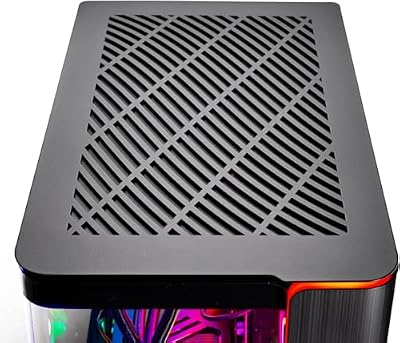
6. Skytech Gaming King 95, Ryzen 7 7800X3D up to 5GHz, AMD RX 9070XT

Skytech Gaming PC Desktop, Ryzen 7 7800X3D, RX 9070 XT, 32GB RAM, 1TB SSD




As an Amazon Associate we earn from qualifying purchases. Product prices and availability are accurate as of the date/time indicated.
Rounding out the list is the Skytech King 95, the powerful-yet-composed pick. It pairs the efficient Ryzen 7 7800X3D — boosting up to 5GHz — with AMD’s potent RX 9070XT graphics card, giving you serious high-resolution gaming power in a system whose efficient CPU keeps the thermal and acoustic load reasonable. At around $2,099.99 it is the premium build here and the most capable.
This is the system for the buyer who wants strong performance but still values a system that does not roar. The 7800X3D’s excellent efficiency means the CPU side stays cool and quiet despite its gaming prowess, and while a powerful GPU like the RX 9070XT will spin its fans up under heavy load, the cool CPU keeps overall heat in check. For a high-performance gaming PC that pairs a gaming-leading, efficient processor with a fast GPU while staying as composed as the hardware allows, the King 95 is the standout.
Pros: Efficient gaming-leading 7800X3D, powerful RX 9070XT, capable high-resolution performance.
Cons: The strong GPU will be audible under heavy load; highest price here.
How to Choose a Quiet Gaming PC
Choosing a quiet gaming PC begins with an understanding of where noise comes from: heat. When a CPU or GPU gets hot, its fans spin faster to cool it, and that is what you hear. The most effective route to a quiet system is therefore an efficient component that produces less heat in the first place. CPUs like the AMD Ryzen 7 7700X and the gaming-focused Ryzen 7 7800X3D run cool for their performance, so their fans rarely need to ramp up loudly.
Cooling headroom is the next factor, because a cooler that comfortably outpaces a CPU’s heat can spin slowly and quietly. The same is true at the case level: a roomy, well-ventilated chassis like the O11-style case lets fans move air gently rather than at high, noisy speeds. Counter-intuitively, good airflow and quiet operation go hand in hand — a system that stays cool keeps its fans calm, while a cramped, hot box forces them to scream.
The GPU matters too, since the graphics card is often the loudest component under gaming load. A card with capable cooling and some thermal headroom for the resolution you play at will keep its fans more composed. That is why pairing a sensible GPU like the RTX 5060 with an efficient CPU produces a notably calm system, whereas pushing a very powerful card hard — as the RX 9070XT in the King 95 will be under load — naturally generates more fan noise, even if the CPU stays quiet.
Finally, set realistic expectations and match the build to your priorities. No high-performance gaming PC is truly silent under full load — the goal is low, unobtrusive noise during typical play rather than absolute silence. Decide your resolution and budget, favour an efficient CPU and a roomy, well-cooled chassis, and accept that the more GPU power you demand, the more fan noise comes with it. Pick the quiet system on this list whose balance of efficiency and performance fits how you play, and you will end up with a PC you barely notice.
Frequently Asked Questions
What makes a gaming PC quiet?
Low noise comes from low heat. When components stay cool, their fans can spin slowly and quietly; when they get hot, the fans ramp up and get loud. Efficient CPUs that produce less heat — like the Ryzen 7 7700X and 7800X3D in several systems here — combined with capable cooling and a roomy chassis are the recipe for a calm, quiet gaming PC.
Is an efficient CPU like the 7800X3D really quieter?
Generally, yes. The Ryzen 7 7800X3D delivers excellent gaming performance per watt, meaning it produces less heat than higher-wattage chips for the frame rates it generates. Less heat lets its cooler and the case fans run slower and quieter. That efficiency is exactly why it features in the quiet O11 Vision and King 95 builds on this list.
Will a powerful gaming PC ever be completely silent?
Not under full load. Even the quietest high-performance build will produce audible fan noise when the CPU and GPU are working hard — particularly the graphics card. The realistic goal is low, unobtrusive noise during typical gaming rather than total silence. Efficient components and good cooling, like the systems here use, get you as close as practical.
Does the graphics card affect noise as much as the CPU?
Often more, under gaming load. The GPU is frequently the hardest-working component while you play, so its fans can be the loudest. Pairing a sensible card like the RTX 5060 with an efficient CPU keeps a system calm, whereas running a very powerful GPU such as the RX 9070XT hard will generate more fan noise even when the CPU stays quiet.
Related Guides
- Best Gaming PCs
- Best Gaming PCs with High Airflow
- Best Quiet CPU Coolers
- Best Quiet Case Fans
- Best PC Cases
- Best Gaming Headsets
Affiliate Disclosure: As an Amazon Associate, we earn from qualifying purchases. If you click a link and make a purchase, we may earn a small commission at no extra cost to you. Prices and availability are accurate as of publication and may change.
Ready to decide? Our #1 pick for 2026 is the Skytech O11 Vision (Ryzen 7 7700X / RTX 5070).
Live price & availability on Amazon.


