

🛒 Best Price Today on Amazon
Prime members get fast, free shipping on everything above, plus member-only deals. New members get a 30-day free trial — cancel anytime.
- Top Psvr2 Accessories Picks for 2026
- Best PSVR2 Setup at a Glance
- 1. PlayStation VR2 (PSVR2) — Base Headset Bundle for PS5
- 2. PlayStation VR2 — Horizon Call of the Mountain Bundle (Game Included)
- 3. PSVR2 PC Adapter — Connect PSVR2 to PC for SteamVR PCVR Support
- 4. PlayStation VR2 Sense Controller Charging Station (Official Sony)
- 5. Globular Cluster CMP2 — Comfortable Mod for PSVR2 (Sweet Spot Keeper)
- 6. Hard Carrying Case for PSVR2 — Headset and Sense Touch Controllers
- How to Choose the Right PSVR2 Setup
- Related Guides
- Frequently Asked Questions
- Related Guides
- Related Articles
Top Psvr2 Accessories Picks for 2026
Here are our current top psvr2 accessories picks, compared on real Amazon owner reviews, price, and features. Live prices update below.
As an Amazon Associate we earn from qualifying purchases at no extra cost to you.


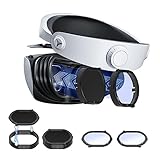


The PlayStation VR2 is the most polished console VR headset of 2026 and the centre of a small but serious ecosystem of accessories worth knowing about. It is built for the PlayStation 5 first and foremost — eye tracking, HDR OLED panels, headset rumble, adaptive-trigger Sense controllers and inside-out tracking come together to deliver an experience that AAA console VR exclusives like Horizon Call of the Mountain and Gran Turismo 7 lean into hard. This guide rounds up the best PSVR2 setup in 2026, including the headset itself, the official bundles, the PC adapter that unlocks SteamVR PCVR, and the comfort and storage accessories that make daily use easier.
Our picks were chosen to assemble a complete, real-world PSVR2 setup — not just headsets ranked by price. We have included the base PSVR2, the Horizon Call of the Mountain bundle, the official PC adapter, the Sense controller charging station, a popular comfort mod and a hard carrying case, with prices spanning from around $35 for a case to around $400 for the headset plus pack-in game. One critical honesty point up front: the PSVR2 PC Adapter enables SteamVR PCVR, but it loses several PS5-exclusive features in the process — no HDR, no eye tracking, no headset rumble — and we call that out clearly in the relevant pick. Below is an at-a-glance comparison, then a closer look at each item and a buyer’s guide on which PSVR2 setup fits your situation.
Best PSVR2 Setup at a Glance
| Item | Best For | Standout Spec | Approx Price |
|---|---|---|---|
| PlayStation VR2 Base Headset | Core PS5 VR experience | OLED HDR, eye tracking, Sense rumble | around $300 |
| PSVR2 Horizon Call of the Mountain Bundle | Best out-of-box value | Headset + flagship pack-in game | around $400 |
| PSVR2 PC Adapter (B0G64FQCLF) | Adds SteamVR PCVR support | PC adapter, requires DisplayPort PC | around $35 |
| PSVR2 Sense Controller Charging Station | Convenient Sense charging | Official Sony 2-controller dock | around $50 |
| Globular Cluster CMP2 Comfort Mod | Better PSVR2 comfort | Sweet-spot keeper, weight balance | around $50 |
| PSVR2 Hard Carrying Case | Safe travel and storage | Hard shell, fits Sense controllers | around $36 |
1. PlayStation VR2 (PSVR2) — Base Headset Bundle for PS5

4


As an Amazon Associate we earn from qualifying purchases. Product prices and availability are accurate as of the date/time indicated.
The base PlayStation VR2 headset is the heart of the entire setup and the starting point for anyone buying into the platform. It pairs OLED panels with HDR support, integrated eye tracking, and Sense controllers with adaptive triggers and haptic feedback — all over a single cable to a PS5. Inside-out tracking means there are no external cameras to set up. At around $300 the base bundle remains a strong value for what is, by 2026 standards, the most polished console VR hardware available.
This is the pick for the PS5 owner who wants the simplest possible entry into PSVR2 and either already owns the games they plan to play or wants to buy them separately. The headset’s OLED HDR panels make the difference in AAA titles like Gran Turismo 7 VR, the eye tracking enables foveated rendering for sharper visuals where you actually look, and the Sense controller rumble and adaptive triggers translate console controller feel into VR. As the foundation of a PSVR2 setup, the base headset bundle is the obvious starting block.
Pros: OLED HDR display, eye tracking, single-cable PS5 setup, Sense controllers with adaptive triggers.
Cons: PS5-only natively — playing on PC requires the separate PC Adapter below.
2. PlayStation VR2 — Horizon Call of the Mountain Bundle (Game Included)

6
PSVR2 PC Adapter, PSVR 2 PC Accessories Kit Compatible with PlayStation VR2, AR Glasses, Portable Monitor, Includes DP 1.4 Cable and Power Adapter (Black) (D85-Blue)
In Stock



As an Amazon Associate we earn from qualifying purchases. Product prices and availability are accurate as of the date/time indicated.
The PSVR2 Horizon Call of the Mountain Bundle is the best out-of-box value for a new PSVR2 owner. It packages the same headset and Sense controllers as the base bundle with a copy of Horizon Call of the Mountain, the platform’s showcase first-party VR exclusive. At around $400 it costs about $100 more than the headset alone, but you are getting a $60-plus flagship VR game in the box.
This is the bundle to choose if you do not already own Horizon Call of the Mountain and want a great PSVR2 experience to play on day one. Horizon Call of the Mountain is purpose-built to showcase the headset — OLED HDR visuals of dense jungles and lit machines, eye-tracked rendering, climbing controls that lean on Sense haptics — and it remains one of the strongest single-player AAA console VR experiences on any platform. As a no-brainer first PSVR2 purchase for newcomers, this bundle is hard to beat on value.

Pros: Same PSVR2 hardware as the base bundle, plus a flagship pack-in game out of the box.
Cons: Premium upfront price; only a strong value if you actually want Horizon.
3. PSVR2 PC Adapter — Connect PSVR2 to PC for SteamVR PCVR Support
6
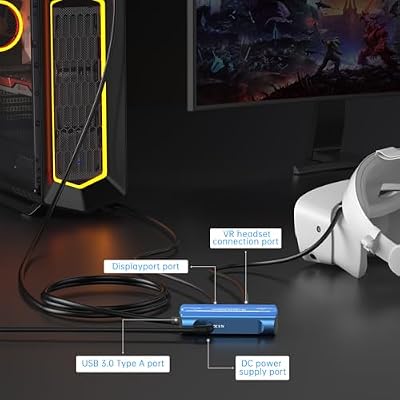
PSVR2 PC Adapter, PSVR 2 PC Accessories Kit Compatible with PlayStation VR2, AR Glasses, Portable Monitor, Includes DP 1.4 Cable and Power Adapter (Black) (D85-Blue)
In Stock
As an Amazon Associate we earn from qualifying purchases. Product prices and availability are accurate as of the date/time indicated.
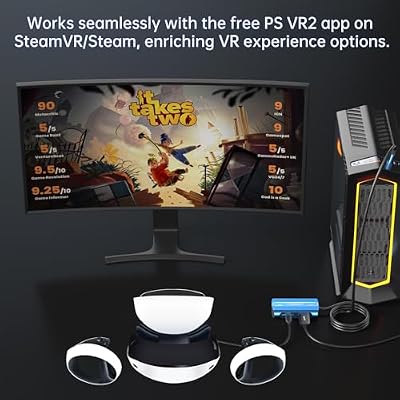
The official PSVR2 PC Adapter is what unlocks SteamVR PCVR on the headset, turning the PSVR2 into a second-job PCVR display when you are not gaming on the PS5. It connects via DisplayPort and USB to a gaming PC and at around $35 is the cheapest item on this list — but it is also the one with the most important caveats, so we have to be honest about them up front.
Plugged into a PC via this adapter, the PSVR2 becomes a SteamVR-compatible PCVR headset — but it loses several PS5-exclusive features in the process: no HDR, no eye tracking and no headset rumble in PC mode. You also need a PC with a DisplayPort output that meets the adapter’s requirements. The upside is access to the much larger SteamVR library on the headset you already own, which is a real win for anyone already invested in PSVR2. The downside is that it is not the full PSVR2 experience — it is a PSVR2 panel with several of its best features turned off. Buy it for the access; do not expect parity with PS5 mode.
Pros: Inexpensive way to unlock SteamVR PCVR on PSVR2 hardware you already own.
Cons: Disables HDR, eye tracking and headset rumble in PC mode — disclosed honestly.
4. PlayStation VR2 Sense Controller Charging Station (Official Sony)
4
As an Amazon Associate we earn from qualifying purchases. Product prices and availability are accurate as of the date/time indicated.
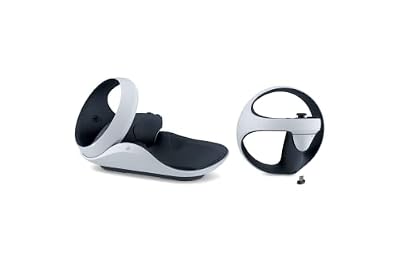
The official Sony Sense Controller Charging Station is the convenience accessory most PSVR2 owners end up wanting. The Sense controllers do not charge from arbitrary USB cables as cleanly as you might expect, and the official dock simply solves the problem with two contact points that hold both controllers in place and charge them via a single wall plug. At around $50 it is the most polished controller-charging solution for the platform.
This is the accessory to grab once you have decided PSVR2 is part of your regular routine. The convenience of putting the Sense controllers in their dock after a session and finding them charged the next day is the kind of small daily benefit that makes a difference over time, and the official dock keeps things tidy and matches the platform’s aesthetic. For frequent PSVR2 players who do not want to wrestle with USB-C cables every session, the official Sony charging station is the easy buy.
Pros: Official Sony two-controller dock, single-plug charging, tidy and reliable.
Cons: Not strictly required — you can charge over USB-C — but very convenient.
5. Globular Cluster CMP2 — Comfortable Mod for PSVR2 (Sweet Spot Keeper)

6


As an Amazon Associate we earn from qualifying purchases. Product prices and availability are accurate as of the date/time indicated.
The Globular Cluster CMP2 is the most popular community-favoured comfort mod for the PSVR2 and a smart upgrade for anyone who finds the stock fit fiddly. It is a counterweight-style accessory that shifts the headset’s balance backwards on your head, helping you maintain the headset’s optical sweet spot more easily and reducing the front-heavy fatigue that some users feel during long sessions. At around $50 it is an affordable but noticeable upgrade.
This is the accessory to choose if you wear the PSVR2 for long sessions and find yourself constantly readjusting the headset to keep the image sharp. The CMP2 keeps the headset planted in the right position, takes some of the weight off the front of your face, and is widely cited in community discussion as one of the most worthwhile PSVR2 upgrades. As a small, high-impact tweak to daily comfort, it is well worth considering once you have settled into the platform.
Pros: Better weight balance and easier sweet-spot retention, popular community-favoured PSVR2 mod.
Cons: Adds a small amount to the total weight; ergonomic preference, not for every user.
6. Hard Carrying Case for PSVR2 — Headset and Sense Touch Controllers

7
MVRPDXC Hard Carrying Case for PlayStation VR2 Gaming Headset and Touch Controllers Accessories, PS VR2 Protective Bag with Lens Protector Cover, PSVR2 Portable Case Suitable for Travel and Home
In Stock
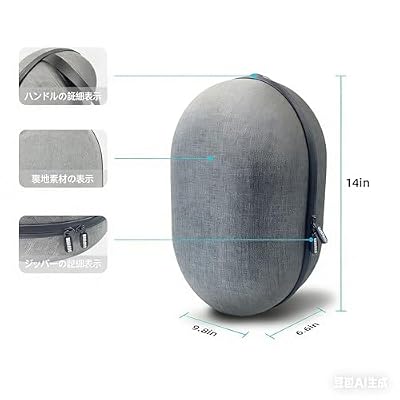


As an Amazon Associate we earn from qualifying purchases. Product prices and availability are accurate as of the date/time indicated.
Rounding out the PSVR2 setup is a dedicated hard carrying case sized for the headset plus the two Sense controllers. The PSVR2 is a relatively expensive piece of hardware that lives near a TV and sometimes travels to a friend’s house, and a hard-shell case protects the panels, the lenses and the Sense triggers from being knocked around. At around $36 it is cheap insurance.
This is the accessory to buy for anyone who actually moves their PSVR2 — students, renters, travellers, or anyone storing the headset on a shelf rather than under a TV. A hard case shields the OLED panels from scratches, the controllers from accidental drops, and the cable from snagging. As a low-cost, high-utility addition to the platform that extends the practical lifespan of the hardware you have invested in, the hard carrying case rounds out the PSVR2 setup well.
Pros: Hard shell protection for headset, Sense controllers and cable; affordable insurance.
Cons: Optional — only worth it if you actually transport or store the PSVR2 frequently.
How to Choose the Right PSVR2 Setup
The first decision in a PSVR2 setup is which headset bundle to start with. The base PSVR2 bundle is the right choice if you already own the games you want to play on it, or you plan to be selective about purchases — you save around $100 over the Horizon bundle and pick titles on your own schedule. The Horizon Call of the Mountain bundle is the better value if you do not already own that game, because it bundles a major first-party VR exclusive at a real discount compared to buying the headset and the game separately.
The second decision is whether to add the PSVR2 PC Adapter. This is the single most impactful — and most caveated — accessory on the list. It genuinely opens up SteamVR PCVR on the headset you already own, but it disables HDR, eye tracking and headset rumble while in PC mode, so the PC experience is not the full PSVR2 experience. Buy it if you want access to SteamVR on PSVR2 hardware you already own and you accept the feature loss; skip it if those PS5-exclusive features are the reason you wanted PSVR2 in the first place.
Comfort and convenience accessories are the next layer. The Sense controller charging station turns ‘where did I put the USB-C cable’ into ‘controllers are always charged’ for the cost of a couple of AAA games. The Globular Cluster CMP2 comfort mod is one of the most-recommended community upgrades for anyone who finds the stock PSVR2 ergonomics front-heavy, and tends to noticeably improve long-session comfort. Neither is required to play, but both make the platform nicer to live with day to day.
Finally, think about how and where you will store the PSVR2. The hard carrying case is a small, sensible investment if you ever move the headset around — between rooms, into storage between play sessions, or to a friend’s PS5. If your PSVR2 lives permanently under one TV and never moves, the case matters less. Build the setup that matches how you actually use the platform: pick the right bundle for the games you want, decide whether PC access is worth the feature trade-off, and add the comfort and convenience accessories that make sense for your habits.
Frequently Asked Questions
Can the PSVR2 work on PC?
Yes, with the official PSVR2 PC Adapter. The adapter connects the headset to a gaming PC via DisplayPort and USB and enables SteamVR PCVR. However, in PC mode the PSVR2 loses several of its PS5-exclusive features — no HDR, no eye tracking, and no headset rumble. The PC adapter is great for accessing SteamVR on PSVR2 hardware you already own, but it does not replicate the full PSVR2 experience the PS5 delivers.
Should I buy the base PSVR2 or the Horizon bundle?
If you already own Horizon Call of the Mountain or do not want it, buy the base PSVR2 bundle and save around $100. If you do not own Horizon and you want it, the Horizon bundle is a better value than buying the game separately. Both versions are the same physical PSVR2 hardware — the only difference is whether the pack-in game is included.
Is the Sense controller charging station worth buying?
For most regular PSVR2 players, yes. The Sense controllers do not charge from arbitrary USB-C cables as smoothly as some controllers, and the official dock simply solves that with a clean two-controller charging station that always keeps them topped up. It is a quality-of-life upgrade rather than a requirement, but a popular one once you start using the headset regularly.
What does the Globular Cluster CMP2 actually do?
It is a counterweight-style comfort mod that shifts the PSVR2’s weight balance toward the back of your head, helping the headset stay in the right position and making the optical sweet spot easier to maintain. Users who feel the PSVR2 is front-heavy or who keep slipping out of the sweet spot tend to find the CMP2 a noticeable improvement, especially in longer sessions.
Related Guides
- Best Standalone VR Headsets
- Best PCVR Headsets
- Best Mixed Reality Headsets
- Best Budget VR Headsets
- Best Gaming Headsets
- Best Gaming Monitors
- Best Gaming PC Builds
Affiliate Disclosure: As an Amazon Associate, we earn from qualifying purchases. If you click a link and make a purchase, we may earn a small commission at no extra cost to you. Prices and availability are accurate as of publication and may change.










