

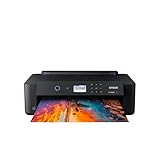
- Top Pick: Epson Expression Photo HD XP-15000 Wireless Wide-Format Inkjet Printer | 6-color wide-format photo printing; up to 9.2 ppm, 13 x 19 in., auto 2-sided; ideal for photographers and home studios
- Best Value: Canon imagePROGRAF PRO-310 Professional 13" Wireless Inkjet Photo Printer, 3" Color LCD, 9 Color Pigment Ink, Black
- Premium Choice: Canon PIXMA PRO-200S Professional 13" Wireless Inkjet Photo Printer, 3" Color LCD, 8-Color Dye Ink, Black
Printing your own art is a different exercise from printing a school report. A sketch scanned at high resolution, a digital painting, or a photograph meant for a frame all depend on how many ink channels the printer carries, whether those inks are pigment or dye, and how large a sheet the machine accepts. Color accuracy and paper handling matter more than pages per minute, which is why a business-focused speed claim is nearly meaningless for this job.
This guide is for illustrators, photographers, and hobbyists who want to produce gallery-style prints at home in 2026, from a first 13 x 19 inch run to a more serious pigment-ink setup. Each pick is described only from its listing, so treat the notes as a starting framework, then check ink and paper compatibility before you commit to a model.
Quick Picks
As an Amazon Associate we earn from qualifying purchases at no extra cost to you.



| Product | Best for | Key spec from the title |
|---|---|---|
| Epson Expression Photo HD XP-15000 | Home studio photo and art prints | 6-color, 13 x 19 in., auto 2-sided |
| Canon imagePROGRAF PRO-310 | Fine art and archival-minded work | 13 in., 9-color pigment ink, 3 in. LCD |
| Canon PIXMA PRO-200S | Vivid photo and glossy art | 13 in., 8-color dye ink, 3 in. LCD |
| Epson WorkForce Pro WF-7310 | Mixed art and office duty | 13 x 19 in., 25 ppm, 500-sheet capacity |
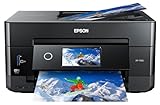
| Epson Expression Photo XP-980 | Print, scan, and copy for creatives | 6-color, wide-format, memory card support |
| Epson Expression Premium XP-7100 | Smaller prints with scanning | 5-color, ADF, borderless photos |
| HP Envy Photo 7975 | Casual home photo prints | Wireless color inkjet, mobile printing |
How to Choose
Ink channels and ink type
More color channels usually mean smoother gradients and richer tone, which is why a 9-color pigment system and an 8-color dye system sit above a 5-color or 6-color machine for serious art work. Pigment inks are generally associated with better fade resistance, while dye inks are generally associated with vivid gloss output. Decide whether you are making gallery pieces to keep or saleable photo prints to hand out. Watch the black and gray channels too: a deeper black and an extra gray tone help monochrome work such as charcoal-style drawings and black-and-white photographs, where a limited ink set shows banding first.
Print width and sheet size
A 13 inch class printer, such as the two Canon models and the three Epson wide-format models, handles up to 13 x 19 inch sheets, which is the sweet spot for framed art. Smaller printers cap at letter size, forcing you to crop or outsource anything larger. If you plan on frequent poster-style work, count 13 x 19 as the minimum. Remember that a standard frame with a mat usually leaves a smaller image area than the sheet itself, so a bigger sheet gives you room to trim and align without wasting a good print.
Paper handling and connectivity
Fine art paper is thicker and sometimes loaded through a rear or manual feed. A 500-sheet tray suits office work but says little about heavy art stock, so read the paper-path details on the listing. Wireless printing, a front-panel LCD, and memory card slots are convenient but secondary to how well the printer feeds the media you actually use. If you swap between glossy photo paper and matte watercolor stock, check whether the manufacturer publishes a list of supported media types and weights, since that list is more informative than any marketing label on the box.
What to ignore and where entry models cut corners
Ignore headline pages-per-minute speeds, because art prints take minutes each regardless. Budget all-in-ones often carry fewer ink channels, use dye inks only, and cap at letter size. Instant ink trials and AI-enabled labels are nice extras but have no bearing on tonal range or sheet size. Also factor in ink replacement: a printer with many separate cartridges lets you replace only the color that runs out, so a heavy use of one tone, such as the blues in a seascape series, does not force you to discard cartridges that still hold ink. That flexibility matters for people who print often and in large batches.
The 7 Best Options
Epson Expression Photo HD XP-15000
This is the practical wide-format choice for a home studio. The title lists 6-color wide-format photo printing, up to 9.2 pages per minute, 13 x 19 inch capability, and automatic 2-sided printing, and it describes the machine as ideal for photographers and home studios. It suits an illustrator who wants gallery-size sheets from a desk-friendly unit without moving to a professional printer, and it works well for a photographer who prints portfolio pieces and the occasional exhibition proof.
- 6-color system and 13 x 19 inch capacity cover framed art sizes
- Wireless and aimed squarely at photographers
- Trade-off: it has fewer ink channels than the Canon pro models
Skip it if archival pigment output is your main goal.
Canon imagePROGRAF PRO-310
The most serious option here for artists who sell or archive their work. The title lists a 13 inch wireless photo printer with a 3 inch color LCD and a 9 color pigment ink system. A buyer who needs lasting tonal depth and a professional workflow, such as a printmaker or fine art photographer, will see the appeal, particularly when the work will be signed, numbered, or shipped to collectors who expect longevity.
- 9-color pigment ink is the richest ink setup in the lineup
- 3 inch LCD makes setup and settings easier to manage
- Trade-off: the listing is purely a photo printer, so it will not scan or copy
Skip it if you need a general-purpose machine for everyday documents.
Canon PIXMA PRO-200S
Aimed at photographers and artists who like vivid, glossy output. The listing names a 13 inch wireless photo printer, a 3 inch color LCD, and an 8 color dye ink system. It fits someone producing photo-style art for display, who values saturated color over archival focus, such as a wedding photographer producing glossy display prints or a designer making colorful promotional art.
- 8-color dye ink gives strong color range for photographic images
- Wireless operation with an on-device LCD
- Trade-off: dye inks are generally less fade resistant than pigment systems
Skip it if your prints are meant to hang for many years in bright rooms.
Epson WorkForce Pro WF-7310
A versatile all-in-one that can handle wide sheets alongside everyday office duty. The listing stresses wide-format printing up to 13 x 19 inches, up to 25 pages per minute, auto 2-sided printing, and a 500-sheet capacity, and it describes the unit as ideal for businesses. It suits a freelancer who wants large flyers, posters, and the occasional art proof from one machine, or a small studio that mixes client paperwork with large-format mockups.
- 13 x 19 inch wide-format support in a multi-function body
- Large paper capacity for volume jobs
- Trade-off: it is business oriented, so photo and color fidelity are not its headline
Skip it if gallery-grade photo quality is the entire point.
Epson Expression Photo XP-980
A multifunction option for creatives who want to scan an original and reprint it. The title lists 6-color wide-format printing, scanning, and copying, up to 8.5 pages per minute, and USB plus memory card support, and it positions the unit for creative projects. An illustrator who digitizes sketches before printing is the obvious buyer.
- 6-color wide-format printing alongside scan and copy
- Memory card support offers a computer-free workflow
- Trade-off: it sits below the Canon pro machines in ink sophistication
Skip it if you only need to print and never scan.
Epson Expression Premium XP-7100
A smaller-footprint all-in-one for home and photo projects. The title lists 5-color print, scan, and copy, up to 15.8 pages per minute, an automatic document feeder, and borderless photo printing. This is for hobbyists printing smaller pieces and handling paperwork on the same device.
- Borderless photo printing is listed, handy for small art cards
- ADF helps with scanning and copying stacks
- Trade-off: the title does not state wide-format capability, so large sheets are not promised
Skip it if you want 13 x 19 inch prints.
HP Envy Photo 7975
A casual home printer for photos and family projects. The listing calls it a wireless color inkjet photo printer that prints, scans, and copies, with easy setup, mobile printing, a 3 month Instant Ink trial, and AI-enabled labeling. It suits someone printing the occasional photo or postcard, not producing exhibition art.
- Print, scan, and copy with mobile printing support
- Easy setup suits first-time buyers
- Trade-off: no wide-format or multi-channel ink system is named in the title
Skip it if your prints are meant for sale or display.
Which One Fits Your Situation
You make fine art prints to sell or archive
The Canon imagePROGRAF PRO-310 is the strongest fit, with its 9 color pigment ink system and 13 inch width.
You print vivid photography
The Canon PIXMA PRO-200S and Epson Expression Photo HD XP-15000 both suit photographic work. Choose the Canon for 8-color dye richness and the Epson for a friendlier home-studio footprint.
You scan your own sketches
The Epson Expression Photo XP-980 combines 6-color wide-format printing with scanning and memory card support in one unit.
You need one machine for work and art
The Epson WorkForce Pro WF-7310 covers large sheets and office volume, accepting that its color is aimed at business output.
You print small cards and keepsakes
The Epson Expression Premium XP-7100 offers borderless photo printing and a document feeder, which makes it a sensible match for postcards, small prints, and the paperwork that comes with running a craft shop. The HP Envy Photo 7975 is the simplest pick when ease of setup matters most.
Common Mistakes
- Choosing by pages per minute when art prints are limited by quality, not speed.
- Buying a letter-size printer, then wanting 13 x 19 inch sheets a month later.
- Mixing up dye and pigment ink and expecting archival life from a dye printer.
- Skipping the paper path details when planning to use heavy fine art stock.
- Forgetting color calibration, which matters as much as the printer itself.
Related guides
- Combination Smoke And Carbon Monoxide Detectors
- Aio Liquid Coolers For High Performance Gaming
- How To Lower Input Delay In Competitive Shooters
Frequently Asked Questions
Is pigment or dye ink better for art prints?
Pigment is generally favored for longevity and archival goals, while dye is favored for vibrant photographic color. Pick based on whether the print will be displayed for years or enjoyed in the short term.
Do I need a 13 x 19 inch printer?
Not for small prints, but it is the standard size for framed pieces and gives you room to crop and mat. Most serious home setups start there.
Why are some listed printers left out?
A basic home inkjet and a sticker-and-label printer were omitted because neither fits fine art printing. Only models with photo-oriented inks or wide-format capacity belong here, with a couple of smaller home models kept as lighter-duty options.
Can an all-in-one handle art prints?
Some can, particularly the wide-format Epson models. A dedicated photo printer will usually offer richer color depth, but an all-in-one adds scanning and copying convenience.







