

🛒 Best Price Today on Amazon
Prime members get fast, free shipping on everything above, plus member-only deals. New members get a 30-day free trial — cancel anytime.
- Top Motherboards Cad Picks for 2026
- Best Motherboards for CAD at a Glance
- 1. GIGABYTE B650 AORUS Elite AX AMD AM5 ATX Motherboard (Ryzen 9000/8000/7000)
- 2. GIGABYTE Z790 AORUS Elite AX LGA 1700 ATX Motherboard (Intel 14th/13th/12th Gen)
- 3. MSI MAG B550 Tomahawk Gaming Motherboard (AMD Ryzen 5000, AM4, DDR4, PCIe 4.0)
- 4. ASUS ROG Strix Z390-E Gaming Motherboard LGA1151 (Intel 8th/9th Gen), ATX DDR4
- 5. MSI B550M PRO-VDH WiFi ProSeries Motherboard (AMD Ryzen 5000, AM4, DDR4, PCIe 4.0)
- 6. MSI PRO B550M-VC WiFi ProSeries Motherboard (AMD Ryzen 5000, AM4, DDR4, PCIe 4.0)
- How to Choose a Motherboard for CAD
- Frequently Asked Questions
- Related Guides
- Related Articles
Top Motherboards Cad Picks for 2026
Here are our current top motherboards cad picks, compared on real Amazon owner reviews, price, and features. Live prices update below.


CAD and 3D work asks different things of a motherboard than pure gaming does. A CAD workstation needs rock-solid stability for long modelling and rendering sessions, generous RAM capacity for large assemblies, the PCIe lanes to feed a powerful workstation GPU and fast storage, and dependable connectivity for peripherals and networking. The board is the foundation everything else plugs into, so reliability and expansion matter more than flashy extras. This guide rounds up the best motherboards for CAD in 2026 across both AMD and Intel platforms and a range of budgets.
Our picks were chosen on what a CAD machine genuinely depends on: robust power delivery and stability, RAM capacity and speed support, the PCIe lanes and slots needed for a GPU plus NVMe storage, and solid connectivity. We have included AM4 DDR4 boards for value-focused builds, current AM5 and Intel options for new systems, and a mix of ATX and micro-ATX form factors, with prices from around $80 to around $400. Below is an at-a-glance comparison of all six, then a closer look at each board and a buyer’s guide built around the chipsets, memory support and expansion that actually matter for CAD.
Best Motherboards for CAD at a Glance
| Motherboard | Best For | Standout Spec | Approx Price |
|---|---|---|---|
| GIGABYTE B650 AORUS Elite AX | Modern AM5 CAD workstation | AM5, DDR5, PCIe 5.0, Wi-Fi | around $150 |
| GIGABYTE Z790 AORUS Elite AX | High-end Intel CAD build | LGA1700, DDR5, robust VRM | around $190 |
| MSI MAG B550 Tomahawk | Reliable AM4 value workstation | AM4, DDR4, strong VRM | around $160 |
| ASUS ROG Strix Z390-E Gaming | Legacy Intel CAD upgrade | LGA1151, DDR4, dual M.2 | around $400 |
| MSI B550M PRO-VDH WiFi | Compact micro-ATX CAD PC | Micro-ATX, AM4, Wi-Fi | around $100 |
| MSI PRO B550M-VC WiFi | Budget reliable workstation | Micro-ATX, AM4, business-grade | around $80 |
1. GIGABYTE B650 AORUS Elite AX AMD AM5 ATX Motherboard (Ryzen 9000/8000/7000)

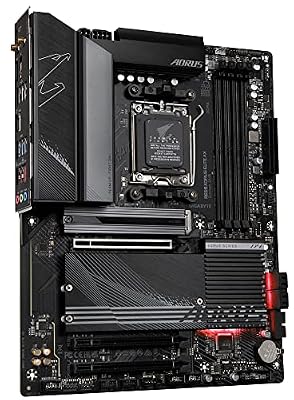
GIGABYTE B650 AORUS Elite AX AMD AM5 ATX Motherboard, Support Ryzen 9000/8000/7000 Series, DDR5, 14+2+1 Power Phase, PCIe 5.0 M.2, USB-C 3.2 Gen 2, WIFI6E, 2.5GbE, EZ-Latch, Q-Flash, RGB Fusion



As an Amazon Associate we earn from qualifying purchases. Product prices and availability are accurate as of the date/time indicated.
The GIGABYTE B650 AORUS Elite AX is the pick to lead with for a modern CAD workstation. It is a current-generation AMD AM5 ATX board supporting Ryzen 9000, 8000 and 7000 processors, with DDR5 memory, PCIe 5.0, multiple M.2 slots and built-in Wi-Fi. At around $150 it delivers a future-ready platform with the expansion and stability CAD work demands.
This is the board for someone building a new CAD or 3D machine on AMD’s latest socket. AM5 support means you can pair it with a powerful current Ryzen CPU for fast modelling and rendering, DDR5 brings high memory bandwidth and capacity for large assemblies, and PCIe 5.0 plus several M.2 slots give the lanes to feed a workstation GPU and fast NVMe storage at once. AORUS-grade power delivery keeps things stable under sustained load, and integrated Wi-Fi adds connectivity flexibility. For a reliable, expandable, modern workstation foundation, this is the standout.
Pros: Modern AM5 platform, DDR5, PCIe 5.0, multiple M.2, sturdy VRM, built-in Wi-Fi.
Cons: Newer platform means DDR5 and AM5 CPU costs; mid-range chipset.
2. GIGABYTE Z790 AORUS Elite AX LGA 1700 ATX Motherboard (Intel 14th/13th/12th Gen)
The GIGABYTE Z790 AORUS Elite AX is the high-end Intel pick. It is a Z790 ATX board for LGA 1700 processors (Intel 14th, 13th and 12th generation), with DDR5 support, a robust multi-phase VRM, several M.2 slots and Wi-Fi. At around $190 it is a capable, well-equipped foundation for a powerful Intel-based CAD workstation.
This is the board for the CAD user who prefers Intel and wants headroom. The Z790 chipset and strong power delivery comfortably support high-core-count Intel CPUs that excel at the multi-threaded rendering and simulation CAD workloads lean on, DDR5 provides ample fast memory for big projects, and the generous M.2 and PCIe provision lets you run a workstation GPU alongside multiple fast drives. AORUS-class components and cooling keep it stable through long sessions, and Wi-Fi rounds out connectivity. For a high-end Intel CAD platform with room to grow, it is an excellent choice.

Pros: Z790 with strong VRM for high-core Intel CPUs, DDR5, ample M.2, Wi-Fi, stable.
Cons: Premium of the Intel options; requires DDR5 and an LGA1700 CPU.
3. MSI MAG B550 Tomahawk Gaming Motherboard (AMD Ryzen 5000, AM4, DDR4, PCIe 4.0)

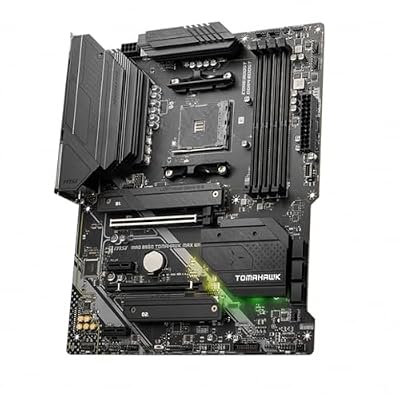
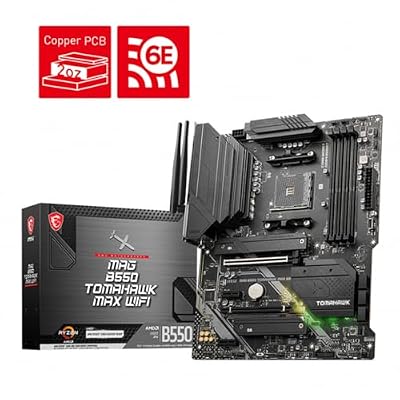
MSI MAG B550 Tomahawk MAX WiFi Gaming Motherboard (AMD Ryzen 5000 Series, AM4, DDR4, PCIe 4.0, SATA 6Gb/s, M.2, USB 3.2 Gen 2, HDMI/DP, Wi-Fi 6E, Bluetooth 5.2, 2.5Gbps LAN, ATX)



As an Amazon Associate we earn from qualifying purchases. Product prices and availability are accurate as of the date/time indicated.
The MSI MAG B550 Tomahawk is the reliable AM4 value pick, and a board with a well-earned reputation for stability. It is a B550 ATX board for AMD Ryzen 5000 processors using DDR4 memory and PCIe 4.0, with a notably strong VRM for its class and dependable build quality. At around $160 it is a proven, dependable platform for a value-focused CAD workstation.
This is the board to choose if you are building a capable CAD machine on the mature, cost-effective AM4 platform rather than the latest socket. The Tomahawk is renowned for its robust power delivery, which keeps a strong Ryzen 5000 CPU stable and cool during long rendering and modelling runs, and PCIe 4.0 with M.2 support handles a workstation GPU and fast storage well. DDR4 keeps memory costs down while still supporting plenty of capacity. For a rock-solid, great-value workstation board, the B550 Tomahawk is hard to beat.
Pros: Renowned stability, strong VRM, AM4/Ryzen 5000, PCIe 4.0, excellent value DDR4.
Cons: Previous-generation AM4/DDR4; not an upgrade path to newer CPUs.
4. ASUS ROG Strix Z390-E Gaming Motherboard LGA1151 (Intel 8th/9th Gen), ATX DDR4

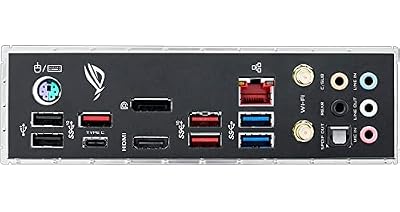
Asus ROG Strix Z390-E Gaming Motherboard LGA1151 (Intel 8th 9th Gen) ATX DDR4 DP HDMI M.2 USB 3.1 Gen2 802.11AC Wi-Fi


As an Amazon Associate we earn from qualifying purchases. Product prices and availability are accurate as of the date/time indicated.
The ASUS ROG Strix Z390-E is the legacy Intel pick, aimed at upgrading or completing an older 8th or 9th generation Intel build. It is an LGA1151 ATX board with DDR4 support, dual M.2 slots, strong power delivery and ROG-grade features. At around $400 its price reflects scarcity of this older platform rather than current-generation performance.
This is the board for a specific situation: you have an existing 8th or 9th gen Intel CPU for a CAD workstation and need a high-quality Z390 board to build around. The ROG Strix Z390-E offers robust VRM for stable operation, dual M.2 for fast storage and a full set of connectivity, making it a solid foundation for that platform. Be honest with yourself about value, though — at this price a new AM5 or Z790 board plus a modern CPU may serve a CAD workload better. Choose it only if staying on LGA1151 is a deliberate decision.

Pros: Quality ROG Z390 board, strong VRM, dual M.2, ideal to complete an LGA1151 build.
Cons: Old platform at a high price; new sockets offer more for the money.
5. MSI B550M PRO-VDH WiFi ProSeries Motherboard (AMD Ryzen 5000, AM4, DDR4, PCIe 4.0)

MSI B550M PRO-VDH WiFi ProSeries Motherboard (AMD Ryzen 5000, AM4, DDR4, PCIe 4.0, SATA 6Gb/s, M.2, USB 3.2 Gen 1, Wi-Fi, Bluetooth, D-SUB/HDMI/DP, Micro-ATX)


As an Amazon Associate we earn from qualifying purchases. Product prices and availability are accurate as of the date/time indicated.
The MSI B550M PRO-VDH WiFi is the compact micro-ATX pick. It brings the value-oriented B550 chipset to a smaller form factor, supporting AMD Ryzen 5000 CPUs with DDR4 memory, PCIe 4.0, an M.2 slot and built-in Wi-Fi. At around $100 it is an affordable, space-efficient foundation for a tidy CAD workstation in a smaller case.
This is the board for someone who wants a reliable AM4 CAD machine that does not take up a full ATX footprint — useful for compact studios, secondary workstations or tighter desks. The B550 chipset and Ryzen 5000 support provide the multi-threaded muscle CAD enjoys, PCIe 4.0 and M.2 feed a GPU and fast storage, and integrated Wi-Fi simplifies connectivity where Ethernet is awkward. As a micro-ATX board it has fewer slots than a full ATX option, so confirm it has the expansion you need, but for a compact, dependable, well-priced workstation it fits the bill.
Pros: Compact micro-ATX, AM4/Ryzen 5000, PCIe 4.0, M.2, integrated Wi-Fi, affordable.
Cons: Fewer expansion slots than ATX; DDR4 AM4 platform.
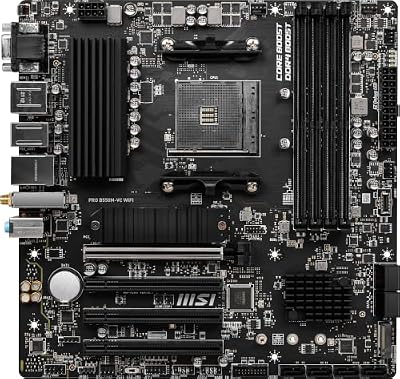
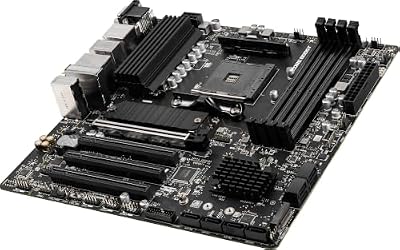
6. MSI PRO B550M-VC WiFi ProSeries Motherboard (AMD Ryzen 5000, AM4, DDR4, PCIe 4.0)

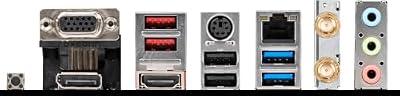
MSI PRO B550M-VC WiFi ProSeries Motherboard (AMD Ryzen 5000 Series, AM4, DDR4, PCIe 4.0, SATA 6Gb/s, M.2, USB 3.2 Gen 2, HDMI/DP, Wi-Fi 6E, Bluetooth 5.2, mATX)



As an Amazon Associate we earn from qualifying purchases. Product prices and availability are accurate as of the date/time indicated.
Rounding out the list is the MSI PRO B550M-VC WiFi, the budget reliable pick. It is a micro-ATX ‘PRO’ series board built with a business-and-professional focus, supporting AMD Ryzen 5000 CPUs with DDR4, PCIe 4.0, M.2 and Wi-Fi. At around $80 it is the most affordable board on this list and a sensible base for an entry-level CAD or productivity workstation.
This is the board for the buyer who wants dependable, no-frills stability at the lowest cost. MSI’s PRO line emphasises steady, professional operation over gamer styling, which suits a workstation that needs to stay reliable through long working days. Ryzen 5000 support and PCIe 4.0 cover a GPU and fast storage, the M.2 slot handles a quick NVMe boot drive, and Wi-Fi adds connectivity flexibility. It is an entry-level board, so expansion and power delivery are more modest than the pricier options here — but for an affordable, steady CAD foundation, it does the job well.

Pros: Business-focused PRO stability, AM4/Ryzen 5000, PCIe 4.0, M.2, Wi-Fi, lowest price.
Cons: Entry-level VRM and expansion; modest for the most demanding CPUs.
How to Choose a Motherboard for CAD
Start with the platform and chipset, because they set the ceiling for everything a CAD workstation can do. CAD and 3D rendering reward high-core-count CPUs, so pick a board that supports a strong processor: a modern AM5 board like the B650 AORUS Elite AX or an Intel Z790 like the AORUS Elite AX for new builds, or the mature AM4 B550 boards for excellent value. Match the socket to the CPU you intend to run, and favour a chipset with the power delivery to keep that CPU stable under sustained, long-duration workloads.
RAM support is critical for CAD, where large assemblies and complex scenes can consume enormous amounts of memory. Check both the maximum capacity the board supports and the memory type — the newer AM5 and Z790 boards here use faster DDR5 with high capacity ceilings, while the AM4 boards use more affordable DDR4 that still scales to plenty of memory for many workloads. Buy a board that lets you fit, or grow into, the RAM your projects demand, since running short of memory cripples CAD performance.
PCIe lanes and slots determine how much you can connect, and CAD machines often want a workstation GPU plus several fast NVMe drives at once. Look at the number and generation of PCIe slots and M.2 sockets: the ATX boards here generally offer more expansion than the micro-ATX models, so if you plan multiple drives, add-in cards or a large GPU, an ATX board with PCIe 4.0 or 5.0 and several M.2 slots gives you the headroom. Confirm the slot layout fits your components before buying.
Finally, prioritise reliability and connectivity over RGB and gamer extras. A CAD workstation needs to stay rock-solid through long sessions, so a strong VRM and quality components — as on the B550 Tomahawk or the AORUS boards — matter more than lighting. Make sure the networking, USB and other ports suit your peripherals, and weigh whether built-in Wi-Fi is useful for your setup. And be realistic about value: an older board like the Z390-E only makes sense if you already own a matching CPU. Match the platform to your processor, ensure ample RAM and PCIe, and pick the dependable board on this list that fits your build.
Frequently Asked Questions
What makes a motherboard good for CAD rather than just gaming?
CAD workstations prioritise stability for long sessions, high RAM capacity for large assemblies, enough PCIe lanes and M.2 slots for a workstation GPU and fast storage, and dependable connectivity — over gaming-focused extras like RGB or extreme overclocking. A board with a strong VRM, generous memory support and solid expansion, such as the AORUS or B550 Tomahawk options here, suits CAD work well.
How much RAM support do I need for CAD?
As much as your projects demand — large CAD assemblies and 3D scenes can use a great deal of memory, so check the board’s maximum capacity. The AM5 and Z790 boards here support faster, high-capacity DDR5, while the AM4 B550 boards use more affordable DDR4 that still scales to plenty for many workloads. Buy a board that lets you fit or grow into the RAM your software needs, since running short badly hurts CAD performance.
AMD or Intel for a CAD workstation?
Both work well — CAD benefits most from a strong, high-core-count CPU and a stable board, available on either platform. The AM5 B650 and AM4 B550 boards here pair with capable Ryzen processors, while the Z790 and Z390 boards suit Intel CPUs. Choose based on the specific processor that fits your budget and workload, then pick a reliable board with the RAM and PCIe support to match.
Is the older Z390 board worth buying for CAD today?
Only if you already own a compatible 8th or 9th generation Intel CPU and want a quality board to complete that build. The ASUS ROG Strix Z390-E is a good board, but at its current price a new AM5 or Z790 platform with a modern CPU often delivers more performance for CAD per dollar. Treat staying on the older LGA1151 socket as a deliberate choice rather than a value upgrade.
Related Guides
- Best Motherboards
- Best CPUs for Workstations
- Best RAM for Your Build
- Best Power Supplies
- Best NVMe SSDs
- Best PC Cases
Affiliate Disclosure: As an Amazon Associate, we earn from qualifying purchases. If you click a link and make a purchase, we may earn a small commission at no extra cost to you. Prices and availability are accurate as of publication and may change.










