The Intel Core i5-8400 is a six-core processor that still powers plenty of gaming and office PCs, but it only works on the right board. It needs an LGA1151 socket from the 300 series, and a board made for an older generation will not accept it even though the socket name looks the same. That single detail turns a simple upgrade into a careful purchase, because the wrong chipset means a processor that will not boot at all.
This guide is for owners of an i5-8400 who need a replacement board, and for builders putting together a budget gaming PC around this six-core chip. It covers two motherboards chosen from the names and specifications on their Amazon pages, both built for 8th generation Intel Core processors, with socket, chipset, memory support and expansion compared so you can match a board to your processor before you buy. Check the socket, the chipset and the CPU support list together before you order either board.
Quick Picks
As an Amazon Associate we earn from qualifying purchases
| Product | Best for | Key spec from title |
|---|---|---|
| ASUS Prime B360M-A | Balanced builds with dual M.2 slots | LGA1151, Intel B360, DDR4 2666MHz |
| Gigabyte B360M DS3H | Budget builds with four memory slots | LGA1151, Intel B360, DDR4 |
How to Choose
Confirm the socket, chipset and CPU support list
The i5-8400 uses the LGA1151 socket in its 300-series form, which is often called LGA1151 v2 to separate it from earlier LGA1151 boards. Only 300-series chipsets such as B360, H310, H370 and Z370 accept this processor, so a board with an older 100- or 200-series chipset will not work even if the socket looks identical. Both boards in this guide use the Intel B360 chipset and state they are designed for 8th generation Intel Core processors. Before buying, check the board’s CPU support list for the i5-8400 by name, and note the BIOS version listed beside it.
Compare memory support and slot count
Memory support shapes how much RAM your i5-8400 build can use and how fast it can run. Both boards here use DDR4 memory in four DIMM slots, with support up to 64GB at speeds up to 2666 MHz, which is the speed the i5-8400 pairs with naturally. Check how many slots the board has and how much memory you plan to install now, because a board with four slots lets you start with two sticks and add two more later.
Check storage, expansion and rear ports
Storage and ports decide what else your build can hold and connect. Count the M.2 slots first, because the ASUS board here offers dual M.2 slots while many budget boards offer only one, and a second M.2 drive is a common upgrade for games. Then count the SATA ports for hard drives and older SSDs, and check the PCIe slots for your graphics card. On the rear panel, look for the video outputs you need if you ever use the i5-8400’s integrated graphics, plus enough USB ports for your keyboard, mouse, headset and external drives.
Install safely and use the board’s listed safeguards
Safe installation starts with the power off and the system unplugged from the wall, and with the board handled by its edges so you do not touch the socket pins or the circuits. Seat the i5-8400 in the LGA1151 socket, close the retention bracket, and mount the cooler before you connect any power. The ASUS Prime B360M-A listing describes 5X Protection III hardware safeguards, which cover the board’s power delivery and connected components, and that is the kind of listed protection to look for rather than any standard the listing does not show.
The 2 Best Options
ASUS Prime B360M-A
The ASUS Prime B360M-A is the board most closely tied to the i5-8400, and its Amazon listing states it is designed exclusively for 8th generation Intel Core processors. Built on the LGA1151 socket with an Intel B360 chipset, it lists the i5-8400 among its compatible processors, so the pairing is confirmed rather than assumed. The board offers DDR4 memory up to 2666 MHz across four DIMM slots with up to 64GB capacity, plus dual M.2 slots with Intel Optane memory compatibility for fast storage.
Specs
- Socket: LGA1151
- Chipset: Intel B360
- Memory: DDR4 up to 2666 MHz, 4 DIMMs, up to 64GB
- Compatible processors: 8th Generation Intel Core i7, Core i5, Core i3, Pentium and Celeron
- Storage: Dual M.2 slots with Intel Optane Memory compatibility, SATA 6 Gbps
- USB: USB 3.1 Gen 2
- Video outputs: HDMI, DVI-D, VGA
- Lighting: Aura Sync RGB header
- Safeguards: 5X Protection III hardware safeguards
- Form factor: Micro ATX
- Item weight: 1.65 lb
- Dimensions: 9.6 x 2.03 x 8.1 inches
- Included: Motherboard, software drivers, user manual, warranty card
- BIOS: Check the CPU support list for the i5-8400 and its BIOS version
- CPU: 6-core i5-8400 supported, 65W TDP
- Case fit: Micro ATX fits compact and standard cases
Best for: Balanced budget builds around the i5-8400 that want dual M.2 slots and full display output options, in a compact Micro ATX case or a standard tower, and for builders who want the board’s listed 5X Protection III safeguards, and for office builds that need three video outputs.
Watch out for: The board is built for 8th generation chips, so confirm your exact processor is on its CPU support list before buying, note the BIOS version listed beside it, and confirm the board fits your case before ordering.
Gigabyte B360M DS3H

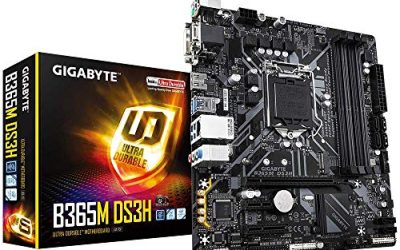
The Gigabyte B360M DS3H is a budget Micro ATX board for 8th and 9th generation Intel Core processors, built on the LGA1151 socket with an Intel B360 chipset. The board offers a PCIe Gen3 x4 M.2 slot for a fast NVMe drive, six SATA ports for additional storage, and USB 3.1 Gen 1 Type-A ports for everyday peripherals. The board’s APP Center gathers utilities such as EasyTune and the System Information Viewer in one place.
Specs
- Socket: LGA1151
- Chipset: Intel B360
- Memory: DDR4, 4 DIMMs, dual channel, up to 64GB
- Memory speeds: DDR4 2133, 2400 and 2666 MHz
- Compatible processors: 8th and 9th Gen Intel Core processors
- Storage: PCIe Gen3 x4 M.2 slot, 6 SATA III ports
- USB: USB 3.1 Gen 1 Type-A ports
- LAN: Realtek 8118 Gigabit LAN chip
- Lighting: RGB Fusion, 7-color RGB LED strip support
- Software: APP Center with EasyTune and System Information Viewer
- Durability: Ultra Durable design
- Video outputs: HDMI, DVI and VGA
- Audio: Realtek 7.1 HD audio solution
- BIOS: Check the CPU support list for the i5-8400 and its BIOS version
- Form factor: Micro ATX
Best for: Budget i5-8400 builds that want four memory slots and solid storage options at a low board cost, leaving more budget for the graphics card and memory, and for first-time builders who want the APP Center utilities, and for builders who want a board that lists 8th and 9th generation support.
Watch out for: The single M.2 slot means a second NVMe drive needs a SATA SSD or an adapter, so plan storage ahead, count your drives before ordering, list every drive you own before choosing storage, and check the board’s dimensions against your case.
Which One Fits Your Situation
You want the board most directly matched to the i5-8400
Choose the ASUS Prime B360M-A. Its listing states it is designed exclusively for 8th generation Intel Core processors, and the i5-8400 appears on its CPU support list by name. The dual M.2 slots give you room for a fast boot drive and a game drive, and the HDMI, DVI and VGA outputs cover almost any monitor you own.
You are building the cheapest capable gaming PC around the i5-8400
Choose the Gigabyte B360M DS3H. Its four DDR4 slots and six SATA ports cover memory and storage for a budget build, while the lower board cost leaves more of your budget for the graphics card. The PCIe Gen3 x4 M.2 slot still gives you a fast NVMe boot drive, which is the upgrade that matters most.
You need two M.2 drives for games and storage
Choose the ASUS Prime B360M-A. Its dual M.2 slots with Intel Optane compatibility let you run a fast NVMe boot drive and a second M.2 drive for games without touching SATA. The Gigabyte board has only one M.2 slot, so a second fast drive would need an adapter or a SATA SSD instead.
You want a compact build for a small case or a living room
Choose either board, since both are Micro ATX, and decide by storage needs. Pick the ASUS Prime B360M-A if you want dual M.2 and three video outputs, or the Gigabyte B360M DS3H if you want the simpler budget board. Measure your case first, and confirm the rear ports match your monitor and peripherals before ordering.
Common Mistakes
- Buying an older LGA1151 board with a 100- or 200-series chipset, which will not accept the i5-8400 at all even though the socket name looks the same, so check the chipset printed on the board before you buy, and note the chipset beside the socket.
- Skipping the CPU support list and assuming any B360 board works with any 8th generation chip, then finding the board needs a BIOS revision you do not have, and having no older chip to perform the update with.
- Choosing a board with a single M.2 slot, then finding there is nowhere for a second NVMe game drive without an adapter or a slower SATA drive, so count the M.2 slots before you buy the drive.
- Installing the board without checking that the case standoffs line up with its mounting holes, which can short the board the first time you power it on, so check every standoff against the mounting holes before fitting the board.
- Pairing the i5-8400 with memory faster than the board supports, then wondering why the kit runs at a lower speed than the box advertises, and wasting money on speed the board cannot use.
Frequently Asked Questions
Which motherboards work with the Intel Core i5-8400?
The i5-8400 needs a 300-series LGA1151 board, such as one with a B360, H310, H370 or Z370 chipset. Both boards in this guide use the Intel B360 chipset and state support for 8th generation Intel Core processors. Always check the board’s CPU support list for the i5-8400 by name, and note the BIOS version listed beside it before you buy.
Is the B360 chipset good enough for the i5-8400?
Yes, B360 is a natural match for the i5-8400, because the chip cannot be overclocked and does not need a Z-series board. B360 gives you DDR4 memory up to 2666 MHz, M.2 storage, USB 3.1 and enough PCIe lanes for a modern graphics card.
How much RAM should I pair with an i5-8400?
For gaming, 16GB of DDR4 is a sound starting point, and both boards here support up to 64GB across four DIMM slots. Start with two 8GB sticks so you keep dual-channel memory and leave two slots free for a later upgrade.
Can I use the i5-8400’s integrated graphics with these boards?
Yes, both boards offer video outputs for the i5-8400’s integrated graphics, which suits office work, video playback and troubleshooting. The ASUS Prime B360M-A offers HDMI, DVI-D and VGA, so it covers older and newer monitors alike. For gaming, add a dedicated graphics card in the PCIe x16 slot, and connect your monitor to the card rather than the board.